← Back to charts
LG gram Link icon
APP STORE

LG gram Link

LG Electronics, Inc. · Utilities · United States store
NOT IN TOP 100 HERE
View on App Store ↗ Instagram card Google Play version →
Revenue a month, worldwide
Too small to estimate
Not enough chart or ratings data
New ratings
Tracking
Daily counts start building from today
Rating
1.8 of 5
23 ratings in this store
Countries it ranks in
0
was 0 on Oct 16, 2026

Revenue

Estimated from the grossing charts of Oct 23, 2026 in the 53 countries we track, and ratings growth on the App Store.

EST. REVENUE / MONTH · WORLDWIDE
Unranked
Not in any grossing chart, and it sells nothing in the store (no in-app purchases, free download). Any revenue comes from ads or payments outside the store, which we can't see.
EST. LIFETIME DOWNLOADS
805 to 2.3K
Estimated from ratings count
RATINGS
23
AVG RATING
1.83
PRICE
Free
AGE
3.7y
LAST UPDATE
116d ago
VERSION
4.0.4
SIZE
325 MB
AGE RATING
4+

Last 30 days

From our daily snapshots of every grossing chart.

DAYS IN A GROSSING CHART
0 / 30
COUNTRIES NOW
0 (was 0)
EST. REVENUE FROM CHARTS, DAILY · BOTH STORES ONLY EST
Show daily values
Sep 24, 2026not in a grossing chart
Sep 25, 2026not in a grossing chart
Sep 26, 2026not in a grossing chart
Sep 27, 2026not in a grossing chart
Sep 28, 2026not in a grossing chart
Sep 29, 2026not in a grossing chart
Sep 30, 2026not in a grossing chart
Oct 1, 2026not in a grossing chart
Oct 2, 2026not in a grossing chart
Oct 3, 2026not in a grossing chart
Oct 4, 2026not in a grossing chart
Oct 5, 2026not in a grossing chart
Oct 6, 2026not in a grossing chart
Oct 7, 2026not in a grossing chart
Oct 8, 2026not in a grossing chart
Oct 9, 2026not in a grossing chart
Oct 10, 2026not in a grossing chart
Oct 11, 2026not in a grossing chart
Oct 12, 2026not in a grossing chart
Oct 13, 2026not in a grossing chart
Oct 14, 2026not in a grossing chart
Oct 15, 2026not in a grossing chart
Oct 16, 2026not in a grossing chart
Oct 17, 2026not in a grossing chart
Oct 18, 2026not in a grossing chart
Oct 19, 2026not in a grossing chart
Oct 20, 2026not in a grossing chart
Oct 21, 2026not in a grossing chart
Oct 22, 2026not in a grossing chart
Oct 23, 2026not in a grossing chart
Best rank Sep 24, 2026: not ranked. Now: not ranked. Days at zero are days outside every grossing chart.

Money and momentum

Measured from the store, not estimated.

WHAT IT CHARGES
No in-app purchases
Earns from its upfront price, ads or payments outside the store.
REVIEW MOMENTUM
0.1 reviews / week
  • Recent reviews average1.6 stars
  • Recent 1 and 2 star share86%
From the latest 14 written reviews, covering 1233 days.
RELEASE CADENCE
0 updates in 90 days
  • Typical gap between releases49 days
From the last 18 versions listed on the App Store.
RATING BREAKDOWN
23 ratings
5★17%
4★4%
3★0%
2★0%
1★78%

What users want

From the latest 14 reviews on the United States App Store, Jun 8, 2023 to Oct 15, 2026: 86% are 1 or 2 stars. Open a theme to read what people wrote.

WHAT THEY COMPLAIN ABOUT · SHARE OF BAD REVIEWS
Bugs, things not working33%

4 of the 1 and 2 star reviews.

★★★★★ What looks like a link doesn't work.
★★★★★ I don't know what to do- I will maybe try other wifi networks around my campus but I bought this for school so if this doesn't work it's super inconvenient.
★★★★★ It was working but just stopped working
Lost data, sync, backup17%

2 of the 1 and 2 star reviews.

★★★★★ Deleted and will avoid LG products from here forward.
★★★★★ First, while this App is called LG Gram Link, on my LG Gram laptop, the program it works with is called “Sync on Mobile”.
WHAT THEY ASK FOR
  • Why do they need access to my entire photo album? 1★, Jul 7, 2025
  • Please, LG, do some usability testing, and add some instructions in English! 1★, Dec 31, 2023
WORDS THAT KEEP COMING UP IN BAD REVIEWS

Nothing stands out.

WHAT THEY LOVE · SHARE OF GOOD REVIEWS

Not enough good reviews in English to tell.

Found by matching words and phrases in the reviews, not read by a person. A review can count toward more than one theme.

What users say

Latest reviews, United States App Store.

★★★★★Oct 15, 2026
Outrageous requirements

Requires ALL of your photos videos and files to use the app.

★★★★★Oct 6, 2026
Completely worthless

It does nothing unless you give it access to sensitive data. This should be pulled off the app store.

★★★★★Oct 4, 2026
STOP FISHING PRIVATE INFORMATION

To control or mirror tv connect doesnt need to agree your stupid policy to acess all personal data. TRASH!!

★★★★★Nov 9, 2025
It works great

Compared to other phone link apps this works great I’m so happy I bought my LG gram 2 in 1 laptop

★★★★★Sep 9, 2025
No good

Didn’t work, I couldn’t connect. I used “Link to windows” instead, works much better!

★★★★★Jul 7, 2025
Full photo permission

Why do they need access to my entire photo album? Seems super sketchy! Deleted and will avoid LG products from here forward.

Store screenshots

ScreenshotScreenshotScreenshotScreenshotScreenshotScreenshotScreenshotScreenshotScreenshotScreenshot

App Store ads

Apple Search Ads this app ran in the last 90 days, from Apple's public ad repository.

No App Store ads in the EU
None in the last 90 days.

Apple only publishes ads shown in the EU (EU Digital Services Act), with a 7 day delay. An app that advertises only outside the EU shows nothing here.

Growth research

Where this app is buying and earning its users. Each link opens pre filtered.

ASO keywords

Most repeated terms in the listing. Highlighted ones also appear in the title.

smartphone18photos10webos7gram7files7gram link6smartphone webos6keyboard mouse6optional accessing6connect5mouse5accessing5optional5link4keyboard4camera4required4connect webos3webos smartphone3smartphone regardless3scanning code3photos videos3files photos3gram chat3

What's new in 4.0.4

UI Bug Fix

Released Jan 26, 2023. Current version shipped Jun 30, 2026.

Store description

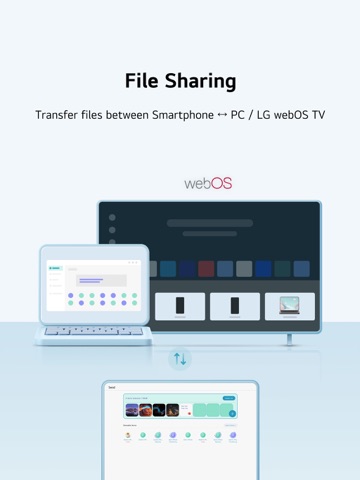
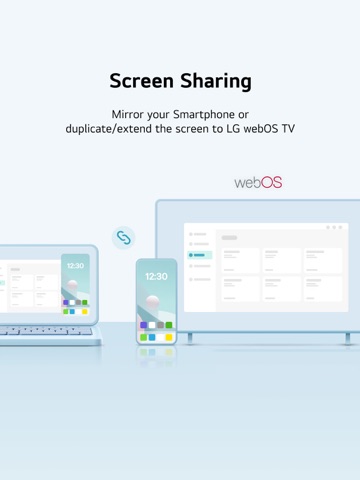
■ App Info Connect your PC and LG webOS TV with your Smartphone regardless of the OS LG gram Link is a Smartphone connectivity application for LG PC users Try to connect your LG PC and LG webOS TV with any Smartphone regardless of the operating system You can transfer files, mirror your Smartphone, use it as a secondary monitor and more! ※ To use LG gram Link on gram PC, you must run the LG gram Link app on your iPhone (iPad).   • Easy connection with QR code You can easily connect LG PC with your Smartphone just by scanning the QR code.   • Smartphone ↔ PC / LG webOS TV file transfer Send any photos, videos or files you want to your Smartphone or LG webOS TV   • Import files and photos from PC to Smartphone Quickly search for files and photos on your PC and effortlessly import them to your Smartphone. Access the data you need on your PC instantly to work more efficiently. (This feature works in conjunction with the gram chat On-Device, so the gram chat On-Device must be installed and run for the first time before it can be used.)   • AI classification Manage and search your photos easily using LG AI Gallery feature. Your photos will be organized automatically by date, person, location, etc.   • Screen mirroring Cast your Smartphone screen on your PC.   • Display extension/duplication Use your Smartphone or LG webOS TV as a second screen.   • Keyboard/Mouse sharing  Control your Smartphone or LG webOS TV with your PC's keyboard/mouse. ※ To use the “Keyboard/Mouse share” feature, your iPhone needs to have Assistive Touch enabled.    (Includes when trying to use "Keyboard/Mouse share" with mouse click in mirroring)    Go to Settings > Accessibility > Touch > AssistiveTouch      Assistive Touch Guide : https://support.apple.com/en-us/111794   • Sharing Smartphone camera Use your Smartphone's camera on your PC. Perfect for video conferencing or photography, offering flexible functionality.   • Sharing Smartphone audio Play audio from your Smartphone through your PC speakers. Enjoy your content with enhanced sound quality.   • Talking on the phone via PC Make or receive calls directly on your PC. Talk hands-free while working, boosting your productivity.   • Get Smartphone notifications on PC View Smartphone notifications directly on your PC. Stay updated and conveniently manage your notifications without missing anything. ■ Supported models : webOS TV - webOS26 version or later required ■ Access rights - Photos (all photos) (Required) : Accessing photos and videos to be transmitted - Camera (Required) : Scanning a QR code to connect to a PC, taking photos, and attaching them - Notification (Required) : Checking connection, receiving files, and sending a transfer complete notification - Local network (Optional) : Accessing a local network to connect to a PC - Bluetooth (Optional) : Searching LG gram Link app users nearby - Files and folders (Optional) : Accessing files and folders to be transmitted to a PC - Location services (camera) (Optional) : Accessing locations where photos are saved - Microphone (Optional) : Accessing a microphone while recording videos ■ Support E-mail : lg-gramlink@lge.com

See this store page in another country

Prices, ranks and reviews are per country. Revenue above is already worldwide.

More from LG Electronics, Inc.

LG ThinQ
Lifestyle
239.5K ratingsAnalyze →
LG Soundbar
Utilities
652 ratingsAnalyze →
LG AV Remote
Utilities
98 ratingsAnalyze →
LG XBOOM ~’24 & selected*
Music
413 ratingsAnalyze →
LG Screen Manager (LG Monitor)
Entertainment
0 ratingsAnalyze →
Pocket Photo
Photo & Video
33 ratingsAnalyze →
LG TONE Free
Utilities
504 ratingsAnalyze →
LG HVAC Service
Business
10 ratingsAnalyze →
LGMV-Business
Utilities
25 ratingsAnalyze →