ASO keywords
Most repeated terms in the listing. Highlighted ones also appear in the title.
smartphone18photos10webos7gram7files7gram link6smartphone webos6keyboard mouse6optional accessing6connect5mouse5accessing5optional5link4keyboard4camera4required4connect webos3webos smartphone3smartphone regardless3scanning code3photos videos3files photos3gram chat3
What's new in 4.0.4
UI Bug Fix
Released Jan 26, 2023. Current version shipped Jun 30, 2026.
Store description
■ App Info
Connect your PC and LG webOS TV with your Smartphone regardless of the OS
LG gram Link is a Smartphone connectivity application for LG PC users
Try to connect your LG PC and LG webOS TV with any Smartphone regardless of the operating system
You can transfer files, mirror your Smartphone, use it as a secondary monitor and more!
※ To use LG gram Link on gram PC, you must run the LG gram Link app on your iPhone (iPad).
• Easy connection with QR code
You can easily connect LG PC with your Smartphone just by scanning the QR code.
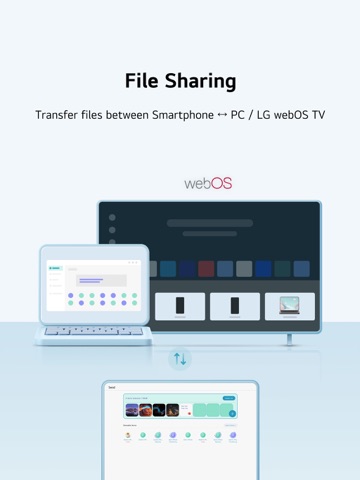
• Smartphone ↔ PC / LG webOS TV file transfer
Send any photos, videos or files you want to your Smartphone or LG webOS TV
• Import files and photos from PC to Smartphone
Quickly search for files and photos on your PC and effortlessly import them to your Smartphone.
Access the data you need on your PC instantly to work more efficiently.
(This feature works in conjunction with the gram chat On-Device, so the gram chat On-Device must be installed and run for the first time before it can be used.)
• AI classification
Manage and search your photos easily using LG AI Gallery feature.
Your photos will be organized automatically by date, person, location, etc.
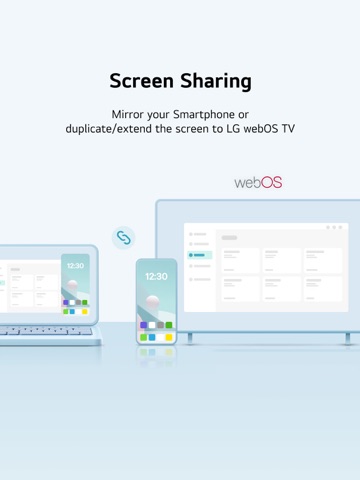
• Screen mirroring
Cast your Smartphone screen on your PC.
• Display extension/duplication
Use your Smartphone or LG webOS TV as a second screen.
• Keyboard/Mouse sharing
Control your Smartphone or LG webOS TV with your PC's keyboard/mouse.
※ To use the “Keyboard/Mouse share” feature, your iPhone needs to have Assistive Touch enabled.
(Includes when trying to use "Keyboard/Mouse share" with mouse click in mirroring)
Go to Settings > Accessibility > Touch > AssistiveTouch
Assistive Touch Guide : https://support.apple.com/en-us/111794
• Sharing Smartphone camera
Use your Smartphone's camera on your PC.
Perfect for video conferencing or photography, offering flexible functionality.
• Sharing Smartphone audio
Play audio from your Smartphone through your PC speakers.
Enjoy your content with enhanced sound quality.
• Talking on the phone via PC
Make or receive calls directly on your PC.
Talk hands-free while working, boosting your productivity.
• Get Smartphone notifications on PC
View Smartphone notifications directly on your PC.
Stay updated and conveniently manage your notifications without missing anything.
■ Supported models :
webOS TV - webOS26 version or later required
■ Access rights
- Photos (all photos) (Required) : Accessing photos and videos to be transmitted
- Camera (Required) : Scanning a QR code to connect to a PC, taking photos, and attaching them
- Notification (Required) : Checking connection, receiving files, and sending a transfer complete notification
- Local network (Optional) : Accessing a local network to connect to a PC
- Bluetooth (Optional) : Searching LG gram Link app users nearby
- Files and folders (Optional) : Accessing files and folders to be transmitted to a PC
- Location services (camera) (Optional) : Accessing locations where photos are saved
- Microphone (Optional) : Accessing a microphone while recording videos
■ Support E-mail : lg-gramlink@lge.com
See this store page in another country
Prices, ranks and reviews are per country. Revenue above is already worldwide.