← Back to charts
LG Telepresence icon
APP STORE

LG Telepresence

LG Electronics, Inc. · Productivity · United States store
NOT IN TOP 100 HERE
View on App Store ↗ Instagram card
Revenue a month, worldwide
Too small to estimate
Not enough chart or ratings data
New ratings
Tracking
Daily counts start building from today
Rating
3.0 of 5
2 ratings in this store
Countries it ranks in
0
was 0 on Oct 16, 2026

Revenue

Estimated from the grossing charts of Oct 23, 2026 in the 53 countries we track, and ratings growth on the App Store.

EST. REVENUE / MONTH · WORLDWIDE
Unranked
Not in any grossing chart, and it sells nothing in the store (no in-app purchases, free download). Any revenue comes from ads or payments outside the store, which we can't see.
EST. LIFETIME DOWNLOADS
70 to 200
Estimated from ratings count
RATINGS
2
AVG RATING
3.00
PRICE
Free
AGE
7.5y
LAST UPDATE
1669d ago
VERSION
6.0.15007
SIZE
22 MB
AGE RATING
4+

Last 30 days

From our daily snapshots of every grossing chart.

DAYS IN A GROSSING CHART
0 / 30
COUNTRIES NOW
0 (was 0)
EST. REVENUE FROM CHARTS, DAILY · APP STORE ONLY EST
Show daily values
Sep 24, 2026not in a grossing chart
Sep 25, 2026not in a grossing chart
Sep 26, 2026not in a grossing chart
Sep 27, 2026not in a grossing chart
Sep 28, 2026not in a grossing chart
Sep 29, 2026not in a grossing chart
Sep 30, 2026not in a grossing chart
Oct 1, 2026not in a grossing chart
Oct 2, 2026not in a grossing chart
Oct 3, 2026not in a grossing chart
Oct 4, 2026not in a grossing chart
Oct 5, 2026not in a grossing chart
Oct 6, 2026not in a grossing chart
Oct 7, 2026not in a grossing chart
Oct 8, 2026not in a grossing chart
Oct 9, 2026not in a grossing chart
Oct 10, 2026not in a grossing chart
Oct 11, 2026not in a grossing chart
Oct 12, 2026not in a grossing chart
Oct 13, 2026not in a grossing chart
Oct 14, 2026not in a grossing chart
Oct 15, 2026not in a grossing chart
Oct 16, 2026not in a grossing chart
Oct 17, 2026not in a grossing chart
Oct 18, 2026not in a grossing chart
Oct 19, 2026not in a grossing chart
Oct 20, 2026not in a grossing chart
Oct 21, 2026not in a grossing chart
Oct 22, 2026not in a grossing chart
Oct 23, 2026not in a grossing chart
Best rank Sep 24, 2026: not ranked. Now: not ranked. Days at zero are days outside every grossing chart.

Money and momentum

Measured from the store, not estimated.

WHAT IT CHARGES
No in-app purchases
Earns from its upfront price, ads or payments outside the store.
REVIEW MOMENTUM
Too few reviews
Fewer than 3 recent written reviews in this country.
RELEASE CADENCE
0 updates in 90 days
  • Typical gap between releases1041 days
From the last 3 versions listed on the App Store.
RATING BREAKDOWN
2 ratings
5★50%
4★0%
3★0%
2★0%
1★50%

What users say

Latest reviews, United States App Store.

★★★★★Jan 15, 2020
100% Lg

Lg

Store screenshots

ScreenshotScreenshotScreenshotScreenshotScreenshotScreenshotScreenshotScreenshotScreenshotScreenshot

App Store ads

Apple Search Ads this app ran in the last 90 days, from Apple's public ad repository.

Apple's ad repository couldn't be reached right now. Try again later.

Growth research

Where this app is buying and earning its users. Each link opens pre filtered.

ASO keywords

Most repeated terms in the listing. Highlighted ones also appear in the title.

telepresence11manual9remotecall8telepresence lge8lge5remotecall installer5please refer5manual telepresence5lge update5update telepresence5telepresence manual5manual pdf5connection code5visualsupport remotecall3lge viewer3run remotecall3refer manual3enter digit3digit connection3application3installer3run3please3refer3

What's new in 6.0.15007

- Other minor bug fixes

Released Apr 21, 2019. Current version shipped Mar 30, 2022.

Store description

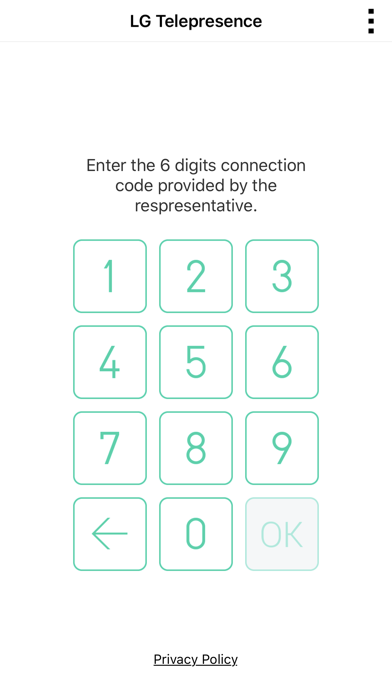
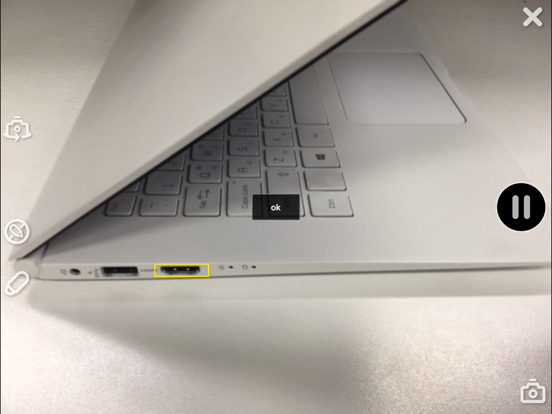
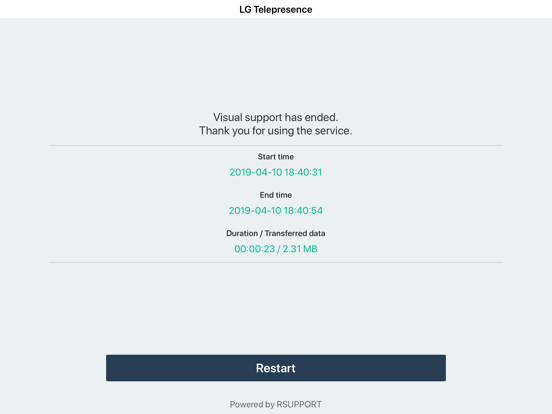
Telepresence - VisualSupport RemoteCall allows support representatives and their customers to collaboratively support iOS devices (iPhones & iPads). Below are the necessary steps to use VisualSupport - RemoteCall. Test Instruction: [ PC Side ] 1. RemoteCall Install (Windows 10 PC Application) A. Open a web browser and move to: https://telepresence.lge.com:8080/viewer/download 2. Download the RemoteCall Installer. 3. Run the RemoteCall Installer. 4. Once installed, run RemoteCall. A. After that, run the program B. Please refer manual(page4 ~ 5) C. Manual: https://telepresence.lge.com/update/telepresence_Manual.pdf 5. Enter the user ID and password, then click ‘Login’. A. ID: appletest01 B. PW: 222222 6. Click 'Start' 7. Standby to Connect. [ Mobile Side ] 1. Launch the App A. Tap the ‘LG Telepresence’ icon to launch the application 2. Enter the 6-Digit Connection Code A. Enter the 6-Digit Connection Code(PC Connection Code) into the mobile app, then tap ‘OK’ 3. Tap ‘Agree’ to continue. A. Please refer manual(page7 ~ 8) B. Manual: https://telepresence.lge.com/update/telepresence_Manual.pdf For more information regarding the installation process or how to use LG telepresence - RemoteCall, please refer to the documents listed below. 1. RemoteCall Installer (PC Application) A. URL: https://telepresence.lge.com:8080/viewer/download 2. User Manual (For Testing Purposes) A. Manual: https://telepresence.lge.com/update/telepresence_Manual.pdf 3. Demo Video A. https://drive.google.com/file/d/1wncEfxihCXTRWUNGs-aw7dq2SN6Jor9B/view?usp=sharing 4. DemoAccount(PC app ID/PW) A. ID : appletest01 B. PW : 222222

See this store page in another country

Prices, ranks and reviews are per country. Revenue above is already worldwide.

More from LG Electronics, Inc.

LG ThinQ
Lifestyle
239.5K ratingsAnalyze →
LG Soundbar
Utilities
652 ratingsAnalyze →
LG AV Remote
Utilities
98 ratingsAnalyze →
LG XBOOM ~’24 & selected*
Music
413 ratingsAnalyze →
LG Screen Manager (LG Monitor)
Entertainment
0 ratingsAnalyze →
Pocket Photo
Photo & Video
33 ratingsAnalyze →
LG TONE Free
Utilities
504 ratingsAnalyze →
LG gram Link
Utilities
23 ratingsAnalyze →
LG HVAC Service
Business
10 ratingsAnalyze →