← Back to charts
Photo Ruler: Measure & Scale icon
APP STORE

Photo Ruler: Measure & Scale

Phuc Pham · Utilities · United States store
NOT IN TOP 100 HERE
View on App Store ↗ Instagram card
Revenue a month, worldwide
Too small to estimate
Not enough chart or ratings data
New ratings
Tracking
Daily counts start building from today
Rating
0.0 of 5
0 ratings in this store
Countries it ranks in
0
was 0 on Oct 19, 2026

Revenue

Estimated from the grossing charts of Oct 26, 2026 in the 53 countries we track, and ratings growth on the App Store.

EST. REVENUE / MONTH · WORLDWIDE
Unranked
Not in any grossing chart, and too few ratings (0) to read its growth. Most apps at this stage earn little or nothing.
EST. LIFETIME DOWNLOADS
n/a
Estimated from ratings count
RATINGS
0
AVG RATING
n/a
PRICE
Free
AGE
153d
LAST UPDATE
94d ago
VERSION
1.2.0
SIZE
4 MB
AGE RATING
4+

Last 30 days

From our daily snapshots of every grossing chart.

DAYS IN A GROSSING CHART
0 / 30
COUNTRIES NOW
0 (was 0)
EST. REVENUE FROM CHARTS, DAILY · APP STORE ONLY EST
Show daily values
Sep 27, 2026not in a grossing chart
Sep 28, 2026not in a grossing chart
Sep 29, 2026not in a grossing chart
Sep 30, 2026not in a grossing chart
Oct 1, 2026not in a grossing chart
Oct 2, 2026not in a grossing chart
Oct 3, 2026not in a grossing chart
Oct 4, 2026not in a grossing chart
Oct 5, 2026not in a grossing chart
Oct 6, 2026not in a grossing chart
Oct 7, 2026not in a grossing chart
Oct 8, 2026not in a grossing chart
Oct 9, 2026not in a grossing chart
Oct 10, 2026not in a grossing chart
Oct 11, 2026not in a grossing chart
Oct 12, 2026not in a grossing chart
Oct 13, 2026not in a grossing chart
Oct 14, 2026not in a grossing chart
Oct 15, 2026not in a grossing chart
Oct 16, 2026not in a grossing chart
Oct 17, 2026not in a grossing chart
Oct 18, 2026not in a grossing chart
Oct 19, 2026not in a grossing chart
Oct 20, 2026not in a grossing chart
Oct 21, 2026not in a grossing chart
Oct 22, 2026not in a grossing chart
Oct 23, 2026not in a grossing chart
Oct 24, 2026not in a grossing chart
Oct 25, 2026not in a grossing chart
Oct 26, 2026not in a grossing chart
Best rank Sep 27, 2026: not ranked. Now: not ranked. Days at zero are days outside every grossing chart.

Money and momentum

Measured from the store, not estimated.

WHAT IT CHARGES
3 purchases listed
  • Weekly$3.99
  • Yearly$19.99
  • Lifetime Pro$39.99
Top in-app purchases as listed on the App Store, in local prices.
REVIEW MOMENTUM
Too few reviews
Fewer than 3 recent written reviews in this country.
RELEASE CADENCE
0 updates in 90 days
  • Typical gap between releases45 days
From the last 3 versions listed on the App Store.

Store screenshots

ScreenshotScreenshotScreenshotScreenshotScreenshotScreenshotScreenshotScreenshotScreenshotScreenshot

App Store ads

Apple Search Ads this app ran in the last 90 days, from Apple's public ad repository.

No App Store ads in the EU
None in the last 90 days.

Apple only publishes ads shown in the EU (EU Digital Services Act), with a 7 day delay. An app that advertises only outside the EU shows nothing here.

Growth research

Where this app is buying and earning its users. Each link opens pre filtered.

ASO keywords

Most repeated terms in the listing. Highlighted ones also appear in the title.

photo4web4photo credit3credit card3card coin3scales pixels3length height3two ends3web levi3levi web3tape3real3size3object3reference3measure2snap2credit2card2coin2frame2scales2pixels2length2

What's new in 1.2.0

Introducing Premium with new features. Plus bug fixes and improvements.

Released May 27, 2026. Current version shipped Jul 24, 2026.

Store description

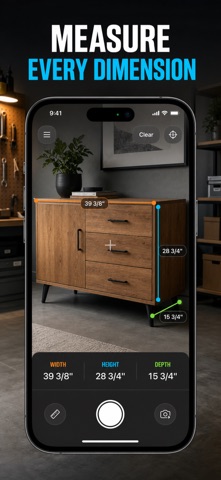
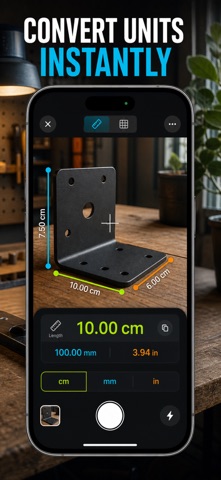
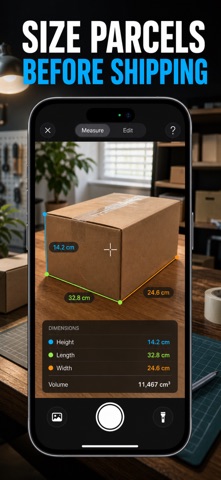
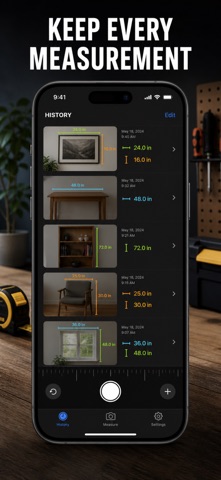
Turn your camera into a tape measure. Snap a photo with a credit card or coin in the frame and the app scales the pixels to reveal the real length, height and size of almost anything. No laser, no guesswork — just point, tap and read the measurement. Perfect for furniture, parcels, DIY projects, art, plants and anywhere a real tape is out of reach. WHY THIS APP • Measure length, height, width and object size straight from a photo • Use a credit card, coin or A4 sheet as the scale reference — no calibration • Read results in millimeters, centimeters or inches, converted instantly • Drop several segments onto one photo to size many parts at once • Save annotated photos to a history you can revisit any time • Fully offline and on device — no account, no sign-in, no ads HOW IT WORKS 1. Snap or load a photo with your reference object and the target both flat in the frame 2. Tap the two ends of the reference edge, then the two ends of your object 3. The app scales the pixels and shows the real-world measurement instantly It's a fast, practical estimating aid. For fabrication or safety-critical work, confirm the result with a physical tape or caliper. Full access is unlocked with a subscription — available weekly or yearly, or as a one-time lifetime purchase. Terms of Use https://web-levi.web.app/terms Privacy Policy https://web-levi.web.app/privacy-policy Questions or feedback? tphuc.work@gmail.com

See this store page in another country

Prices, ranks and reviews are per country. Revenue above is already worldwide.

More from Phuc Pham

J2ME Emulator
Games
8 ratingsAnalyze →
Origami: Paper Folding Guide
Education
0 ratingsAnalyze →
Widget Maker: Theme Icons
Utilities
0 ratingsAnalyze →
Time Blocking: Day Planner
Productivity
2 ratingsAnalyze →
Letter Printer: PDF Writer
Productivity
1 ratingsAnalyze →
Photo Printer: Print to Size
Photo & Video
0 ratingsAnalyze →
Square Footage & Floor Area
Utilities
0 ratingsAnalyze →
Rock ID: Gem & Crystal Scan
Education
1 ratingsAnalyze →
Fonts Keyboard - Cool Text
Utilities
0 ratingsAnalyze →