← Back to charts
Time Blocking: Day Planner icon
APP STORE

Time Blocking: Day Planner

Phuc Pham · Productivity · United States store
NOT IN TOP 100 HERE
View on App Store ↗ Instagram card
Revenue a month, worldwide
Too small to estimate
Not enough chart or ratings data
New ratings
Tracking
Daily counts start building from today
Rating
1.0 of 5
2 ratings in this store
Countries it ranks in
0
was 0 on Oct 17, 2026

Revenue

Estimated from the grossing charts of Oct 23, 2026 in the 53 countries we track, and ratings growth on the App Store.

EST. REVENUE / MONTH · WORLDWIDE
Unranked
Not in any grossing chart, and too few ratings (3) to read its growth. Most apps at this stage earn little or nothing.
EST. LIFETIME DOWNLOADS
70 to 200
Estimated from ratings count
RATINGS
2
AVG RATING
1.00
PRICE
Free
AGE
157d
LAST UPDATE
66d ago
VERSION
1.2.1
SIZE
7 MB
AGE RATING
4+

Last 30 days

From our daily snapshots of every grossing chart.

DAYS IN A GROSSING CHART
0 / 30
COUNTRIES NOW
0 (was 0)
EST. REVENUE FROM CHARTS, DAILY · APP STORE ONLY EST
Show daily values
Sep 25, 2026not in a grossing chart
Sep 26, 2026not in a grossing chart
Sep 27, 2026not in a grossing chart
Sep 28, 2026not in a grossing chart
Sep 29, 2026not in a grossing chart
Sep 30, 2026not in a grossing chart
Oct 1, 2026not in a grossing chart
Oct 2, 2026not in a grossing chart
Oct 3, 2026not in a grossing chart
Oct 4, 2026not in a grossing chart
Oct 5, 2026not in a grossing chart
Oct 6, 2026not in a grossing chart
Oct 7, 2026not in a grossing chart
Oct 8, 2026not in a grossing chart
Oct 9, 2026not in a grossing chart
Oct 10, 2026not in a grossing chart
Oct 11, 2026not in a grossing chart
Oct 12, 2026not in a grossing chart
Oct 13, 2026not in a grossing chart
Oct 14, 2026not in a grossing chart
Oct 15, 2026not in a grossing chart
Oct 16, 2026not in a grossing chart
Oct 17, 2026not in a grossing chart
Oct 18, 2026not in a grossing chart
Oct 19, 2026not in a grossing chart
Oct 20, 2026not in a grossing chart
Oct 21, 2026not in a grossing chart
Oct 22, 2026not in a grossing chart
Oct 23, 2026not in a grossing chart
Oct 24, 2026not in a grossing chart
Best rank Sep 25, 2026: not ranked. Now: not ranked. Days at zero are days outside every grossing chart.

Money and momentum

Measured from the store, not estimated.

WHAT IT CHARGES
3 purchases listed
  • Timebox Coach: Weekly$2.99
  • Task Timetable: Yearly$14.99
  • Routine Agenda: Pay Once$29.99
Top in-app purchases as listed on the App Store, in local prices.
REVIEW MOMENTUM
Too few reviews
Fewer than 3 recent written reviews in this country.
RELEASE CADENCE
1 update in 90 days
  • Typical gap between releases25 days
From the last 4 versions listed on the App Store.
RATING BREAKDOWN
2 ratings
5★0%
4★0%
3★0%
2★0%
1★100%

What users say

Latest reviews, United States App Store.

★★★★★Sep 27, 2026
Pay to even try it?

You won’t get a dollar or even a penny from me. Go back to China.

Store screenshots

ScreenshotScreenshotScreenshotScreenshotScreenshotScreenshotScreenshotScreenshotScreenshotScreenshot

App Store ads

Apple Search Ads this app ran in the last 90 days, from Apple's public ad repository.

Apple's ad repository couldn't be reached right now. Try again later.

Growth research

Where this app is buying and earning its users. Each link opens pre filtered.

ASO keywords

Most repeated terms in the listing. Highlighted ones also appear in the title.

day18time8hour5timeline5list5block5blocks4planned4work4web4hour hour3hour timeline3start time3deep work3charts day3day activity3activity map3coach tab3full access3web levi3levi web3color3real3see3

What's new in 1.2.1

Bug fixes and performance improvements.

Released May 20, 2026. Current version shipped Aug 19, 2026.

Store description

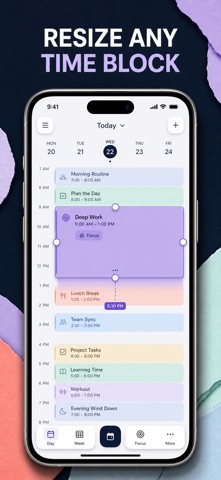
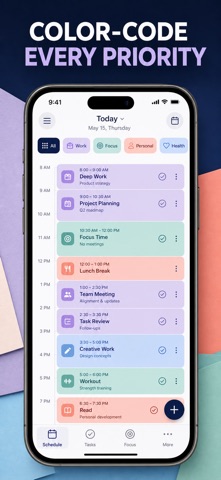
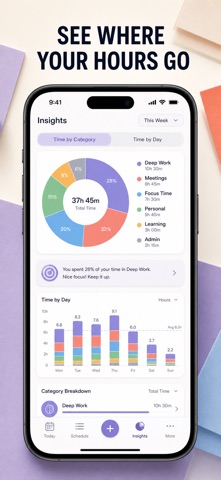
Time blocking, done properly: give every hour of your day a name, a color, and a place on a real timeline — then find out where those hours actually went. Most planners hand you a list and hope for the best. A list has no width, so it never warns you that your "quick morning" is already seven hours long. TimeBlock puts your day on an hour-by-hour timeline you can see: each block sits at its real start time, at its real length, in its own color. The moment your day is overbooked, the timeline shows it — before the day starts, not after it collapses. WHAT YOU GET - A day you can actually see: blocks sit on an hour-by-hour timeline with a live "now" line, so you always know what you should be doing this minute - Realistic plans instead of wishful lists: set a start time and a duration, and an overloaded day becomes obvious at a glance - A planned day in one tap: pick Deep Work Day, Study Day, Creative Day, or Balanced Day and the whole timeline fills in - The truth about your week: donut and bar charts, a 7-day activity map, hours planned, and your most-repeated blocks - A finish rate you can defend: tick blocks off and watch your daily completion score in the Coach tab - A nudge every evening so tomorrow gets planned tonight, plus coaching on time boxing, buffer time, theme days, and strategic breaks PERFECT FOR - Deep-work professionals protecting long, uninterrupted focus windows - Students building study sessions with breaks that are planned, not accidental - Freelancers and creatives who need work, admin, and rest to coexist in one day - Anyone whose to-do list keeps growing while the day keeps disappearing WHY NOT JUST USE A TO-DO LIST OR YOUR CALENDAR? A to-do list is infinite; your day is not. A calendar is built for meetings other people booked, not for the focus time you owe yourself. TimeBlock does one job only — laying out your own hours, in color, and showing you afterwards how you really spent them. Nothing to invite, nothing to negotiate, no meeting requests in the way. PRIVACY Every block, note, and template you apply stays on your iPhone. No account, no sign-up, no ads, no third-party analytics, no tracking. Nothing you plan ever leaves the device. FULL ACCESS Full access unlocks everything in the app: unlimited time blocks, all eight block colors and per-block notes, the full day-template library, the Insights dashboard with charts and your 7-day activity map, and the Coach tab with your daily score, tips, and planning methods. Available as a weekly subscription, a yearly subscription, or a one-time lifetime purchase. Subscriptions renew automatically unless cancelled at least 24 hours before the current period ends; manage or cancel anytime in your App Store account settings. Open the Today tab, add your first block for tomorrow morning, and see how much day you really have. Terms of Use (EULA): https://web-levi.web.app/terms Privacy Policy: https://web-levi.web.app/privacy-policy Questions? tphuc.work@gmail.com

See this store page in another country

Prices, ranks and reviews are per country. Revenue above is already worldwide.

More from Phuc Pham

J2ME Emulator
Games
8 ratingsAnalyze →
Origami: Paper Folding Guide
Education
0 ratingsAnalyze →
Photo Printer: Print to Size
Photo & Video
0 ratingsAnalyze →
Letter Printer: PDF Writer
Productivity
1 ratingsAnalyze →
Widget Maker: Theme Icons
Utilities
0 ratingsAnalyze →
Square Footage & Floor Area
Utilities
0 ratingsAnalyze →
Photo Ruler: Measure & Scale
Utilities
0 ratingsAnalyze →
Multiplication Practice Kids
Education
0 ratingsAnalyze →
Compass: True North Finder
Utilities
0 ratingsAnalyze →