ASO keywords
Most repeated terms in the listing. Highlighted ones also appear in the title.
crisp7water6speaker6sound4eject4dust4ads4device4test speaker3crisp uses3eject trapped3trapped water3compare real3device face3face down3sound vibration3taxlite net3net crisp3crisp html3test3frequencies3trapped3dislodge3tap3
What's new in 1.4.0
Crisp 1.4 — made for iPhone Duo.
• Built for iPhone Duo: layouts use the inner display and stay clear of the fold
• Eject, Tone, Test and Hearing are laid out in two columns on the inner display
• Start stays within reach on the outer display
• One welcome screen replaces the three-page intro
• Clearer text and colors, and better support for larger text sizes
• The audiogram now shows frequency and dB scales
• Smoother audio start-up and a microphone fix
Still 100% on-device, no ads, nothing you do here ever leaves your device.
Released May 11, 2026. Current version shipped Oct 22, 2026.
Store description
Clear water. Test your speaker. Verify the result.
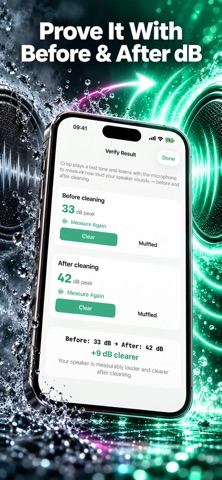
Crisp uses targeted sound frequencies to help eject trapped water and dislodge dust from iPhone and iPad speakers. Then it listens with the microphone to compare real Before/After dB measurements—so you can check the result instead of guessing.
NO ADS. NO ACCOUNTS. 100% OFFLINE.
Is my data private?
Everything runs on your device. Nothing leaves your iPhone or iPad. No accounts, no analytics, no ads, no tracking.
How do I get started?
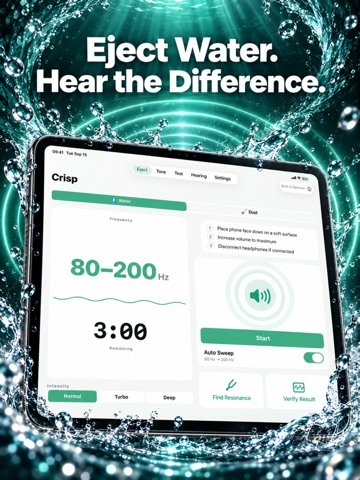
1. Place your device face down on a soft surface
2. Set volume to maximum
3. Tap Start Eject and wait 3 minutes
What can I do with it?
- Eject trapped water using a 165Hz tone, or switch to Dust mode to shake out lint and debris
- Choose Normal, Turbo, or Deep intensity for a faster or more thorough clean
- Find your phone's exact speaker resonance point with Resonance Finder for a stronger clean
- Compare a real Before/After dB reading, not just a guess, to confirm the cycle worked
- Generate any tone from 20Hz to 22kHz — up to 30kHz in Ultrasonic mode — with sine, square, triangle, or sawtooth waveforms
- Test speaker frequency response with bass (80Hz), mid (1kHz), and treble (8kHz) presets
- Run stereo balance (left/right) tests on stereo-capable devices
- Check your microphone for blockages with a one-tap diagnostic
- Measure ambient sound level with the built-in dB meter
- Sweep frequencies automatically to dislodge stubborn dust particles
- Take a structured hearing test across the audible range and save your audiogram
- Save your favorite frequencies for one-tap recall
- Set a cleaning reminder and track your streak over the past 7 days
- Ask Siri to eject water, hands-free
- 100% no ads, ever — most speaker-cleaning apps are free with ads until you subscribe; Crisp never shows one
What devices does it work on?
iPhone or iPad running iOS 17 or later. The same audio principles work on any built-in speaker.
Why use Crisp?
Speaker grilles trap moisture from sweat, rain, pool splashes, and humidity. Dust and pocket lint accumulate over time. Crisp uses sound vibration — the same technique built into Apple Watch — to physically dislodge particles without opening your device or using cleaning tools that can damage internal components.
Does it really work?
Sound vibration ejection is a well-documented technique. Results depend on how much water is trapped and how recently. For best results, run the cycle within an hour of water exposure, repeat 2 to 3 times, and keep the device face down throughout.
How much does it cost?
Download free. Optional Crisp Pro plans and any eligible introductory offer are shown in the app using your local App Store price. You can manage or cancel subscriptions anytime in Settings.
Terms of Use: https://taxlite.net/crisp/terms.html
Privacy Policy: https://taxlite.net/crisp/privacy.html
See this store page in another country
Prices, ranks and reviews are per country. Revenue above is already worldwide.