← Back to charts
LiDAR Floor Plan: Room Scanner icon
APP STORE

LiDAR Floor Plan: Room Scanner

ZHENGQIAO JIANG · Productivity · United States store
NOT IN TOP 100 HERE
View on App Store ↗ Instagram card
Revenue a month, worldwide
Too small to estimate
Not enough chart or ratings data
New ratings
Tracking
Daily counts start building from today
Rating
0.0 of 5
0 ratings in this store
Countries it ranks in
0
was 0 on Oct 19, 2026

Revenue

Estimated from the grossing charts of Oct 25, 2026 in the 53 countries we track, and ratings growth on the App Store.

EST. REVENUE / MONTH · WORLDWIDE
Unranked
Not in any grossing chart, and too few ratings (0) to read its growth. Most apps at this stage earn little or nothing.
EST. LIFETIME DOWNLOADS
n/a
Estimated from ratings count
RATINGS
0
AVG RATING
n/a
PRICE
Free
AGE
111d
LAST UPDATE
7d ago
VERSION
1.4.0
SIZE
52 MB
AGE RATING
4+

Last 30 days

From our daily snapshots of every grossing chart.

DAYS IN A GROSSING CHART
0 / 30
COUNTRIES NOW
0 (was 0)
EST. REVENUE FROM CHARTS, DAILY · APP STORE ONLY EST
Show daily values
Sep 27, 2026not in a grossing chart
Sep 28, 2026not in a grossing chart
Sep 29, 2026not in a grossing chart
Sep 30, 2026not in a grossing chart
Oct 1, 2026not in a grossing chart
Oct 2, 2026not in a grossing chart
Oct 3, 2026not in a grossing chart
Oct 4, 2026not in a grossing chart
Oct 5, 2026not in a grossing chart
Oct 6, 2026not in a grossing chart
Oct 7, 2026not in a grossing chart
Oct 8, 2026not in a grossing chart
Oct 9, 2026not in a grossing chart
Oct 10, 2026not in a grossing chart
Oct 11, 2026not in a grossing chart
Oct 12, 2026not in a grossing chart
Oct 13, 2026not in a grossing chart
Oct 14, 2026not in a grossing chart
Oct 15, 2026not in a grossing chart
Oct 16, 2026not in a grossing chart
Oct 17, 2026not in a grossing chart
Oct 18, 2026not in a grossing chart
Oct 19, 2026not in a grossing chart
Oct 20, 2026not in a grossing chart
Oct 21, 2026not in a grossing chart
Oct 22, 2026not in a grossing chart
Oct 23, 2026not in a grossing chart
Oct 24, 2026not in a grossing chart
Oct 25, 2026not in a grossing chart
Oct 26, 2026not in a grossing chart
Best rank Sep 27, 2026: not ranked. Now: not ranked. Days at zero are days outside every grossing chart.

Money and momentum

Measured from the store, not estimated.

WHAT IT CHARGES
4 purchases listed
  • Lifetime$79.99
  • Yearly$39.99
  • Monthly$9.99
  • Weekly$3.99
Top in-app purchases as listed on the App Store, in local prices.
REVIEW MOMENTUM
Too few reviews
Fewer than 3 recent written reviews in this country.
RELEASE CADENCE
2 updates in 90 days
  • Typical gap between releases34 days
From the last 5 versions listed on the App Store.

Store screenshots

ScreenshotScreenshotScreenshotScreenshotScreenshotScreenshotScreenshotScreenshotScreenshotScreenshot

App Store ads

Apple Search Ads this app ran in the last 90 days, from Apple's public ad repository.

No App Store ads in the EU
None in the last 90 days.

Apple only publishes ads shown in the EU (EU Digital Services Act), with a 7 day delay. An app that advertises only outside the EU shows nothing here.

Growth research

Where this app is buying and earning its users. Each link opens pre filtered.

ASO keywords

Most repeated terms in the listing. Highlighted ones also appear in the title.

room8floor plan5floor4plan4furniture4scan4walkthrough video3icloud sync3taxlite net3net redesign3redesign home3home html3share3lidar3model3home3export3walkthrough3pro3walls2connected2move2adjust2draw2

What's new in 1.4.0

What's new in 1.4.0: • Built for iPhone Duo: layouts for the outer screen, the open inner screen, half-folded and tabletop use, with controls in the side bar and kept out of the crease • Roomier iPad and Duo workspaces: your library beside a live 3D preview, an editor with its tools in a side column, and settings in two panes • Open a project in a new window (iPad and Duo), and drag the live 2D plan into another app in Split View • Long-press a room for one-step Walk or Make Video • Safer projects: fixes for floors lost while a building merges, rooms deleted from a building, and scans still downloading from iCloud • Clearer, more consistent tool names and icons, and smoother motion that respects Reduce Motion • Faster library and building loading Thanks for using LiDAR Floor Plan!

Released Jul 7, 2026. Current version shipped Oct 19, 2026.

Store description

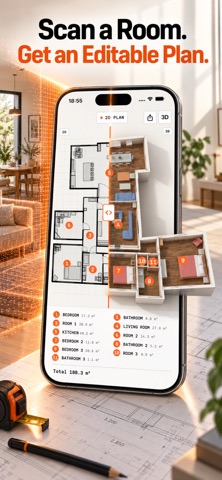
Turn a real room into a floor plan you can correct, organize, and share. LiDAR Floor Plan captures walls, doors, windows, furniture, and connected rooms, then gives you both a top-down 2D plan and an editable 3D model. Fix what the scan missed, move furniture, adjust finishes, or draw a room from scratch — without sending a private view of your home to a server. BUILT FOR USEFUL OUTPUTS • Export a floor plan as PDF or crisp PNG • Share an interactive 3D model as USDZ • Create a smooth 1080p room-to-room walkthrough video • Combine multiple captured floors into one connected building EDIT AFTER YOU SCAN Room capture is only the starting point. Adjust walls, openings, furniture, materials, room names, floor alignment, camera shots, and walkthrough pace in the visual editor. You can also start with a blank room when no LiDAR scan is needed. PRIVATE BY DESIGN There is no account, advertising, analytics SDK, or third-party tracking. Scanning, editing, rendering, and export happen on-device. Optional iCloud sync uses your own Apple account so projects can move between your supported devices. Scan, draw, edit, and preview for free. Pro is required when you export or share a finished PDF, PNG, USDZ model, or walkthrough video, and also unlocks custom materials, furniture, backgrounds, and camera placement. Room scanning requires a LiDAR-equipped iPhone Pro or iPad Pro. Projects already captured on a supported device can be edited on other compatible iPads through iCloud sync. Terms of Use: https://taxlite.net/redesign_home/terms.html Privacy Policy: https://taxlite.net/redesign_home/privacy.html

See this store page in another country

Prices, ranks and reviews are per country. Revenue above is already worldwide.

More from ZHENGQIAO JIANG

ReadAloud: Text to Speech PDF
Productivity
21 ratingsAnalyze →
VocalShift: Voice Changer
Entertainment
0 ratingsAnalyze →
AnyDay: Calendar & Date Alarm
Productivity
1 ratingsAnalyze →
StudPlan: Wall Framing Layout
Utilities
0 ratingsAnalyze →
StairPlan: Stair Calculator
Utilities
1 ratingsAnalyze →
Slab Rebar Concrete Calculator
Utilities
0 ratingsAnalyze →
Floor Calculator & Carpet
Utilities
0 ratingsAnalyze →
FormatBox: File Converter
Utilities
0 ratingsAnalyze →
Days Off: PTO Holiday Planner
Productivity
0 ratingsAnalyze →