ASO keywords
Most repeated terms in the listing. Highlighted ones also appear in the title.
wall10stud8studs7cut6board5steel4gable4material4ready4list4icloud4sync4rake gable3cut lists3analytics advertising3advertising tracking3tracking sdks3board feet3feet wood3wood volume3volume wall3wall area3gable walls3rough opening3
What's new in 1.7.0
What's new in 1.7.0:
• iPhone Duo support — on the inner display, Wall shows your inputs on one side and the live diagram and results on the other, and Project and Reference open as a list beside the detail. Controls move into the system side bar, the fraction keyboard adapts to the screen, and nothing lands in the fold when the device is half open
• More accurate calculations — header sizes now follow the IRC span limits exactly, studs no longer overlap corners and openings, cripple, blocking and insulation counts are corrected, and openings are checked against one consistent set of rules everywhere
• Two-story load is now saved with each wall and applies to windows and exterior doors
• PDF quotes now paginate long cut lists and show exact percentages and amounts
• iCloud sync fixed — projects now sync across your devices through your own iCloud account
• Text now follows your Dynamic Type size, and every text field has a Done button above the keyboard
• Project and wall summaries, reference tables and shared text are now fully translated, with correct singular and plural forms
100% offline, on-device — no accounts, no ads, no tracking.
Released May 18, 2026. Current version shipped Oct 15, 2026.
Store description
Plan wall framing in seconds — wood or steel, straight or rake/gable — with full material takeoffs, client quotes, and cut lists ready for the job site.
Built for iOS 17. No accounts. No analytics. No advertising. No tracking SDKs. 100% offline — every calculation runs on your phone, so it works in a basement or anywhere else with no signal.
WHAT YOU CAN DO
• FRAME A SINGLE WALL
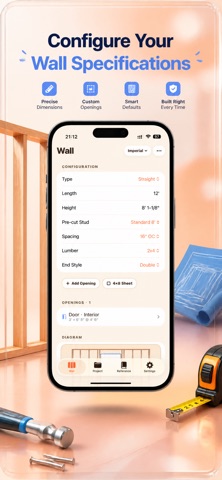
Enter length, height, and on-center spacing (12", 16", 19.2", or 24"). Choose 2x4 or 2x6 lumber. Get instant stud counts, plate lengths, board feet, wood volume, and wall area, with a live layout and your choice of end-stud configuration. Tap any field to type over it instantly.
• STEEL FRAMING
Cold-formed steel studs for non-load-bearing partitions — track and stud linear-foot takeoffs, gauge selection, and self-drilling screw counts.
• RAKE, GABLE & ASYMMETRIC GABLE WALLS
Enter a pitch (3:12 to 12:12, or custom) or low/high heights. Gable walls support a center or off-centre ridge with independent left/right slopes. Every stud comes out with its exact length and bevel angle, ready to cut.
• DOORS, WINDOWS & CORNERS
Drop in any opening with its rough opening size, and position it from the left edge, right edge, or center — one tap. King studs, jack studs, cripples, sills, and headers are calculated for you, including built-up trimmer posts for wide openings per IRC R602.7.5.
• CUT LIST & MATERIAL TAKEOFF
A full board-by-board takeoff — studs, plates, headers, blocking — per wall and across the project. Sheathing and drywall sheet counts, insulation coverage, and fastener estimates included. A buy list shows how many sticks of each market length to order, exportable as CSV.
• 4×8 SHEET LAYOUT
See exactly where OSB or plywood panels land on your wall. Edges on a stud are green; unsupported joins are flagged red before you start nailing.
• FIXTURE BACKING
Point-placed blocking for grab bars, TV mounts, and cabinets, each with its own board footage and diagram placement.
• PRESETS
One tap loads standard pre-cut heights (92-5/8", 104-5/8", 116-5/8"). Or save your own wall configuration once and reuse or update it on any wall.
• MARK-OUT GUIDE
A copy-ready list of measured positions along the plate — for marking studs on-site without re-counting.
• MULTI-WALL PROJECTS
Save framing jobs across multiple walls with intersection tracking (shared studs auto-deducted at T-junctions). Duplicate a wall or start the next one pre-filled with the last. Undo an accidental delete. Track totals: studs, plates, board feet, wood volume, wall area, and cost.
• CLIENT QUOTE PDF & EXPORT
A client-ready estimate with labor hours, material subtotal, markup, and tax — without exposing your cut list. Or export a full PDF with diagrams, cut lists, mark-out positions, and material summary.
• IMPERIAL AND METRIC
Feet-inches-fractions down to 1/8", or millimeters. Switch anytime without losing your project.
• YOUR OWN iCLOUD SYNC
Projects sync across your iPhone and iPad through your own iCloud account — optional, can be turned off in Settings. Never touches our servers; there are none.
• IRC REFERENCE BUILT IN
IRC R602.7 header sizing, bearing and point loads, nominal vs. actual lumber sizes, steel gauge-to-mil, common rough opening sizes, corner stud configurations, and roof pitch to angle conversions.
PRIVACY FIRST
StudPlan runs on-device. No login. No analytics. No advertising. No tracking SDKs. No camera, photo library, location, or microphone access requested. Turn on iCloud sync and your projects sync only through your own iCloud account — never through our servers, because we don't have any.
3-day free trial, then $1.99/week. Monthly, yearly, and lifetime options available. Cancel anytime.
Terms of Use: https://taxlite.net/stud_plan/terms.html
Privacy Policy: https://taxlite.net/stud_plan/privacy.html
See this store page in another country
Prices, ranks and reviews are per country. Revenue above is already worldwide.