← Back to charts
PDF Editor Expert: Fill & Sign icon
APP STORE

PDF Editor Expert: Fill & Sign

PixelRis Inc. · Business · United States store
NOT IN TOP 100 HERE
View on App Store ↗ Instagram card
Revenue a month, worldwide EST
$489
Likely $163 to $1.5K
New ratings
+0
in 11 days, 68 in total
Rating
4.7 of 5
47 ratings in this store
Countries it ranks in
0
was 0 on Oct 17, 2026

Revenue

Estimated from the grossing charts of Oct 24, 2026 in the 53 countries we track, and ratings growth on the App Store.

EST. REVENUE / YEAR · WORLDWIDE
$5.9K
3.6 new ratings a month on average since launch
EST. LIFETIME DOWNLOADS
1.6K to 4.7K
Estimated from ratings count
WHERE ITS USERS ARE · SHARE OF RATINGS
  • United States 47 ratings69%
  • India 16 ratings24%
  • Indonesia 2 ratings3%
  • Philippines 2 ratings3%
  • Canada 1 ratings1%
HOW SURE ARE WE
Not in any grossing chart, so this comes from ratings growth (3.6 new ratings a month on average since launch): revenue grows with new ratings, more slowly for apps that collect ratings fast. Tested on 418 apps with verified revenue: typically off by about 2 times, and big earners tend to come out low. Countries we don't track (and Google Play in China, which doesn't exist) aren't included, and neither are ads or web payments. Gross revenue before store fees.
RATINGS
47
AVG RATING
4.70
PRICE
Free
AGE
1.6y
LAST UPDATE
1d ago
VERSION
2.8
SIZE
78 MB
AGE RATING
4+

Last 30 days

From our daily snapshots of every grossing chart and daily ratings counts.

DAYS IN A GROSSING CHART
1 / 30
COUNTRIES NOW
0 (was 0)
NEW RATINGS, LAST 7 DAYS
+0
EST. REVENUE FROM CHARTS, DAILY · APP STORE ONLY EST
Show daily values
Sep 25, 2026not in a grossing chart
Sep 26, 2026not in a grossing chart
Sep 27, 2026not in a grossing chart
Sep 28, 2026not in a grossing chart
Sep 29, 2026not in a grossing chart
Sep 30, 2026not in a grossing chart
Oct 1, 2026not in a grossing chart
Oct 2, 2026not in a grossing chart
Oct 3, 2026not in a grossing chart
Oct 4, 2026$12.5K · 1 country
Oct 5, 2026not in a grossing chart
Oct 6, 2026not in a grossing chart
Oct 7, 2026not in a grossing chart
Oct 8, 2026not in a grossing chart
Oct 9, 2026not in a grossing chart
Oct 10, 2026not in a grossing chart
Oct 11, 2026not in a grossing chart
Oct 12, 2026not in a grossing chart
Oct 13, 2026not in a grossing chart
Oct 14, 2026not in a grossing chart
Oct 15, 2026not in a grossing chart
Oct 16, 2026not in a grossing chart
Oct 17, 2026not in a grossing chart
Oct 18, 2026not in a grossing chart
Oct 19, 2026not in a grossing chart
Oct 20, 2026not in a grossing chart
Oct 21, 2026not in a grossing chart
Oct 22, 2026not in a grossing chart
Oct 23, 2026not in a grossing chart
Oct 24, 2026not in a grossing chart
Best rank Sep 25, 2026: not ranked. Now: not ranked. Days at zero are days outside every grossing chart.
RATINGS IN THE CORE COUNTRIES, DAILY
Show daily values
Oct 13, 202668 ratings
Oct 14, 202668 ratings
Oct 15, 202668 ratings
Oct 17, 202668 ratings
Oct 18, 202668 ratings
Oct 20, 202668 ratings
Oct 22, 202668 ratings
Oct 23, 202668 ratings
Oct 24, 202668 ratings
68 on Oct 13, 2026, 68 on Oct 24, 2026. New ratings track new downloads, even outside the charts.

Money and momentum

Measured from the store, not estimated.

WHAT IT CHARGES
5 purchases listed
  • Pro Yearly$39.99
  • Pro Weekly offer$5.99
  • Pro Weekly offer$7.99
  • Pro Yearly$29.99
  • Pro Monthy$3.99
Top in-app purchases as listed on the App Store, in local prices.
REVIEW MOMENTUM
0.2 reviews / week
  • Recent reviews average4.8 stars
  • Recent 1 and 2 star share0%
From the latest 12 written reviews, covering 509 days.
RELEASE CADENCE
3 updates in 90 days
  • Typical gap between releases15 days
From the last 19 versions listed on the App Store.
RATING BREAKDOWN
47 ratings
5★77%
4★21%
3★0%
2★0%
1★2%

What users want

From the latest 12 reviews on the United States App Store, Jun 2, 2025 to Jun 5, 2025: 0% are 1 or 2 stars. Open a theme to read what people wrote.

WHAT THEY COMPLAIN ABOUT · SHARE OF BAD REVIEWS

Only 0 of the latest 12 reviews are 1 or 2 stars, too few to find patterns. Users are mostly happy.

WHAT THEY ASK FOR
  • Just wish there were a few more text formatting options. 5★, Jun 3, 2025
WORDS THAT KEEP COMING UP IN BAD REVIEWS

Nothing stands out.

WHAT THEY LOVE · SHARE OF GOOD REVIEWS
Easy to use33%

4 of the 4 and 5 star reviews.

★★★★★ It's well curated, easy to use, and actually functional.
★★★★★ Scanning and signing features are solid; Could be a bit faster, but it's reliable and easy to understand.
★★★★★ It's simple and does what I need.
Useful, it helps25%

3 of the 4 and 5 star reviews.

★★★★★ I use this to prepare notes and sign PDFs for work. It's simple and does what I need. Haven't had any major issues so far.
★★★★★ I've been using this app to make small edits to PDF files and it's been super helpful.
★★★★★ Editing and signing PDFs has becọme much easier with this app. Just wish there were a few more text formatting options.
Accurate, great results25%

3 of the 4 and 5 star reviews.

★★★★★ Most everything works well with this app and I've used it for years.
★★★★★ I've been using this app to make small edits to PDF files and it's been super helpful. Easy to use and gets the job done without any hassle.
★★★★★ Sometimes it takes a second to load, but overall it works well.

Found by matching words and phrases in the reviews, not read by a person. A review can count toward more than one theme.

What users say

Latest reviews, United States App Store.

★★★★★Jun 5, 2025
Great App

This app help me a lot in making notes for my use.

★★★★★Jun 5, 2025
praise

To be honest, this app is still good.

★★★★★Jun 5, 2025
Very good Editor app

It's OK. I prefer to use it.

★★★★★Jun 4, 2025
NICE!

This app is great, I recọmmend it to everyone! It's really very practical.

★★★★★Jun 4, 2025
Wonderful Tools

Most everything works well with this app and I've used it for years.

★★★★★Jun 4, 2025
To use

This app has found several, or this is good!!!

Apps like this

Same category, earning about as much.
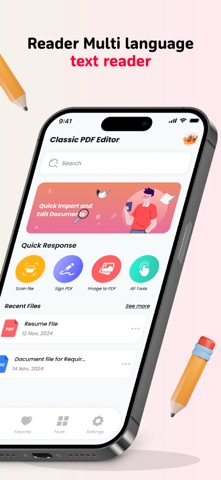
Store screenshots

ScreenshotScreenshotScreenshotScreenshotScreenshotScreenshotScreenshotScreenshotScreenshotScreenshot

App Store ads

Apple Search Ads this app ran in the last 90 days, from Apple's public ad repository.

Apple's ad repository couldn't be reached right now. Try again later.

Growth research

Where this app is buying and earning its users. Each link opens pre filtered.

ASO keywords

Most repeated terms in the listing. Highlighted ones also appear in the title.

pdf13pdfs8pdf editor8editor5documents5reading4edit sign3manage documents3handling pdfs3reading experience3documents pdf3pdf merge3view pdf3sites view3edit3sign3annotate3manage3text3convert3view3files2handling2experience2

What's new in 2.8

Implemented new tools Improvement in UI Bug Fixes

Released Mar 26, 2025. Current version shipped Oct 23, 2026.

Store description

Edit, Sign, Draw, Annotate and Manage Your PDFs on the Go with PDF Editor Easily edit, sign, and manage your documents anytime, anywhere with PDF Editor. Whether you're reading, annotating, scanning, or converting files, this app makes handling PDFs effortless. ▶ WHAT YOU CAN DO WITH PDF EDITOR Enjoy a Seamless Reading Experience • Switch between Day, Night, or Sepia mode for comfortable reading in any lighting condition. • Choose vertical or horizontal scrolling for a flexible reading experience. • Open PDFs directly from email, the web, or any app that supports the Apple Share menu. Scan Documents to PDF • Transform your camera into a powerful document scanner. • Automatically detect document edges and apply perspective correction. • Enhance scans with color adjustments and auto-crop tools for the best results. Fill Out and Sign Forms • Fill in interactive text fields, checkboxes, and radio buttons effortlessly. • Supports all major form formats, including AcroForms and static XFA forms. Highlight and Annotate PDFs • Mark important content using highlight colors, text notes, or stickers. • Add stamps like "Approved," "Confidential," and more. • Record voice notes and attach them to documents for easy reference. Convert Files to PDF with Ease Convert various file types into PDFs in just a few taps: • Word Documents → PDF • Excel Spreadsheets → PDF • PowerPoint Presentations → PDF • Images (JPG, PNG) → PDF • Plain Text (TXT) → PDF Merge, Edit, and Organize PDFs • Rotate, reorder, and delete pages in your PDF. • Merge multiple PDFs into a single file. • Preview and rearrange pages using an intuitive thumbnail view. With PDF Editor, handling PDFs has never been easier. Scan, annotate, convert, and manage your documents—all in one powerful app! Read more about our terms and conditions here: https://sites.google.com/view/pdf-editor-lite-privacy-policy/home https://sites.google.com/view/pdfeditorlitetermsofuse/home

See this store page in another country

Prices, ranks and reviews are per country. Revenue above is already worldwide.

More from PixelRis Inc.

Office Word Editor:Docs, Share
Productivity
123 ratingsAnalyze →
Free PDF Converter PDF to Word
Utilities
13 ratingsAnalyze →
Smart Printer App and Scan
Business
0 ratingsAnalyze →
PDF Maker: Scan & Convert
Business
0 ratingsAnalyze →