← Back to charts
PDF Maker: Scan & Convert icon
APP STORE

PDF Maker: Scan & Convert

PixelRis Inc. · Business · United States store
NOT IN TOP 100 HERE
View on App Store ↗ Instagram card
Revenue a month, worldwide
Too small to estimate
Not enough chart or ratings data
New ratings
Tracking
Daily counts start building from today
Rating
0.0 of 5
0 ratings in this store
Countries it ranks in
0
was 0 on Oct 17, 2026

Revenue

Estimated from the grossing charts of Oct 23, 2026 in the 53 countries we track, and ratings growth on the App Store.

EST. REVENUE / MONTH · WORLDWIDE
Unranked
Not in any grossing chart, and too few ratings (0) to read its growth. Most apps at this stage earn little or nothing.
EST. LIFETIME DOWNLOADS
n/a
Estimated from ratings count
RATINGS
0
AVG RATING
n/a
PRICE
Free
AGE
1.8y
LAST UPDATE
453d ago
VERSION
1.7
SIZE
22 MB
AGE RATING
4+

Last 30 days

From our daily snapshots of every grossing chart.

DAYS IN A GROSSING CHART
0 / 30
COUNTRIES NOW
0 (was 0)
EST. REVENUE FROM CHARTS, DAILY · APP STORE ONLY EST
Show daily values
Sep 25, 2026not in a grossing chart
Sep 26, 2026not in a grossing chart
Sep 27, 2026not in a grossing chart
Sep 28, 2026not in a grossing chart
Sep 29, 2026not in a grossing chart
Sep 30, 2026not in a grossing chart
Oct 1, 2026not in a grossing chart
Oct 2, 2026not in a grossing chart
Oct 3, 2026not in a grossing chart
Oct 4, 2026not in a grossing chart
Oct 5, 2026not in a grossing chart
Oct 6, 2026not in a grossing chart
Oct 7, 2026not in a grossing chart
Oct 8, 2026not in a grossing chart
Oct 9, 2026not in a grossing chart
Oct 10, 2026not in a grossing chart
Oct 11, 2026not in a grossing chart
Oct 12, 2026not in a grossing chart
Oct 13, 2026not in a grossing chart
Oct 14, 2026not in a grossing chart
Oct 15, 2026not in a grossing chart
Oct 16, 2026not in a grossing chart
Oct 17, 2026not in a grossing chart
Oct 18, 2026not in a grossing chart
Oct 19, 2026not in a grossing chart
Oct 20, 2026not in a grossing chart
Oct 21, 2026not in a grossing chart
Oct 22, 2026not in a grossing chart
Oct 23, 2026not in a grossing chart
Oct 24, 2026not in a grossing chart
Best rank Sep 25, 2026: not ranked. Now: not ranked. Days at zero are days outside every grossing chart.

Money and momentum

Measured from the store, not estimated.

WHAT IT CHARGES
2 purchases listed
  • Pro Monthly Offer$7.99
  • Pro Weekly offer$4.99
Top in-app purchases as listed on the App Store, in local prices.
REVIEW MOMENTUM
Too few reviews
Fewer than 3 recent written reviews in this country.
RELEASE CADENCE
0 updates in 90 days
  • Typical gap between releases6 days
From the last 7 versions listed on the App Store.

Store screenshots

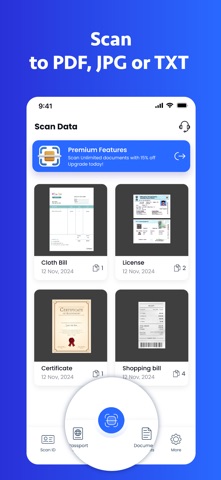
ScreenshotScreenshotScreenshotScreenshotScreenshotScreenshot

App Store ads

Apple Search Ads this app ran in the last 90 days, from Apple's public ad repository.

Apple's ad repository couldn't be reached right now. Try again later.

Growth research

Where this app is buying and earning its users. Each link opens pre filtered.

ASO keywords

Most repeated terms in the listing. Highlighted ones also appear in the title.

pdf5extract text3access features3sites view3pdfscanner home3scan3text3scans3edit3anything2copy2convert2images2want2rearrange2ocr2extract2sign2secure2share2save2subscribe2access2features2

What's new in 1.7

Improvement and bug fixes

Released Jan 13, 2025. Current version shipped Jul 28, 2025.

Store description

With PDF Maker, you can scan anything at any time. From contracts and ID cards to class notes and bills, simply aim your camera and scan. The program automatically detects edges, straightens the image, and provides a clean digital copy. * Convert images to PDFs! Do you have images or screenshots that you would want to convert to PDF? Import them from your gallery, rearrange them, and export them as a single PDF file - quick and simple. * Use OCR to extract text. Want to extract text from a printed page? Use our built-in OCR function to identify text in your scans. You may copy, edit, or distribute it without having to type anything. * Edit and annotate. Need to sign a paper, highlight key points, or make a short note? You can accomplish all of this within the app. Rearrange, rotate, or eliminate any unnecessary pages. * Private and secure Your papers remain on your device. Scans are not uploaded anywhere until you share them. You can even secure the app with Face ID or a passcode for more privacy. * Save and share in seconds. Please send your scans via email or AirDrop. Save them in Files, iCloud, or another app. Depending on your needs, choose between PDF and picture formats. * SUBSCRIPTIONS You can subscribe to Document PDF Converter: Scan to get access to premium features, like unlimited conversions and shares, sign, edit and group your documents. Options: - 7-day trial at $0.99, then renews weekly for $4.99 - Monthly for $7.99 – Subscribe to get Pro access to all features. You will be charged after the purchase confirmation. – Subscriptions to our scanner app auto-renew 24 hours before the expiration date. You can manage your subscriptions in account Settings on the App Store. Terms of use - https://sites.google.com/view/termsofuse-pdfscanner/home Privacy Policy - https://sites.google.com/view/privacypolicy-pdfscanner/home

See this store page in another country

Prices, ranks and reviews are per country. Revenue above is already worldwide.

More from PixelRis Inc.

Office Word Editor:Docs, Share
Productivity
123 ratingsAnalyze →
Free PDF Converter PDF to Word
Utilities
13 ratingsAnalyze →
PDF Editor Expert: Fill & Sign
Business
47 ratingsAnalyze →
Smart Printer App and Scan
Business
0 ratingsAnalyze →