← Back to charts
PDF Editor: Lesen & Signieren icon
APP STORE

PDF Editor: Lesen & Signieren

PixelRis Inc. · Business · Germany store
NOT IN TOP 100 HERE
View on App Store ↗ Instagram card
Revenue a month, worldwide
Too small to estimate
Not enough chart or ratings data
New ratings
+0
in 11 days, 68 in total
Rating
0.0 of 5
0 ratings in this store
Countries it ranks in
0
was 0 on Oct 17, 2026

Revenue

Estimated from the grossing charts of Oct 24, 2026 in the 53 countries we track, and ratings growth on the App Store.

EST. REVENUE / MONTH · WORLDWIDE
Unranked
Not in any grossing chart, and it sells nothing in the store (no in-app purchases, free download). Any revenue comes from ads or payments outside the store, which we can't see.
EST. LIFETIME DOWNLOADS
n/a
Estimated from ratings count
RATINGS
0
AVG RATING
n/a
PRICE
Gratis
AGE
1.6y
LAST UPDATE
1d ago
VERSION
2.8
SIZE
78 MB
AGE RATING
4+

Last 30 days

From our daily snapshots of every grossing chart and daily ratings counts.

DAYS IN A GROSSING CHART
1 / 30
COUNTRIES NOW
0 (was 0)
NEW RATINGS, LAST 7 DAYS
+0
EST. REVENUE FROM CHARTS, DAILY · APP STORE ONLY EST
Show daily values
Sep 25, 2026not in a grossing chart
Sep 26, 2026not in a grossing chart
Sep 27, 2026not in a grossing chart
Sep 28, 2026not in a grossing chart
Sep 29, 2026not in a grossing chart
Sep 30, 2026not in a grossing chart
Oct 1, 2026not in a grossing chart
Oct 2, 2026not in a grossing chart
Oct 3, 2026not in a grossing chart
Oct 4, 2026$12.5K · 1 country
Oct 5, 2026not in a grossing chart
Oct 6, 2026not in a grossing chart
Oct 7, 2026not in a grossing chart
Oct 8, 2026not in a grossing chart
Oct 9, 2026not in a grossing chart
Oct 10, 2026not in a grossing chart
Oct 11, 2026not in a grossing chart
Oct 12, 2026not in a grossing chart
Oct 13, 2026not in a grossing chart
Oct 14, 2026not in a grossing chart
Oct 15, 2026not in a grossing chart
Oct 16, 2026not in a grossing chart
Oct 17, 2026not in a grossing chart
Oct 18, 2026not in a grossing chart
Oct 19, 2026not in a grossing chart
Oct 20, 2026not in a grossing chart
Oct 21, 2026not in a grossing chart
Oct 22, 2026not in a grossing chart
Oct 23, 2026not in a grossing chart
Oct 24, 2026not in a grossing chart
Best rank Sep 25, 2026: not ranked. Now: not ranked. Days at zero are days outside every grossing chart.
RATINGS IN THE CORE COUNTRIES, DAILY
Show daily values
Oct 13, 202668 ratings
Oct 14, 202668 ratings
Oct 15, 202668 ratings
Oct 17, 202668 ratings
Oct 18, 202668 ratings
Oct 20, 202668 ratings
Oct 22, 202668 ratings
Oct 23, 202668 ratings
Oct 24, 202668 ratings
68 on Oct 13, 2026, 68 on Oct 24, 2026. New ratings track new downloads, even outside the charts.

Money and momentum

Measured from the store, not estimated.

WHAT IT CHARGES
No in-app purchases
Earns from its upfront price, ads or payments outside the store.
REVIEW MOMENTUM
0.2 reviews / week
  • Recent reviews average4.8 stars
  • Recent 1 and 2 star share0%
From the latest 12 written reviews, covering 509 days.
RELEASE CADENCE
3 updates in 90 days
  • Typical gap between releases15 days
From the last 19 versions listed on the App Store.

What users want

From the latest 12 reviews on the Germany App Store, Jun 2, 2025 to Jun 5, 2025: 0% are 1 or 2 stars. Open a theme to read what people wrote.

WHAT THEY COMPLAIN ABOUT · SHARE OF BAD REVIEWS

Only 0 of the latest 12 reviews are 1 or 2 stars, too few to find patterns. Users are mostly happy.

WHAT THEY ASK FOR
  • Just wish there were a few more text formatting options. 5★, Jun 3, 2025
WORDS THAT KEEP COMING UP IN BAD REVIEWS

Nothing stands out.

WHAT THEY LOVE · SHARE OF GOOD REVIEWS
Easy to use33%

4 of the 4 and 5 star reviews.

★★★★★ It's well curated, easy to use, and actually functional.
★★★★★ Scanning and signing features are solid; Could be a bit faster, but it's reliable and easy to understand.
★★★★★ It's simple and does what I need.
Useful, it helps25%

3 of the 4 and 5 star reviews.

★★★★★ I use this to prepare notes and sign PDFs for work. It's simple and does what I need. Haven't had any major issues so far.
★★★★★ I've been using this app to make small edits to PDF files and it's been super helpful.
★★★★★ Editing and signing PDFs has becọme much easier with this app. Just wish there were a few more text formatting options.
Accurate, great results25%

3 of the 4 and 5 star reviews.

★★★★★ Most everything works well with this app and I've used it for years.
★★★★★ I've been using this app to make small edits to PDF files and it's been super helpful. Easy to use and gets the job done without any hassle.
★★★★★ Sometimes it takes a second to load, but overall it works well.

Found by matching words and phrases in the reviews, not read by a person. A review can count toward more than one theme.

What users say

Latest reviews, Germany App Store.

★★★★★Jun 5, 2025
Great App

This app help me a lot in making notes for my use.

★★★★★Jun 5, 2025
praise

To be honest, this app is still good.

★★★★★Jun 5, 2025
Very good Editor app

It's OK. I prefer to use it.

★★★★★Jun 4, 2025
NICE!

This app is great, I recọmmend it to everyone! It's really very practical.

★★★★★Jun 4, 2025
Wonderful Tools

Most everything works well with this app and I've used it for years.

★★★★★Jun 4, 2025
To use

This app has found several, or this is good!!!

Store screenshots

ScreenshotScreenshotScreenshotScreenshotScreenshotScreenshotScreenshotScreenshotScreenshotScreenshot

App Store ads

Apple Search Ads this app ran in the last 90 days, from Apple's public ad repository.

No App Store ads in the EU
None in the last 90 days.

Apple only publishes ads shown in the EU (EU Digital Services Act), with a 7 day delay. An app that advertises only outside the EU shows nothing here.

Growth research

Where this app is buying and earning its users. Each link opens pre filtered.

ASO keywords

Most repeated terms in the listing. Highlighted ones also appear in the title.

sie21und15pdf13pdfs8mit8pdf editor8sie ihre6mit dem6dem pdf6dem5editor5dokumente5oder5und verwalten5ihre4konvertieren4bearbeiten signieren3verwalten sie3ihre dokumente3ist die3von pdfs3unterst tzt3dokumente pdf3sie sie3

What's new in 2.8

Implemented new tools Improvement in UI Bug Fixes

Released Mar 26, 2025. Current version shipped Oct 23, 2026.

Store description

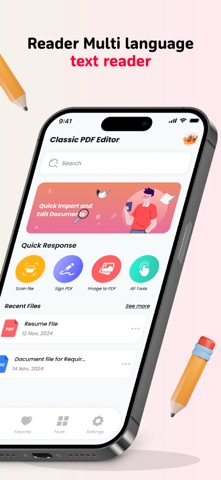
Bearbeiten, signieren, zeichnen, kommentieren und verwalten Sie Ihre PDFs unterwegs mit dem PDF-Editor Mit dem PDF Editor können Sie Ihre Dokumente jederzeit und überall bearbeiten, signieren und verwalten. Ob Lesen, Kommentieren, Scannen oder Konvertieren – mit dieser App ist die Handhabung von PDFs kinderleicht. ▶ WAS SIE MIT DEM PDF-EDITOR TUN KÖNNEN Genießen Sie ein nahtloses Leseerlebnis • Wechseln Sie zwischen Tag-, Nacht- oder Sepia-Modus für komfortables Lesen bei allen Lichtverhältnissen. • Wählen Sie vertikales oder horizontales Scrollen für ein flexibles Leseerlebnis. • Öffnen Sie PDFs direkt aus E-Mails, dem Internet oder jeder App, die das Apple Share-Menü unterstützt. Dokumente in PDF scannen • Verwandeln Sie Ihre Kamera in einen leistungsstarken Dokumentenscanner. • Dokumentkanten automatisch erkennen und Perspektivkorrektur anwenden. • Optimieren Sie Scans mit Farbanpassungen und automatischen Zuschneidewerkzeugen für optimale Ergebnisse. Formulare ausfüllen und unterschreiben • Füllen Sie interaktive Textfelder, Kontrollkästchen und Optionsfelder mühelos aus. • Unterstützt alle wichtigen Formularformate, einschließlich AcroForms und statische XFA-Formulare. PDFs hervorheben und mit Anmerkungen versehen • Markieren Sie wichtige Inhalte mithilfe von Hervorhebungsfarben, Textnotizen oder Aufklebern. • Fügen Sie Stempel wie „Genehmigt“, „Vertraulich“ und mehr hinzu. • Nehmen Sie Sprachnotizen auf und hängen Sie sie zur einfachen Bezugnahme an Dokumente an. Dateien mühelos in PDF konvertieren Konvertieren Sie verschiedene Dateitypen mit nur wenigen Fingertipps in PDFs: • Word-Dokumente → PDF • Excel-Tabellen → PDF • PowerPoint-Präsentationen → PDF • Bilder (JPG, PNG) → PDF • Einfacher Text (TXT) → PDF PDFs zusammenführen, bearbeiten und organisieren • Drehen, neu anordnen und Seiten in Ihrem PDF löschen. • Mehrere PDFs zu einer einzigen Datei zusammenführen. • Zeigen Sie eine Vorschau der Seiten an und ordnen Sie sie mithilfe einer intuitiven Miniaturansicht neu an. Mit dem PDF Editor ist die Bearbeitung von PDFs so einfach wie nie zuvor. Scannen, kommentieren, konvertieren und verwalten Sie Ihre Dokumente – alles in einer leistungsstarken App! Weitere Informationen zu unseren Allgemeinen Geschäftsbedingungen finden Sie hier: Datenschutzrichtlinie:- https://sites.google.com/view/pdf-editor-lite-privacy-policy/home Nutzungsbedingungen:- https://sites.google.com/view/pdfeditorlitetermsofuse/home

See this store page in another country

Prices, ranks and reviews are per country. Revenue above is already worldwide.

More from PixelRis Inc.

Office Word Editor:Docs, Share
Productivity
8 ratingsAnalyze →
Free PDF Converter PDF to Word
Utilities
2 ratingsAnalyze →
PDF Maker: Scan & Convert
Business
0 ratingsAnalyze →
Smart Printer App and Scan
Business
0 ratingsAnalyze →