← Back to charts
BIM 360 Field icon
APP STORE

BIM 360 Field

Autodesk Inc. · Productivity · United States store
NOT IN TOP 100 HERE
View on App Store ↗ Instagram card
Revenue a month, worldwide
Too small to estimate
Not enough chart or ratings data
New ratings
Tracking
Daily counts start building from today
Rating
2.4 of 5
29 ratings in this store
Countries it ranks in
0
was 0 on Oct 16, 2026

Revenue

Estimated from the grossing charts of Oct 21, 2026 in the 53 countries we track, and ratings growth on the App Store.

EST. REVENUE / MONTH · WORLDWIDE
Unranked
Not in any grossing chart, and it sells nothing in the store (no in-app purchases, free download). Any revenue comes from ads or payments outside the store, which we can't see.
EST. LIFETIME DOWNLOADS
1K to 2.9K
Estimated from ratings count
RATINGS
29
AVG RATING
2.38
PRICE
Free
AGE
16.4y
LAST UPDATE
10d ago
VERSION
4.83
SIZE
54 MB
AGE RATING
4+

Last 30 days

From our daily snapshots of every grossing chart.

DAYS IN A GROSSING CHART
0 / 30
COUNTRIES NOW
0 (was 0)
EST. REVENUE FROM CHARTS, DAILY · APP STORE ONLY EST
Show daily values
Sep 24, 2026not in a grossing chart
Sep 25, 2026not in a grossing chart
Sep 26, 2026not in a grossing chart
Sep 27, 2026not in a grossing chart
Sep 28, 2026not in a grossing chart
Sep 29, 2026not in a grossing chart
Sep 30, 2026not in a grossing chart
Oct 1, 2026not in a grossing chart
Oct 2, 2026not in a grossing chart
Oct 3, 2026not in a grossing chart
Oct 4, 2026not in a grossing chart
Oct 5, 2026not in a grossing chart
Oct 6, 2026not in a grossing chart
Oct 7, 2026not in a grossing chart
Oct 8, 2026not in a grossing chart
Oct 9, 2026not in a grossing chart
Oct 10, 2026not in a grossing chart
Oct 11, 2026not in a grossing chart
Oct 12, 2026not in a grossing chart
Oct 13, 2026not in a grossing chart
Oct 14, 2026not in a grossing chart
Oct 15, 2026not in a grossing chart
Oct 16, 2026not in a grossing chart
Oct 17, 2026not in a grossing chart
Oct 18, 2026not in a grossing chart
Oct 19, 2026not in a grossing chart
Oct 20, 2026not in a grossing chart
Oct 21, 2026not in a grossing chart
Oct 22, 2026not in a grossing chart
Oct 23, 2026not in a grossing chart
Best rank Sep 24, 2026: not ranked. Now: not ranked. Days at zero are days outside every grossing chart.

Money and momentum

Measured from the store, not estimated.

WHAT IT CHARGES
No in-app purchases
Earns from its upfront price, ads or payments outside the store.
REVIEW MOMENTUM
0.0 reviews / week
  • Trendfalling
  • Recent reviews average2.4 stars
  • Recent 1 and 2 star share65%
From the latest 26 written reviews, covering 5992 days.
RELEASE CADENCE
1 update in 90 days
  • Typical gap between releases42 days
From the last 25 versions listed on the App Store.
RATING BREAKDOWN
29 ratings
5★24%
4★7%
3★3%
2★14%
1★52%

What users want

From the latest 26 reviews on the United States App Store, May 28, 2010 to Dec 12, 2024: 65% are 1 or 2 stars. Open a theme to read what people wrote.

WHAT THEY COMPLAIN ABOUT · SHARE OF BAD REVIEWS
Lost data, sync, backup29%

5 of the 1 and 2 star reviews.

★★★★★ Syncing issues NEED to be fixed.
★★★★★ Images will not sync Waste of time
★★★★★ Two main issues I have with this program: one, the program has to be in the foreground to sync.
Worse after an update18%

3 of the 1 and 2 star reviews.

★★★★★ Please return the color scheme to the old format. I am unable to see/read many items in the app with the new white on white color scheme. Issue statuses are practically impossible to make out.
★★★★★ This app updated on Sunday evening, and on Monday morning at 4:00 I was unable to see what was going on in my issues list.
★★★★★ The last update took the colors from high contrast to very low contrast.
Price and subscription12%

2 of the 1 and 2 star reviews.

★★★★★ I checked pricing and to use this app they want a thousand dollars!!
★★★★★ Buy the expensive software...you can use the apt!
Login and account problems12%

2 of the 1 and 2 star reviews.

★★★★★ Can not Sign In to view software.
★★★★★ This looks promising, but I can't sign in with my autodesk ID...Please fix!
WHAT THEY ASK FOR

No feature requests in the latest reviews.

WORDS THAT KEEP COMING UP IN BAD REVIEWS

Nothing stands out.

WHAT THEY LOVE · SHARE OF GOOD REVIEWS
Accurate, great results50%

4 of the 4 and 5 star reviews.

★★★★★ It is industrial strength and intended for companies to create and manage serious programs for Quality, Safety, Commissioning and Handover using either 2D or BIM.
★★★★★ If the Window Client works well, we would save money due to the fact that every employee has devices with the Windows OS.
★★★★★ Tracking issues, managing quality control, utilizing BIM in the field and on the go has improved our work.
Easy to use38%

3 of the 4 and 5 star reviews.

★★★★★ Easy to use and save your time, great software!
★★★★★ Gravity mode makes navigation simple and the link to all my object properties is a game changer.
★★★★★ It is easy to use templates to create checklists 2.

Found by matching words and phrases in the reviews, not read by a person. A review can count toward more than one theme.

What users say

Latest reviews, United States App Store.

★★★★★Dec 12, 2024
Don’t Risk Your Project!

how would we rely our project with a software that is hardly signed in…

★★★★★Jun 25, 2024
Não consigo logar

Aparece um erro informando que não foi possível autenticar no servidor do app. Não sei se é devido a minha região. Não consigo logar

★★★★★Jun 13, 2023
Storage usage

The app keeps adding new data and doesn’t appear to overwrite any old data. Every month my iPad storage is full.

★★★★★Mar 21, 2023
Worst program ever.

This is perhaps the worst program I’ve ever been forced to use. It has so many bugs it is literally not even usable half of the time. Do yourself a favor and don’t install this trash software.

★★★★★Feb 14, 2022
Checklist Issue

Unable to open current checklist and edit. Can only create new checklists

★★★★★Jan 21, 2022
Average at best

Syncing issues NEED to be fixed.

Store screenshots

ScreenshotScreenshotScreenshotScreenshotScreenshot

App Store ads

Apple Search Ads this app ran in the last 90 days, from Apple's public ad repository.

Apple's ad repository couldn't be reached right now. Try again later.

Growth research

Where this app is buying and earning its users. Each link opens pre filtered.

ASO keywords

Most repeated terms in the listing. Highlighted ones also appear in the title.

field11bim field10bim8autodesk bim6field mobile5autodesk4mobile4construction4quality safety3safety commissioning3daily update3update feature3license services3services agreement3checklists3daily3jobsite3management2collaboration2quality2safety2commissioning2checklist2manage2

What's new in 4.83

This update includes bug fixes and improvements.

Released May 27, 2010. Current version shipped Oct 13, 2026.

Store description

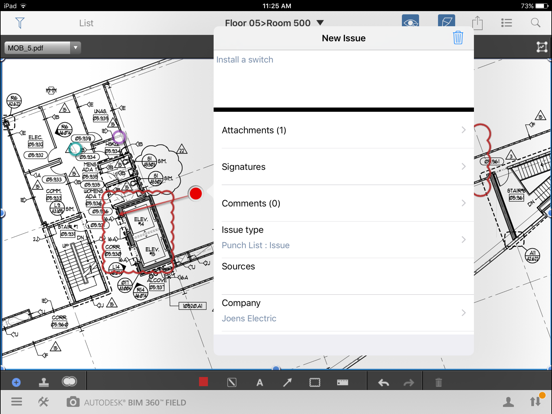
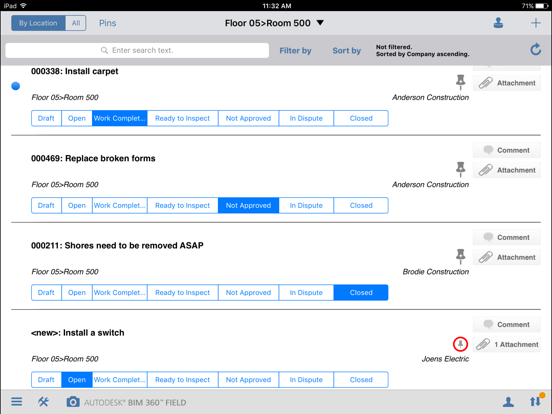
Autodesk® BIM 360™ Field is field management software for 2D and 3D environments that combines mobile technologies at the point of construction with cloud-based collaboration and reporting. BIM 360 Field puts critical information into the hands of those in the field, helping to measurably improve quality, safety, and commissioning for construction and capital projects of all types. ______________________ Issue and Checklist Management ◆ Create and manage issues and checklists on an iPad in the field ◆ Compile quality, safety, or commissioning checklist results for trades, scope, and/or time periods ◆ Preconfigured checklists help make inspections faster, and more consistent User Interface and Navigation ◆ Paper-like forms are familiar and easy to access and complete ◆ Link your BIM 360 Glue models to the BIM 360 Field equipment database to track progress ◆ Mark-up drawings and photos to illustrate issues and/or fortify checklists Accessibility and Collaboration ◆ Access the latest field data—whether you’re online or offline ◆ Share document changes with field and office teams instantly ◆ Store and distribute 2D construction drawings, BIM Models, plans, images, specs, and company policies Manage Daily Jobsite Performance ◆ Enter notes and upload pictures taken on the iPad to give a complete picture of what happened ◆ Daily Update feature provides a digital record/proof of jobsite conditions to share with stakeholder’s ◆ Track construction labor and manpower: Who is doing what, when and where ◆ Daily Update feature automatically collects and displays the current jobsite weather conditions ______________________ Autodesk BIM 360 Field mobile app is licensed under the following License and Services Agreement. Your download and/or use of the Autodesk BIM 360 Field mobile app shall serve as your acknowledgement to the terms of this License and Services Agreement with respect to your use of the Autodesk BIM 360 Field mobile app. Requirements: Requires iPad running iPadOS 13 or later.

See this store page in another country

Prices, ranks and reviews are per country. Revenue above is already worldwide.

More from Autodesk Inc.

AutoCAD
Productivity
6.3K ratingsAnalyze →
Autodesk Forma
Business
21.6K ratingsAnalyze →
Autodesk Fusion
Productivity
4.1K ratingsAnalyze →
Motion FX
Entertainment
0 ratingsAnalyze →
Tinkercad
Education
20.2K ratingsAnalyze →
BIM 360
Productivity
148 ratingsAnalyze →
Autodesk® BIM 360 Glue
Productivity
23 ratingsAnalyze →
BIM 360 Field for iPhones
Productivity
28 ratingsAnalyze →
FBX Review
Productivity
0 ratingsAnalyze →