★★★★★Oct 19, 2026
Great App!Just one thing: My iPad isn’t sending my designs to Autodesk Fusion correctly. You are great, Autodesk!!!!

Estimated from the grossing charts of Oct 23, 2026 in the 53 countries we track, and ratings growth on the App Store.
From our daily snapshots of every grossing chart.
| Sep 25, 2026 | not in a grossing chart |
| Sep 26, 2026 | not in a grossing chart |
| Sep 27, 2026 | not in a grossing chart |
| Sep 28, 2026 | not in a grossing chart |
| Sep 29, 2026 | not in a grossing chart |
| Sep 30, 2026 | not in a grossing chart |
| Oct 1, 2026 | not in a grossing chart |
| Oct 2, 2026 | not in a grossing chart |
| Oct 3, 2026 | not in a grossing chart |
| Oct 4, 2026 | not in a grossing chart |
| Oct 5, 2026 | not in a grossing chart |
| Oct 6, 2026 | not in a grossing chart |
| Oct 7, 2026 | not in a grossing chart |
| Oct 8, 2026 | not in a grossing chart |
| Oct 9, 2026 | not in a grossing chart |
| Oct 10, 2026 | not in a grossing chart |
| Oct 11, 2026 | not in a grossing chart |
| Oct 12, 2026 | not in a grossing chart |
| Oct 13, 2026 | not in a grossing chart |
| Oct 14, 2026 | not in a grossing chart |
| Oct 15, 2026 | not in a grossing chart |
| Oct 16, 2026 | not in a grossing chart |
| Oct 17, 2026 | not in a grossing chart |
| Oct 18, 2026 | not in a grossing chart |
| Oct 19, 2026 | not in a grossing chart |
| Oct 20, 2026 | not in a grossing chart |
| Oct 21, 2026 | not in a grossing chart |
| Oct 22, 2026 | not in a grossing chart |
| Oct 23, 2026 | not in a grossing chart |
| Oct 24, 2026 | not in a grossing chart |
Measured from the store, not estimated.
From the latest 500 reviews on the United States App Store, May 9, 2021 to Oct 19, 2026: 30% are 1 or 2 stars. Open a theme to read what people wrote.
24 of the 1 and 2 star reviews.
★★★★★ It turns my screen completely white and it's just frozen like that.
★★★★★ When I clicked Start Tinkering, it got stuck on the loading screen and never loads.
★★★★★ If you are using it on a mobile device and have more than 7 sketches, you might as well say goodbye to being able to edit any of them without Tinkercad crashing, and also sometimes while editing a sketch, the sketch…
21 of the 1 and 2 star reviews.
★★★★★ Anytime I go into one specific assignment that my teacher created at home in my iPad, it doesn't work.
★★★★★ Every time i open the app it stays on the loading screen way to long idk if it's a bug or my iPad Air 12
★★★★★ The advertisement always pops up, look like a bug, so it disturbs user's display and restrict the ability to control.
20 of the 1 and 2 star reviews.
★★★★★ Can not log into account with my iPad mini.
★★★★★ It literally is making me do what it says. It lets me create a custom one. But It basically wants me to do certain things 🤬
★★★★★ Never stops loading but would be nice if eventually loads well now I can't make a account
13 of the 1 and 2 star reviews.
★★★★★ The approval takes forever
★★★★★ Hits a loading screen and stays there.
★★★★★ When I clicked Start Tinkering, it got stuck on the loading screen and never loads.
11 of the 1 and 2 star reviews.
★★★★★ Ingo in and it just flashing blue and white saying lost connection
★★★★★ I just got it and it says “ lost connection”.
★★★★★ So when I open Tinkercad, on the loading screen it does a “Lost connection error”.
4 of the 1 and 2 star reviews.
★★★★★ Can not log into account with my iPad mini. Hits a loading screen and stays there.
★★★★★ Will update review if this gets fixed.
★★★★★ I usually love tinkered however the last update keeps stopping while designing
3 of the 1 and 2 star reviews.
★★★★★ THIS IS TRASH IT SAYS MY ACCOUNT HAS TO BE APPROVED I TOLD MY MOM AND IT SAYS MY PASSWORD IS WRONG IT WOULDN'T WORK DELETE THIS CRAP
★★★★★ But when I opened the app and it said I had lost connection then when I looked at my internet I was on and nothing was wrong but I guess the app though wrong.
★★★★★ Suddenly your work is a mass of rectangles ungrouped and completely useless.
3 of the 1 and 2 star reviews.
★★★★★ I followed the App Support link on the AppStore page and it says the page no longer exists.
★★★★★ But, the price is right, and Autodesk does support the community of makers and learners.
51 of the 4 and 5 star reviews.
★★★★★ It works really well, and its easy to use, im under 13 and i make super detailed stuff, thisnis awesome!!!!!!!
★★★★★ I started as a newbie 9 months ago and I've now designed over 30 different things of various difficulties using Tinkercad. No it doesn't have every feature you could possibly want, but there are workarounds that allow…
★★★★★ Watch some YouTube tutorials because although it's very easy to pick up, the rabbit hole goes pretty deep.
39 of the 4 and 5 star reviews.
★★★★★ It is fun to use to design and if your printer is not on it you can download it and put it in to your printer
★★★★★ I started as a newbie 9 months ago and I've now designed over 30 different things of various difficulties using Tinkercad. No it doesn't have every feature you could possibly want, but there are workarounds that allow…
★★★★★ I tried to build my characters legs up, but the shapes warrant moving where I was moving them at and every time I placed a sheepe on top of another day stickt to each other, but it was very fun to try
23 of the 4 and 5 star reviews.
★★★★★ It is fun to use to design and if your printer is not on it you can download it and put it in to your printer
★★★★★ I've mastered 90% of the topics in 3d design and i love this app / website .
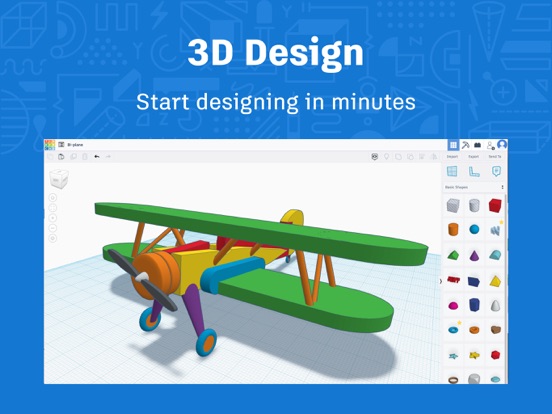
★★★★★ I highly recommend this to everyone who wants to get started in 3D design in an easy and fun way.—SnakeMaster, well-known Tinkerer
13 of the 4 and 5 star reviews.
★★★★★ you need an account to use but it's worth it
★★★★★ Love free software that just works.
★★★★★ Started my 3d journey over 10 yrs ago and always recommend Tinkercad as one of the best 3d cad software for beginners.
8 of the 4 and 5 star reviews.
★★★★★ Ever since I've downloaded, it has been the most helpful app on my device.
★★★★★ This App is useful but approving the account is really not helpful to kids so please get rid of it and why do we need it.
★★★★★ Useful for 3D printing objects, among other things.
Found by matching words and phrases in the reviews, not read by a person. A review can count toward more than one theme.
Latest reviews, United States App Store.
Just one thing: My iPad isn’t sending my designs to Autodesk Fusion correctly. You are great, Autodesk!!!!
);<
It’s better when you make something else like this like can you make a shape that that was inspired by Minecraft like make a happy guest shape and also make a green harness shape and also I’m of Minecraft so thank you for for doing this and please make the shape today
you need an account to use but it’s worth it
This is a great app once you get the hang of it. If you connect a mouse and keyboard to your iPad, it works great. Five stars on the app in general. HOWEVER, you have to login every time. The login with Apple option has a passkey button, but it doesn’t do anything. I have to enter my Apple password. My Apple password is complex because I don’t use it often. After going through all of that, sometimes it still doesn’t log me in properly. Why the heck is this app password protected anyway? Why isn’t there a “trust this device” option? I figure these are bugs from the port of the web app into iPad OS. It’s a free app, so I guess I shouldn’t complain too much. It just seems like they really missed such a simple thing. I hope Autodesk sees this and fixes the login experience so I can bump this up to 5 stars.
Anytime I go into one specific assignment that my teacher created at home in my iPad, it doesn’t work. It turns my screen completely white and it’s just frozen like that.


Apple Search Ads this app ran in the last 90 days, from Apple's public ad repository.
Where this app is buying and earning its users. Each link opens pre filtered.
Most repeated terms in the listing. Highlighted ones also appear in the title.
Released Dec 17, 2019. Current version shipped Oct 9, 2026.
Prices, ranks and reviews are per country. Revenue above is already worldwide.