← Back to charts
Simple Notes - Notepad Manager icon
APP STORE

Simple Notes - Notepad Manager

Komorebi Inc. · Productivity · United States store
NOT IN TOP 100 HERE
View on App Store ↗ Instagram card Google Play version →
Revenue a month, worldwide EST
$8.9K
Likely $3K to $26.7K
New ratings
Tracking
Daily counts start building from today
Rating
4.7 of 5
790 ratings in this store
Countries it ranks in
0
was 0 on Oct 18, 2026

Revenue

Estimated from the grossing charts of Oct 25, 2026 in the 53 countries we track, and ratings growth on the App Store.

EST. REVENUE / YEAR · WORLDWIDE
$106.7K
457 new ratings a month on average since launch
EST. LIFETIME DOWNLOADS
27.6K to 79K
Estimated from ratings count
WHERE ITS USERS ARE · SHARE OF RATINGS
  • Japan 37.3K ratings95%
  • South Korea 811 ratings2%
  • United States 790 ratings2%
  • France 146 ratings0%
  • Philippines 44 ratings0%
  • Australia 43 ratings0%
  • Mexico 33 ratings0%
  • Indonesia 9 ratings0%
HOW SURE ARE WE
Not in any grossing chart, so this comes from ratings growth (457 new ratings a month on average since launch): revenue grows with new ratings, more slowly for apps that collect ratings fast. Tested on 418 apps with verified revenue: typically off by about 2 times, and big earners tend to come out low. Countries we don't track (and Google Play in China, which doesn't exist) aren't included, and neither are ads or web payments. Gross revenue before store fees.
RATINGS
790
AVG RATING
4.74
PRICE
Free
AGE
7.2y
LAST UPDATE
19d ago
VERSION
4.2.1
SIZE
216 MB
AGE RATING
4+

Last 30 days

From our daily snapshots of every grossing chart.

DAYS IN A GROSSING CHART
0 / 30
COUNTRIES NOW
0 (was 0)
EST. REVENUE FROM CHARTS, DAILY · BOTH STORES ONLY EST
Show daily values
Sep 26, 2026not in a grossing chart
Sep 27, 2026not in a grossing chart
Sep 28, 2026not in a grossing chart
Sep 29, 2026not in a grossing chart
Sep 30, 2026not in a grossing chart
Oct 1, 2026not in a grossing chart
Oct 2, 2026not in a grossing chart
Oct 3, 2026not in a grossing chart
Oct 4, 2026not in a grossing chart
Oct 5, 2026not in a grossing chart
Oct 6, 2026not in a grossing chart
Oct 7, 2026not in a grossing chart
Oct 8, 2026not in a grossing chart
Oct 9, 2026not in a grossing chart
Oct 10, 2026not in a grossing chart
Oct 11, 2026not in a grossing chart
Oct 12, 2026not in a grossing chart
Oct 13, 2026not in a grossing chart
Oct 14, 2026not in a grossing chart
Oct 15, 2026not in a grossing chart
Oct 16, 2026not in a grossing chart
Oct 17, 2026not in a grossing chart
Oct 18, 2026not in a grossing chart
Oct 19, 2026not in a grossing chart
Oct 20, 2026not in a grossing chart
Oct 21, 2026not in a grossing chart
Oct 22, 2026not in a grossing chart
Oct 23, 2026not in a grossing chart
Oct 24, 2026not in a grossing chart
Oct 25, 2026not in a grossing chart
Best rank Sep 26, 2026: not ranked. Now: not ranked. Days at zero are days outside every grossing chart.

Money and momentum

Measured from the store, not estimated.

WHAT IT CHARGES
3 purchases listed
  • Premium Service$39.99
  • Premium (Annual)$14.99
  • Premium (Monthly)$4.99
Top in-app purchases as listed on the App Store, in local prices.
REVIEW MOMENTUM
0.1 reviews / week
  • Trendfalling
  • Recent reviews average4.4 stars
  • Recent 1 and 2 star share8%
From the latest 36 written reviews, covering 2622 days.
RELEASE CADENCE
2 updates in 90 days
  • Typical gap between releases85 days
From the last 25 versions listed on the App Store.
RATING BREAKDOWN
790 ratings
5★84%
4★10%
3★3%
2★1%
1★2%

What users want

From the latest 36 reviews on the United States App Store, Aug 21, 2019 to Jul 14, 2026: 8% are 1 or 2 stars. Open a theme to read what people wrote.

WHAT THEY COMPLAIN ABOUT · SHARE OF BAD REVIEWS

Only 3 of the latest 36 reviews are 1 or 2 stars, too few to find patterns. Users are mostly happy.

WHAT THEY ASK FOR
  • I wish I could high light on it and make headings but it's not a deal breaker for me. 5★, Jul 17, 2025
  • Please add the ability to pin a note at the top of a folder. 5★, Jun 10, 2025
  • I hope you can add the local PC backup and restore feature, since I don't use iCloud backups. 1★, Jan 10, 2023
  • i just wish you could highlight, underline, and stuff like that. 4★, Aug 30, 2021
  • I wish it lets me add videos to my notes but very good app for notes 5★, Feb 10, 2021
  • i just wish there was some way we could use text styles ( bold italics underline ss , etc ) and change the alignment. 4★, May 3, 2020
  • If you could make that possible it would be great. 4★, Apr 10, 2020
  • also, just an idea- you could maybe add an audio feature. 4★, Apr 10, 2020
WORDS THAT KEEP COMING UP IN BAD REVIEWS

Nothing stands out.

WHAT THEY LOVE · SHARE OF GOOD REVIEWS
Easy to use35%

11 of the 4 and 5 star reviews.

★★★★★ I enjoy this app and hinted in the name it is a very simple app to use to take notes.
★★★★★ It's simple and I love that.
★★★★★ Simple Notes is a fantastic app!
Looks great16%

5 of the 4 and 5 star reviews.

★★★★★ It doesn't stress me out with minimum customization and making note taking look organized and clean
★★★★★ It's so clean and I love the fonts and how you can change the colors of the folders.
★★★★★ It's easy, clean and lets you change app color as well as folders.
Fun, addictive10%

3 of the 4 and 5 star reviews.

★★★★★ I enjoy this app and hinted in the name it is a very simple app to use to take notes.
★★★★★ Enjoy the easiest way to play and get the prize!
★★★★★ Thank you for reading and I know you'll enjoy this app as much as I do!
Worth the money6%

2 of the 4 and 5 star reviews.

★★★★★ You get 7 folders to create with the free version of this app and that's enough for my project.
★★★★★ Thank you to the creators of this app and for only charging once—you have made this affordable and user friendly.
Great support6%

2 of the 4 and 5 star reviews.

★★★★★ Being an iOS app, it should support drag and drop of files and folders.
★★★★★ The only thing that could make it better would be support for bold, underline and italics.

Found by matching words and phrases in the reviews, not read by a person. A review can count toward more than one theme.

What users say

Latest reviews, United States App Store.

★★★★★Jul 14, 2026
Simple Notes Reviwe

I enjoy this app and hinted in the name it is a very simple app to use to take notes. It doesn’t stress me out with minimum customization and making note taking look organized and clean

★★★★★Jul 17, 2025
100/10

I love this app!! Hands down my favorite notes app yet. It’s simple and I love that. I wish I could high light on it and make headings but it’s not a deal breaker for me. It’s so clean and I love the fonts and how you can change the colors of the folders. I’m using this for Bible notes and it’s been the best!!

★★★★★Jun 10, 2025
Please add the ability to pin a note at the top in a folder

Simple Notes is a fantastic app! It is straightforward and easy to use, making it a breeze to stay organized. I would like to request the addition of one feature. Please add the ability to pin a note at the top of a folder. Thank you.

★★★★★Jun 2, 2025
Great for school!

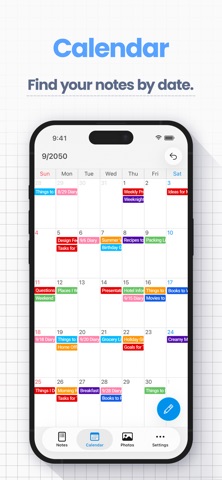
This app never gives me any technical issues, I love it so much for using it as a school planner because I can just color code each note on the calendar by the color of my folders for each class, and I automatically know which class it’s for and I can see directly what the assignment is, when it’s due on the calendar, and what class it’s for. And you can make it cute colors!

★★★★★Mar 1, 2025
My Go-To For Calendar Notes

I’m a journalist and I have tried every app in the store to find that one notepad that is easiest to use. I also needed a simple calendar that I could keep track of my daily earnings in the stock market. I used many apps but none would stick for one reason or another. But the features of this app made keeping track super simple. I could put my earnings in the title bar so they are visible without having to open the full days notes. For more details I can use screenshots of all of my trades and just attach them to the body of the note and they will be there whenever I need them for further breakdowns. I think everyone will probably agree it is the easiest to use and perfect for what you need it for.

★★★★★Dec 24, 2024
Super EZ

Kool App- Try it! It Won’t Disappoint!

Store screenshots

ScreenshotScreenshotScreenshotScreenshotScreenshotScreenshotScreenshotScreenshotScreenshotScreenshot

App Store ads

Apple Search Ads this app ran in the last 90 days, from Apple's public ad repository.

Apple's ad repository couldn't be reached right now. Try again later.

Growth research

Where this app is buying and earning its users. Each link opens pre filtered.

ASO keywords

Most repeated terms in the listing. Highlighted ones also appear in the title.

notes28note10screen7date6text6export6photo5service5home screen5character count5photos4images4choose4tap4pdf4icloud4help4simple notes3photo album3works offline3baby journal3view notes3notes date3place tap3

What's new in 4.2.1

Bug fixes and improvements.

Released Aug 30, 2019. Current version shipped Oct 6, 2026.

Store description

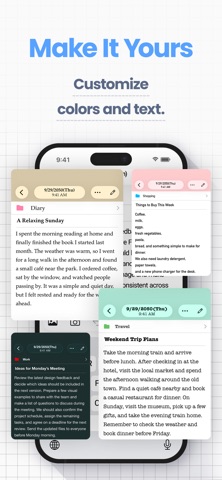
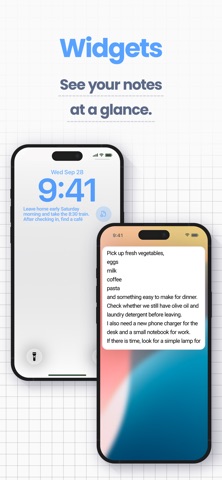
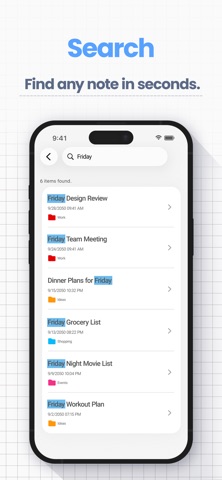
Simple Notes is an easy-to-use notes app that leaves out the extras, so writing, organizing, and finding notes stay simple. Notes go into color-coded folders, and you can find them using the calendar or photo album. No account or setup is required, and the app works offline. Core features are free. Keep everything in one place, from class notes and work memos to a diary or baby journal. [Features] ■ Add Photos to Notes - Attach images to any note - Insert pictures from your photo library, or take a photo on the spot ■ Folder Organization - Create folders to keep your notes organized - Choose from 24 folder colors to tell categories apart at a glance ■ Calendar View - View notes by date using the built-in calendar - Tap any date to see notes for that date — perfect for locating past entries ■ Photo Album - Browse all images added to notes in one place - Tap a photo to jump to its note ■ Home Screen & Lock Screen Widgets - Keep a note on your Home Screen like a sticky note — no need to open the app - Lock Screen widgets let you see a note without unlocking your iPhone - Choose which note to display and its text size *Widgets are part of the Premium Service* ■ Sort Notes & Bullet Lists - Sort by note date, date edited, date created, or title, ascending or descending - Bullet lists make it easy to write shopping and packing lists ■ Passcode Lock - Protect your notes with a passcode - Supports Face ID and Touch ID for quick and secure access ■ Font Styles - Choose from 12 font styles - Choose a playful, elegant, or professional look for your notes ■ Themes and App Icons - Pick from 23 theme colors and matching app icons - Customize the look of the app and even the Home Screen icon ■ Full-Note Image & PDF - Turn an entire note, even a long one with photos, into a single image to share - Export notes as PDFs for work or school ■ Data Backup & Export - Back up your notes to iCloud or export them to your computer - Hand exported notes to AI apps for summaries, or save them to Notion or Google Drive - Export formats: HTML (for Windows), RTFD (for Mac, keeps images), PDF, and TXT *Data export and iCloud backup are part of the Premium Service; notes are also included in your iPhone’s device backup* ■ iCloud Sync - Use iCloud to sync notes across your iPhone and iPad (Premium Service) - Restore your notes on a new device if yours is lost or broken ■ Smart Search - Use the built-in search to quickly find notes - Add text tags like “#Important” to make key notes easier to locate ■ Character Count - Check the character count as you write reports, essays, or fiction - Each note can hold up to 100,000 characters ■ Text Display Settings - Adjust text size, contrast, and line spacing - Ideal if you prefer larger text or need better readability - Dark Mode is supported for nighttime use ■ Remove Ads - The Premium Service hides all ads - Enjoy a clean, distraction-free screen for your notes [Great For] - Students: class and lecture notes with photos, one folder per course — export notes as PDF or text and hand them to AI apps for exam prep - Parents: a baby journal with photos, growth records, and family memos in folders - Work: meeting notes, ideas, and memos in one place — tap the mic on the iOS keyboard to dictate notes, handy for transcripts and meeting minutes - Writers: novels, blog drafts, and reports — live character count and PDF sharing [Good to Know] - Works on iPhone and iPad (iOS/iPadOS 14 or later) - Works offline — create and view notes even in Airplane Mode - No handwriting inside notes or audio recording (write on exported images and PDFs) [Help & Contact] - For help, go to “Help / FAQ” in the app settings - If you still have questions, tap “Contact Us” on the help screen - For faster support, contact us through the app rather than leaving an App Store review 【Terms of Service】 https://komorebi-studio.com/tos_en.html 【Privacy Policy】 https://komorebi-studio.com/policyredirect.html

See this store page in another country

Prices, ranks and reviews are per country. Revenue above is already worldwide.