ASO keywords
Most repeated terms in the listing. Highlighted ones also appear in the title.
notizen20und20oder14auf9notiz8die7mit7aus6ein6als6den5ohne5fotos5hle5pdf5hle aus5als pdf5sie4ber4einem4icloud4die notizen3einem ort3deine notizen3
What's new in 4.2.1
Fehlerbehebungen und Verbesserungen.
Released Nov 21, 2019. Current version shipped Oct 6, 2026.
Store description
Die App „Notizen“ verzichtet auf überflüssige Funktionen, damit Schreiben, Ordnen und Wiederfinden einfach bleiben.
Du ordnest Notizen in farbigen Ordnern und findest sie über den Kalender oder das Fotoalbum wieder. Ohne Konto, ohne Einrichtung, auch offline.
Die Grundfunktionen sind kostenlos. Vorlesungsnotizen, Arbeitsnotizen, Tagebuch oder Babytagebuch: alles an einem Ort.
[Funktionen]
■ Fotos zu Notizen hinzufügen
- Füge Bilder zu jeder Notiz hinzu
- Wähle Fotos aus deiner Fotomediathek oder mache direkt ein neues Foto
■ Ordner-Organisation
- Erstelle Ordner, um deine Notizen geordnet zu halten
- Wähle aus 24 Ordnerfarben, um Kategorien leicht zu erkennen
■ Kalenderansicht
- Sieh dir Notizen nach Datum im integrierten Kalender an
- Tippe auf ein Datum, um die Notizen dieses Tages zu sehen
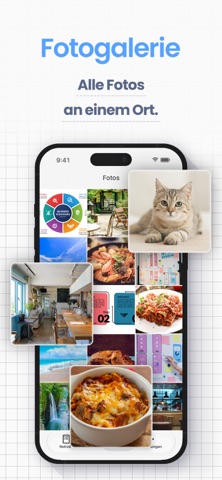
■ Fotoalbum
- Alle Bilder aus deinen Notizen an einem Ort
- Tippe auf ein Foto, um zur zugehörigen Notiz zu springen
■ Widgets für Home-Bildschirm und Sperrbildschirm
- Notiz als Klebezettel auf dem Home-Bildschirm — ohne die App zu öffnen
- Sperrbildschirm-Widget: Notiz lesen, ohne das iPhone zu entsperren
- Wähle die angezeigte Notiz und die Textgröße
*Widgets erfordern Premium*
■ Notizen sortieren und Aufzählungen
- Sortieren nach Notizdatum, Änderungsdatum, Erstellungsdatum oder Titel, auf- oder absteigend
- Aufzählungszeichen für Einkaufs- und Packlisten
■ Passcode-Sperre
- Schütze deine Notizen mit einem Passcode
- Unterstützt Face ID und Touch ID
■ Schriftstile
- Wähle aus 12 Schriftstilen: verspielt, elegant oder professionell
■ Themes und App-Icons
- Wähle aus 23 Themenfarben und den passenden App-Icons
- Passe App-Design und App-Symbol an
■ Ganze Notiz als Bild oder PDF
- Ganze Notiz samt Fotos als einzelnes Bild teilen
- Exportiere Notizen als PDF für Arbeit oder Schule
■ Datensicherung und Export
- Sichere Notizen in iCloud oder exportiere sie auf den Computer
- Übergib exportierte Notizen an KI-Apps für Zusammenfassungen, oder sichere sie in Notion oder Google Drive
- Formate: HTML (für Windows), RTFD (für Mac, mit Bildern), PDF, TXT (Textdatei)
*Datenexport und iCloud-Backup erfordern Premium; Notizen sind auch im iPhone-Geräte-Backup enthalten*
■ iCloud-Synchronisierung
- Notizen über iCloud zwischen iPhone und iPad synchronisieren (Premium)
- Notizen auf einem neuen Gerät wiederherstellen, selbst wenn das alte defekt ist
■ Intelligente Suche
- Integrierte Suche, um Notizen schnell zu finden
- Mit Stichwörtern wie „#Wichtig“ findest du Notizen später leichter
■ Zeichenzählung
- Zeichenzahl im Blick bei Referaten, Aufsätzen oder Romanen
- Bis zu 100.000 Zeichen pro Notiz
■ Textanzeigeeinstellungen
- Schriftgröße, Kontrast und Zeilenabstand anpassen — bis hin zu sehr großer Schrift
- Unterstützt den Dunkelmodus
■ Werbung entfernen
- Der Premium-Dienst blendet alle Werbung aus
- Ein aufgeräumter Bildschirm ohne Ablenkung
[Gut geeignet für]
- Schule und Studium: Vorlesungsnotizen mit Fotos, pro Fach ein Ordner — exportiere Notizen als PDF oder Text und übergib sie KI-Apps zur Prüfungsvorbereitung
- Eltern: Babytagebuch mit Fotos, Wachstumsnotizen, Familienmemos in Ordnern
- Arbeit: Besprechungsnotizen, Ideen, Merkzettel — mit der Diktier-Taste der iOS-Tastatur sprichst du Notizen ein, praktisch für Transkripte und Protokolle
- Schreiben: Romane, Blogentwürfe, Berichte — mit Zeichenzähler, am Ende als PDF
[Gut zu wissen]
- Für iPhone und iPad (iOS/iPadOS 14 oder neuer)
- Funktioniert offline — auch im Flugmodus
- Keine Handschrift in Notizen, keine Sprachaufnahme (möglich auf exportierten Bildern und PDFs)
[Hilfe und Kontakt]
- Antworten findest du unter „Hilfe / FAQ“ in den App-Einstellungen
- Bleiben Fragen offen, tippe im Hilfebildschirm auf „Kontakt aufnehmen“
- Für schnellere Hilfe schreib uns direkt über die App, nicht über eine Bewertung
【Nutzungsbedingungen】
https://komorebi-studio.com/tos_en.html
【Datenschutzrichtlinie】
https://komorebi-studio.com/policyredirect.html
See this store page in another country
Prices, ranks and reviews are per country. Revenue above is already worldwide.