ASO keywords
Most repeated terms in the listing. Highlighted ones also appear in the title.
notes27note10screen7date6text6export6photo5service5home screen5character count5photos4images4choose4tap4pdf4icloud4help4simple notes3photo album3works offline3baby journal3view notes3notes date3place tap3
What's new in 4.2.1
Bug fixes and improvements.
Released Nov 21, 2019. Current version shipped Oct 6, 2026.
Store description
Simple Notes is an easy-to-use notes app that leaves out the extras, so writing, organising, and finding notes stay simple.
Notes go into colour-coded folders, and you can find them using the calendar or photo album. No account or setup is required, and the app works offline.
Core features are free. Keep everything in one place, from class notes and work memos to a diary or baby journal.
[Features]
■ Add Photos to Notes
- Attach images to any note
- Insert pictures from your photo library, or take a photo on the spot
■ Folder Organisation
- Create folders to keep your notes organised
- Choose from 24 folder colours to tell categories apart at a glance
■ Calendar View
- View notes by date using the built-in calendar
- Tap any date to see notes for that date — perfect for locating past entries
■ Photo Album
- Browse all images added to notes in one place
- Tap a photo to jump to its note
■ Home Screen & Lock Screen Widgets
- Keep a note on your Home Screen like a sticky note — no need to open the app
- Lock Screen widgets let you see a note without unlocking your iPhone
- Choose which note to display and its text size
*Widgets are part of the Premium Service*
■ Sort Notes & Bullet Lists
- Sort by note date, date edited, date created, or title, ascending or descending
- Bullet lists make it easy to write shopping and packing lists
■ Passcode Lock
- Protect your notes with a passcode
- Supports Face ID and Touch ID for quick and secure access
■ Font Styles
- Choose from 12 font styles
- Choose a playful, elegant, or professional look for your notes
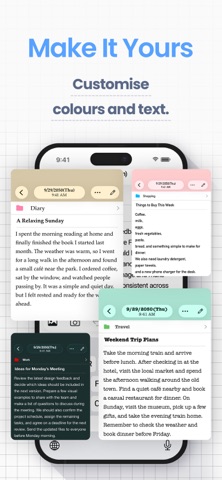
■ Themes and App Icons
- Pick from 23 theme colours and matching app icons
- Customise the look of the app and even the Home Screen icon
■ Full-Note Image & PDF
- Turn an entire note, even a long one with photos, into a single image to share
- Export notes as PDFs for work or school
■ Data Backup & Export
- Back up your notes to iCloud or export them to your computer
- Hand exported notes to AI apps for summaries, or save them to Notion or Google Drive
- Export formats: HTML (for Windows), RTFD (for Mac, keeps images), PDF, and TXT
*Data export and iCloud backup are part of the Premium Service; notes are also included in your iPhone’s device backup*
■ iCloud Sync
- Use iCloud to sync notes across your iPhone and iPad (Premium Service)
- Restore your notes on a new device if yours is lost or broken
■ Smart Search
- Use the built-in search to quickly find notes
- Add text tags like “#Important” to make key notes easier to locate
■ Character Count
- Check the character count as you write reports, essays, or fiction
- Each note can hold up to 100,000 characters
■ Text Display Settings
- Adjust text size, contrast, and line spacing
- Ideal if you prefer larger text or need better readability
- Dark Mode is supported for use at night
■ Remove Ads
- The Premium Service hides all ads
- Enjoy a clean, distraction-free screen
[Great For]
- Students: class and lecture notes with photos, one folder per course — export notes as PDF or text and hand them to AI apps for exam prep
- Parents: a baby journal with photos, growth records, and family memos in folders
- Work: meeting notes, ideas, and memos in one place — tap the mic on the iOS keyboard to dictate notes, handy for transcripts and minutes
- Writers: novels, blog drafts, and reports — live character count and PDF sharing
[Good to Know]
- Works on iPhone and iPad (iOS/iPadOS 14 or later)
- Works offline — create and view notes with no internet connection, even on a plane
- No handwriting inside notes or audio recording (write on exported images and PDFs)
[Help & Contact]
- For help, go to “Help / FAQ” in the app settings
- If you still have questions, tap “Contact Us” on the help screen
- For faster support, contact us through the app rather than leaving an App Store review
【Terms of Service】
https://komorebi-studio.com/tos_en.html
【Privacy Policy】
https://komorebi-studio.com/policyredirect.html
See this store page in another country
Prices, ranks and reviews are per country. Revenue above is already worldwide.