ASO keywords
Most repeated terms in the listing. Highlighted ones also appear in the title.
notes9photo8photos7location7collections7points7watermark6images6address5import5image5point5basic version5title note5pro pack5pack upgrade5annotations4title4tags4saving4basic4note4text4hand drawn3
What's new in 5.4
■ Version 5.4: Fixed photo quality and smaller exports
‣ Fixed: In version 5.3, Medium and Low could save full-size photos on some iPhones. New captures now follow the selected quality; photos already saved keep their size.
‣ Share smaller copies of a saved photo, selected points, or collections. Choose Full size, a longest-side limit, or Fit within file size; the saved photos stay unchanged.
‣ For points or collections, see the photo count and estimated total before sharing. Choose Stamped or Original for image exports; KMZ with editable drawings keeps full-size originals.
■ Also new in version 5.3
■ Camera and Video
‣ In the viewfinder, tap the zoom readout to choose a lens, or drag it to zoom.
‣ Choose a 1-, 3-, 5-, or 10-second shutter delay for steadier captures.
‣ Lock focus, set it by hand, or save a focus position per lens, and let the camera remember your last lens and zoom.
‣ For clearer low-light photos, open Settings > Photo capture settings on the camera screen and enable Prioritize quality in low light; hold steady during capture.
‣ Assign taps or holds in Viewfinder controls to capture photos or start/stop video; set Double tap to Black screen to hide the viewfinder during recording.
‣ Record video even in complete darkness: in video mode, tap the flashlight button to turn on the Video light. To set its brightness from 25% to 100%, open Settings > Viewfinder controls on the camera screen.
‣ On iPadOS 26 and 27, significant viewfinder layout optimizations keep camera controls clear, accessible, and well positioned across portrait, landscape, and resized windows.
■ Video overlays
‣ Export individual overlays from your recorded videos for use in other video projects, including transparent clips for your video editor.
■ Video transcripts and captions
‣ On iOS 26 or later, transcribe videos on-device in supported languages, search spoken words and jump to matches, correct, copy, or share transcripts, import or export SRT subtitles, and show captions during replay or in stamped exports.
■ Points and photo records
‣ Everyday edits stay simple. In the point editor, open More and choose Advanced under View to compare point/photo values, resolve conflicts, and sync supported metadata.
Released Dec 6, 2018. Current version shipped Sep 27, 2026.
Store description
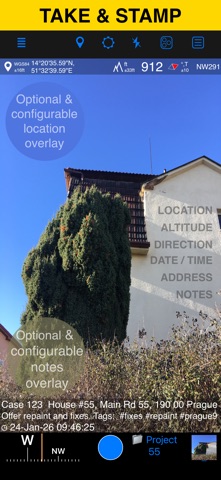
Capture photos and videos with precise location, date, address, and custom notes overlaid directly on them. Add hand-drawn annotations to photos for quick markups in the field. Easily search and filter your shots by title, tags, or notes — or sort them by proximity and date. Organize everything into folders or collections for structured reporting. Need to work with older photos? Import from your library and restore their location, direction, and notes automatically.
LOCATION OVERLAY
Supports decimal, DM, DMS, UTM, and MGRS coordinate formats.
True or magnetic heading, in degrees or mils.
Accuracy and altitude in feet or meters.
CAMERA AND CAPTURE SETTINGS
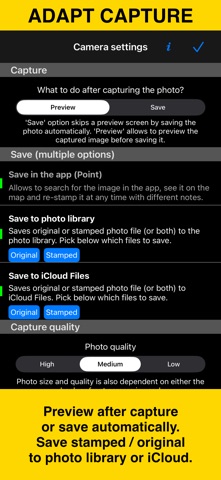
Save photos automatically or open in preview to annotate before saving.
Option to save a copy to the photo library — original, stamped, or both.
Record location-aware field video with map, QR code, watermark, speed, and motion overlays, then replay recordings in the app. The basic version stores one video and exports a branded clip of up to 15 seconds.
ANNOTATE AND COMMENT
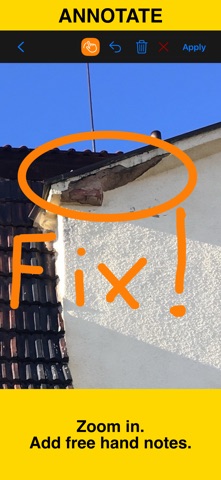
Before or after saving, zoom in/out and draw directly on the photo using your finger or Apple Pencil.
Crop, resize, rotate, or tilt the photo before or after saving.
Notes overlay supports Title, Note, Tags/Folder, and Address.
Address can be auto-filled from GPS or entered manually.
Edit notes and add annotations later (MENU > POINTS > tap an image).
Tapping a point row opens the editor, where you can add an audio note.
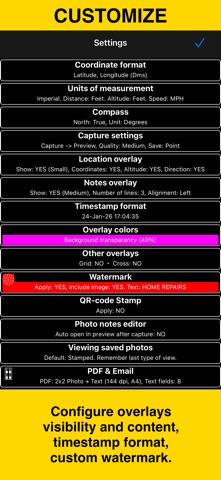
Timestamps support many formats and languages.
Scan QR codes, barcodes, or text and use the result for the title or note field.
WATERMARK
The Pro Pack upgrade removes the basic version watermark and allows you to set up a watermark with your own image, text, and colors, if needed.
SHARE AND EXCHANGE
Share multiple points via MENU > POINTS, or entire collections via MENU > POINT COLLECTIONS.
Images can be shared with or without location/notes text, and with or without overlays.
Photo filenames can include title, note, address, tags/folder name, collection, coordinates, altitude, heading, or capture date.
To transfer complete points and images to another device, use KMZ (Google Earth archive) — includes photos, notes, annotations, and audio.
PDF REPORTS
Generate and share PDF documents for the selected photos/points or whole collection/folder, with options for the number of images per page and photo descriptions.
ORGANIZE, SEARCH & SORT
You can organize images into collections/folders. Existing images/points can be moved between collections.
Search by notes, address, or tags; filter by creation month; sort by proximity; or show only one collection.
IMPORT
Import photos from your library. The app reads TIFF/EXIF/GPS/IPTC metadata to restore location, direction, and notes for the stamp.
NAVIGATE
Navigate back to any saved photo/point from its editor.
MAP VIEW
Review any saved photo/point and its location on the map.
== PRO PACK UPGRADE ==
You can do a lot with the basic functions in the app. The PRO PACK upgrade adds:
- Ability to create additional point/image collections.
- Enables sharing of more than 5 points/images at once.
- Export/import capabilities — in particular, KMZ export/import enables transfer of collections or selected waypoints between devices.
- Ability to save hand-drawn annotations for the image.
- Crop, resize, rotate, or tilt the photo before or after saving.
- Extra protection of your work and privacy with PIN code or biometric-based access options.
- Removes the basic version watermark and allows you to apply a custom watermark with your image, text, and colors.
- Unlimited saved videos and full-length stamped or original video exports.
Terms of Use: https://www.apple.com/legal/internet-services/itunes/dev/stdeula/
See this store page in another country
Prices, ranks and reviews are per country. Revenue above is already worldwide.