← Back to charts
GPS Câmera 55. Foto Geo. icon
APP STORE

GPS Câmera 55. Foto Geo.

Kalimex-Consulting s.r.o. @Blocoware & Stanislav Dvoychenko · Navigation · Brazil store
#21 GROSSING · NAVIGATION
View on App Store ↗ Instagram card
Revenue a month, worldwide EST
$7K
Likely $2.3K to $21.1K
▼ 20.6% in 13 days
New ratings
+0
in 1 days, 9.1K in total
Rating
4.8 of 5
1.8K ratings in this store
Countries it ranks in
17
was 10 on Oct 16, 2026

Revenue

Estimated from the grossing charts of Oct 23, 2026 in the 53 countries we track, and ratings growth on the App Store.

EST. REVENUE / YEAR · WORLDWIDE
$84.3K
No Google Play version found
EST. LIFETIME DOWNLOADS
63.5K to 181.5K
Estimated from ratings count
WHERE IT EARNS · EST. / MONTH
  • Germany #98 Navigation$6.3K · 89%
  • Poland #77 Navigation$406 · 6%
  • Austria #83 Navigation$349 · 5%
HOW SURE ARE WE
Small app: combines its grossing ranks with ratings growth (96 new ratings a month on average since launch). Tested on 418 apps with verified revenue: typically off by about 2.6 times, so the range is wide. Countries we don't track (and Google Play in China, which doesn't exist) aren't included, and neither are ads or web payments. Gross revenue before store fees.
RATINGS
1.8K
AVG RATING
4.80
PRICE
Grátis
AGE
7.9y
LAST UPDATE
27d ago
VERSION
5.4
SIZE
91 MB
AGE RATING
+4

Last 30 days

From our daily snapshots of every grossing chart and daily ratings counts.

DAYS IN A GROSSING CHART
30 / 30
COUNTRIES NOW
17 (was 4)
NEW RATINGS, LAST 1 DAYS
+0
EST. REVENUE A MONTH, DAILY · APP STORE EST
Show daily values
Sep 24, 2026$2.9K a month
Sep 25, 2026$2.9K a month
Sep 26, 2026$6.2K a month
Sep 27, 2026$2.9K a month
Sep 28, 2026$2.9K a month
Sep 29, 2026$2.9K a month
Sep 30, 2026$2.9K a month
Oct 1, 2026$2.9K a month
Oct 2, 2026$8.4K a month
Oct 3, 2026$2.9K a month
Oct 4, 2026$2.9K a month
Oct 5, 2026$6.3K a month
Oct 6, 2026$8.4K a month
Oct 7, 2026$8.4K a month
Oct 8, 2026$8.4K a month
Oct 9, 2026$8.4K a month
Oct 10, 2026$8.8K a month
Oct 11, 2026$8.8K a month
Oct 12, 2026$2.9K a month
Oct 13, 2026not in a grossing chart
Oct 14, 2026not in a grossing chart
Oct 15, 2026not in a grossing chart
Oct 16, 2026not in a grossing chart
Oct 17, 2026$22.1K a month
Oct 18, 2026$1K a month
Oct 19, 2026$926 a month
Oct 20, 2026$639 a month
Oct 21, 2026$10.8K a month
Oct 22, 2026not in a grossing chart
Oct 23, 2026$7K a month
The same estimate as the headline, saved every day. Best rank Sep 24, 2026: #62 Navigation · BR. Now: #38 Navigation · UA.
RATINGS IN THE CORE COUNTRIES, DAILY
Show daily values
Oct 22, 20269.1K ratings
Oct 23, 20269.1K ratings
9.1K on Oct 22, 2026, 9.1K on Oct 23, 2026. New ratings track new downloads, even outside the charts.

Money and momentum

Measured from the store, not estimated.

WHAT IT CHARGES
No in-app purchases
Earns from its upfront price, ads or payments outside the store.
REVIEW MOMENTUM
0.3 reviews / week
  • Trendrising
  • Recent reviews average4.4 stars
  • Recent 1 and 2 star share11%
From the latest 125 written reviews, covering 2878 days.
RELEASE CADENCE
3 updates in 90 days
  • Typical gap between releases41 days
From the last 25 versions listed on the App Store.
RATING BREAKDOWN
1.8K ratings
5★89%
4★7%
3★2%
2★1%
1★2%

What users want

From the latest 125 reviews on the Brazil App Store, Dec 6, 2018 to Oct 3, 2026: 11% are 1 or 2 stars. Open a theme to read what people wrote.

WHAT THEY COMPLAIN ABOUT · SHARE OF BAD REVIEWS
Price and subscription21%

3 of the 1 and 2 star reviews.

★★★★★ Every time you update, be prepared to have to figure out how to sync your subscription or past purchases
★★★★★ I utilize this app for work, I understand the paywall for other premium features but why do I have to pay to use my cameras on my iPhone, it seems like a greedy cash grab!
★★★★★ Exporting pictures should be instant Don't waste money on upgrading
Limits, credits, locked features14%

2 of the 1 and 2 star reviews.

★★★★★ I utilize this app for work, I understand the paywall for other premium features but why do I have to pay to use my cameras on my iPhone, it seems like a greedy cash grab!
★★★★★ I'm a QA at an airport and I bought this app to replace Solocator which limits characters on apple products when entering photo notes.
Wrong or poor results14%

2 of the 1 and 2 star reviews.

★★★★★ Withers it's way wrong or I don't know how to use it.
★★★★★ Why does the time stamp always show a wrong address like the house next to where I'm at?
WHAT THEY ASK FOR
  • I perform numerous QA/QC inspections, and I need a solution that can prove I took a photo, capturing the location and timestamp. 5★, Nov 15, 2025
  • However, I wish it integrated with OneDrive, as that would be a valuable addition. 5★, Nov 15, 2025
  • I love this app, just wish they would create a fix for when you zoom in and the light is bright and the screen goes I'll white and then you have to close the app and reopen it 5★, Oct 17, 2025
  • They should have an easier way to enter in project info in the watermark which can appear on every photo. 1★, Sep 29, 2024
  • It definitely needs an easier way to enter notes for that particular photo. 1★, Sep 29, 2024
  • Still seems like it could confuse others and it would be nice to have the ability to change the date/time format. 5★, Oct 6, 2023
  • I don't know where to find info on my issue Once a week ( used weekdays) the screen goes all white and bleaches out anything I wish to picture. 5★, Dec 20, 2021
WORDS THAT KEEP COMING UP IN BAD REVIEWS

Nothing stands out.

WHAT THEY LOVE · SHARE OF GOOD REVIEWS
Useful, it helps7%

8 of the 4 and 5 star reviews.

★★★★★ In my profession (bridge engineer), this app is a game changer.
★★★★★ Many people have wanted me to join CompanyCam but I refuse because I find this app much more useful.
★★★★★ This app has been a very useful tool in developing and documenting fence lines for pastures as well as new water lines.
Easy to use5%

5 of the 4 and 5 star reviews.

★★★★★ I can export detailed PDF reports, generate CSV files for data analysis, and automatically upload everything to iCloud for easy access.
★★★★★ This allows for easy alterations for different use cases.
★★★★★ Honestly these guys thought of everything everything I want to program into an app for inspections is already here easy point of access to just turn your photos into a report instantly saves hours possibly days of…
Great support5%

5 of the 4 and 5 star reviews.

★★★★★ This app has been a very useful tool in developing and documenting fence lines for pastures as well as new water lines. Well done!
★★★★★ Additionally, the customer service and development teams respond swiftly to inquiries, with complete answers rather than re-hashing tutorial-like information.
★★★★★ -Customer support without delay.
Looks great3%

3 of the 4 and 5 star reviews.

★★★★★ Been using this app for over four years now and not a single issue. The photos and associated data collected I use with various government agencies and NGOs.
★★★★★ Hate how annoying it is to change the name on photos
Accurate, great results3%

3 of the 4 and 5 star reviews.

★★★★★ Great idea great quality the only issue I have is the clarity of the photo itself is not as detailed and sharp as say an application that just takes pictures
★★★★★ Give you good storage and reliable accuracy & quality.
★★★★★ Never any problems I use this app everyday for work always accurate and clear

Found by matching words and phrases in the reviews, not read by a person. A review can count toward more than one theme.

What users say

Latest reviews, Brazil App Store.

★★★★★Oct 3, 2026
Excelente

A cada revisão, mais novidades e qualidade.

★★★★★Sep 29, 2026
I am constantly recommending this app to people

In my profession (bridge engineer), this app is a game changer. Needed technical help once and I think I worked with the actual app owner! This is the only app that I’ve ever been involved in that is too good to be true. Can I be more hyperbolic? Now, recognize this is an engineer talking!

★★★★★Aug 22, 2026
Melhor app de mundo

Melhor app para esses serviços

★★★★★Jun 1, 2026
Great App

Photos can be used for Official documentation.

★★★★★May 8, 2026
Great

Great idea great quality the only issue I have is the clarity of the photo itself is not as detailed and sharp as say an application that just takes pictures

★★★★★May 6, 2026
Bom app

Aplicativo útil para engenharia, porém deveria dispor de gravação de vídeo, fotografia panorâmica e otimização para iPad.

Apps like this

Same category, earning about as much.

Store screenshots

ScreenshotScreenshotScreenshotScreenshotScreenshotScreenshotScreenshotScreenshotScreenshotScreenshot

App Store ads

Apple Search Ads this app ran in the last 90 days, from Apple's public ad repository.

No App Store ads in the EU
None in the last 90 days.

Apple only publishes ads shown in the EU (EU Digital Services Act), with a 7 day delay. An app that advertises only outside the EU shows nothing here.

Growth research

Where this app is buying and earning its users. Each link opens pre filtered.

ASO keywords

Most repeated terms in the listing. Highlighted ones also appear in the title.

cole10pontos10notas9fotos7localiza7por7imagens7marca gua6pontos imagens6anota6para6marca6endere5sobreposi5uma5foto5vers sica5antes depois5depois salvar5tulo nota5pro pack5data4tulo4etiquetas4

What's new in 5.4

■ Versão 5.4: qualidade das fotos corrigida e exportações menores ‣ Corrigido: na versão 5.3, Média e Baixa podiam salvar fotos em tamanho original em alguns iPhones. As novas capturas voltam a respeitar a qualidade escolhida; as fotos já salvas mantêm o tamanho. ‣ Compartilhe cópias menores de uma foto salva, pontos selecionados ou coleções. Escolha tamanho original, limite do lado maior ou limite de tamanho de arquivo; as fotos salvas não são alteradas. ‣ Para pontos ou coleções, veja a quantidade de fotos e o tamanho total estimado antes de compartilhar. Escolha Com carimbo ou Original para exportar imagens; o KMZ com desenhos editáveis mantém os originais no tamanho completo. ■ Também novo na versão 5.3 ■ Câmera e vídeo ‣ No visor, toque no indicador de zoom para escolher uma lente ou arraste-o para ajustar o zoom. ‣ Escolha um atraso do obturador de 1, 3, 5 ou 10 segundos para capturas mais estáveis. ‣ Bloqueie o foco, ajuste-o à mão ou salve uma posição por lente e deixe a câmera lembrar a última lente e o zoom. ‣ Para fotos mais nítidas com pouca luz, abra Configurações > Configurações de captura de foto na tela da câmera e ative Priorizar qualidade com pouca luz; mantenha a câmera firme durante a captura. ‣ Em Controles do visor, atribua um toque ou toque prolongado a fotos ou ao início/fim do vídeo; configure Toque duplo como Tela preta para ocultar o visor durante a gravação. ‣ Grave vídeo mesmo na escuridão total: no modo vídeo, toque no botão de lanterna para acender a Luz de vídeo. Para ajustar o brilho de 25% a 100%, abra Configurações > Controles do visor na tela da câmera. ‣ No iPadOS 26 e 27, otimizações significativas no layout do visor mantêm os controles da câmera claros, acessíveis e bem posicionados em retrato, paisagem e janelas redimensionadas. ■ Sobreposições de vídeo ‣ Exporte sobreposições individuais dos vídeos gravados para usar em outros projetos, incluindo clipes transparentes para seu editor de vídeo. ■ Transcrições e legendas de vídeo ‣ No iOS 26 ou posterior, transcreva vídeos no dispositivo em idiomas compatíveis, pesquise palavras faladas e vá às correspondências, corrija, copie ou compartilhe transcrições, importe ou exporte legendas SRT e mostre-as durante a reprodução ou nas exportações com dados sobrepostos. ■ Pontos e registros fotográficos ‣ As edições do dia a dia continuam simples. No editor de pontos, abra Mais e escolha Avançada em Visualização para comparar os valores do ponto e da foto, resolver divergências e sincronizar metadados compatíveis.

Released Dec 6, 2018. Current version shipped Sep 27, 2026.

Store description

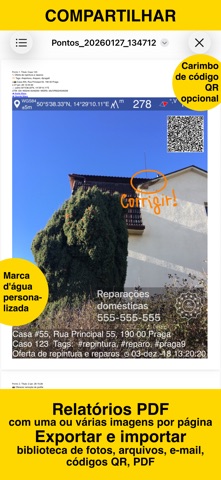
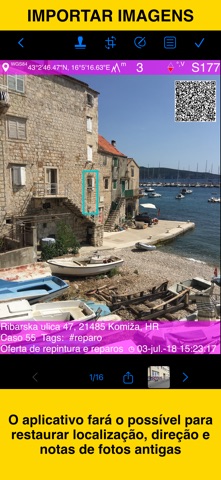
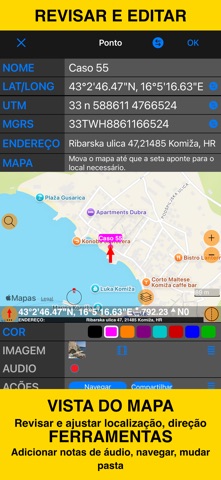
Capture fotos e vídeos com localização precisa, data, endereço e notas personalizadas sobrepostas diretamente. Adicione anotações à mão às fotos para marcações rápidas em campo. Pesquise e filtre as capturas por título, etiquetas ou notas, ou ordene por proximidade e data. Organize tudo em pastas ou coleções. Importe fotos antigas da fototeca e restaure automaticamente a localização, a direção e as notas. SOBREPOSIÇÃO DE LOCALIZAÇÃO Compatível com coordenadas decimais, DM, DMS, UTM e MGRS. Direção verdadeira ou magnética, em graus ou mils. Precisão e altitude em pés ou metros. AJUSTES DE CÂMERA E CAPTURA Salve fotos automaticamente ou abra a pré-visualização para fazer anotações antes de salvar. Salve uma cópia na fototeca: original, carimbada ou ambas. Grave vídeos de campo vinculados à localização com sobreposições de mapa, código QR, marca-d’água, velocidade e movimento, e reproduza as gravações no app. A versão básica armazena um vídeo e exporta um clipe de até 15 segundos com a marca do app. ANOTAÇÕES E COMENTÁRIOS Antes ou depois de salvar, amplie ou reduza e desenhe diretamente na foto com o dedo ou o Apple Pencil. Corte, redimensione, gire ou incline a foto antes ou depois de salvar. A sobreposição de notas inclui Título, Nota, Etiquetas/Pasta e Endereço. O endereço pode ser preenchido automaticamente pelo GPS ou inserido manualmente. Edite as notas e adicione outras anotações mais tarde. O editor de pontos permite adicionar uma nota de áudio à imagem ou ao ponto. Os carimbos de data e hora aceitam vários formatos e idiomas. Escaneie códigos QR, códigos de barras ou texto e use o resultado no campo de título ou nota. MARCA-D’ÁGUA O Pro Pack remove a marca-d’água da versão básica e permite configurar outra com sua própria imagem, texto e cores. COMPARTILHAR E TROCAR Compartilhe vários pontos em MENU > PONTOS ou coleções inteiras em MENU > COLEÇÕES DE PONTOS. As imagens podem ser compartilhadas com ou sem o texto de localização/notas e com ou sem sobreposições. Os nomes de arquivo podem incluir título, nota, endereço, etiquetas ou pasta, coleção, coordenadas, altitude, direção ou data da captura. Transfira pontos e imagens completos para outro dispositivo usando KMZ (arquivo do Google Earth), incluindo fotos, notas, anotações e áudio. RELATÓRIOS PDF Gere e compartilhe PDFs das fotos/pontos selecionados ou de uma coleção/pasta inteira, com opções para o número de imagens por página e suas descrições. ORGANIZAR, PESQUISAR E ORDENAR Organize imagens em coleções/pastas e mova imagens/pontos existentes entre as coleções. Pesquise por notas, endereço ou etiquetas; filtre por mês de criação; ordene por proximidade ou mostre apenas uma coleção. IMPORTAR Importe fotos da fototeca. O app lê metadados TIFF/EXIF/GPS/IPTC para restaurar a localização, a direção e as notas do carimbo. NAVEGAR Navegue de volta a qualquer foto/ponto salvo usando o editor. VISUALIZAÇÃO DO MAPA Consulte qualquer foto/ponto salvo e sua localização no mapa. == ATUALIZAÇÃO PRO PACK == Os recursos básicos do app já oferecem muitas possibilidades. O PRO PACK adiciona: - Criação de coleções adicionais de pontos/imagens. - Compartilhamento de mais de 5 pontos/imagens de uma vez. - Exportação e importação; em especial, KMZ para transferir coleções ou pontos de passagem selecionados entre dispositivos. - Salvamento de anotações desenhadas à mão sobre a imagem. - Corte, redimensionamento, rotação ou inclinação da foto antes ou depois de salvar. - Proteção adicional do trabalho e da privacidade por PIN ou biometria. - Remoção da marca-d’água da versão básica e uso de outra personalizada com imagem, texto e cores. - Vídeos salvos sem limite e exportações completas com sobreposições ou do vídeo original. Termos de uso: https://www.apple.com/legal/internet-services/itunes/dev/stdeula/

See this store page in another country

Prices, ranks and reviews are per country. Revenue above is already worldwide.

More from Kalimex-Consulting s.r.o. @Blocoware & Stanislav Dvoychenko

Taxímetro. Medidor de táxi GPS
Navigation
126 ratingsAnalyze →
Planímetro 55. Medir no mapa.
Navigation
70 ratingsAnalyze →
Bússola 55. Mapa e GPS Kit.
Navigation
135 ratingsAnalyze →
GPS Team 55
Navigation
1 ratingsAnalyze →