← Back to charts
GPS Camera 55. Field Survey icon
APP STORE

GPS Camera 55. Field Survey

Kalimex-Consulting s.r.o. @Blocoware & Stanislav Dvoychenko · Navigation · United States store
NOT IN TOP 100 HERE
View on App Store ↗ Instagram card
Revenue a month, worldwide EST
$6.9K
Likely $2.3K to $20.7K
▲ 22.4% in 11 days
New ratings
Tracking
Daily counts start building from today
Rating
4.7 of 5
2.8K ratings in this store
Countries it ranks in
12
was 10 on Oct 16, 2026

Revenue

Estimated from the grossing charts of Oct 21, 2026 in the 53 countries we track, and ratings growth on the App Store.

EST. REVENUE / YEAR · WORLDWIDE
$83K
No Google Play version found
EST. LIFETIME DOWNLOADS
98.5K to 281.4K
Estimated from ratings count
WHERE IT EARNS · EST. / MONTH
  • France #80 Navigation$6.4K · 92%
  • Poland #95 Navigation$525 · 8%
HOW SURE ARE WE
Small app: combines its grossing ranks with ratings growth (96 new ratings a month on average since launch). Tested on 418 apps with verified revenue: typically off by about 2.6 times, so the range is wide. Countries we don't track (and Google Play in China, which doesn't exist) aren't included, and neither are ads or web payments. Gross revenue before store fees.
RATINGS
2.8K
AVG RATING
4.70
PRICE
Free
AGE
7.9y
LAST UPDATE
26d ago
VERSION
5.4
SIZE
91 MB
AGE RATING
4+

Last 30 days

From our daily snapshots of every grossing chart.

DAYS IN A GROSSING CHART
30 / 30
COUNTRIES NOW
17 (was 4)
EST. REVENUE A MONTH, DAILY · APP STORE EST
Show daily values
Sep 24, 2026$2.9K a month
Sep 25, 2026$2.9K a month
Sep 26, 2026$6.2K a month
Sep 27, 2026$2.9K a month
Sep 28, 2026$2.9K a month
Sep 29, 2026$2.9K a month
Sep 30, 2026$2.9K a month
Oct 1, 2026$2.9K a month
Oct 2, 2026$8.4K a month
Oct 3, 2026$2.9K a month
Oct 4, 2026$2.9K a month
Oct 5, 2026$6.3K a month
Oct 6, 2026$8.4K a month
Oct 7, 2026$8.4K a month
Oct 8, 2026$8.4K a month
Oct 9, 2026$8.4K a month
Oct 10, 2026$8.8K a month
Oct 11, 2026$8.8K a month
Oct 12, 2026$2.9K a month
Oct 13, 2026not in a grossing chart
Oct 14, 2026not in a grossing chart
Oct 15, 2026not in a grossing chart
Oct 16, 2026not in a grossing chart
Oct 17, 2026$22.1K a month
Oct 18, 2026$1K a month
Oct 19, 2026$926 a month
Oct 20, 2026$639 a month
Oct 21, 2026$10.8K a month
Oct 22, 2026not in a grossing chart
Oct 23, 2026not in a grossing chart
The same estimate as the headline, saved every day. Best rank Sep 24, 2026: #62 Navigation · BR. Now: #38 Navigation · UA.

Money and momentum

Measured from the store, not estimated.

WHAT IT CHARGES
3 purchases listed
  • Pro pack.$1.99
  • Pro pack$24.99
  • Pro pack.$9.99
Top in-app purchases as listed on the App Store, in local prices.
REVIEW MOMENTUM
0.3 reviews / week
  • Trendrising
  • Recent reviews average4.4 stars
  • Recent 1 and 2 star share11%
From the latest 125 written reviews, covering 2877 days.
RELEASE CADENCE
3 updates in 90 days
  • Typical gap between releases41 days
From the last 25 versions listed on the App Store.
RATING BREAKDOWN
2.8K ratings
5★85%
4★8%
3★3%
2★1%
1★3%

What users want

From the latest 125 reviews on the United States App Store, Dec 6, 2018 to Oct 3, 2026: 11% are 1 or 2 stars. Open a theme to read what people wrote.

WHAT THEY COMPLAIN ABOUT · SHARE OF BAD REVIEWS
Price and subscription21%

3 of the 1 and 2 star reviews.

★★★★★ Every time you update, be prepared to have to figure out how to sync your subscription or past purchases
★★★★★ I utilize this app for work, I understand the paywall for other premium features but why do I have to pay to use my cameras on my iPhone, it seems like a greedy cash grab!
★★★★★ Exporting pictures should be instant Don't waste money on upgrading
Limits, credits, locked features14%

2 of the 1 and 2 star reviews.

★★★★★ I utilize this app for work, I understand the paywall for other premium features but why do I have to pay to use my cameras on my iPhone, it seems like a greedy cash grab!
★★★★★ I'm a QA at an airport and I bought this app to replace Solocator which limits characters on apple products when entering photo notes.
Wrong or poor results14%

2 of the 1 and 2 star reviews.

★★★★★ Withers it's way wrong or I don't know how to use it.
★★★★★ Why does the time stamp always show a wrong address like the house next to where I'm at?
WHAT THEY ASK FOR
  • I perform numerous QA/QC inspections, and I need a solution that can prove I took a photo, capturing the location and timestamp. 5★, Nov 15, 2025
  • However, I wish it integrated with OneDrive, as that would be a valuable addition. 5★, Nov 15, 2025
  • I love this app, just wish they would create a fix for when you zoom in and the light is bright and the screen goes I'll white and then you have to close the app and reopen it 5★, Oct 17, 2025
  • They should have an easier way to enter in project info in the watermark which can appear on every photo. 1★, Sep 29, 2024
  • It definitely needs an easier way to enter notes for that particular photo. 1★, Sep 29, 2024
  • Still seems like it could confuse others and it would be nice to have the ability to change the date/time format. 5★, Oct 6, 2023
  • I don't know where to find info on my issue Once a week ( used weekdays) the screen goes all white and bleaches out anything I wish to picture. 5★, Dec 20, 2021
WORDS THAT KEEP COMING UP IN BAD REVIEWS

Nothing stands out.

WHAT THEY LOVE · SHARE OF GOOD REVIEWS
Useful, it helps7%

8 of the 4 and 5 star reviews.

★★★★★ In my profession (bridge engineer), this app is a game changer.
★★★★★ Many people have wanted me to join CompanyCam but I refuse because I find this app much more useful.
★★★★★ This app has been a very useful tool in developing and documenting fence lines for pastures as well as new water lines.
Easy to use5%

5 of the 4 and 5 star reviews.

★★★★★ I can export detailed PDF reports, generate CSV files for data analysis, and automatically upload everything to iCloud for easy access.
★★★★★ This allows for easy alterations for different use cases.
★★★★★ Honestly these guys thought of everything everything I want to program into an app for inspections is already here easy point of access to just turn your photos into a report instantly saves hours possibly days of…
Great support5%

5 of the 4 and 5 star reviews.

★★★★★ This app has been a very useful tool in developing and documenting fence lines for pastures as well as new water lines. Well done!
★★★★★ Additionally, the customer service and development teams respond swiftly to inquiries, with complete answers rather than re-hashing tutorial-like information.
★★★★★ -Customer support without delay.
Looks great3%

3 of the 4 and 5 star reviews.

★★★★★ Been using this app for over four years now and not a single issue. The photos and associated data collected I use with various government agencies and NGOs.
★★★★★ Hate how annoying it is to change the name on photos
Accurate, great results3%

3 of the 4 and 5 star reviews.

★★★★★ Great idea great quality the only issue I have is the clarity of the photo itself is not as detailed and sharp as say an application that just takes pictures
★★★★★ Give you good storage and reliable accuracy & quality.
★★★★★ Never any problems I use this app everyday for work always accurate and clear

Found by matching words and phrases in the reviews, not read by a person. A review can count toward more than one theme.

What users say

Latest reviews, United States App Store.

★★★★★Oct 3, 2026
Excelente

A cada revisão, mais novidades e qualidade.

★★★★★Sep 29, 2026
I am constantly recommending this app to people

In my profession (bridge engineer), this app is a game changer. Needed technical help once and I think I worked with the actual app owner! This is the only app that I’ve ever been involved in that is too good to be true. Can I be more hyperbolic? Now, recognize this is an engineer talking!

★★★★★Aug 22, 2026
Melhor app de mundo

Melhor app para esses serviços

★★★★★Jun 1, 2026
Great App

Photos can be used for Official documentation.

★★★★★May 8, 2026
Great

Great idea great quality the only issue I have is the clarity of the photo itself is not as detailed and sharp as say an application that just takes pictures

★★★★★May 6, 2026
Bom app

Aplicativo útil para engenharia, porém deveria dispor de gravação de vídeo, fotografia panorâmica e otimização para iPad.

Apps like this

Same category, earning about as much.
Store screenshots

ScreenshotScreenshotScreenshotScreenshotScreenshotScreenshotScreenshotScreenshotScreenshotScreenshot

App Store ads

Apple Search Ads this app ran in the last 90 days, from Apple's public ad repository.

No App Store ads in the EU
None in the last 90 days.

Apple only publishes ads shown in the EU (EU Digital Services Act), with a 7 day delay. An app that advertises only outside the EU shows nothing here.

Growth research

Where this app is buying and earning its users. Each link opens pre filtered.

ASO keywords

Most repeated terms in the listing. Highlighted ones also appear in the title.

notes9photo8photos7location7collections7points7watermark6images6address5import5image5point5basic version5title note5pro pack5pack upgrade5annotations4title4tags4saving4basic4note4text4hand drawn3

What's new in 5.4

■ Version 5.4: Fixed photo quality and smaller exports ‣ Fixed: In version 5.3, Medium and Low could save full-size photos on some iPhones. New captures now follow the selected quality; photos already saved keep their size. ‣ Share smaller copies of a saved photo, selected points, or collections. Choose Full size, a longest-side limit, or Fit within file size; the saved photos stay unchanged. ‣ For points or collections, see the photo count and estimated total before sharing. Choose Stamped or Original for image exports; KMZ with editable drawings keeps full-size originals. ■ Also new in version 5.3 ■ Camera and Video ‣ In the viewfinder, tap the zoom readout to choose a lens, or drag it to zoom. ‣ Choose a 1-, 3-, 5-, or 10-second shutter delay for steadier captures. ‣ Lock focus, set it by hand, or save a focus position per lens, and let the camera remember your last lens and zoom. ‣ For clearer low-light photos, open Settings > Photo capture settings on the camera screen and enable Prioritize quality in low light; hold steady during capture. ‣ Assign taps or holds in Viewfinder controls to capture photos or start/stop video; set Double tap to Black screen to hide the viewfinder during recording. ‣ Record video even in complete darkness: in video mode, tap the flashlight button to turn on the Video light. To set its brightness from 25% to 100%, open Settings > Viewfinder controls on the camera screen. ‣ On iPadOS 26 and 27, significant viewfinder layout optimizations keep camera controls clear, accessible, and well positioned across portrait, landscape, and resized windows. ■ Video overlays ‣ Export individual overlays from your recorded videos for use in other video projects, including transparent clips for your video editor. ■ Video transcripts and captions ‣ On iOS 26 or later, transcribe videos on-device in supported languages, search spoken words and jump to matches, correct, copy, or share transcripts, import or export SRT subtitles, and show captions during replay or in stamped exports. ■ Points and photo records ‣ Everyday edits stay simple. In the point editor, open More and choose Advanced under View to compare point/photo values, resolve conflicts, and sync supported metadata.

Released Dec 6, 2018. Current version shipped Sep 27, 2026.

Store description

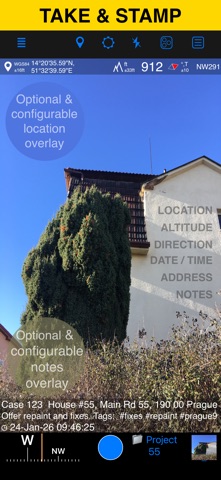
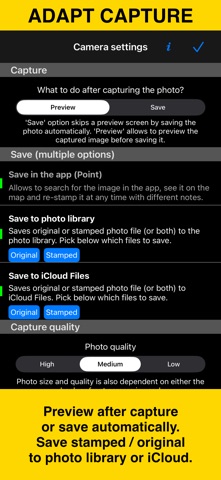
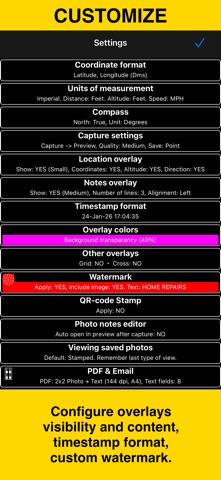
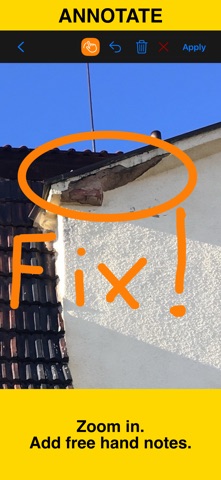
Capture photos and videos with precise location, date, address, and custom notes overlaid directly on them. Add hand-drawn annotations to photos for quick markups in the field. Easily search and filter your shots by title, tags, or notes — or sort them by proximity and date. Organize everything into folders or collections for structured reporting. Need to work with older photos? Import from your library and restore their location, direction, and notes automatically. LOCATION OVERLAY Supports decimal, DM, DMS, UTM, and MGRS coordinate formats. True or magnetic heading, in degrees or mils. Accuracy and altitude in feet or meters. CAMERA AND CAPTURE SETTINGS Save photos automatically or open in preview to annotate before saving. Option to save a copy to the photo library — original, stamped, or both. Record location-aware field video with map, QR code, watermark, speed, and motion overlays, then replay recordings in the app. The basic version stores one video and exports a branded clip of up to 15 seconds. ANNOTATE AND COMMENT Before or after saving, zoom in/out and draw directly on the photo using your finger or Apple Pencil. Crop, resize, rotate, or tilt the photo before or after saving. Notes overlay supports Title, Note, Tags/Folder, and Address. Address can be auto-filled from GPS or entered manually. Edit notes and add annotations later (MENU > POINTS > tap an image). Tapping a point row opens the editor, where you can add an audio note. Timestamps support many formats and languages. Scan QR codes, barcodes, or text and use the result for the title or note field. WATERMARK The Pro Pack upgrade removes the basic version watermark and allows you to set up a watermark with your own image, text, and colors, if needed. SHARE AND EXCHANGE Share multiple points via MENU > POINTS, or entire collections via MENU > POINT COLLECTIONS. Images can be shared with or without location/notes text, and with or without overlays. Photo filenames can include title, note, address, tags/folder name, collection, coordinates, altitude, heading, or capture date. To transfer complete points and images to another device, use KMZ (Google Earth archive) — includes photos, notes, annotations, and audio. PDF REPORTS Generate and share PDF documents for the selected photos/points or whole collection/folder, with options for the number of images per page and photo descriptions. ORGANIZE, SEARCH & SORT You can organize images into collections/folders. Existing images/points can be moved between collections. Search by notes, address, or tags; filter by creation month; sort by proximity; or show only one collection. IMPORT Import photos from your library. The app reads TIFF/EXIF/GPS/IPTC metadata to restore location, direction, and notes for the stamp. NAVIGATE Navigate back to any saved photo/point from its editor. MAP VIEW Review any saved photo/point and its location on the map. == PRO PACK UPGRADE == You can do a lot with the basic functions in the app. The PRO PACK upgrade adds: - Ability to create additional point/image collections. - Enables sharing of more than 5 points/images at once. - Export/import capabilities — in particular, KMZ export/import enables transfer of collections or selected waypoints between devices. - Ability to save hand-drawn annotations for the image. - Crop, resize, rotate, or tilt the photo before or after saving. - Extra protection of your work and privacy with PIN code or biometric-based access options. - Removes the basic version watermark and allows you to apply a custom watermark with your image, text, and colors. - Unlimited saved videos and full-length stamped or original video exports. Terms of Use: https://www.apple.com/legal/internet-services/itunes/dev/stdeula/

See this store page in another country

Prices, ranks and reviews are per country. Revenue above is already worldwide.

More from Kalimex-Consulting s.r.o. @Blocoware & Stanislav Dvoychenko

Compass 55. Map & GPS kit.
Navigation
1.6K ratingsAnalyze →
Taximeter. GPS taxi cab meter.
Navigation
618 ratingsAnalyze →
Planimeter 55. Measure on map.
Navigation
68 ratingsAnalyze →
GPS Team 55
Navigation
2 ratingsAnalyze →