← Back to charts
Simple Calendar Daily Planner icon
APP STORE

Simple Calendar Daily Planner

Komorebi Inc. · Productivity · United States store
NOT IN TOP 100 HERE
View on App Store ↗ Instagram card Google Play version →
Revenue a month, worldwide EST
$380.3K
Likely $126.8K to $1.1M
▲ >999% in 11 days
New ratings
+34
in 1 days, 453.9K in total
Rating
4.6 of 5
6.4K ratings in this store
Countries it ranks in
3
was 5 on Oct 16, 2026

Revenue

Estimated from the grossing charts of Oct 21, 2026 in the 53 countries we track, and ratings growth on the App Store.

EST. REVENUE / YEAR · WORLDWIDE
$4.6M
Both stores combined. Small app estimate, so no split per store
EST. LIFETIME DOWNLOADS
222.7K to 636.2K
Estimated from ratings count
WHERE IT EARNS · EST. / MONTH
  • Japan #59 Productivity (iOS), #40 Productivity (Play)$344.2K · 91%
  • South Korea #90 Productivity (iOS)$31.7K · 8%
  • Taiwan #89 Productivity (iOS)$4.4K · 1%
HOW SURE ARE WE
Small app: combines its grossing ranks with ratings growth (4762 new ratings a month on average since launch). Tested on 418 apps with verified revenue: typically off by about 2.6 times, so the range is wide. Countries we don't track (and Google Play in China, which doesn't exist) aren't included, and neither are ads or web payments. Gross revenue before store fees.
RATINGS
6.4K
AVG RATING
4.61
PRICE
Free
AGE
7.9y
LAST UPDATE
3d ago
VERSION
6.2.0
SIZE
99 MB
AGE RATING
4+

Last 30 days

From our daily snapshots of every grossing chart and daily ratings counts.

DAYS IN A GROSSING CHART
17 / 30
COUNTRIES NOW
1 (was 0)
NEW RATINGS, LAST 1 DAYS
+34
EST. REVENUE A MONTH, DAILY · BOTH STORES EST
Show daily values
Sep 24, 2026not in a grossing chart
Sep 25, 2026not in a grossing chart
Sep 26, 2026not in a grossing chart
Sep 27, 2026not in a grossing chart
Sep 28, 2026not in a grossing chart
Sep 29, 2026not in a grossing chart
Sep 30, 2026not in a grossing chart
Oct 1, 2026not in a grossing chart
Oct 2, 2026not in a grossing chart
Oct 3, 2026not in a grossing chart
Oct 4, 2026not in a grossing chart
Oct 5, 2026$136.7K a month
Oct 6, 2026not in a grossing chart
Oct 7, 2026not in a grossing chart
Oct 8, 2026$139.9K a month
Oct 9, 2026$139.9K a month
Oct 10, 2026$169.6K a month
Oct 11, 2026$296.1K a month
Oct 12, 2026$341.7K a month
Oct 13, 2026$1.4M a month
Oct 14, 2026$1.6M a month
Oct 15, 2026$844.1K a month
Oct 16, 2026$953.2K a month
Oct 17, 2026$995.1K a month
Oct 18, 2026$1.1M a month
Oct 19, 2026$911.6K a month
Oct 20, 2026$571.7K a month
Oct 21, 2026$2.1M a month
Oct 22, 2026not in a grossing chart
Oct 23, 2026not in a grossing chart
The same estimate as the headline, saved every day. Best rank Sep 24, 2026: not ranked. Now: #64 Productivity · JP.
RATINGS IN THE CORE COUNTRIES, DAILY
Show daily values
Oct 22, 2026453.9K ratings
Oct 23, 2026453.9K ratings
453.9K on Oct 22, 2026, 453.9K on Oct 23, 2026. New ratings track new downloads, even outside the charts.

Money and momentum

Measured from the store, not estimated.

WHAT IT CHARGES
3 purchases listed
  • Premium (Annual)$19.99
  • Remove Ads$8.99
  • Premium (Monthly)$2.99
Top in-app purchases as listed on the App Store, in local prices.
REVIEW MOMENTUM
0.4 reviews / week
  • Trendsteady
  • Recent reviews average3.5 stars
  • Recent 1 and 2 star share36%
From the latest 100 written reviews, covering 1611 days. The store only returns this many, so this is the most recent slice.
RELEASE CADENCE
5 updates in 90 days
  • Typical gap between releases44 days
From the last 25 versions listed on the App Store.
RATING BREAKDOWN
6.4K ratings
5★78%
4★12%
3★5%
2★2%
1★3%

What users want

From the latest 100 reviews on the United States App Store, May 26, 2022 to Sep 12, 2026: 36% are 1 or 2 stars. Open a theme to read what people wrote.

WHAT THEY COMPLAIN ABOUT · SHARE OF BAD REVIEWS
Lost data, sync, backup33%

12 of the 1 and 2 star reviews.

★★★★★ Nobody is downloading a separate app to immediately sync it with their own calendar.
★★★★★ This app randomly deleted all my data when I was running low on phone storage without any notice and customer support will not respond to me.
★★★★★ this is the second time my calendar has gotten deleted with no warning or notification.
Wrong or poor results8%

3 of the 1 and 2 star reviews.

★★★★★ This app is absolutely useless unless you've somehow managed to delete you standard calendar.
★★★★★ I was wanting something separate but I have to connect it and this pulls everything from the other one making this useless for my needs.
★★★★★ I finally found this app for a calendar that was easy to use and fit perfectly on my screen so I could see my schedule and screenshot the week to share with others, and more because of the most recent update the time…
Price and subscription6%

2 of the 1 and 2 star reviews.

★★★★★ I bought the paid version on iPad to remove ads but when I opened it on iPhone with same AppleID it seems like I have to pay full price again.
★★★★★ At first, the calendar was easy to use and worked fine, but suddenly the events I had saved shifted by one day. I had to check all my events and rewrite them in the calendar. Even though I bought the app. Why did this…
Worse after an update6%

2 of the 1 and 2 star reviews.

★★★★★ I went into the App Store and searched it, found it and noticed there was an update, so I updated it.
★★★★★ I finally found this app for a calendar that was easy to use and fit perfectly on my screen so I could see my schedule and screenshot the week to share with others, and more because of the most recent update the time…
No customer support6%

2 of the 1 and 2 star reviews.

★★★★★ This app randomly deleted all my data when I was running low on phone storage without any notice and customer support will not respond to me.
★★★★★ I have followed all of the trouble shooting FAQ steps and contacted Apple support.
WHAT THEY ASK FOR
  • For some reason, the app only works if you allow it to give access to your other Calendar apps for you to be able to use it do not like that whatsoever should have an option to not have to link them very frustrating. 2★, Sep 12, 2026
  • I wish I could speak Asian language but I can't so what's happening to my Simple Calendar 1★, May 27, 2026
  • Unable to save an event because I needed to add a calendar and after following instructions, still unable to add a calendar. 2★, Feb 23, 2026
  • Hi, can you please add the option to allow us to add our own wallpapers to this app? 3★, Dec 30, 2025
  • I would like for it to add a feature where I could add someone's birthday and it will track how old that individual is or how many years an anniversary is, etc. 5★, Jul 22, 2025
  • It would be nice to either have entries begin with the title or have the cells expand so you can read the entire entry. 2★, Mar 25, 2025
  • Well I used to until about a week ago when I went to open it to add an appointment and I could no longer open it. 1★, Nov 1, 2024
  • this is all i need and all i want. 5★, Apr 15, 2024
WORDS THAT KEEP COMING UP IN BAD REVIEWS
simple calendar3
WHAT THEY LOVE · SHARE OF GOOD REVIEWS
Easy to use37%

22 of the 4 and 5 star reviews.

★★★★★ It's easy to add things and I get notifications the day before.
★★★★★ This is such a simple and easy app to use!
★★★★★ Part of the “Simple App” series.
Useful, it helps17%

10 of the 4 and 5 star reviews.

★★★★★ I love 💕 this candler its very helpful
★★★★★ It's very to the point and helps with quick changes to schedule!
★★★★★ This calendar is INCREDIBLE! My friend suggested I get it sophomore year of high school and I've used it ever since. Everything is customizable and so easily organized. There's no limits on calendars- which is AMAZING…
Worth the money8%

5 of the 4 and 5 star reviews.

★★★★★ super helpful, completely free, and aesthetic!
★★★★★ The ads are in a banner at bottom — so unobtrusive that I only recently paid the one-time fee to go ad-free.
★★★★★ I love this app it's easy free and well organized
Looks great5%

3 of the 4 and 5 star reviews.

★★★★★ Imports any and all calendars you already use (Google and Apple) into one interface.
★★★★★ super helpful, completely free, and aesthetic!
★★★★★ It is perfect and can even have a design.🤩
Fast3%

2 of the 4 and 5 star reviews.

★★★★★ It's very to the point and helps with quick changes to schedule!
★★★★★ I can look at monthly view for a quick reminder of what is going on, the weekly or daily for more details.

Found by matching words and phrases in the reviews, not read by a person. A review can count toward more than one theme.

What users say

Latest reviews, United States App Store.

★★★★★Sep 12, 2026
Forces to link

For some reason, the app only works if you allow it to give access to your other Calendar apps for you to be able to use it do not like that whatsoever should have an option to not have to link them very frustrating. I wanted to separate different calendars for different things.

★★★★★Aug 30, 2026
Awesome 🙌👍☺️

I love 💕 this candler its very helpful

★★★★★Aug 23, 2026
👍

Very good app just not what I was looking for would recommend

★★★★★May 27, 2026
Up until today

Why all of a sudden I have Asian words and numbers in my simple calendar? I wish I could speak Asian language but I can’t so what’s happening to my Simple Calendar

★★★★★Apr 30, 2026
Completely useless

Nobody is downloading a separate app to immediately sync it with their own calendar. This app is absolutely useless unless you’ve somehow managed to delete you standard calendar. My intent was to use this app for tracking fitness but instead I accidentally deleted every event on my standard calendar so now I will be on the phone with clients for the rest of the day. Really appreciate that!

★★★★★Apr 20, 2026
Deleted all my data

This app randomly deleted all my data when I was running low on phone storage without any notice and customer support will not respond to me.

Apps like this

Same category, earning about as much.

Store screenshots

ScreenshotScreenshotScreenshotScreenshotScreenshotScreenshotScreenshotScreenshotScreenshotScreenshot

App Store ads

Apple Search Ads this app ran in the last 90 days, from Apple's public ad repository.

Apple's ad repository couldn't be reached right now. Try again later.

Growth research

Where this app is buying and earning its users. Each link opens pre filtered.

ASO keywords

Most repeated terms in the listing. Highlighted ones also appear in the title.

calendar19events13color coding6icloud5weekly5daily5color5screen5event5display5day5monthly weekly5weekly daily5font size5calendars4monthly4coding4font4lock4days4help4simple calendar3calendar calendar3icloud calendar3

What's new in 6.2.0

・Faster app launch. ・Smoother horizontal swiping in the month view. ・Reduced the app size by about 25%. ・Week numbers now follow your region's rules for the start of the week and the first week of the year. *If you have changed "Start of Week" in the app, that setting takes priority. ・Added a "Delete All History" option to the History screen. ・Year and month are now shown in the natural format for your language in widgets, the Move Event screen and other places. ・The "Add Event" button no longer stretches too wide on iPad. ・Matched the color of the "+" button to the other buttons on the screen. ・Events added in Google Calendar are now more likely to appear right away. ・Other text fixes and localization improvements. If you have any questions or run into a problem, please contact us from "Contact Us" in the app. If you enjoy this app, a review on the App Store would mean a lot to us. Thank you for your continued support.

Released Nov 16, 2018. Current version shipped Oct 20, 2026.

Store description

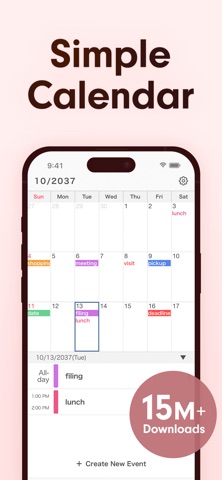
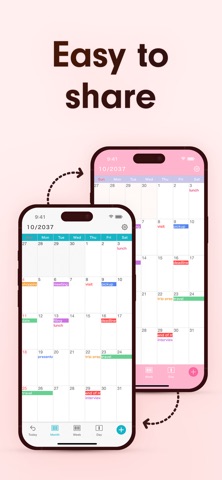
Simple Calendar is a calendar app that works directly with your iCloud, Google and Microsoft calendars, with clear monthly, weekly and daily views, color coding, widgets and repeating events. Our design philosophy is all about simplicity and ease of use. Simple Calendar comes with various customization options, including font size — use the style that suits you best. In this calendar app, you can use the sharing features of iCloud Calendar and Google Calendar, making it easy to share schedules with family, partners, and colleagues. It's perfect for those looking for a minimalist calendar app focused on functionality instead of extra (and sometimes unnecessary) features — for work, family, shifts, school and travel. [List of Functions] · Share schedules with iCloud and Google Calendar · 15 Home Screen widgets · Next event on your Lock Screen · Font size adjustment (10 options) · Weekly (7 days · 5 days · 3 days) display · Daily display · Color coding for different calendars · Add notes, URLs, and maps · Sync with other scheduling apps · Event templates, history and search · Add an event to multiple days at once · Daily summary notifications · Restore deleted events from the Trash · 50 theme colors and a changeable app icon · Set your favorite photo as the wallpaper · Background colors for dates · White, black, or colored text for events · Set any day of the week as a day off · Change the start day of the week · Display week numbers · Lock with passcode [Function Details] ■ iOS Calendar This app uses the built-in iOS calendar system. Events made with this app will be synchronized with other scheduling apps and the iOS standard Calendar app. Your events are stored in your own calendar account (iCloud, Google, etc.), never on our servers. If you switch phones, simply sign in again and everything comes back — no account registration needed. Events sync to iPad automatically and can be viewed on a Mac or PC via iCloud.com. ■ Adjust Font Size You can choose from five font sizes of extra-small, small, medium, large, and extra-large. You can also choose light or bold text for better readability. ■ Monthly, Weekly, and Daily Calendar With one tap at the bottom of the screen, you can switch between monthly, weekly, and daily display. Switch the weekly calendar to a 7-, 5- or 3-day display to find what is right for you. A list of the day's events can be shown under the monthly calendar. ■ Color Coding You can create separate calendars according to different schedules, such as work and home. Then, you can manage them clearly by color coding them. For each calendar, you can choose everything from its color to white or black text. ■ Secure Passcode Lock You can securely lock the app with a passcode, Face ID or Touch ID if you don't want anyone to view your calendars. ■ Notification Settings You can set up notifications for scheduled events at the event time, as well as 5 min, 15 min, or more prior to the event, so you don't miss important plans! Get a summary of today's events in the morning or tomorrow's events the night before. Over 21 million downloads, 4.6 user rating (as of August 2026). [Note to Users] Since this calendar app uses the standard function of the iOS calendar, events older than one month may no longer appear on your device with the default settings. If you want to keep past events, please follow the procedure below after installing the app. 1. Open the iOS Settings app. 2. Tap "Calendar". 3. Tap "Sync". 4. Select "All Events". For details, see "Help/FAQ" in the app. [Help / Inquiries] Please visit "Help/FAQ" from the settings screen of the app. If this doesn't help, please contact us through "Contact Us" from the settings screen. We can respond much faster this way than to app reviews. [Terms of Service] https://komorebi-studio.com/tos_en.html [Privacy Policy] https://komorebi-studio.com/policyredirect.html

See this store page in another country

Prices, ranks and reviews are per country. Revenue above is already worldwide.

More from Komorebi Inc.

QR Code Reader: Quick Scan
Productivity
162.4K ratingsAnalyze →
Wheel +: Spin Roulette Picker
Games
11.8K ratingsAnalyze →
Shopping List - Grocery & Todo
Shopping
28.8K ratingsAnalyze →
Notepad - Simple Notes & Memo
Business
6.7K ratingsAnalyze →
ToDo List - Daily Task Planner
Productivity
5.3K ratingsAnalyze →
Expense Tracker - Money Note
Finance
3K ratingsAnalyze →
Simple Notes - Notepad Manager
Productivity
790 ratingsAnalyze →
My Calendar: Planner & Agenda
Productivity
391 ratingsAnalyze →
Simple Diary - Daily Journal
Lifestyle
909 ratingsAnalyze →