ASO keywords
Most repeated terms in the listing. Highlighted ones also appear in the title.
calendar19events13colour coding6icloud5weekly5daily5colour5screen5event5display5day5monthly weekly5weekly daily5font size5calendars4monthly4coding4font4lock4days4help4simple calendar3calendar calendar3icloud calendar3
What's new in 6.2.0
・Faster app launch.
・Smoother horizontal swiping in the month view.
・Reduced the app size by about 25%.
・Week numbers now follow your region's rules for the start of the week and the first week of the year.
*If you have changed "Start of Week" in the app, that setting takes priority.
・Added a "Delete All History" option to the History screen.
・Year and month are now shown in the natural format for your language in widgets, the Move Event screen and other places.
・The "Add Event" button no longer stretches too wide on iPad.
・Matched the color of the "+" button to the other buttons on the screen.
・Events added in Google Calendar are now more likely to appear right away.
・Other text fixes and localization improvements.
If you have any questions or run into a problem, please contact us from "Contact Us" in the app.
If you enjoy this app, a review on the App Store would mean a lot to us. Thank you for your continued support!
Released Nov 16, 2018. Current version shipped Oct 20, 2026.
Store description
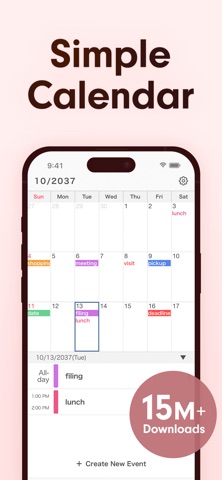
Simple Calendar is a calendar app that works directly with your iCloud, Google and Microsoft calendars, with clear monthly, weekly and daily views, colour coding, widgets and repeating events.
Our design philosophy is all about simplicity and ease of use. Simple Calendar comes with various customisation options, including font size — use the style that suits you best.
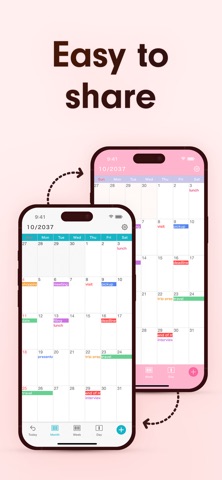
In this calendar app, you can use the sharing features of iCloud Calendar and Google Calendar, making it easy to share schedules with family, partners, and colleagues.
It's perfect for those looking for a minimalist calendar app focused on functionality instead of extra (and sometimes unnecessary) features — for work, family, shifts, school and travel.
[List of Functions]
- Share schedules with iCloud and Google Calendar
- 15 Home Screen widgets
- Next event on your Lock Screen
- Font size adjustment (10 options)
- Weekly (7 days - 5 days - 3 days) display
- Daily display
- Colour coding for different calendars
- Add notes, URLs, and maps
- Sync with other scheduling apps
- Event templates, history and search
- Add an event to multiple days at once
- Daily summary notifications
- Restore deleted events from the Trash
- 50 theme colours and a changeable app icon
- Set your favourite photo as the wallpaper
- Background colours for dates
- White, black, or coloured text for events
- Set any day of the week as a day off
- Change the start day of the week
- Display week numbers
- Lock with passcode
[Function Details]
■ iOS Calendar
This app uses the built-in iOS calendar system. Events made with this app will be synchronised with other scheduling apps and the iOS standard Calendar app.
Your events are stored in your own calendar account (iCloud, Google, etc.), never on our servers. If you switch phones, simply sign in again and everything comes back — no account registration needed. Events sync to iPad automatically and can be viewed on a Mac or PC via iCloud.com.
■ Adjust Font Size
You can choose from five font sizes of extra-small, small, medium, large, and extra-large.
You can also choose light or bold text for better readability.
■ Monthly, Weekly, and Daily Calendar
With one tap at the bottom of the screen, you can switch between monthly, weekly, and daily display.
Switch the weekly calendar to a 7-, 5- or 3-day display to find what is right for you.
A list of the day's events can be shown under the monthly calendar.
■ Colour Coding
You can create separate calendars according to different schedules, such as work and home. Then, you can manage them clearly by colour coding them. For each calendar, you can choose everything from its colour to white or black text.
■ Secure Passcode Lock
You can securely lock the app with a passcode, Face ID or Touch ID if you don't want anyone to view your calendars.
■ Notification Settings
You can set up notifications for scheduled events at the event time, as well as 5 min, 15 min, or more prior to the event, so you don't miss important plans!
Get a summary of today's events in the morning or tomorrow's events the night before.
Over 21 million downloads, 4.6 user rating (as of August 2026).
[Note to Users]
Since this calendar app uses the standard function of the iOS calendar, events older than one month may no longer appear on your device with the default settings. If you want to keep past events, please follow the procedure below after installing the app.
1. Open the iOS Settings app.
2. Tap "Calendar".
3. Tap "Sync".
4. Select "All Events".
For details, see "Help/FAQ" in the app.
[Help / Inquiries]
Please visit "Help/FAQ" from the settings screen of the app. If this doesn't help, please contact us through "Contact Us" from the settings screen. We can respond much faster this way than to app reviews.
[Terms of Service]
https://komorebi-studio.com/tos_en.html
[Privacy Policy]
https://komorebi-studio.com/policyredirect.html
See this store page in another country
Prices, ranks and reviews are per country. Revenue above is already worldwide.