ASO keywords
Most repeated terms in the listing. Highlighted ones also appear in the title.
books9reading7page6reader5device5files5books folders5cloud pass5folders4cloud4vertical4book4search4series4ebook reader3page curl3curl turning3comics books3two page3page spread3icloud drive3ads tracking3ads3comics3
What's new in 2.1.3
2.1.3
• Read Markdown (.md) documents. Headings, lists, tables, code and footnotes are shown (images appear as their alt text).
• Choose how page position is shown (Settings → E-books). The book-wide page count shifts less between chapters.
• Tapping to stop a scrolling page in Vertical scroll no longer jumps a screen further.
• Large TXT files with few chapter headings no longer freeze while opening.
• What's new is now listed version by version.
Released Sep 29, 2026. Current version shipped Oct 24, 2026.
Store description
A comic and ebook reader with real page-curl turning. Everything on your device is free — no account, no ads, no limit on books or folders. The app contains no comics or books; it reads the files you already have. Connecting your own NAS or Dropbox is an optional one-time purchase (Cloud Pass).
■ Formats
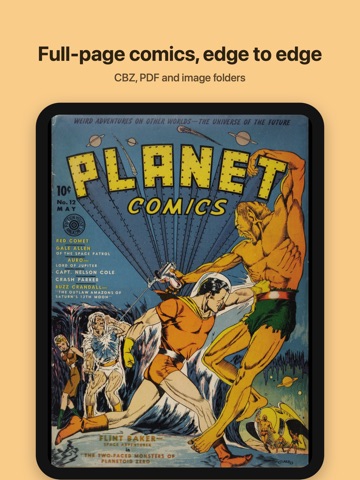
CBZ/ZIP and CBR/RAR comics, PDF, folders of images, EPUB and FB2 ebooks, DRM-free MOBI and AZW3 ebooks, and TXT files (legacy encodings such as CP949 or Shift_JIS detected automatically). ComicInfo.xml is honored for title, volume number, writer and reading direction. Japanese vertical writing (tategaki) with ruby: vertical EPUB and MOBI open vertically, Aozora Bunko TXT ruby notation is rendered, and each book can be switched between horizontal and vertical. Word (DOCX), Hangul (HWP, HWPX) and ODT documents reflow with their tables and footnotes, and any book can be exported to PDF or page images (ZIP).
■ Comic reader
• Page-curl turning, vertical scroll (webtoon) mode
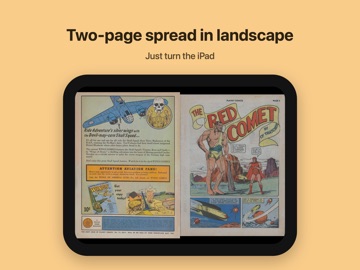
• Two-page spread on tablets and in landscape
• Left-to-right or right-to-left, pinch zoom, fit to screen, width or height
• Five tap-zone layouts
• Automatic border cropping for scans, brightness and colour filters
■ Ebook reader
• Change size, font, line spacing and margins — the page reflows at once
• Register your own font files (TTF, OTF)
• Two columns on wide screens, two-page spread in landscape
• Table of contents, footnote preview and jump, in-book search, bookmarks
• Highlight and annotate any passage; export notes as Markdown, CSV, Anki or HTML
• Send a selection straight to the dictionary or a web search
• Read aloud with the voices installed on your device
• Follows the publisher's styling (indents, drop caps)
■ Library
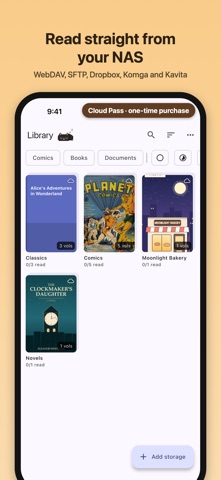
• Add a folder and it is scanned recursively, covers built, volumes grouped into series. Changed files are rescanned automatically
• No limits. As many books and folders as you like
• Search, sort, filter by kind (comics, books, documents) and by reading status
• Continue-reading row, favourites, shelves you arrange yourself, pick a series cover
• Calibre libraries: authors, series and tags, grouped by author or series
• Reading stats with goals, streaks and a year-end recap
• Hardcover: post started and finished books (free, optional)
• Send books from a computer's browser over the same Wi-Fi
• Screen reader and large font support
■ Lock and backup
Lock books with a PIN (blurred cover, relocks when you leave). Export positions, bookmarks, shelves, locks and settings to one file.
■ Free and paid
Everything you need to read is free. There is no cap on books or folders, and none of the reader features above is locked.
Cloud Pass — one purchase, not a subscription, adds:
• NAS (WebDAV, SFTP, SMB), Dropbox and Komga/Kavita (OPDS) libraries in your library. CBZ and EPUB are read in place, fetching only the pages you open (PDF and CBR are downloaded first)
• Keep remote books on the device for offline reading, Wi-Fi-only downloads, a cache size limit
• Carry your place and bookmarks between devices through a cloud folder you choose (iCloud Drive, for example) or a KOReader sync server — there is no server of ours
A NAS away from home needs DDNS or port forwarding. Speed depends on your connection.
Master Pro — Cloud Pass plus on-device tools:
• AI upscaling for low-resolution pages
• Panel-by-panel reading, speech-bubble translation and dialogue search
■ No ads, no tracking
No ads, tracking or analytics. The network is used only for storage you connect, and for Hardcover if you connect it (book title and status only). Connect nothing and it uses no network. There is no account, and your reading history stays on the device.
■ Good to know
• iCloud Drive, Google Drive and OneDrive work through the Files app and suit syncing, but not streaming a whole library.
• FTP and WebDAV with self-signed certificates are not supported yet.
• Requires iOS 16 or later, on iPhone and iPad.
See this store page in another country
Prices, ranks and reviews are per country. Revenue above is already worldwide.