ASO keywords
Most repeated terms in the listing. Highlighted ones also appear in the title.
keyboard6key6word6efkey5languages5stays5words5type5search5types4typing4swipe4word once3clipboard history3gif search3icloud sync3sync learned3learned words3phone3hold3sentence3nothing3switch3keys3
What's new in 2.2.1
Version 2.2.1. Six new languages, a number pad, photo themes and a long list of fixes from testers.
NEW LANGUAGES
• English (Australia) and English (Canada). colour and centre stay as typed, arvo and Saskatoon are in the dictionary. With your iPhone region set to Australia or Canada, the app offers to switch.
• Telugu, Malayalam and Tamil by transliteration: type in Latin letters, get the word in its own script. ente becomes എന്റെ.
• Luxembourgish, with ë, é and ä on the keys.
NEW
• Number pad on demand: hold 123, or add it to the bar.
• Photo background for custom themes, with key transparency and your own text color. Pro.
• Translate while you type: the translation is written into the app as you go. Pro.
• Your own AI actions next to Fix, Reword, Formal and Casual. Pro.
• Dictation writes two as 2 and takes your own word replacements.
• Large emoji, 7 across. The emoji row on the 123 page scrolls through 30 favorites.
• Setup at the top of Typing and Keyboard: Like iPhone, EFKey or Mine.
• Shift changes the case of the word, the selection, or both. Your pick.
• Autocorrect in fields where apps turn it off, like the YouTube search box. Off by default.
TYPING
• Bolder context correction is on: "this is my dig" becomes "this is my dog". Backspace right after puts your word back.
• Digits inside words get fixed: mus8me becomes musíme, j8st becomes just.
• Glued words split: Shehad becomes She had, amikoregybe becomes amikor egybe.
• Long words with typos are corrected after backspace too.
• Spanish: no se que becomes no sé qué. Italian: Lui e felice becomes Lui è felice.
• A correction tapped in the bar can be undone with backspace, like an autocorrect.
• The letter preview appears and disappears as fast as on the system keyboard.
FIXES
• A password copied from the Passwords app leaves the clipboard history once it expires.
• About 220,000 unsupported words are gone from English, so fewer odd words show up next to a swipe.
• Swipe right after a tap: I + was gives "I was", not "Iw".
• 1st, 2nd and 3pm stay as typed.
• iPad has its own layout with tab, caps lock and a hide key. The bar uses the full width.
• The keyboard no longer makes iOS fall back to the system keyboard while it opens.
Released Jul 9, 2026. Current version shipped Oct 21, 2026.
Store description
EFKey types like the keyboard you already use. It has the parts that one is missing.
Typing runs on your phone, in 90 languages, and stays free.
GESTURES INSTEAD OF PAGES
Hold any key and its second character comes up. @ # % € sit in the corner of every key, so the numbers page stays where it is.
Flick left on the delete key and it erases whole words.
Hold the spacebar and the keyboard turns into a trackpad. Slide, and the cursor lands where you meant it.
Glide over the letters and the word types itself, accents and apostrophes included. Pick another word once and the next identical swipe follows your pick.
Double-space ends the sentence.
84 LANGUAGES, TWO AT A TIME
Turn on two languages and write in both in one sentence: dakujem becomes ďakujem while dont gets its apostrophe. Nothing to switch.
26 languages are fully verified. 62 more are in beta: they work, a native speaker just hasn't checked them yet.
The app itself speaks 26 languages.
QWERTY, QWERTZ, AZERTY, Dvorak, Colemak.
A number row that adds a row instead of shrinking your keys.
CORRECTION THAT READS THE SENTENCE
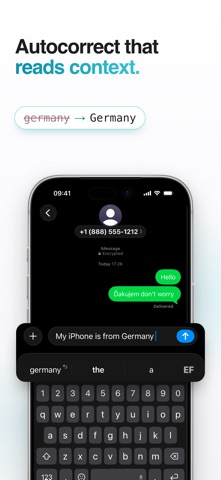
Autocorrect looks at up to three words of context. "i said hat" becomes "that"; "red hat" stays as it is.
It fixes a word with three mistakes in it and leaves alone the one that was already right.
Type germany or iphone and get Germany and iPhone.
Names from your contacts show up in suggestions and in swipe. No contacts permission needed.
Prediction learns how you write. Give it a few days.
Fix a word once and press backspace: it never touches that word again.
THE TOOLS. EFKEY PRO.
Clipboard history with your own categories, pinning and search.
Translator. Type in one language, insert the other, without leaving the keyboard.
Dictation. Speak and it types, translated if you want, with a Live Activity in the Dynamic Island.
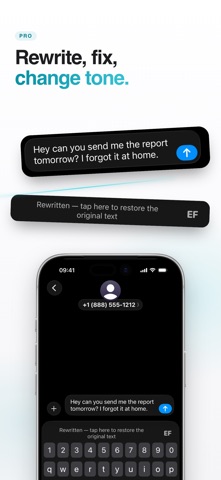
AI edits. Rewrite, fix the grammar, change the tone. Or swipe down from the spacebar and the whole field gets rewritten.
GIF search, a calculator that answers in the suggestion bar, text shortcuts, My info autofill, one-handed mode, typing stats.
Shortcuts on the keys: hold C to copy, H for clipboard history, D for dictation. Remappable.
Your own colours and saved themes, key press animations, more swipe trail effects.
iCloud sync of learned words and settings.
One purchase. No subscription. Seven days free when you start the trial yourself, no card and no account. Typing stays free either way.
Translation, dictation and AI edits run on-device where iOS supports it. Or bring your own API key (Anthropic, Gemini, OpenAI, Groq, OpenRouter). It stays in your Keychain, and your text goes only to the provider you picked.
MADE TO FEEL RIGHT
Native down to the pixel, light and dark, and it follows the appearance of the app you are in.
Multi-touch that keeps up at full speed. No dropped keys.
Emoji with search, skin tones and suggestions as you type.
Settings you can search. Type a word and it takes you to the switch.
PRIVATE BY DESIGN
No keystroke logging. No analytics or tracking SDKs. No server of ours anywhere.
Typing, prediction and autocorrect work offline. iOS never lets a custom keyboard into a password field, and when a password is shown in plain text, EFKey stops correcting and learns nothing from it.
The only things that leave your phone are the ones you switch on yourself: GIF search, your own AI key, iCloud sync (learned words end-to-end encrypted, settings through your private iCloud). efkey.app/privacy says what, where and when.
Full Access is optional. The keyboard types at full strength without it. Only the tools that reach outside the keyboard need it.
Your learned and blocked words export and import anytime.
LIGHT ON STORAGE
Every language except English downloads when you enable it. Nothing you don't type in sits in your phone.
Set it up in a minute.
Questions? dev@eef.sk · efkey.app
See this store page in another country
Prices, ranks and reviews are per country. Revenue above is already worldwide.