← Back to charts
EFKey – Swipe & AI Tastatur icon
APP STORE

EFKey – Swipe & AI Tastatur

Peter Feranc · Utilities · Germany store
NOT IN TOP 100 HERE
View on App Store ↗ Instagram card
Revenue a month, worldwide EST
$1.7K
Likely $578 to $5.2K
▼ 50.0% in 12 days
New ratings
+30
in 12 days, 90 in total
Rating
5.0 of 5
6 ratings in this store
Countries it ranks in
1
was 1 on Oct 20, 2026

Revenue

Estimated from the grossing charts of Oct 26, 2026 in the 53 countries we track, and ratings growth on the App Store.

EST. REVENUE / YEAR · WORLDWIDE
$20.8K
No Google Play version found
EST. LIFETIME DOWNLOADS
210 to 600
Estimated from ratings count
WHERE IT EARNS · EST. / MONTH
  • Finland #91 Utilities$1.7K · 100%
HOW SURE ARE WE
Small app: combines its grossing ranks with ratings growth (25 new ratings a month on average since launch). Tested on 418 apps with verified revenue: typically off by about 2.6 times, so the range is wide. Countries we don't track (and Google Play in China, which doesn't exist) aren't included, and neither are ads or web payments. Gross revenue before store fees.
RATINGS
6
AVG RATING
5.00
PRICE
Gratis
AGE
110d
LAST UPDATE
6d ago
VERSION
2.2.1
SIZE
103 MB
AGE RATING
4+

Last 30 days

From our daily snapshots of every grossing chart and daily ratings counts.

DAYS IN A GROSSING CHART
5 / 30
COUNTRIES NOW
0 (was 0)
NEW RATINGS, LAST 7 DAYS
+24
EST. REVENUE A MONTH, DAILY · APP STORE EST
Show daily values
Sep 28, 2026not in a grossing chart
Sep 29, 2026not in a grossing chart
Sep 30, 2026not in a grossing chart
Oct 1, 2026not in a grossing chart
Oct 2, 2026not in a grossing chart
Oct 3, 2026not in a grossing chart
Oct 4, 2026not in a grossing chart
Oct 5, 2026not in a grossing chart
Oct 6, 2026not in a grossing chart
Oct 7, 2026not in a grossing chart
Oct 8, 2026not in a grossing chart
Oct 9, 2026not in a grossing chart
Oct 10, 2026not in a grossing chart
Oct 11, 2026not in a grossing chart
Oct 12, 2026not in a grossing chart
Oct 13, 2026not in a grossing chart
Oct 14, 2026$3.5K a month
Oct 15, 2026not in a grossing chart
Oct 16, 2026not in a grossing chart
Oct 17, 2026not in a grossing chart
Oct 18, 2026not in a grossing chart
Oct 19, 2026$2.2K a month
Oct 20, 2026$1.6K a month
Oct 21, 2026$1.7K a month
Oct 22, 2026not in a grossing chart
Oct 23, 2026not in a grossing chart
Oct 24, 2026not in a grossing chart
Oct 25, 2026not in a grossing chart
Oct 26, 2026$1.7K a month
Oct 27, 2026not in a grossing chart
The same estimate as the headline, saved every day. Best rank Sep 28, 2026: not ranked. Now: not ranked.
RATINGS IN THE CORE COUNTRIES, DAILY
Show daily values
Oct 14, 202660 ratings
Oct 15, 202662 ratings
Oct 17, 202664 ratings
Oct 18, 202665 ratings
Oct 19, 202666 ratings
Oct 20, 202668 ratings
Oct 21, 202670 ratings
Oct 22, 202671 ratings
Oct 23, 202681 ratings
Oct 24, 202688 ratings
Oct 25, 202690 ratings
Oct 26, 202690 ratings
60 on Oct 14, 2026, 90 on Oct 26, 2026. New ratings track new downloads, even outside the charts.

Money and momentum

Measured from the store, not estimated.

WHAT IT CHARGES
No in-app purchases
Earns from its upfront price, ads or payments outside the store.
REVIEW MOMENTUM
1.5 reviews / week
  • Trendrising
  • Recent reviews average4.7 stars
  • Recent 1 and 2 star share9%
From the latest 23 written reviews, covering 108 days.
RELEASE CADENCE
6 updates in 90 days
  • Typical gap between releases9 days
From the last 10 versions listed on the App Store.
RATING BREAKDOWN
6 ratings
5★100%
4★0%
3★0%
2★0%
1★0%

What users want

From the latest 23 reviews on the Germany App Store, Jul 11, 2026 to Oct 21, 2026: 9% are 1 or 2 stars. Open a theme to read what people wrote.

WHAT THEY COMPLAIN ABOUT · SHARE OF BAD REVIEWS

Only 2 of the latest 23 reviews are 1 or 2 stars, too few to find patterns. Users are mostly happy.

WHAT THEY ASK FOR
  • Also, please add a "Clear/Reset Input" (重输) button for the Chinese 9-key layout. 5★, Oct 18, 2026
  • Please add a way for us to continue to support the development when you can. 5★, Sep 17, 2026
WORDS THAT KEEP COMING UP IN BAD REVIEWS

Nothing stands out.

WHAT THEY LOVE · SHARE OF GOOD REVIEWS
Looks great10%

2 of the 4 and 5 star reviews.

★★★★★ The offline autocorrect is spot on, and the privacy first design is exactly what I was looking for.
★★★★★ I cant believe how iOS still feels 10 years behind on certain very basic but core UX/UI that apparently I took for granted on Android.
Great support10%

2 of the 4 and 5 star reviews.

★★★★★ ⭐ A small wish: I really hope you can add Chinese language support for the settings menu in the future.
★★★★★ Please add a way for us to continue to support the development when you can.

Found by matching words and phrases in the reviews, not read by a person. A review can count toward more than one theme.

What users say

Latest reviews, Germany App Store.

★★★★★Oct 21, 2026
Best keyboard ever!

Just go for the pro—you won’t regret it.

★★★★★Oct 21, 2026
Fantastic keyboard!

I just switched to iPhone after using Android phones my entire life. Tyiping/keyboard was by far the biggest pain point, and with this keyboard I no longer notice a difference. The keyboard is customizable, the features are clearly well thought out (dual language ftw!), and most importantly it’s as responsive as the native keyboard unlike swiftkey. It only took me 3 days on the free trial to purchase the pro version. Keep up the good work!

★★★★★Oct 19, 2026
Immersive experience👍

Early adopter here! I’ve been with EFKey since the start and it just keeps getting better. Finally, a keyboard that doesn't phone home or log my data. The offline autocorrect is spot on, and the privacy first design is exactly what I was looking for. Highly recommend for anyone tired of big tech keyboards.

★★★★★Oct 19, 2026
Best keyboard I’ve used

Bought pro right away

★★★★★Oct 18, 2026
🚀 Smooth 120Hz and amazing privacy!

As an iPhone 17 pm.user, I was really frustrated by the lag of the stock iOS keyboard. EFKey completely fixed my issue! It runs incredibly smooth on the 120Hz ProMotion screen. Most importantly, it works fully offline with no privacy concerns. The customization options are fantastic. ⭐ A small wish: I really hope you can add Chinese language support for the settings menu in the future. Also, optimizing the Chinese 9-key (九宫格) layout grid and adding localized gestures (like swiping up on the delete key to clear a word) would make it the absolute best privacy keyboard for Chinese users. Thank you Peter for this great app! Also, please add a "Clear/Reset Input" (重输) button for the Chinese 9-key layout. It allows users to clear the unconfirmed Pinyin sequence with one tap when we make a mistake, which is extremely essential for 9-key fast typing!

★★★★★Oct 17, 2026
Pleasantly surprised

Good alternative to Swiftkey on IOS. Developer is active and engages with users, implementing new features based on their feedback.

Apps like this

Same category, earning about as much.

Store screenshots

ScreenshotScreenshotScreenshotScreenshotScreenshotScreenshotScreenshotScreenshot

App Store ads

Apple Search Ads this app ran in the last 90 days, from Apple's public ad repository.

Apple's ad repository couldn't be reached right now. Try again later.

Growth research

Where this app is buying and earning its users. Each link opens pre filtered.

ASO keywords

Most repeated terms in the listing. Highlighted ones also appear in the title.

und28die20der13ein11auf10sie8mit8die tastatur8das7tastatur6wird6den6efkey5wort5oder5ohne5wie4hat4sprachen4bleibt4eine4rter4dem4nur4

What's new in 2.2.1

Version 2.2.1. Sechs neue Sprachen, ein Ziffernblock, Themes mit Foto und eine lange Liste von Korrekturen aus den Tests. NEUE SPRACHEN • Englisch (Australien) und Englisch (Kanada). colour und centre bleiben, wie du sie tippst, arvo und Saskatoon stehen im Wörterbuch. Ist dein iPhone auf Australien oder Kanada eingestellt, bietet die App den Wechsel an. • Telugu, Malayalam und Tamil per Transliteration: Du tippst in lateinischen Buchstaben und bekommst das Wort in seiner Schrift. Aus ente wird എന്റെ. • Luxemburgisch, mit ë, é und ä auf den Tasten. NEU • Ziffernblock auf Abruf: 123 halten oder in die Leiste legen. • Foto als Hintergrund für eigene Themes, mit transparenten Tasten und eigener Schriftfarbe. Pro. • Übersetzen beim Tippen: Die Übersetzung wird laufend in die App geschrieben. Pro. • Eigene KI-Aktionen neben Korrigieren, Neu formulieren, Formell und Locker. Pro. • Diktieren schreibt zwei als 2 und kennt deine eigenen Wortersetzungen. • Große Emoji, 7 nebeneinander. Die Emoji-Reihe auf der 123-Seite scrollt durch 30 Favoriten. • Voreinstellung oben in Schreiben und Tastatur: Wie iPhone, EFKey oder Meine. • Shift ändert die Groß- und Kleinschreibung des Wortes, der Auswahl oder beider. Du entscheidest. • Autokorrektur auch in Feldern, in denen Apps sie abschalten, etwa der YouTube-Suche. Standardmäßig aus. SCHREIBEN • Mutigere Korrektur nach Kontext ist an: „this is my dig" wird zu „this is my dog". Die Rücktaste direkt danach holt dein Wort zurück. • Ziffern im Wort werden korrigiert: aus mus8me wird musíme, aus j8st wird just. • Zusammengeklebte Wörter werden getrennt: aus Shehad wird She had, aus amikoregybe wird amikor egybe. • Lange Wörter mit Tippfehlern werden auch nach der Rücktaste korrigiert. • Spanisch: aus no se que wird no sé qué. Italienisch: aus Lui e felice wird Lui è felice. • Eine in der Leiste angetippte Korrektur nimmt die Rücktaste zurück, genau wie eine Autokorrektur. • Die Buchstabenvorschau erscheint und verschwindet so schnell wie auf der Systemtastatur. KORREKTUREN • Ein aus der Passwörter-App kopiertes Passwort verschwindet aus dem Verlauf der Zwischenablage, sobald es abläuft. • Rund 220.000 unbelegte Wörter sind aus dem Englischen verschwunden, neben einem Swipe tauchen also weniger seltsame Wörter auf. • Swipe direkt nach einem Tipp: I + was ergibt „I was", nicht „Iw". • 1st, 2nd und 3pm bleiben, wie du sie tippst. • Das iPad hat ein eigenes Layout mit Tab, Feststelltaste und Ausblendtaste. Die Leiste nutzt die volle Breite. • Beim Öffnen bringt die Tastatur iOS nicht mehr dazu, zur Systemtastatur zu wechseln.

Released Jul 9, 2026. Current version shipped Oct 21, 2026.

Store description

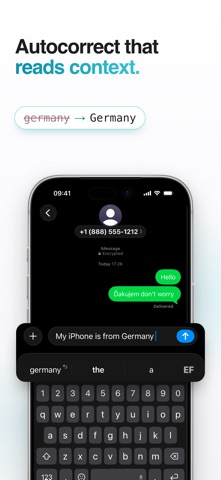
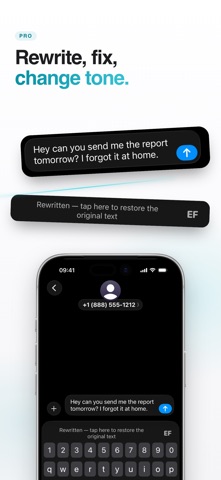
EFKey tippt wie die Tastatur, die du schon kennst. Und hat, was ihr fehlt. Das Schreiben läuft auf deinem iPhone, in 90 Sprachen, und bleibt kostenlos. GESTEN STATT SEITEN Halte eine beliebige Taste und ihr zweites Zeichen erscheint. @ # % € sitzen in der Ecke jeder Taste, die Zahlenseite brauchst du dafür nicht. Wische auf der Löschtaste nach links und sie löscht ganze Wörter. Halte die Leertaste und die Tastatur wird zum Trackpad. Fahr mit dem Finger, und der Cursor landet, wo du ihn haben willst. Gleite über die Buchstaben und das Wort schreibt sich selbst, mit Umlauten und Apostrophen. Wählst du einmal ein anderes Wort, folgt die nächste gleiche Geste deiner Wahl. 90 SPRACHEN, ZWEI GLEICHZEITIG Schalte zwei Sprachen ein und schreib in beiden im selben Satz: aus Madchen wird Mädchen, und dont bekommt seinen Apostroph. Umschalten musst du nichts. 26 Sprachen sind vollständig geprüft. Die übrigen sind in der Beta: Sie funktionieren, nur hat sie noch kein Muttersprachler durchgesehen. QWERTZ, QWERTY, AZERTY, Dvorak, Colemak. Eine Zahlenreihe, die eine Zeile hinzufügt, statt deine Tasten zu verkleinern. KORREKTUR, DIE DEN SATZ LIEST Die Autokorrektur schaut auf bis zu drei Wörter Kontext. „i said hat" wird zu „that", „red hat" bleibt, wie es ist. Sie korrigiert ein Wort mit drei Fehlern und lässt das in Ruhe, das schon richtig war. Tipp germany oder iphone und du bekommst Germany und iPhone. Namen aus deinen Kontakten erscheinen in den Vorschlägen und beim Wischen. Ohne Zugriff auf deine Kontakte. Die Vorhersage lernt, wie du schreibst. Gib ihr ein paar Tage. Korrigiere ein Wort einmal und drück die Rücktaste: Dieses Wort fasst sie nie wieder an. DIE WERKZEUGE. EFKEY PRO. Verlauf der Zwischenablage mit eigenen Kategorien, Anheften und Suche. Übersetzer. Schreib in einer Sprache, füge in der anderen ein, ohne die Tastatur zu verlassen. Diktieren. Du sprichst, sie schreibt, auf Wunsch gleich übersetzt, mit Live-Aktivität in der Dynamic Island. KI-Bearbeitung. Umschreiben, Grammatik korrigieren, Ton ändern. Oder wisch von der Leertaste nach unten und das ganze Feld wird umgeschrieben. GIF-Suche, ein Rechner, der in der Vorschlagsleiste antwortet, Textkürzel, Ausfüllen mit Meine Daten, Einhandmodus, Schreibstatistik. Kürzel auf den Tasten: Halte C zum Kopieren, H für die Zwischenablage, D zum Diktieren. Frei belegbar. iCloud-Sync der gelernten Wörter und Einstellungen. Ein Kauf. Kein Abo. Sieben Tage kostenlos, wenn du den Test selbst startest, ohne Karte und ohne Konto. Das Schreiben bleibt so oder so kostenlos. Übersetzung, Diktieren und KI-Bearbeitung laufen auf dem Gerät, wo iOS das unterstützt. Oder verbinde deinen eigenen API-Schlüssel (Anthropic, Gemini, OpenAI, Groq, OpenRouter). Er bleibt in deinem Schlüsselbund, und dein Text geht nur an den Anbieter, den du gewählt hast. SO, WIE ES SEIN SOLL Nativ bis aufs Pixel, hell und dunkel, und sie folgt dem Erscheinungsbild der App, in der du gerade bist. Emoji mit Suche, Hauttönen und Vorschlägen beim Tippen. PRIVAT, WEIL ES SO GEBAUT IST Keine Aufzeichnung von Tastenanschlägen. Keine Analyse- oder Tracking-SDKs. Nirgends ein Server von uns. Schreiben, Vorhersage und Autokorrektur funktionieren offline. In ein Passwortfeld lässt iOS eine eigene Tastatur nie, und wenn ein Passwort als Klartext angezeigt wird, hört EFKey auf zu korrigieren und lernt nichts daraus. Dein iPhone verlässt nur, was du selbst einschaltest: GIF-Suche, dein eigener KI-Schlüssel, iCloud-Sync (gelernte Wörter Ende-zu-Ende verschlüsselt, Einstellungen über dein privates iCloud). Auf efkey.app/privacy steht, was wohin geht und wann. Voller Zugriff ist optional. Die Tastatur tippt auch ohne ihn mit voller Kraft. Nur die Werkzeuge, die über die Tastatur hinausgehen, brauchen ihn. SPART SPEICHER Jede Sprache außer Englisch wird erst geladen, wenn du sie einschaltest. Auf deinem iPhone liegt nichts, in dem du nicht schreibst. In einer Minute eingerichtet. Fragen? dev@eef.sk · efkey.app

See this store page in another country

Prices, ranks and reviews are per country. Revenue above is already worldwide.

More from Peter Feranc

Simple Alarm - Countdown
Utilities
0 ratingsAnalyze →
Ticknow: Tasks & Live Activity
Productivity
0 ratingsAnalyze →