ASO keywords
Most repeated terms in the listing. Highlighted ones also appear in the title.
trips9car8trip8adapter7engine6obd25gas5start5obd2 port5elm327 adapter5port4battery4fuel4adapter plugged3eco score3start trip3obd2 elm3273engine computer3elm3273mileage3reminders3diagnostics3phone3work3
What's new in 3.5.7
DrivePulse reads your car through an OBD2 adapter: fault codes explained in plain words, real fuel consumption, engine health and every trip on a map. No account and no server of ours.
What's new in this version:
• My year on the road. In Year in review, your year in a few pages to share as a story: distance, trips and hours behind the wheel, your longest trip, fuel, eco driving and the fault codes that went away. No plate, no places, no money: you pick the page to send.
• Automatic connection, parked too. The app connects to the adapter on its own again, even with the car parked: when it connects it asks the car a few questions, then stays quiet until you drive off. If your locked car sets off its alarm, turn off automatic connection in Settings.
• Distance before the connection. If the adapter connects after you have set off, the app recovers the distance driven before from the car's odometer, where it can read it, and counts it apart from the GPS distance: in the trip, in the totals and in the work trip report.
• Used car check. For buyers and sellers: with the car stopped, one read-only pass over fault codes, monitors, odometer and the other control units. It tells you what the car reported today; it is not an appraisal. The PDF and QR code come with the full version.
• Trip replay. Speed, revs and consumption over time on the map, with a cursor and playback.
• Before the inspection. Ready monitors, permanent codes and distance since the codes were last cleared, on one card. These are the readings from the car, not the inspection result.
• Electric cars, charging included. A charge between two trips is recognized and suggested like a fill-up, with approximate kWh if you entered the battery capacity. On an electric car the price in Settings is the energy price.
• The car's data in Shortcuts. "DrivePulse status" now also returns fuel, range, mileage, battery and fault codes as JSON, with the same names as Home Assistant.
• More control units, more codes. Fault codes from the other control units on 16 makes, read-only and with the car stopped, plus 267 more manufacturer codes. A code without a description now gets its own card: the system, the type of fault and what to tell the garage.
• Share as a story. The trip card and the month card also in portrait, for stories; the card for the garage ends with a QR code.
• Large numbers on CarPlay: in the dashboard tiles the value takes the place of the icon. And the tiles you choose for the car screen also at the top of Live data on the phone. Both off by default.
Also:
• Mileage reminders alert you at the end of a trip.
• At the start of each month, a notification with the month's report.
• If the car moves while the trip is paused, an alert.
• A default trip type for each vehicle, and the start or end address can be corrected by hand.
• The work trip report in Statistics too, for a company car.
• Misfires per cylinder in Extended diagnostics: experimental, on cars with the CAN protocol.
• The Live Activity in the colors of the main screen, without the duplicate notification.
• In Health, the 12 V battery only costs points when your trips show a weak start.
• On some electric and hybrid cars, no more questions the car doesn't need.
Released Jun 24, 2026. Current version shipped Oct 19, 2026.
Store description
DrivePulse connects to your car's OBD2 port through an ELM327 adapter and keeps your trips, gas mileage, costs, reminders and diagnostics on your phone. Every US car and light truck since the 1996 model year has an OBD2 port. Miles, mpg, gallons and degrees Fahrenheit follow your phone's region.
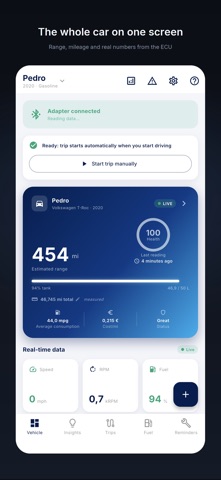
The home screen shows where you parked, the battery status, your range, what you have spent and how your last trip went. Car, motorcycle or scooter: one profile each, with separate data.
WORK TRIPS
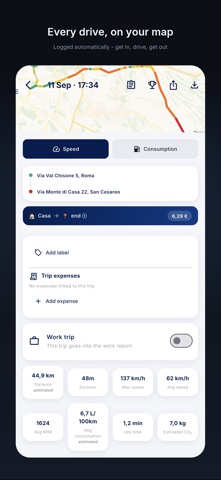
Mark which trips are for work and the app prepares the report: odometer, distance, expenses and receipts, per trip or per period, in PDF and CSV. It is a record for your employer or your accountant, not a tax filing.
FILL-UPS AND RECEIPTS
When the fuel level goes up, the app sends you a notification with the fill-up already entered, and you save it with one tap. It also works for propane, natural gas and charging in kWh. Or take a photo of the receipt or the pump display: the app reads gallons, price and total and lets you check them before saving.
AUTOMATIC TRIPS
With the adapter plugged in you don't press anything: the trip starts when you start the car and ends when you turn it off. Each trip has the route on a map colored by speed, duration, distance, cost, temperatures, battery and range. If you stop for gas or lunch, pause it: the trip resumes when you say so and stays a single trip. The history keeps expenses and favorite places.
DRIVING TIPS
The Eco Score tells you what to change: large on the car's screen and in Driving analysis on the phone. At the start of a trip, with a cold engine, it counts for less, because fuel use says little then.
CAR HEALTH
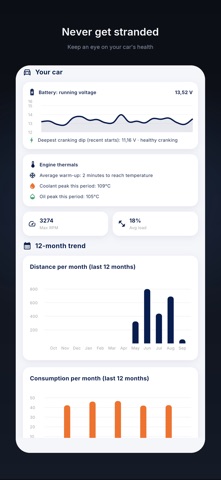
Battery, engine, temperatures, DPF and DEF (AdBlue) in green, yellow or red, with a sentence that explains. A value not read yet stays empty instead of turning into a zero.
PARKING
When you get out, the app saves where you left the car and walks you back to it.
GAS AND COSTS
Distance, fuel spending, mileage in mpg, L/100 km or km/l (kWh on electric cars), Eco Score and estimated savings. The score rewards efficiency, never speed. Monthly or yearly summary to share.
REMINDERS
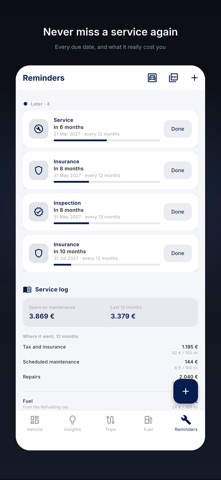
Insurance, registration, inspection and service, by date or by mileage, handy with a lease too. From the VIN the app works out the vehicle details.
CARPLAY AND SIRI
From CarPlay you start and end trips and look at the dashboard, which you choose. With Siri: "Hey Siri, start my trip with DrivePulse", and the same for pause, resume and end, also from Shortcuts.
DIAGNOSTICS (PRO)
With an OBD2 ELM327 adapter: the codes behind the Check Engine light explained with what to do, every parameter your engine computer exposes, a guided battery test while the engine starts, DPF regenerations. The app only reads. It does not clear codes, does not reset anything and does not write to the engine computer. One exception: on three European electric models (Citroën e-C3, Fiat Grande Panda, Opel Frontera) a probe you start by hand opens the extended diagnostic session for a moment to re-read one value, then goes straight back. Even there it writes nothing.
WHICH CARS
Codes, live data and fuel use work on any vehicle with an OBD2 port, gas or diesel. A few readings, like the odometer from the instrument cluster, depend on the brand: where they are missing, the app counts the miles from your trips.
NO ACCOUNT, NO SERVER OF OURS
Your trips never reach us. No ads, no tracking.
PRICE
Free for 7 days or 15 trips, whichever comes first, with everything on except extended diagnostics (one free reading with the adapter connected). Then a single purchase unlocks everything for good. No subscription.
Note: the app only works with an OBD2 ELM327 adapter plugged into the car's diagnostic port. On iPhone the adapter must be Bluetooth LE or Wi-Fi: the OBDLink MX+ and other classic Bluetooth adapters do not connect to an iPhone. Without an adapter, only reminders and manually entered expenses remain, and trips are not recorded.
See this store page in another country
Prices, ranks and reviews are per country. Revenue above is already worldwide.