ASO keywords
Most repeated terms in the listing. Highlighted ones also appear in the title.
map8field7coordinate6layers6measure5features5draw measure5draw4convert4coordinates4export4dxf4system4points4lines4import4pdf4systems4points lines3coordinate systems3national grids3gnss rtk3wms xyz3satellite imagery3
What's new in 3.0.0
This is the biggest update the app has ever had.
NEW: CAD VIEWER
• Open DXF, Netcad NCZ, KML/KMZ, GeoJSON, shapefile-ZIP and LandXML on a clean canvas
• Real layer names, Netcad colours, hatches and text labels
• Snap to endpoint, midpoint and edge; azimuth, scale and crosshair measurement
• Draw on top, then send only what you want to the map
NEW: SCANNED PLANS & MAP SHEETS
• Place JPG, PNG and PDF sheets on the map
• Automatic georeferencing from world-file (.jgw/.pgw/.tfw) and .prj
• GeoPDF: coordinates inside the PDF are read, no manual placement
• Control-point placement with outlier detection
• Cropping, drag-to-align and rotation correction for skewed scans
NEW: TOTAL STATION, GNSS/RTK & LEVELLING
• Read Leica GSI, Carlson RW5, Sokkia SDR33, Nikon RAW and LandXML
• External GNSS/RTK receivers, NTRIP, site calibration and NMEA logging
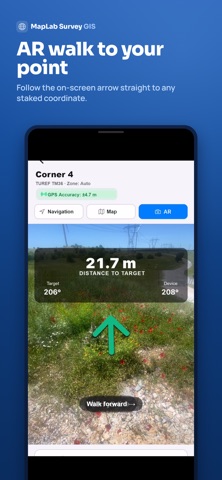
• Stake-out now uses the fix from your external receiver
• Levelling: misclosure, tolerance check and adjustment
YOUR OWN COUNTRY'S COORDINATE SYSTEM
• The app now opens with your country's national system — 148 countries
• Coordinates shown in the system you picked: map, attributes and photo stamps
• Move to another zone and the correct zone of the same system follows you
• Search coordinate systems by country name; country picker added to the panel
• You are warned when the system you picked does not cover where you are
MORE
• Import MBTiles tile packages — bring your own basemap
• UTM/MGRS grid on the map
• GPX import and export
• Up to 4 photos per feature
• Rapid mode now works for lines and areas too
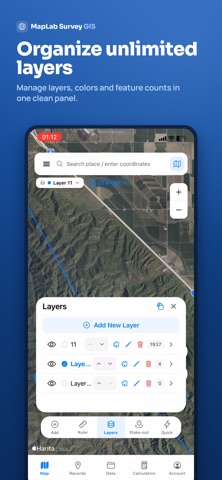
• Organise layers into folders and nested groups
• Branded field reports: company name, logo, signature block and QR code
• Offline maps: download, list and delete
• Landscape and tablet support
• Field forms and the whole interface in 46 languages
FIXES
• Map freezing resolved
• Switching files in the CAD viewer no longer throws you back to the map
• Drawings now ask for confirmation before being discarded
• Stake-out distance was not updating — fixed
• Many bug fixes and performance improvements
Released Apr 14, 2026. Current version shipped Aug 18, 2026.
Store description
MapLab Survey is a field GIS and land surveying app: draw, measure, open CAD files, convert coordinates and export to DXF — online or offline.
WORKS IN YOUR COUNTRY, OUT OF THE BOX
The app opens with your country's own national coordinate system and language. 148 countries, 46 languages. Move to another zone and the correct zone of the same system follows you — no manual setup.
DRAW & MEASURE WITH GPS
• Points, lines and polygons
• Area, perimeter, distance, coordinates, slope and volume
• Vertex editing, object snap and undo
• Rapid point mode for fast field capture
CAD VIEWER (BETA)
• Open DXF and Netcad NCZ on a clean canvas — no import needed
• Real layer names and colours
• Snap to endpoint, midpoint and edge; measure with a crosshair
• Draw points, lines and areas, then send only what you want to the map
SCANNED PLANS & MAP SHEETS (BETA)
• Place JPG, PNG and PDF sheets on the map
• Automatic georeferencing from world-file (.jgw/.pgw/.tfw) and .prj
• Control-point placement with residual check
• Rotation of skewed scans is corrected
COORDINATE SYSTEMS
• 564 systems: national grids, UTM, Gauss-Krüger, Lambert and more
• Search by country name in your own language
• Warns you when a system does not cover where you are
• Convert between WGS84, UTM, ED50, TUREF and national grids
GNSS, RTK & STAKE-OUT
• External GNSS / RTK over Bluetooth, with NTRIP
• Antenna height, point averaging and fix-quality gate
• Total station import: Leica GSI, Carlson RW5, Sokkia SDR33, Nikon RAW
• Stake-out with live guidance and AR camera route view
• Site calibration against control points
• GPS track recording, compass and north direction
ANALYSIS & ENGINEERING
• Split area into equal parts (subdivision)
• Buffer / zone of influence
• Volume and cut/fill calculation
• Slope analysis, elevation profile and cross-section
• Contour lines
• Attribute query
• Spatial operations: union, intersection, difference and dissolve
• UTM/MGRS grid on the map
COGO & COORDINATE TOOLS
• Traverse: create points from azimuth and distance
• Convert selected features between systems in bulk
• Type in a single coordinate and convert it
• Export converted coordinates as CSV
BRANDED FIELD REPORTS
• Generate PDF, XLS or TXT reports from your features
• Add your company name and logo
• Prepared-by line and signature block
• QR code with project and location summary
• Choose which features and which system to include
LAYERS & BASEMAPS
• Satellite, street, topographic, light and dark basemaps
• Add WMS and XYZ services
• Create, edit, show and hide layers
• Organise layers into folders and nested groups
• Zoom to layers or features
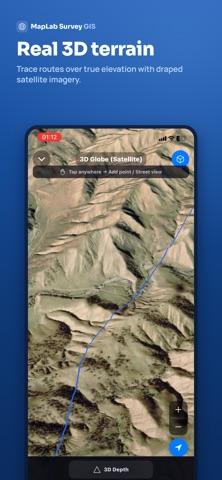
3D GLOBE & VISUAL REVIEW
• 3D terrain over satellite imagery
• Street view for field preview
• Historical satellite imagery
INFRASTRUCTURE & VECTOR MAP
• OpenInfraMap: power lines, substations and power plants
• Pipelines and telecom infrastructure
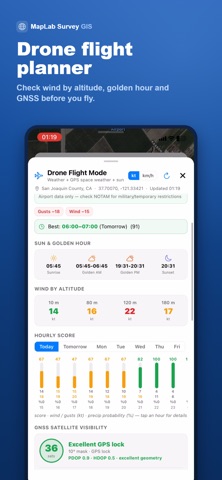
DRONE FLIGHT MODE
Review flight suitability, weather, wind and field conditions before drone operations.
ATTRIBUTES, PHOTOS & FORMS
• Name, description and custom attributes
• Photos attached to features, with a coordinate stamp
• Field forms
• Address lookup with reverse geocoding
• Custom labels, icons, colours and line styles
OFFLINE WORK
• Download map areas for offline use
• Import MBTiles tile packages — bring your own basemap
• GeoPDF: coordinates embedded in the PDF are read automatically
• Draw, measure and record with no connection
IMPORT & EXPORT
KML/KMZ, DXF, GeoJSON, CSV, TXT, GPX and PDF — works with QGIS, AutoCAD, NetCAD and other GIS/CAD software.
SMART APP GUIDE
Built-in help for drawing, measurement, coordinate systems, WMS, DXF/KML, layers and analysis.
Online map services, WMS/XYZ layers, address lookup and the smart guide may require internet access.
Measure in the field. Manage on the map. Export your data.
Terms of Use (EULA):
https://www.apple.com/legal/internet-services/itunes/dev/stdeula/
See this store page in another country
Prices, ranks and reviews are per country. Revenue above is already worldwide.