★★★★★Oct 21, 2026
Remarkable desktop-level app that feels better than iMovie on a MacExcellent app

Estimated from the grossing charts of Oct 21, 2026 in the 53 countries we track, and ratings growth on the App Store.
From our daily snapshots of every grossing chart.
| Sep 24, 2026 | not in a grossing chart |
| Sep 25, 2026 | not in a grossing chart |
| Sep 26, 2026 | not in a grossing chart |
| Sep 27, 2026 | not in a grossing chart |
| Sep 28, 2026 | not in a grossing chart |
| Sep 29, 2026 | not in a grossing chart |
| Sep 30, 2026 | not in a grossing chart |
| Oct 1, 2026 | not in a grossing chart |
| Oct 2, 2026 | not in a grossing chart |
| Oct 3, 2026 | not in a grossing chart |
| Oct 4, 2026 | not in a grossing chart |
| Oct 5, 2026 | not in a grossing chart |
| Oct 6, 2026 | not in a grossing chart |
| Oct 7, 2026 | not in a grossing chart |
| Oct 8, 2026 | not in a grossing chart |
| Oct 9, 2026 | not in a grossing chart |
| Oct 10, 2026 | not in a grossing chart |
| Oct 11, 2026 | not in a grossing chart |
| Oct 12, 2026 | not in a grossing chart |
| Oct 13, 2026 | not in a grossing chart |
| Oct 14, 2026 | not in a grossing chart |
| Oct 15, 2026 | not in a grossing chart |
| Oct 16, 2026 | not in a grossing chart |
| Oct 17, 2026 | not in a grossing chart |
| Oct 18, 2026 | not in a grossing chart |
| Oct 19, 2026 | not in a grossing chart |
| Oct 20, 2026 | not in a grossing chart |
| Oct 21, 2026 | not in a grossing chart |
| Oct 22, 2026 | not in a grossing chart |
| Oct 23, 2026 | not in a grossing chart |
Measured from the store, not estimated.
From the latest 303 reviews on the United States App Store, May 30, 2026 to Oct 21, 2026: 29% are 1 or 2 stars. Open a theme to read what people wrote.
19 of the 1 and 2 star reviews.
★★★★★ Yeah I tried to use it and then my IPad glitched out
★★★★★ Before I render 25 mins video 4k - 60fps - 120,000 kbps bitrate without any storage issue , but now (after new update) it's asking me you will need 50gb for render I'm shocked because my Ipad has 809GB free space
★★★★★ The Apple ID login doesn't work and that is how I log in to my Pro account.
12 of the 1 and 2 star reviews.
★★★★★ Can't even log into my account through the iPad app.
★★★★★ You can't even sign into it with your CapCut account information.
★★★★★ Logged me out and won't let me sign in with my PAID ACCOUNT
12 of the 1 and 2 star reviews.
★★★★★ It's too slow and makes the video choppy.
★★★★★ crashes, corrupts mp3 files, laggy, 2023 A16 13 inch iPad for reference.
★★★★★ Look, this app is amazing as an ipad user who was looking for a substitute for the regular laggy capcut app, which is especially janky on an ipad.
10 of the 1 and 2 star reviews.
★★★★★ The app also freezes up when exporting sometimes.
★★★★★ Otherwise, you will face the issue of the app crashing wildly.
★★★★★ The app freezes everytime I open a new project.
7 of the 1 and 2 star reviews.
★★★★★ It's way too small I can't touch or see anything I can't even edit my video
★★★★★ But holy this lacks so hard.
★★★★★ Second time trying to edit a video using this and for whatever reason it can't export correctly.
4 of the 1 and 2 star reviews.
★★★★★ I'm just a small YouTuber trying to make videos on a laggy IPad and when CapCut gave me the option to download this I thought it would be exactly like it but I was wrong.
★★★★★ It behaves like a fake app.
★★★★★ I downloaded this to use on my ipad but it's useless.
3 of the 1 and 2 star reviews.
★★★★★ Before I render 25 mins video 4k - 60fps - 120,000 kbps bitrate without any storage issue , but now (after new update) it's asking me you will need 50gb for render I'm shocked because my Ipad has 809GB free space
★★★★★ I've updated the app today in hopes it would finally work but no.
★★★★★ Update: 10 emails back and forth and CapCut Customer Service is useless.
3 of the 1 and 2 star reviews.
★★★★★ CapCut customer support should not be allowed to be called support until they learn the definition of the word
★★★★★ There is not enough evidence to support that it is a genuine app.
★★★★★ Update: 10 emails back and forth and CapCut Customer Service is useless.
19 of the 4 and 5 star reviews.
★★★★★ I've only been using CapCut pad for less than a month and i have been making very good edits
★★★★★ I just started using it upon recommendation by Gemini, and it's the most intuitive editor I've ever seen since I started with Premiere on a Mac Quadra in 1994.
★★★★★ It's perfectly suited for Ipad users and a bit hard to find out what to do or how to use it as there is limited information on this new app but it's easy to use if you poke around a bit.
14 of the 4 and 5 star reviews.
★★★★★ If it is always available for free, I'm not quitting
★★★★★ I can access to advanced features for free, so now, I don't have to pay for it.
★★★★★ It's basically CapCut but u get Standard for free jojo but it's literally pc version
12 of the 4 and 5 star reviews.
★★★★★ Otherwise this is a great app weather your editing for fun or editing videos to post.
★★★★★ I said it to my best cousins I sent all of my videos. It's so good.
★★★★★ Easy to use, hours of fun!
8 of the 4 and 5 star reviews.
★★★★★ THIS IS AWESOME VERY VERY USEFUL FOR YT
★★★★★ IT HELPS ME EDIT VERY GOOD AND I GET BETTER AT EDITING RATE IT 5 STARSSS
★★★★★ I like it and stuff, and I feel like it's pretty useful for iPad!
4 of the 4 and 5 star reviews.
★★★★★ Best quality no ads gives me good template.
★★★★★ The quality of my videos comes out nice, I highly recommend this!
★★★★★ Disability is horrible. I do not know how to fix it. Please help me.
Found by matching words and phrases in the reviews, not read by a person. A review can count toward more than one theme.
Latest reviews, United States App Store.
Excellent app
почему невозможно добавить свой шрифт? 🥲
Hi CapCut team, First, thank you for adding the option to import custom fonts to CapCut for iPad. I sent feedback about this earlier, and I was really happy to see the feature added. I can’t know whether my request contributed, but I appreciate that you listen to your users and keep improving the app. I love using CapCut. I’d like to report an issue with audio clips on the timeline. After trimming an audio clip, I often have trouble extending it again by dragging its edge. The gesture doesn’t register reliably: sometimes it works, but often I have to try repeatedly before the clip finally extends. This happens whether I use an Apple Pencil or my finger, and it takes a lot of time to get the adjustment right. I don’t seem to have the same problem with video clips or other timeline elements, such as text and color adjustments. It seems to happen specifically with audio clips. For example, if I trim a sound and then want to extend it to include more audio, or extract audio from a video and extend it slightly, I often can’t do it smoothly. Could you please look into how audio clip edges respond to dragging on the iPad? Thank you for your work on CapCut.
I honestly love this app I hope nothing happens to it
Not age appropriate would recommend for ages 10+ There’s lots of swears on the app
Can you please remove all the inappropriate things that kids can’t see? I would love that, so please do that. It would also be good for other kids, too. I’m not just trying to do it for myself, but for the safety of other children too. 🙏😅👍
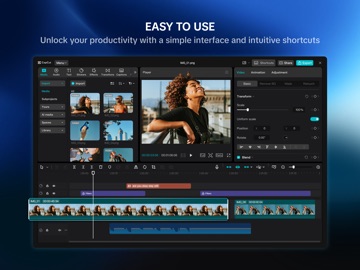


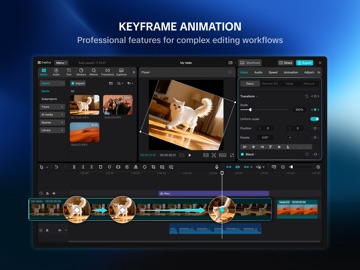

Apple Search Ads this app ran in the last 90 days, from Apple's public ad repository.
Where this app is buying and earning its users. Each link opens pre filtered.
Most repeated terms in the listing. Highlighted ones also appear in the title.
Released May 27, 2026. Current version shipped Oct 12, 2026.
Prices, ranks and reviews are per country. Revenue above is already worldwide.