← Back to charts
CapCut Pad icon
APP STORE

CapCut Pad

Bytedance Pte. Ltd · Photo & Video · Japan store
NOT IN TOP 100 HERE
View on App Store ↗ Google Play version →

Revenue

Estimated from today's grossing charts in the 53 countries we track, and ratings growth on the App Store.

EST. REVENUE / MONTH · WORLDWIDE
Unranked
Not in any grossing chart, and it sells nothing in the store (no in-app purchases, free download). Any revenue comes from ads or payments outside the store, which we can't see.
EST. LIFETIME DOWNLOADS
7.9K to 22.5K
Estimated from ratings count
RATINGS
225
AVG RATING
4.15
PRICE
無料
AGE
333d
LAST UPDATE
9d ago
VERSION
9.6.0
SIZE
1353 MB
AGE RATING
4+

Last 28 days

From our daily snapshots of every grossing chart.

DAYS IN A GROSSING CHART
0 / 28
COUNTRIES NOW
0 (was 0)
EST. REVENUE FROM CHARTS, DAILY · APP STORE ONLY EST
Show daily values
Sep 24, 2026not in a grossing chart
Sep 25, 2026not in a grossing chart
Sep 26, 2026not in a grossing chart
Sep 27, 2026not in a grossing chart
Sep 28, 2026not in a grossing chart
Sep 29, 2026not in a grossing chart
Sep 30, 2026not in a grossing chart
Oct 1, 2026not in a grossing chart
Oct 2, 2026not in a grossing chart
Oct 3, 2026not in a grossing chart
Oct 4, 2026not in a grossing chart
Oct 5, 2026not in a grossing chart
Oct 6, 2026not in a grossing chart
Oct 7, 2026not in a grossing chart
Oct 8, 2026not in a grossing chart
Oct 9, 2026not in a grossing chart
Oct 10, 2026not in a grossing chart
Oct 11, 2026not in a grossing chart
Oct 12, 2026not in a grossing chart
Oct 13, 2026not in a grossing chart
Oct 14, 2026not in a grossing chart
Oct 15, 2026not in a grossing chart
Oct 16, 2026not in a grossing chart
Oct 17, 2026not in a grossing chart
Oct 18, 2026not in a grossing chart
Oct 19, 2026not in a grossing chart
Oct 20, 2026not in a grossing chart
Oct 21, 2026not in a grossing chart
Best rank Sep 24, 2026: not ranked. Now: not ranked. Days at zero are days outside every grossing chart.

Money and momentum

Measured from the store, not estimated.

WHAT IT CHARGES
No in-app purchases
Earns from its upfront price, ads or payments outside the store.
REVIEW MOMENTUM
Too few reviews
Fewer than 3 recent written reviews in this country.
RELEASE CADENCE
7 updates in 90 days
  • Typical gap between releases10 days
From the last 20 versions listed on the App Store.
RATING BREAKDOWN
225 ratings
5★66%
4★12%
3★4%
2★5%
1★12%

Store screenshots

ScreenshotScreenshotScreenshotScreenshotScreenshot

App Store ads

Apple Search Ads this app ran in the last 90 days, from Apple's public ad repository.

Apple's ad repository couldn't be reached right now. Try again later.

Growth research

Where this app is buying and earning its users. Each link opens pre filtered.

ASO keywords

Most repeated terms in the listing. Highlighted ones also appear in the title.

capcut10capcut capcut5capcut pad3pad capcut3capcut net3net clause3region capcut3tiktok3youtube3instagram3facebook3pad2net2clause2region2capcutapp2

What's new in 9.6.0

- いくつかの既知の問題を修正し、トリミング体験を改善しました。 CapCutを応援していただきありがとうございます。一緒に素敵な瞬間を創造できることを楽しみにしています。

Released Nov 23, 2025. Current version shipped Oct 12, 2026.

Store description

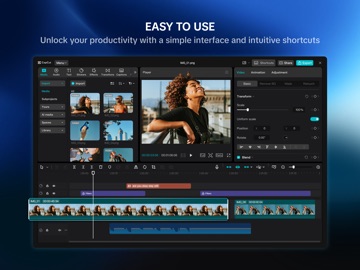
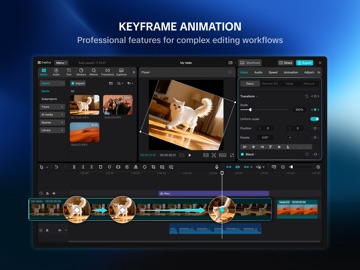
CapCut Pad版をお試しください! CapCut Padでは、デスクトップレベルの編集機能を指先で手軽に扱えます。正確なマルチトラックタイムライン編集、スムーズなパフォーマンス、タッチ操作向けのクリエイティブな作業環境をお楽しみください。 CapCutは、使いやすい動画および写真編集ツール、さまざまなアプリ内フォントとエフェクト、キーフレームアニメーション、スムーズなスローモーション、クロマキー、動画の安定化などの強力な機能といった、その瞬間をキャプチャして仕上げるための機能がすべて揃っています。 自動キャプション、テキスト読み上げ、モーショントラッキング、背景削除などのユニークな機能で、高品質な動画を作成しましょう。TikTok、YouTube、Instagram、WhatsApp、Facebookであなたの個性をアピールしてバズりましょう! 機能 基本的な動画編集 • クリップをトリミングして短くしたり、動画を分割・結合したりできます。 • 動画の速度を0.1倍から100倍の範囲で調整して、スムーズな速度曲線を適用できます。 • ズームインやズームアウトのエフェクトで動画クリップをアニメーションを付けることができます。 • フリーズフレーム機能で最高の瞬間をハイライトできます。 • クリップ間にクリエイティブなトランジションを追加できます。 高度な動画編集 • すべての設定でキーフレームアニメーションがサポートされています。 • オプティカルフローとスピードカーブでスムーズなスローモーションを作成できます。 • クロマキーで特定の色を削除できます。 • マルチトラックタイムラインで複数のクリップを配置してプレビューできます。 • 手ぶれ補正を適用して映像を安定させることができます。 インテリジェント機能 • 自動キャプション:音声認識を使用して字幕を自動生成できます。 • テキスト読み上げ:テキストを複数の言語やトーンの音声に変換できます。 • 背景削除:ワンクリックで自動的に背景を削除できます。 テキストとステッカー • さまざまなフォントやスタイルでテキストを追加したり、クリエイティブなテンプレートを使用したりできます。 • 字幕を動画のタイムラインで直接調整できます。 人気のエフェクトとフィルター • 人気のスタイルに合った毎週更新されるフィルターを使ってみることができます。 • グリッチ、ぼかし、3Dなどの多数のビジュアルエフェクトを適用できます。 • 明るさ、コントラスト、彩度を自由に調整できます。 音楽とサウンドエフェクト • 動画に音楽トラックやサウンドエフェクトを追加できます。 • 既存の映像からオーディオ、クリップ、録音内容を抽出できます。 簡単な共有 • スマートHDRで動画を最大4K 60fpsでエクスポートできます。 • 解像度やフォーマットをカスタマイズしてから、ソーシャルプラットフォームにそのまま共有できます。 CapCutは、魅力的で高品質な動画を作成するために必要なすべてが詰まったオールインワンの動画エディターおよび動画メーカーアプリケーションです。初心者でも数秒でCapCutを使い始めることができ、上級ユーザーでも動画を編集するために必要なすべての機能を活用することができます。動画エディター機能と動画メーカー機能という独自の機能で自分の個性を表現しましょう。動画を作成したら、ワンクリックでソーシャルメディアに共有して、皆のいいね、コメント、注目を集めることができます。 利用規約 — https://www.capcut.net/clause/user-agreement?region=us プライバシーポリシー — https://www.capcut.net/clause/privacy?region=us お問い合わせ CapCutに関するご質問がある場合は、capcut.support@bytedance.comまでお問い合わせください。 Facebook:https://www.facebook.com/capcutapp/ Instagram:https://www.instagram.com/capcutapp/ YouTube:https://www.youtube.com/c/capcutofficial TikTok:https://www.tiktok.com/@capcut

See this store page in another country

Prices, ranks and reviews are per country. Revenue above is already worldwide.