← Back to charts
HEIC to JPG Converter – NoExif icon
APP STORE

HEIC to JPG Converter – NoExif

Charles-Adrien Fournier · Photo & Video · United States store
NOT IN TOP 100 HERE
View on App Store ↗ Instagram card
Revenue a month, worldwide
Too small to estimate
Not enough chart or ratings data
New ratings
Tracking
Daily counts start building from today
Rating
5.0 of 5
1 ratings in this store
Countries it ranks in
0
was 0 on Oct 19, 2026

Revenue

Estimated from the grossing charts of Oct 26, 2026 in the 53 countries we track, and ratings growth on the App Store.

EST. REVENUE / MONTH · WORLDWIDE
Unranked
Not in any grossing chart, and too few ratings (1) to read its growth. Most apps at this stage earn little or nothing.
EST. LIFETIME DOWNLOADS
35 to 100
Estimated from ratings count
RATINGS
1
AVG RATING
5.00
PRICE
Free
AGE
1.2y
LAST UPDATE
20d ago
VERSION
2.0.0
SIZE
37 MB
AGE RATING
4+

Last 30 days

From our daily snapshots of every grossing chart.

DAYS IN A GROSSING CHART
0 / 30
COUNTRIES NOW
0 (was 0)
EST. REVENUE FROM CHARTS, DAILY · APP STORE ONLY EST
Show daily values
Sep 27, 2026not in a grossing chart
Sep 28, 2026not in a grossing chart
Sep 29, 2026not in a grossing chart
Sep 30, 2026not in a grossing chart
Oct 1, 2026not in a grossing chart
Oct 2, 2026not in a grossing chart
Oct 3, 2026not in a grossing chart
Oct 4, 2026not in a grossing chart
Oct 5, 2026not in a grossing chart
Oct 6, 2026not in a grossing chart
Oct 7, 2026not in a grossing chart
Oct 8, 2026not in a grossing chart
Oct 9, 2026not in a grossing chart
Oct 10, 2026not in a grossing chart
Oct 11, 2026not in a grossing chart
Oct 12, 2026not in a grossing chart
Oct 13, 2026not in a grossing chart
Oct 14, 2026not in a grossing chart
Oct 15, 2026not in a grossing chart
Oct 16, 2026not in a grossing chart
Oct 17, 2026not in a grossing chart
Oct 18, 2026not in a grossing chart
Oct 19, 2026not in a grossing chart
Oct 20, 2026not in a grossing chart
Oct 21, 2026not in a grossing chart
Oct 22, 2026not in a grossing chart
Oct 23, 2026not in a grossing chart
Oct 24, 2026not in a grossing chart
Oct 25, 2026not in a grossing chart
Oct 26, 2026not in a grossing chart
Best rank Sep 27, 2026: not ranked. Now: not ranked. Days at zero are days outside every grossing chart.

Money and momentum

Measured from the store, not estimated.

WHAT IT CHARGES
3 purchases listed
  • Exif Metadata Pro$1.99
  • Exif Metadata Pro$19.99
  • Lifetime$24.99
Top in-app purchases as listed on the App Store, in local prices.
REVIEW MOMENTUM
Too few reviews
Fewer than 3 recent written reviews in this country.
RELEASE CADENCE
3 updates in 90 days
  • Typical gap between releases25 days
From the last 8 versions listed on the App Store.
RATING BREAKDOWN
1 ratings
5★100%
4★0%
3★0%
2★0%
1★0%

Store screenshots

ScreenshotScreenshotScreenshotScreenshotScreenshotScreenshotScreenshot

App Store ads

Apple Search Ads this app ran in the last 90 days, from Apple's public ad repository.

No App Store ads in the EU
None in the last 90 days.

Apple only publishes ads shown in the EU (EU Digital Services Act), with a 7 day delay. An app that advertises only outside the EU shows nothing here.

Growth research

Where this app is buying and earning its users. Each link opens pre filtered.

ASO keywords

Most repeated terms in the listing. Highlighted ones also appear in the title.

size9photos9photo8remove8location7pro7hidden data6convert6noexif5date5choose5date camera5remove location5right4hidden4data4share4right format3remove hidden3camera details3convert jpeg3reduce file3file size3set size3

What's new in 2.0.0

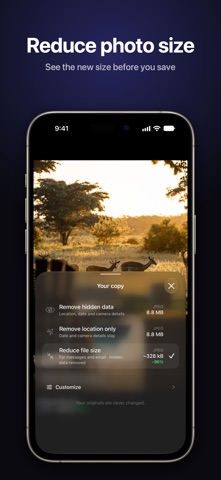
NoExif 2.0 is a full redesign. • Browse your photo library right in NoExif, then open one photo or select several • Pick your copy and see its format and size before you save: remove hidden data, remove location only, convert to JPEG or reduce file size • Target size is now a hard limit: the copy never exceeds the size you set • When photos can't be exported, NoExif says how many and lets you try again for just those • Photos cleaned from the share sheet keep their orientation • Removing the date now also removes the GPS date and time • The share sheet action shows the NoExif icon

Released Aug 29, 2025. Current version shipped Oct 6, 2026.

Store description

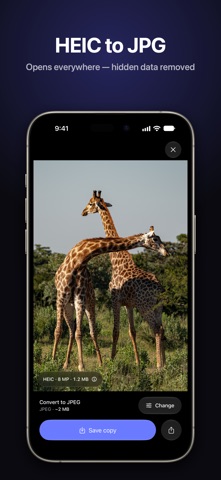
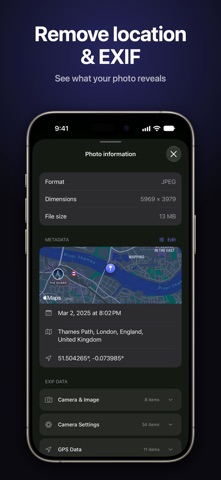
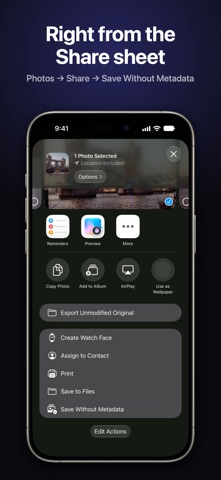
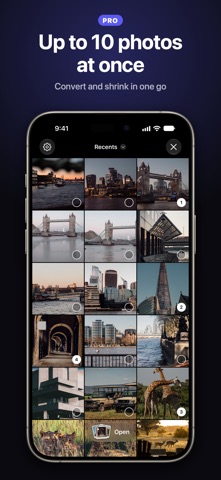
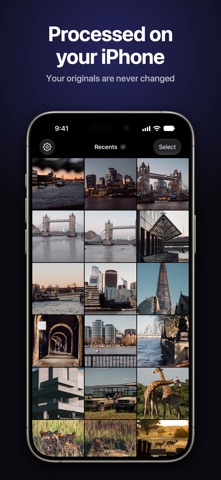
Smaller files, the right format, no hidden data. NoExif makes a copy of your photo that's ready to share: the right format, the right size, and none of the hidden data you didn't mean to send. Your originals are never changed, and photos are processed on your iPhone. PICK YOUR COPY • Remove hidden data: location, date and camera details • Remove location only • Convert to JPEG: the fix for "this file won't open" • Reduce file size, for messages and email See the format and size of each choice before you save. COMPRESS • Preview the new size before you save • Set a size limit (10 MB, 5 MB, 2 MB, 1 MB or your own) and the copy never exceeds it (Pro) • Pick your own quality with a slider (Pro) CONVERT • HEIC to JPG, plus JPG, PNG and HEIC in any direction • Resize while you convert: Original, 4K, 2K or 1K, in a single pass CLEAN • See what a photo reveals before you send it: map, address, date, camera • Choose what to remove and keep the rest (Pro) • Edit a photo's date and location on a map (Pro) YOUR LIBRARY, RIGHT IN THE APP Browse your albums, open a photo, or select up to 10 and export them in one go (Pro). STRAIGHT FROM THE SHARE SHEET Select photos in Photos, tap Share, choose Save Without Metadata. Clean, convert and compress without leaving the app you're in. PRIVATE BY DESIGN NoExif cleans, converts, and compresses photos on your iPhone. Photo files are not uploaded for processing. When a photo contains GPS coordinates, Apple’s location service may be used to show an address. Usage analytics and purchase services may use the network. COMMON QUESTIONS • How do I convert HEIC photos to JPG on iPhone? Open them in NoExif, or share them from Photos, and choose Convert to JPEG. • How do I remove the location from a photo before sending it? Choose Remove location only, or Remove hidden data to also remove the date and camera details. • How do I make a photo small enough for an email or an upload form? Choose Reduce file size, or set a size limit with Pro. GO PRO Unlimited photos, several photos at once, exact quality and size, date and location editing, and your own choice of what to remove. Weekly, yearly, or a one-time Lifetime purchase. Perfect for: email attachments that bounce, marketplace listings, upload forms with size limits, social posts, résumés and portfolios, and travel photos you'd rather not geotag. ---- Privacy policy: https://cafournier.com/noexif/privacypolicy Terms of use: https://cafournier.com/noexif/terms

See this store page in another country

Prices, ranks and reviews are per country. Revenue above is already worldwide.

More from Charles-Adrien Fournier

Pantry & Fridge: FridgeBuddy
Food & Drink
209 ratingsAnalyze →
ShowcaseMe, minimalist folio
Photo & Video
241 ratingsAnalyze →
Bracket Maker - Clashly
Sports
85 ratingsAnalyze →
Feel It ?
Games
22 ratingsAnalyze →
Fitness Stats: Activity Recap
Health & Fitness
16 ratingsAnalyze →
Findr - Easy book finder
Utilities
2 ratingsAnalyze →
Printable Coloring Fun
Entertainment
0 ratingsAnalyze →
Pick finger - Choose who
Entertainment
1 ratingsAnalyze →
Tier List Maker – Tierly
Utilities
8 ratingsAnalyze →