ASO keywords
Most repeated terms in the listing. Highlighted ones also appear in the title.
und18fotos10die8oder8auf7ein7pro7datum und6ein foto6fotos auf6noexif5hle5entfernen5datum5umwandeln5hlen5foto5versteckte daten5ausw hlen5daten4ohne4deine4standort4aus4
What's new in 2.0.0
NoExif 2.0 ist komplett neu gestaltet.
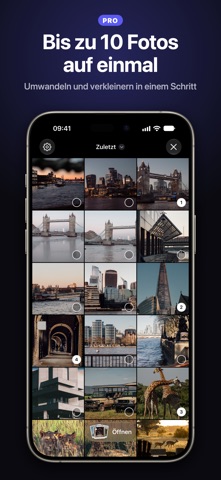
• Durchsuche deine Mediathek direkt in NoExif und öffne ein Foto oder wähle mehrere aus
• Wähle deine Kopie und sieh Format und Größe vor dem Speichern: versteckte Daten entfernen, nur Standort entfernen, in JPEG umwandeln oder Dateigröße reduzieren
• Die Zielgröße ist jetzt ein festes Limit: Die Kopie ist nie größer als der gewählte Wert
• Wenn Fotos nicht exportiert werden können, zeigt NoExif an, wie viele, und du kannst nur diese erneut versuchen
• Im Teilen-Menü bereinigte Fotos behalten ihre Ausrichtung
• Beim Entfernen des Datums werden jetzt auch GPS-Datum und -Uhrzeit entfernt
• Die Aktion im Teilen-Menü zeigt das NoExif-Symbol
Released Aug 29, 2025. Current version shipped Oct 6, 2026.
Store description
Kleinere Dateien, das richtige Format, keine versteckten Daten.
NoExif erstellt eine Kopie deines Fotos, die bereit zum Teilen ist: im richtigen Format, in der richtigen Größe und ohne versteckte Daten, die du nicht mitschicken wolltest. Deine Originale bleiben unverändert, und die Fotos werden auf deinem iPhone verarbeitet.
WÄHLE DEINE KOPIE
• Versteckte Daten entfernen: Standort, Datum und Kamerainfos
• Nur Standort entfernen
• In JPEG umwandeln: die Lösung für „Diese Datei lässt sich nicht öffnen“
• Dateigröße reduzieren, für Nachrichten und E-Mails
Sieh Format und Größe jeder Option, bevor du speicherst.
KOMPRIMIEREN
• Neue Größe vor dem Speichern sehen
• Größenlimit festlegen (10 MB, 5 MB, 2 MB, 1 MB oder ein eigener Wert): Die Kopie ist nie größer (Pro)
• Eigene Qualität per Schieberegler wählen (Pro)
UMWANDELN
• HEIC in JPG sowie JPG, PNG und HEIC in jede Richtung
• Beim Umwandeln die Größe ändern: Original, 4K, 2K oder 1K, in einem Durchgang
BEREINIGEN
• Sieh, was ein Foto verrät, bevor du es sendest: Karte, Adresse, Datum, Kamera
• Auswählen, was entfernt wird, und den Rest behalten (Pro)
• Datum und Ort eines Fotos auf einer Karte bearbeiten (Pro)
DEINE MEDIATHEK, DIREKT IN DER APP
Durchsuche deine Alben, öffne ein Foto oder wähle bis zu 10 aus und exportiere sie in einem Schritt (Pro).
DIREKT AUS DEM TEILEN-MENÜ
Fotos in „Fotos“ auswählen, auf Teilen tippen, „Ohne Metadaten speichern“ wählen. Bereinigen, umwandeln und komprimieren, ohne die App zu verlassen.
PRIVAT VON GRUND AUF
NoExif bereinigt, konvertiert und komprimiert Fotos auf deinem iPhone. Fotodateien werden zur Verarbeitung nicht hochgeladen. Enthält ein Foto GPS-Koordinaten, kann Apples Ortungsdienst eine Adresse anzeigen. Nutzungsanalyse und Käufe können Netzwerkdienste verwenden.
HÄUFIGE FRAGEN
• Wie wandle ich HEIC-Fotos auf dem iPhone in JPG um? Öffne sie in NoExif oder teile sie aus „Fotos“ und wähle „In JPEG umwandeln“.
• Wie entferne ich den Standort aus einem Foto, bevor ich es sende? Wähle „Nur Standort entfernen“ oder „Versteckte Daten entfernen“, um auch Datum und Kamerainfos zu entfernen.
• Wie mache ich ein Foto klein genug für eine E-Mail oder ein Upload-Formular? Wähle „Dateigröße reduzieren“ oder lege mit Pro ein Größenlimit fest.
PRO WERDEN
Unbegrenzt viele Fotos, mehrere Fotos auf einmal, genaue Qualität und Größe, Datum und Ort bearbeiten und selbst auswählen, was entfernt wird. Wöchentlich, jährlich oder einmalig mit Lifetime.
Perfekt für: E-Mail-Anhänge, die zurückkommen, Kleinanzeigen, Upload-Formulare mit Größenlimit, Social Media, Bewerbungen und Portfolios sowie Reisefotos ohne Geotag.
----
Datenschutz: https://cafournier.com/noexif/privacypolicy
Nutzungsbedingungen: https://cafournier.com/noexif/terms
See this store page in another country
Prices, ranks and reviews are per country. Revenue above is already worldwide.