ASO keywords
Most repeated terms in the listing. Highlighted ones also appear in the title.
vittle14vittle pro8video6pro5presenter camera5videos4whiteboard records3shapes arrows3video library3powerful tool3projects pages3upgrade vittle3share3time3shapes3focus3presenter3camera3library3powerful3tool3turn2whiteboard2records2
What's new in 7.1
+ Recording reliability improvements
Released May 9, 2013. Current version shipped Oct 21, 2026.
Store description
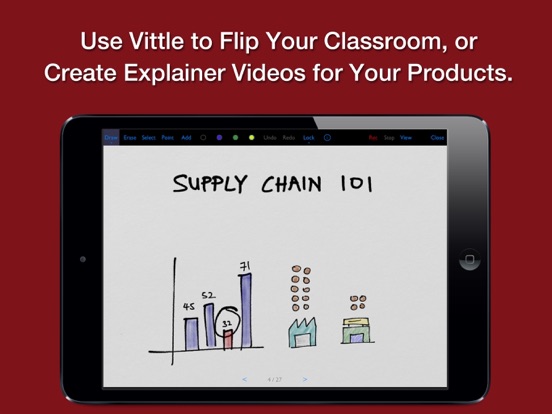
Turn your iPad into a whiteboard that records whatever you draw and write. Annotate, sketch, and talk, and Vittle captures it all as a video you fully own and can share with anyone.
No complicated setup. No hours spent editing. Just hit record and explain, then instantly share.
CREATE A VIDEO, JUST BY WRITING AND SPEAKING
Get your point across, clearly and exactly, every time.
Vittle works like a magic whiteboard that records what you write and say:
- Annotate images, PDFs, and slides with the ultra-smooth ink of our proprietary Inkflow Engine,
- Add shapes, arrows, connectors, and text, then align and style them in a tap,
- Resize and move anything around the page,
- Zoom in to focus on key points,
- Put yourself in the picture with the presenter camera,
- Describe even complex topics in a clear and engaging way.
FLIP YOUR CLASSROOM WITH ENGAGING VIDEO SCREENCASTS
Use Vittle to build a video library on any subject. It is also a powerful tool for collaborating across time and space with any number of people.
Vittle is a powerful tool for flipping your classroom. Turn your lessons into a reusable video library that students can watch and learn from on their own, then use valuable class time to focus on individual coaching.
Or let your students use Vittle to record their thought process as they work through problems. Let them explain everything to each other in short clips to help focus attention and raise engagement.
YOUR VIDEOS, YOUR WAY. NO INTERNET CONNECTION NEEDED.
Vittle produces video files that you own and control. Share them on YouTube, Vimeo, social media, or anywhere else. You can also email videos directly, or securely post them to your company server. No account or third-party service is needed, and everything works offline.
FREE TO START
Vittle is free to download and use. The free edition includes:
- Up to 3 projects, with up to 3 pages each,
- Up to 5 minutes of recording per project,
- Basic shapes, the presenter camera, and the full set of drawing tools.
Videos made with the free edition include a small "Made with Vittle" watermark.
UPGRADE TO VITTLE PRO
When you are ready for more, upgrade to Vittle Pro in the app:
- Unlimited projects and pages,
- Unlimited recording length - hours and hours if you like,
- No watermark on your videos,
- The full library of shapes, arrows, and symbols,
- Photo backgrounds for the presenter camera.
Choose the plan that suits you:
- Monthly or Yearly subscription, with a free trial for new subscribers,
- Lifetime: pay once and keep Vittle Pro forever, no subscription.
Schools and organizations that buy through Apple School Manager or Apple Business Manager can get Vittle Pro as a separate app for volume purchase.
THE FUTURE OF CREATIVITY
We strongly believe that the iPad is a powerful creativity device. Vittle is a new kind of tool that's designed specifically with the iPad in mind. We can't wait to see what you'll do with it!
SUBSCRIPTION DETAILS
Vittle Pro subscriptions renew automatically unless cancelled at least 24 hours before the end of the current period. Payment is charged to your Apple Account at confirmation of purchase, or when the free trial ends. You can manage or cancel your subscription in your App Store account settings. Any unused portion of a free trial is forfeited when you purchase a subscription.
Terms of Use: https://www.apple.com/legal/internet-services/itunes/dev/stdeula/
Privacy Policy: https://www.qrayon.com/home/privacy/
See this store page in another country
Prices, ranks and reviews are per country. Revenue above is already worldwide.