← Back to charts
Tacho 55 Pro. GPS-Kit. icon
APP STORE

Tacho 55 Pro. GPS-Kit.

Stanislav Dvoychenko · Navigation · Germany store
NOT IN TOP 100 HERE
View on App Store ↗ Instagram card
Revenue a month, worldwide EST
$1.8K
Likely $585 to $5.3K
▼ 75.8% in 13 days
New ratings
+3
in 2 days, 6.4K in total
Rating
4.7 of 5
346 ratings in this store
Countries it ranks in
8
was 7 on Oct 17, 2026

Revenue

Estimated from the grossing charts of Oct 23, 2026 in the 53 countries we track, and ratings growth on the App Store.

EST. REVENUE / YEAR · WORLDWIDE
$21.1K
No Google Play version found
EST. LIFETIME DOWNLOADS
12.1K to 34.6K
Estimated from ratings count
WHERE IT EARNS · EST. / MONTH
  • New Zealand #95 Navigation$1.2K · 71%
  • Egypt #78 Navigation$508 · 29%
HOW SURE ARE WE
Small app: combines its grossing ranks with ratings growth (37 new ratings a month on average since launch). Tested on 418 apps with verified revenue: typically off by about 2.6 times, so the range is wide. Countries we don't track (and Google Play in China, which doesn't exist) aren't included, and neither are ads or web payments. Gross revenue before store fees.
RATINGS
346
AVG RATING
4.72
PRICE
3,99 €
AGE
14.4y
LAST UPDATE
30d ago
VERSION
6.4
SIZE
92 MB
AGE RATING
4+

Last 30 days

From our daily snapshots of every grossing chart and daily ratings counts.

DAYS IN A GROSSING CHART
30 / 30
COUNTRIES NOW
6 (was 5)
NEW RATINGS, LAST 2 DAYS
+3
EST. REVENUE A MONTH, DAILY · APP STORE EST
Show daily values
Sep 25, 2026$9.7K a month
Sep 26, 2026not in a grossing chart
Sep 27, 2026not in a grossing chart
Sep 28, 2026not in a grossing chart
Sep 29, 2026not in a grossing chart
Sep 30, 2026not in a grossing chart
Oct 1, 2026not in a grossing chart
Oct 2, 2026not in a grossing chart
Oct 3, 2026not in a grossing chart
Oct 4, 2026not in a grossing chart
Oct 5, 2026not in a grossing chart
Oct 6, 2026not in a grossing chart
Oct 7, 2026not in a grossing chart
Oct 8, 2026not in a grossing chart
Oct 9, 2026not in a grossing chart
Oct 10, 2026$7.3K a month
Oct 11, 2026$7.3K a month
Oct 12, 2026$2K a month
Oct 13, 2026$986 a month
Oct 14, 2026$1.1K a month
Oct 15, 2026$1.5K a month
Oct 16, 2026$1.3K a month
Oct 17, 2026$1.2K a month
Oct 18, 2026$1.4K a month
Oct 19, 2026$2K a month
Oct 20, 2026$1.4K a month
Oct 21, 2026$1.8K a month
Oct 22, 2026not in a grossing chart
Oct 23, 2026$1.8K a month
Oct 24, 2026not in a grossing chart
The same estimate as the headline, saved every day. Best rank Sep 25, 2026: #55 Navigation · AE. Now: #22 Navigation · QA.
RATINGS IN THE CORE COUNTRIES, DAILY
Show daily values
Oct 22, 20266.4K ratings
Oct 23, 20266.4K ratings
Oct 24, 20266.4K ratings
6.4K on Oct 22, 2026, 6.4K on Oct 24, 2026. New ratings track new downloads, even outside the charts.

Money and momentum

Measured from the store, not estimated.

WHAT IT CHARGES
No in-app purchases
Earns from its upfront price, ads or payments outside the store.
REVIEW MOMENTUM
1.3 reviews / week
  • Trendrising
  • Recent reviews average4.6 stars
  • Recent 1 and 2 star share6%
From the latest 500 written reviews, covering 2786 days. The store only returns this many, so this is the most recent slice.
RELEASE CADENCE
2 updates in 90 days
  • Typical gap between releases43 days
From the last 25 versions listed on the App Store.
RATING BREAKDOWN
346 ratings
5★81%
4★14%
3★3%
2★1%
1★1%

What users want

From the latest 500 reviews on the Germany App Store, Mar 9, 2019 to Oct 7, 2026: 6% are 1 or 2 stars. Open a theme to read what people wrote.

WHAT THEY COMPLAIN ABOUT · SHARE OF BAD REVIEWS
Price and subscription21%

6 of the 1 and 2 star reviews.

★★★★★ They don't give the option to cancel the subscription
★★★★★ I paid to download and the advanced settings say to pay a monthly fee? No.
★★★★★ This app is useless if your tablet is a Wi-Fi only! Just realized I gave away $4! I can't use it!
Limits, credits, locked features11%

3 of the 1 and 2 star reviews.

★★★★★ With the app I have to set the limit to buzz.
★★★★★ Does not know the speed limit unless you program it in first.
★★★★★ I wanted it to alert me if I'm over the speed limit.
Wrong or poor results11%

3 of the 1 and 2 star reviews.

★★★★★ Completely useless Road with a variable speed limit.
★★★★★ This app is useless if your tablet is a Wi-Fi only!
★★★★★ this app used to be good and all of a sudden this stupid “gps accuracy” crap started and i did everything it told me to do and IT DOESNT WORK THIS APP MAKES ME WANNA THROW MY PHONE I WANT A REFUND
WHAT THEY ASK FOR
  • I just wish you could lock the fields So they wouldn't change when you touch the screen 5★, Jul 24, 2026
  • But I wish I could have the tilt display in airplane instead of the car image. 5★, Apr 10, 2026
  • Good app, wish it did CarPlay 4★, Apr 7, 2026
  • It met my needs at the time but offered little more that excited me. 5★, Oct 14, 2025
  • Needs added to CarPlay! 5★, Jun 8, 2025
  • But for the those of us that need a tool that is rich in functionality and a work horse of a tool for serious motorcycling - this has it all and then a whole lot more. 5★, Mar 25, 2025
  • I would love to see the open-source speed limit Information integrated into a soon-to-be-released version as has been mentioned on the developer's website. 5★, Sep 2, 2024
  • Please do add the coordinates part it would be nice to know where I'm at in certain situations! 5★, Aug 29, 2024
WORDS THAT KEEP COMING UP IN BAD REVIEWS
speed limit3
WHAT THEY LOVE · SHARE OF GOOD REVIEWS
Accurate, great results11%

47 of the 4 and 5 star reviews.

★★★★★ So accurate in all details.
★★★★★ Been using this app for a while to make sure that my speedometer is accurate on my trucks or how far off it is after getting larger tires very reliable easy to use app
★★★★★ My speed is always accurate to the display that I'm passing.
Useful, it helps8%

34 of the 4 and 5 star reviews.

★★★★★ This app is one of the most useful apps to travel with.
★★★★★ Very glad to see the recent expanded capabilities as they are timely and useful and will steer (😂) you away from more commercially-oriented competitors that cover only a fraction of what's built-in to Speedometer.
★★★★★ This app is incredibly useful for a reliable indication of your phone's GPS performance.
Easy to use7%

29 of the 4 and 5 star reviews.

★★★★★ Been using this app for a while to make sure that my speedometer is accurate on my trucks or how far off it is after getting larger tires very reliable easy to use app
★★★★★ Easy to use and plenty of neat little options.
★★★★★ This app is easy to use and extremely accurate… plus the customer service is off-the-charts!
Worth the money4%

20 of the 4 and 5 star reviews.

★★★★★ The free app is a bargain, and a small fee will give you many more choices.
★★★★★ It is low cost and when considering the breadth of functionality a great value.
★★★★★ Don't skimp out and get the free one buy the pro it's worth every penny!
Great support3%

14 of the 4 and 5 star reviews.

★★★★★ Top quality, best support.
★★★★★ The support, **continued **improvements by the creator is just outstanding!
★★★★★ This app is easy to use and extremely accurate… plus the customer service is off-the-charts!

Found by matching words and phrases in the reviews, not read by a person. A review can count toward more than one theme.

What users say

Latest reviews, Germany App Store.

★★★★★Oct 7, 2026
Simply da best!

This app is one of the most useful apps to travel with. Comes in handy in so many ways including when the speedometer isn’t precise. Feature packed, stable, fresh and current.

★★★★★Sep 26, 2026
Great

Best I have used

★★★★★Sep 24, 2026
Speedometers

I love it

★★★★★Sep 24, 2026
Tolle Ergänzung

Ich nutze diese App seit vielen Jahren ergänzend zu meinem Tacho im Wohnmobil und bin von den Möglichkeiten, die diese App bietet, total begeistert -

★★★★★Sep 16, 2026
Simply The Best

So comprehensive and loaded with features I’ve used it for years and am still discovering more. Nothing else comes close. Very glad to see the recent expanded capabilities as they are timely and useful and will steer (😂) you away from more commercially-oriented competitors that cover only a fraction of what’s built-in to Speedometer. Full Disclosure: Absolutely no connection, direct or indirect, to the brilliant minds behind this App.

★★★★★Sep 1, 2026
Speedometer 55pro. GPS kit.

I’ve had this app for allot of years. I mostly use it on my e-bike. So many great features I can’t even count. So accurate in all details. Stan is constantly updating to better the app. Top quality, best support. Thank you Stan! ***** more than five stars in this day and age.

Apps like this

Same category, earning about as much.

Store screenshots

ScreenshotScreenshotScreenshotScreenshotScreenshotScreenshotScreenshotScreenshotScreenshotScreenshot

App Store ads

Apple Search Ads this app ran in the last 90 days, from Apple's public ad repository.

Apple's ad repository couldn't be reached right now. Try again later.

Growth research

Where this app is buying and earning its users. Each link opens pre filtered.

ASO keywords

Most repeated terms in the listing. Highlighted ones also appear in the title.

und31sie29oder17gps8mit8die7geschwindigkeit6sie die5tacho4strecken4auf4sie strecken3sie mit3erg nzen3nzen sie3teilen sie3und kilometer3geschwindigkeit und3gpx kml3kml und3und kmz3exportieren sie3erstellen sie3nutzen sie3

What's new in 6.4

■ Rallye ‣ Erstellen Sie ein Roadbook, bevor Sie die Strecke fahren: Zeichnen Sie die Route auf der Karte, prüfen Sie das Gelände und erzeugen Sie Streckennotizen mit Chinesenzeichen. ‣ Machen Sie aus einem aufgezeichneten Track ein Roadbook: Wählen Sie auf dem Track-Detailbildschirm Mehr > Rallye-Buch. Streckennotizen entstehen aus dem Straßenverlauf, auf Wunsch mit Chinesenzeichen, und können die verknüpften Wegpunkte des Tracks einbeziehen. ‣ Ihre Routen bleiben bearbeitbar. Verwenden Sie Ihre Roadbooks für spätere Fahrten erneut oder drucken Sie sie aus. ‣ Hören Sie die Streckennotizen in der Sprache des Roadbooks mit Ihrer bevorzugten verfügbaren Stimme. ‣ Wenn Sie ein Roadbook fahren, zeigt das Rallye-Bedienfeld die nächste Streckennotiz mit ihrem Chinesenzeichen und die verbleibende Distanz. Stellen Sie eine Anzeige auf Routenkarte, um Route und Notizen auf einer Live-Karte zu verfolgen, oder auf Streckennotizen, um die nächste Anweisung im Blick zu behalten. ■ Kamera und Video ‣ Kamera-Updates bieten ein einstellbares Videolicht für Dunkelheit, Objektivwahl und Zoomen durch Ziehen, Fokussperre mit manuellem und objektivbezogenem Fokus, Speicherung von Objektiv und Zoom, Auslöseverzögerung und Qualität bei wenig Licht, anpassbare Suchergesten und Aufnahmen mit schwarzem Bildschirm. ■ Bewegungsaufzeichnung und Video-Overlays ‣ Machen Sie aus jedem abgeschlossenen Track, auch aus älteren, Overlay-Videos für Ihren Videoeditor: Wählen Sie auf dem Track-Detailbildschirm Mehr > Overlay-Videos > Exportieren. Geschwindigkeit und Karte stammen aus dem Track selbst, daher ist keine zusätzliche Aufzeichnung nötig. ‣ Für Nick & Roll und G-Kreuz öffnen Sie vor der Trackaufzeichnung MENÜ > Einstellungen > GPS-Tracking > Bewegungs- und Tondaten und aktivieren Sie Bewegung und Ton aufzeichnen. Dabei wird kein Handyvideo aufgenommen, sodass Sie die Overlays mit Aufnahmen einer anderen Kamera kombinieren können, synchronisiert per kurzem Klatschen oder Trackton. ‣ Wählen Sie bei Tracks mit Bewegungsdaten Mehr > Ansichtsoptionen > Karte + Neigung & Rollen + Diagramm. Bewegen Sie das Diagramm, um Karte und Neigungs-/Rollanzeige synchron zu verfolgen. ‣ Exportieren Sie einzelne Overlays aus Ihren aufgenommenen Videos für andere Videoprojekte, auch als transparente Clips für Ihr Schnittprogramm. ‣ Wählen Sie in einem gespeicherten Video Exportieren > Overlay-Videos, um dessen Overlays zu exportieren. ■ Videotranskripte und Untertitel ‣ Transkribieren Sie unter iOS 26 oder neuer Videos auf dem Gerät in unterstützten Sprachen, suchen Sie nach gesprochenen Wörtern und springen Sie zu Treffern, korrigieren, kopieren oder teilen Sie Transkripte, importieren oder exportieren Sie SRT-Untertitel und zeigen Sie Untertitel bei der Wiedergabe oder in Exporten mit Einblendungen an. ■ Offline-Karten ‣ Laden Sie Retina-Karten direkt von Blocoware Open Street Map zur Offline-Nutzung herunter. Kompakte WebP-Kacheln halten Downloads klein und sparen Daten; die Detailstufe reicht bis Zoom 17, Hausnummern sind ab Zoom 16 sichtbar. ‣ Sehen Sie die geschätzte Downloadgröße und setzen Sie pausierte Downloads fort, ohne bereits gespeicherte Daten zu verlieren. ■ Punkte und Fotodokumentation ‣ Alltägliche Änderungen bleiben einfach. Öffnen Sie im Punkteditor Mehr und wählen Sie Erweitert unter Ansicht, um Punkt- und Fotowerte zu vergleichen, Konflikte zu lösen und unterstützte Metadaten abzugleichen. ■ Ein übersichtlicherer Hauptbildschirm ‣ Wir haben die automatische Infotainment-Diashow entfernt, damit der Bildschirm übersichtlicher bleibt und Sie Geschwindigkeit und Karte im Blick behalten. Die Fahrtstatistiken sind weiterhin in den Fahrtdetails verfügbar.

Released Jun 10, 2012. Current version shipped Sep 24, 2026.

Store description

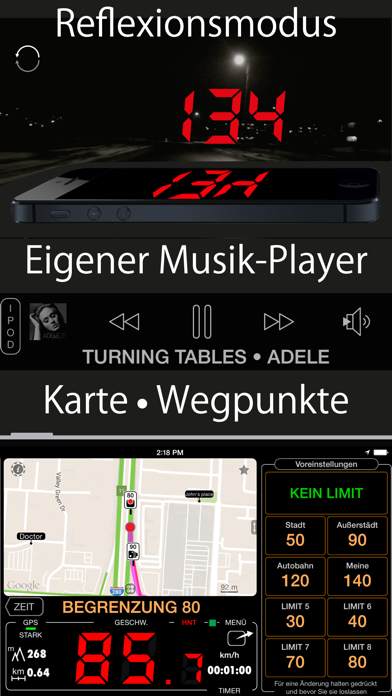
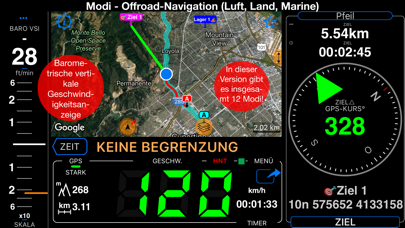
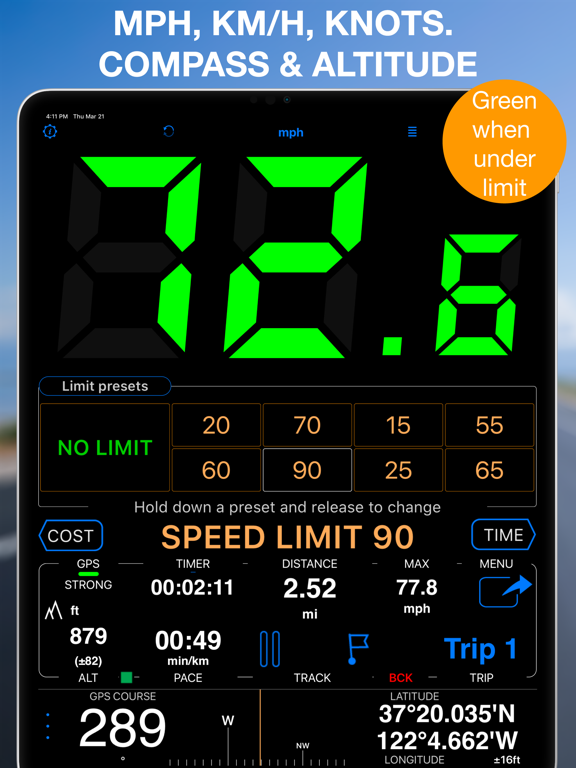
Ein leistungsstarker GPS-Tacho mit Fahrtenbuch, Kostenmonitor sowie Dashcam- und Action-Aufnahmen. Behalten Sie die Geschwindigkeit im Blick, erhalten Sie klare Tempowarnungen und erfassen Sie Strecken, Kilometer und Fahrtkosten. Funktionen: ■ Tempolimits & Warnungen Legen Sie mit 4 oder 8 Schnellwahltasten Tempolimits fest. Beim Überschreiten wechseln die großen Ziffern von Grün zu Rot und ein Signal ertönt. Optional merkt sich die App, wo ein Limit verwendet wurde, und wendet es dort erneut an. ■ Kosten, Kraftstoff & Elektroauto Kosten für Verbrenner und Elektroautos in Echtzeit. Verbrenner: Preis und Verbrauch (US/UK MPG oder L/100 km). Elektroauto: Strompreis/kWh, nutzbare Kapazität, Vollladungsreichweite und Ladeeffizienz inklusive Ladeverlusten. Ergänzen Sie Kosten pro km/Meile, teilen Sie sie mit Mitfahrern und überwachen Sie die geschätzte Restreichweite mit konfigurierbaren Warnungen. ■ GPS-Fahrtenbuch Zeichnen Sie Strecken und Kilometer auf, prüfen Sie Geschwindigkeit, Höhe und Statistiken und folgen Sie früheren Strecken auf der Karte. Import und Export sind in GPX, KML und KMZ möglich. ■ GPS-Dashcam & Action-Kamera Nehmen Sie Straße oder Action mit synchroner Geschwindigkeit, Position, Richtung und Karte auf. Wählen Sie für Live-Ansicht, Wiedergabe oder gestempelte Exporte Geschwindigkeit, Karte, Nick & Roll oder G-Cross. Das saubere Original bleibt erhalten; exportieren Sie alles oder einen Bereich. Speichern Sie einen Frame als georeferenziertes Foto und Wegpunkt. Loop bewahrt nur das letzte Zeitfenster. iOS erlaubt Video aus Datenschutzgründen nur bei sichtbarem Aufnahmebildschirm. Beim Verlassen oder im Hintergrund stoppt es. Keine Parküberwachung oder automatischer Start über den Fahrzeugstrom. ■ Kilometerrechner & PDF-Berichte Berechnen Sie Entfernung, Kraftstoffkosten und Kilometer zwischen Adressen. Ergänzen Sie Lücken im Fahrtenbuch, kategorisieren Sie Fahrten und erstellen Sie anpassbare Berichte für Erstattung oder Steuerunterlagen. ■ Karten Nutzen Sie Apple-, Google-, leere oder Offline-Straßen-, Satelliten- und Topokarten. Importieren Sie MBTiles/SQLiteDB oder laden Sie Karten in der App. Erstellen, importieren und teilen Sie KMZ-Überlagerungen. ■ Modi & Navigation Zur Auswahl stehen Vollbild-Tacho, gespiegeltes HUD, Rallye-Computer, G-Kraft-Monitor, Taxameter, Kartenansicht, Wassersport, Leerlauf-Timer, Gleitschirm-Instrumente sowie Land-, Luft- und Seenavigation. ■ Wegpunkte & Blitzerwarnungen Erstellen Sie Wegpunkte mit Foto oder Audionotiz, Annäherungswarnung oder Tempolimit. Importieren/exportieren Sie CSV, GPX, KML und KMZ. Nutzen Sie importierte Kamera-/Blitzerdaten oder die integrierte Bibliothek. ■ Sprachcoach & Siri-Kurzbefehle Lassen Sie sich Entfernung, Dauer, Geschwindigkeit und Höhe in gewählten Intervallen ansagen. Starten oder stoppen Sie die GPS-Aufzeichnung und setzen Sie Tempolimits per Siri. ■ Barometer-Instrumente Vertikalgeschwindigkeit und Höhe in Echtzeit auf kompatiblen Geräten, mit QFE/QNH. ■ Automatische Kilometeraufzeichnung Tacho und GPS-Aufzeichnung können bei Aktivierung im Hintergrund arbeiten. Optionales Auto-Tracking protokolliert Steuer-/Erstattungsfahrten ohne manuellen Start und Stopp. 50 kostenlose Auto-Strecken monatlich sind enthalten; unbegrenzt per Upgrade. ■ Geschwindigkeit & Distanz 0–999 in km/h, MPH oder Knoten; Maximum, Durchschnitt, Distanz, Höhe und Sonnenzeiten. ■ Datenschutz & Kompatibilität Standortdaten dienen nur Tacho und Fahrtenaufzeichnung in der App und gehen nicht an Dritte. Erfordert iPhone oder Cellular-iPad mit GPS; Wi-Fi-iPads und iPods benötigen externes GPS. Dauerhafte GPS-Nutzung kann die Batterielaufzeit verkürzen. Nutzungsbedingungen: https://www.apple.com/legal/internet-services/itunes/dev/stdeula/

See this store page in another country

Prices, ranks and reviews are per country. Revenue above is already worldwide.

More from Stanislav Dvoychenko

Tacho 55 Start. GPS Black Box
Navigation
3.1K ratingsAnalyze →