ASO keywords
Most repeated terms in the listing. Highlighted ones also appear in the title.
touch9sound9instruments7loops7record7song7third party6recording5create5instrument5audio5touch instruments5multi touch5touch instrument5sound library5garageband4music4multi4guitar4effects4third4party4smart4live loops3
What's new in 2.3.19
This update includes stability improvements and bug fixes
Released Mar 10, 2011. Current version shipped Aug 13, 2026.
Store description
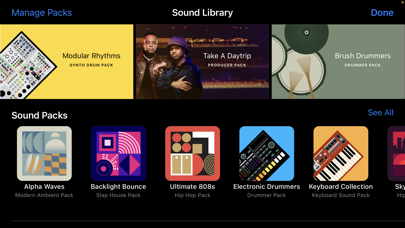
GarageBand turns your iPad, and iPhone into a collection of Touch Instruments and a full-featured recording studio — so you can make music anywhere you go. And with Live Loops, it makes it easy for anyone to have fun creating music like a DJ. Use Multi-Touch gestures to play keyboards, guitars, and create beats that make you sound like a pro — even if you’ve never played a note before. Plug in a guitar or bass and play through classic amps and stompbox effects. Use a Touch Instrument, microphone, or a guitar to instantly record a performance, with support for up to 32 tracks. Use the Sound Library to download additional free instruments, loops, and sound packs created by some of the biggest producers in the world. And then share your song with friends and family.
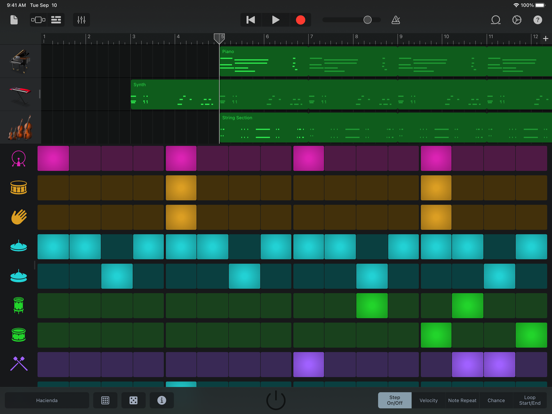
Live Loops. Make music like a DJ
• Use Multi-Touch to tap and trigger a Live Loop cell or group of cells
• Get started with templates or build your own grid from scratch with Apple Loops
• Create custom loops by recording directly into a cell using any Touch Instrument
• Use Remix FX to perform DJ-style effects
• Tap record to capture your performance
Play your iPad, and iPhone, like a musical instrument
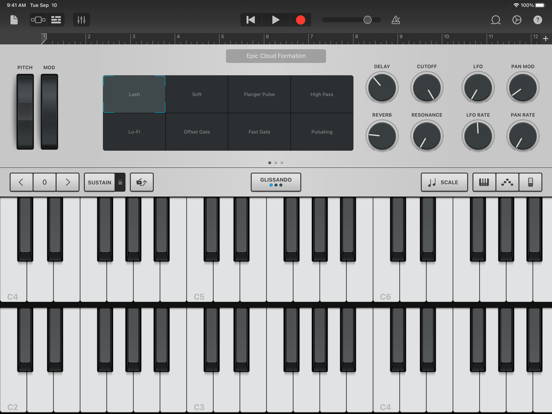
• Play a variety of musical instruments on the innovative Multi-Touch keyboard
• Play and record using the Alchemy Touch Instrument
• Build grooves inspired by classic electronic drum machines with the Beat Sequencer
• Download free instruments, loops, and sound packs for GarageBand with the Sound Library
• Capture any sound and apply studio-class effects
• Recreate legendary guitar or bass rigs using virtual amps and stompboxes
• Record performances from third-party music apps directly into GarageBand using Audio Unit Extensions*
Drummer
• Add virtual session drummers to your song, who take direction and play realistic grooves
• Choose from acoustic, electronic drummers and percussionists**
• Each character provides their own sound and the ability to create over a million realistic grooves and fills
Sound like a virtuoso with Smart Instruments
• Play an entire string orchestra using Smart Strings
• Perform with Chord Strips and autoplay using any keyboard instrument
• Groove with a variety of Smart Basses using upright, electric, and synth sounds
• Strum chords or trigger autoplay patterns on an acoustic and electric Smart Guitar
Create a song anywhere you go
• Record, arrange, and mix your song with up to 32 tracks using Touch Instruments, audio recordings, and loops***
• Record multiple times over any song section and choose your favorite using Multi-Take Recording
• Use professional mixing effects, including Visual EQ, Bitcrusher, and Overdrive
• Recording, mixing and exporting a song can be done at 24-bit audio resolution
• Trim and place musical regions exactly where you want them to play
• Automate the volume and record the movement of controls on Touch Instruments
• Add comments or lyric ideas to your song with an integrated notepad
Share your songs
• Keep your songs up to date across all devices using iCloud Drive
• Create custom ringtones and alerts for your iPad, or iPhone
• Share your songs using email or to social media sites like SoundCloud****
• Remotely add new tracks to your Logic Pro project from your iPhone, or iPad via iCloud
* Requires compatible third-party Audio Unit Extensions apps from the App Store.
** Requires free download from GarageBand Sound Library.
*** Multitrack recording requires a compatible third-party audio interface.
**** Sharing to some social media sites may require apps like iMovie, Clips or other third-party apps
See this store page in another country
Prices, ranks and reviews are per country. Revenue above is already worldwide.