← Back to charts
Compass 55. Map & GPS kit. icon
APP STORE

Compass 55. Map & GPS kit.

Kalimex-Consulting s.r.o. @Blocoware & Stanislav Dvoychenko · Navigation · United States store
NOT IN TOP 100 HERE
View on App Store ↗ Instagram card
Revenue a month, worldwide EST
$1.2K
Likely $416 to $3.7K
▼ 100.0% in 11 days
New ratings
Tracking
Daily counts start building from today
Rating
4.7 of 5
1.6K ratings in this store
Countries it ranks in
5
was 5 on Oct 16, 2026

Revenue

Estimated from the grossing charts of Oct 21, 2026 in the 53 countries we track, and ratings growth on the App Store.

EST. REVENUE / YEAR · WORLDWIDE
$15K
26 new ratings a month on average since launch
EST. LIFETIME DOWNLOADS
54.3K to 155K
Estimated from ratings count
WHERE ITS USERS ARE · SHARE OF RATINGS
  • United States 1.6K ratings50%
  • Turkey 270 ratings9%
  • France 184 ratings6%
  • Germany 168 ratings5%
  • Japan 156 ratings5%
  • Brazil 135 ratings4%
  • Canada 106 ratings3%
  • Australia 89 ratings3%
HOW SURE ARE WE
Not in any grossing chart, so this comes from ratings growth (26 new ratings a month on average since launch): revenue grows with new ratings, more slowly for apps that collect ratings fast. Tested on 418 apps with verified revenue: typically off by about 2 times, and big earners tend to come out low. Countries we don't track (and Google Play in China, which doesn't exist) aren't included, and neither are ads or web payments. Gross revenue before store fees.
RATINGS
1.6K
AVG RATING
4.70
PRICE
Free
AGE
10.1y
LAST UPDATE
36d ago
VERSION
5.9
SIZE
89 MB
AGE RATING
4+

Last 30 days

From our daily snapshots of every grossing chart.

DAYS IN A GROSSING CHART
27 / 30
COUNTRIES NOW
3 (was 1)
EST. REVENUE A MONTH, DAILY · APP STORE EST
Show daily values
Sep 24, 2026$1.3K a month
Sep 25, 2026$1.3K a month
Sep 26, 2026$1.3K a month
Sep 27, 2026$1.3K a month
Sep 28, 2026$1.3K a month
Sep 29, 2026not in a grossing chart
Sep 30, 2026not in a grossing chart
Oct 1, 2026not in a grossing chart
Oct 2, 2026not in a grossing chart
Oct 3, 2026not in a grossing chart
Oct 4, 2026not in a grossing chart
Oct 5, 2026not in a grossing chart
Oct 6, 2026not in a grossing chart
Oct 7, 2026not in a grossing chart
Oct 8, 2026not in a grossing chart
Oct 9, 2026not in a grossing chart
Oct 10, 2026$4.5K a month
Oct 11, 2026not in a grossing chart
Oct 12, 2026not in a grossing chart
Oct 13, 2026not in a grossing chart
Oct 14, 2026not in a grossing chart
Oct 15, 2026not in a grossing chart
Oct 16, 2026not in a grossing chart
Oct 17, 2026not in a grossing chart
Oct 18, 2026not in a grossing chart
Oct 19, 2026not in a grossing chart
Oct 20, 2026not in a grossing chart
Oct 21, 2026not in a grossing chart
Oct 22, 2026not in a grossing chart
Oct 23, 2026not in a grossing chart
The same estimate as the headline, saved every day. Best rank Sep 24, 2026: #81 Navigation · JP. Now: #38 Navigation · CO.

Money and momentum

Measured from the store, not estimated.

WHAT IT CHARGES
3 purchases listed
  • Pro pack$14.99
  • Pro pack.$1.99
  • Pro pack.$9.99
Top in-app purchases as listed on the App Store, in local prices.
REVIEW MOMENTUM
0.3 reviews / week
  • Trendfalling
  • Recent reviews average4.7 stars
  • Recent 1 and 2 star share2%
From the latest 137 written reviews, covering 3653 days.
RELEASE CADENCE
2 updates in 90 days
  • Typical gap between releases42 days
From the last 25 versions listed on the App Store.
RATING BREAKDOWN
1.6K ratings
5★81%
4★13%
3★4%
2★1%
1★2%

What users want

From the latest 137 reviews on the United States App Store, Oct 22, 2016 to Oct 2, 2026: 2% are 1 or 2 stars. Open a theme to read what people wrote.

WHAT THEY COMPLAIN ABOUT · SHARE OF BAD REVIEWS

Only 3 of the latest 137 reviews are 1 or 2 stars, too few to find patterns. Users are mostly happy.

WHAT THEY ASK FOR
  • It does exactly and much more than I need and a one time subscription is fantastic. 5★, Apr 25, 2024
  • I wish it has car play display 5★, Jul 14, 2022
  • I wish I could give you guys more than 5 stars, I can't say enough about this application, it's everything you need and more. 5★, Apr 5, 2022
  • But i really need an option to let me draw custom route and get its elevation profile (like in google earth on a pc). 5★, Dec 18, 2020
  • Wish there was more variety to download through the app, but what is available is good. 4★, Nov 6, 2020
  • I want to be able to use the full potential of the app! 5★, Apr 16, 2020
  • Wish there as a return to default settings. 5★, Dec 30, 2017
  • Please add the option to import kml and kmz files 5★, Jun 15, 2017
WORDS THAT KEEP COMING UP IN BAD REVIEWS

Nothing stands out.

WHAT THEY LOVE · SHARE OF GOOD REVIEWS
Accurate, great results13%

17 of the 4 and 5 star reviews.

★★★★★ Gives me accurate direction when walking in the woods.
★★★★★ We use it for soil borings and works great!
★★★★★ It is accurate on location and eta.
Easy to use12%

15 of the 4 and 5 star reviews.

★★★★★ This is a wonderful GPS for those of us who fly aircraft without electrical systems. I put my iPhone on the dashboard and Compass 55 points the direction to my destination, gives my ground speed, altitude, vertical…
★★★★★ This app seems to cover most of my needs, is quite easy to use and Stan, the developper behind it, is ready to answer any questions in a very short time.
★★★★★ It's not that the app is complicated to use, in fact, it is easy to use but I am an old fart and not very tech savvy.
Useful, it helps9%

12 of the 4 and 5 star reviews.

★★★★★ One of the best, most useful apps I have come across, and for this price a no brainer!
★★★★★ This app helps me get myself and others back to there camps safely!.
★★★★★ A little complicated for the techno challenged generation but fun and useful.
Fun, addictive4%

5 of the 4 and 5 star reviews.

★★★★★ I spend a lot of time outdoors and I do a lot of traveling I also have different tools to navigate something I can use to double check my location but let me tell the depths they went through to develop this one…
★★★★★ A little complicated for the techno challenged generation but fun and useful.
★★★★★ I highly recommend the paid version of this app, with its added features it makes using the app more fun.
Looks great2%

3 of the 4 and 5 star reviews.

★★★★★ It does take a little bit to learn the interface, but once you do it is a pretty cool app.
★★★★★ Excellent job on the interface and how all the features work.
★★★★★ Simply amazing, really love the UI look, love setting waypoints.

Found by matching words and phrases in the reviews, not read by a person. A review can count toward more than one theme.

What users say

Latest reviews, United States App Store.

★★★★★Oct 2, 2026
Compass 55.

Wow

★★★★★Sep 24, 2026
Compass 55

Good I use it sometimes it great. I recomemded.

★★★★★Sep 21, 2026
A great, simple inexpensive GPS!

This is a wonderful GPS for those of us who fly aircraft without electrical systems. I put my iPhone on the dashboard and Compass 55 points the direction to my destination, gives my ground speed, altitude, vertical speed and other important information. At the end I can export the track and relive the trip on Google Earth. I don’t fly anywhere without this great app.

★★★★★May 25, 2026
I am pilot

I have a plane ride in my aircraft private plane

★★★★★May 10, 2026
-/+ что-то более менее работающее

Программа хорошая, но не без недостатков, интерфейс примерно понятный, ориентироваться можно. Из недостатков, нет возможности изменить цвет иконок управления кроме как на оранжевый, не возможности поставить друго формат координат на главном экране, нет Яндекс карт 🫠

★★★★★May 6, 2026
Нет белых точек !!!

Авто прогрызка карты !!

Apps like this

Same category, earning about as much.

Store screenshots

ScreenshotScreenshotScreenshotScreenshotScreenshotScreenshotScreenshotScreenshotScreenshotScreenshot

App Store ads

Apple Search Ads this app ran in the last 90 days, from Apple's public ad repository.

Apple's ad repository couldn't be reached right now. Try again later.

Growth research

Where this app is buying and earning its users. Each link opens pre filtered.

ASO keywords

Most repeated terms in the listing. Highlighted ones also appear in the title.

gps12map9compass7waypoints7location7tracks6import6background6speed5support5export5gps tracks5import export5export waypoints5waypoints tracks5offline4video4recording4target4share4mode4video recording3target waypoint3coordinates converter3

What's new in 5.9

■ Offline maps ‣ Download Retina-quality maps for offline use directly from Blocoware Open Street Map. Compact WebP tiles keep downloads small and save data; map detail reaches zoom 17, with house numbers visible from zoom 16. ■ Motion recording and video overlays ‣ Turn any finished track, including older ones, into overlay videos for your video editor: on the track details screen, choose More > Overlay videos > Export. Speed and Map come from the track itself, so no extra recording is needed. ‣ To add Pitch & Roll and G-Cross, open MENU > Settings > GPS Tracking > Motion and audio data and enable Include motion and audio before you record a track. No phone video is recorded, so you can pair the overlays with footage from another camera, synced by a short clap or the track audio. ‣ On tracks with motion data, choose More > View options > Map + pitch & roll + chart to scrub the chart with the map and pitch-and-roll instrument in sync. ‣ Export individual overlays from your recorded videos for use in other video projects, including transparent clips for your video editor. ‣ From a saved video, choose Export > Overlay videos to export its overlays. ■ Camera and Video ‣ Record video even in complete darkness: in video mode, tap the flashlight button to turn on the Video light. To set its brightness from 25% to 100%, open Settings > Viewfinder controls on the camera screen. ‣ In the viewfinder, tap the zoom readout to choose a lens, or drag it to zoom. ‣ Lock focus, set it by hand, or save a focus position per lens. Use a shutter delay for steadier shots, and let the camera remember your last lens and zoom. ‣ For clearer low-light photos, open Settings > Photo capture settings on the camera screen and enable Prioritize quality in low light; hold steady during capture. ‣ Assign taps or holds in Viewfinder controls to capture photos or start/stop video; set Double tap to Black screen to hide the viewfinder during recording. ■ Video transcripts and captions ‣ On iOS 26 or later, open a saved video and choose More > Transcribe audio to transcribe its audio on-device in a language supported by your device. ‣ Find recordings by spoken words and jump straight to the moment you need. ‣ Correct, copy, or share the transcript, and import or export SRT subtitles. ‣ Follow speech with captions during replay and include them in stamped exports. ■ Points and boundaries ‣ Everyday edits stay simple. In the point editor, open More and choose Advanced under View to compare point/photo values, resolve conflicts, and sync supported metadata. ‣ See each area corner’s inner angle, including reflex angles above 180°, to read complex boundaries more clearly. Enable Show angle annotations in Maps > Common settings > Routes and areas annotations > Annotations.

Released Sep 23, 2016. Current version shipped Sep 17, 2026.

Store description

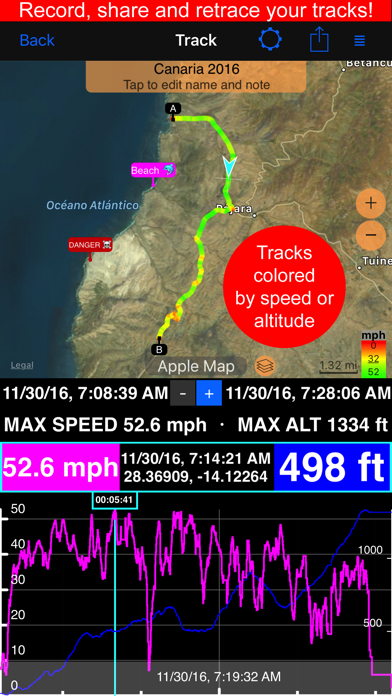
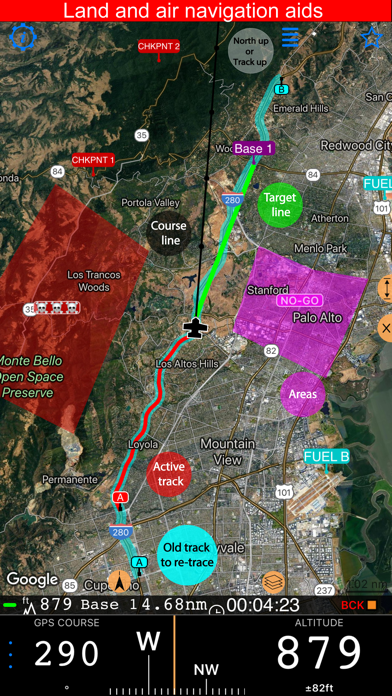
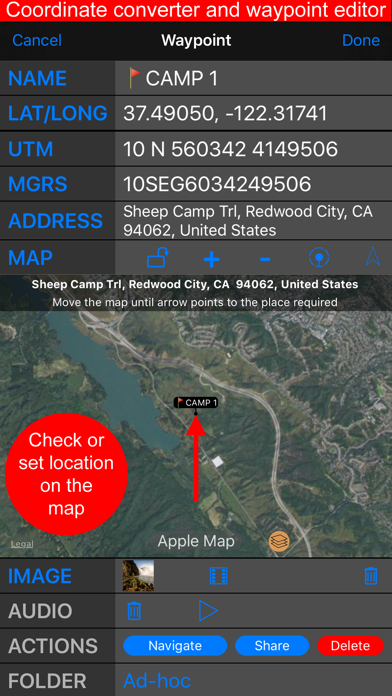
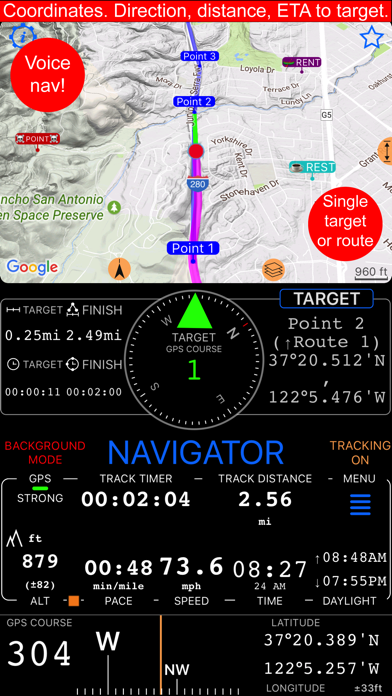
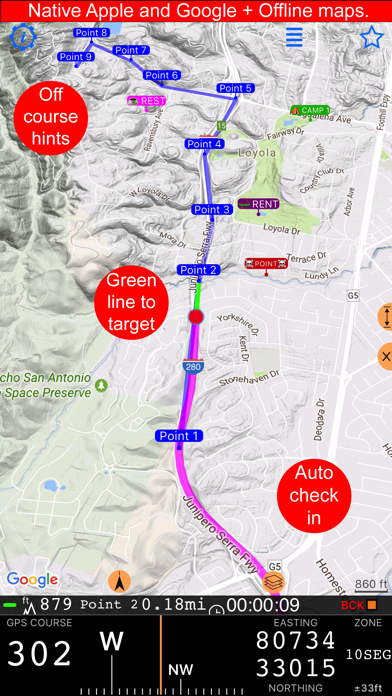
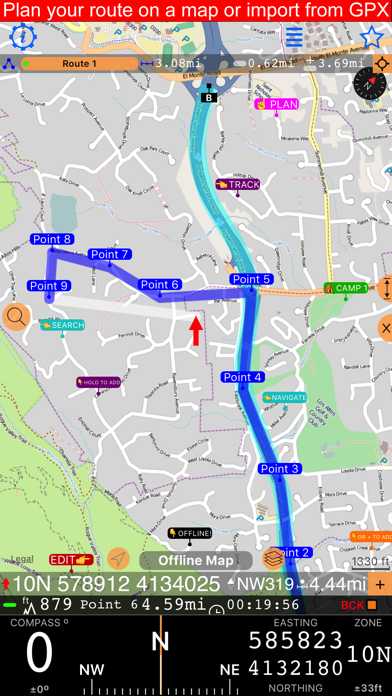
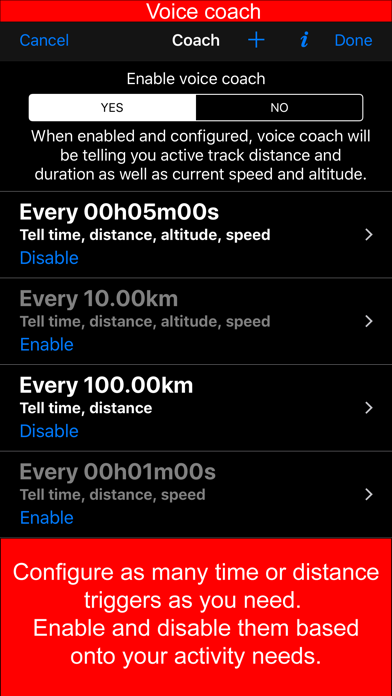
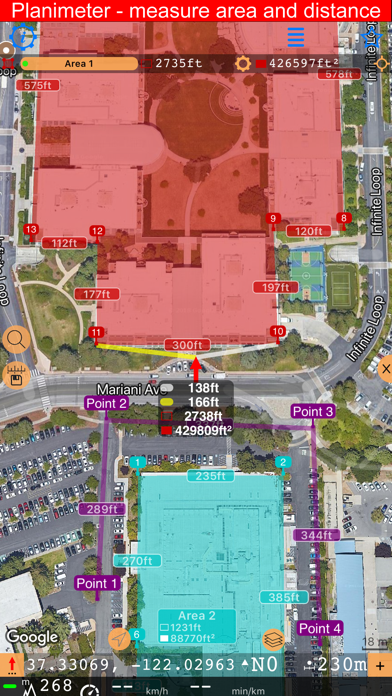
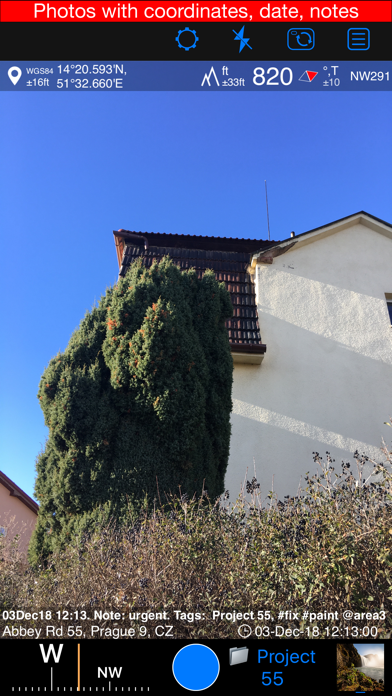
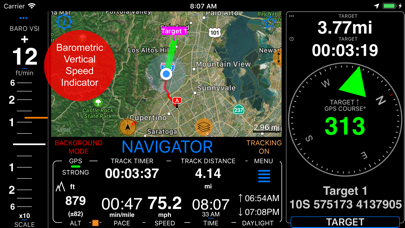
Compass 55 is an offline-capable GPS map and navigation toolkit for hiking, off-road travel, fieldwork, aviation, and marine use—with a compass, waypoints, routes, coordinate tools, and video recording. + Advanced target/waypoint editor. Can be also used as a coordinates converter. You can use map to check or set waypoint location and add photo or audio note. + Share your location via email, text message, Facebook or Twitter. This includes UTM, MGRS and Latitude/Longitude (MENU>Share my location). + You can use UTM, MGRS or Lat/Long, just pick your preference in settings (Coordinate Format). + Speedometer. Shows you the speed and pace. Speedometer also gives you options to control average and max speed and pace counters (MENU > RESET and PAUSE/RESUME counters). + Compass. Instant reaction compass, no delays. Automatically pickups the direction based on magnetic or GPS course. If you mostly walk or drive, you can change this automatic mode in app settings > Compass or GPS course. NATO mils? Same place in settings to set. + Magnetic declination δ for the current location and any location on the map (via World Magnetic Model, WMM, no need for data/internet). + Sunset and sunrise. So you can plan your travel better. + Arrow pointing to your target waypoint. Distance and bearing to it. + Create/measure routes and areas. + Barometric Vertical Speed Indicator (VSI, IVSI) in both scale and graph forms. + Integration of bluetooth sensors: Cycling cadence, Heart rate, Cycling speed. + Video recording for action and fieldwork. Add real-time G-Cross, map, QR code, and pitch & roll overlays as needed, then replay your recordings. The basic version stores one video and exports a branded 15-second clip. All above belong to a basic version. PRO Pack upgrade will add following capabilities: + Recording and sharing GPS tracks. + Moving waypoints between folders. + Showing ETA to a target as this requires GPS tracking. + Native Google map with fantastic terrain map, amazing 3D and real night mode. + Adding own/custom tile map servers. + Downloading offline maps. Offline maps import in .sqlitedb, rmaps, mbtiles formats. Support for overzoom and underzoom - offline map is shown even for zoom levels that are not downloaded. + GPX import and export for waypoints, tracks and routes. + Google Earth KML support for waypoints and tracks import/export. KMZ support for waypoints and tracks export, waypoints import. + Ground overlays. Import KMZ ground overlay or draw your own on the map in the app and share as kmz files! + CSV import/export for waypoints. + Voice coach to tell you active track distance and duration, current speed and altitude without need to open the app. + Support for Siri shortcuts in IOS 12 for starting and stopping GPS tracks. + From version 4.2 - support for OSGB (including grid shifts) and SK 42 in the coordinates converter. + Unlimited saved videos and full-length exports of stamped or original video. + BACKGROUND MODE. App will work in background automatically when tracking. You can use other apps while Compass 55 does its job in the background! + PRIVACY. Compass 55 never shares your location data with 3rd parties or ad agencies. Location data is used solely for telling you direction to a target and recording GPS tracks and never leave the app unless you decide to share by means of a track export. It always lets you know when background mode is on and never runs in background unless the track is being recorded. ! You can use this app on your iPhone as well as on any cellular iPad. **App will not work properly on iPods and wifi only iPads as they don't have GPS (external GPS module is required). As quite a lot of us are using external GPS modules, app is available for wifi only iPads and iPods. ! Please note that as with all GPS apps, continued use of GPS running in the background can dramatically decrease battery life. Terms of Use: https://www.apple.com/legal/internet-services/itunes/dev/stdeula/

See this store page in another country

Prices, ranks and reviews are per country. Revenue above is already worldwide.

More from Kalimex-Consulting s.r.o. @Blocoware & Stanislav Dvoychenko

GPS Camera 55. Field Survey
Navigation
2.8K ratingsAnalyze →
Taximeter. GPS taxi cab meter.
Navigation
618 ratingsAnalyze →
Planimeter 55. Measure on map.
Navigation
68 ratingsAnalyze →
GPS Team 55
Navigation
2 ratingsAnalyze →