← Back to charts
Office NX: PlanMaker icon
GOOGLE PLAY

Office NX: PlanMaker

SoftMaker Software GmbH · Productivity · India store
NOT IN TOP 100 HERE
View on Google Play ↗ Instagram card
Revenue a month, worldwide
Too small to estimate
Not enough chart or ratings data
New ratings
Tracking
Daily counts start building from today
Rating
4.6 of 5
20.7K ratings in this store
Countries it ranks in
0
was 0 on Oct 15, 2026

Revenue

Estimated from the grossing charts of Oct 21, 2026 in the 53 countries we track.

EST. REVENUE / MONTH · WORLDWIDE
Unranked
Not in a grossing chart in any country we track, so there is no rank to estimate from. Most unranked apps earn far less than charted ones, often close to nothing.
LIFETIME INSTALLS (GOOGLE)
476.9K
About 7.2K per month on average since launch
RATINGS
20.7K
AVG RATING
4.60
PRICE
Free
IN APP PURCHASES
₹85.00 - ₹950.00 per item
CONTAINS ADS
No
LAST UPDATE
7d ago
RELEASED
Apr 30, 2021
CONTENT RATING
Rated for 3+

Last 29 days

From our daily snapshots of every grossing chart.

DAYS IN A GROSSING CHART
0 / 29
COUNTRIES NOW
0 (was 0)
EST. REVENUE FROM CHARTS, DAILY · GOOGLE PLAY ONLY EST
Show daily values
Sep 24, 2026not in a grossing chart
Sep 25, 2026not in a grossing chart
Sep 26, 2026not in a grossing chart
Sep 27, 2026not in a grossing chart
Sep 28, 2026not in a grossing chart
Sep 29, 2026not in a grossing chart
Sep 30, 2026not in a grossing chart
Oct 1, 2026not in a grossing chart
Oct 2, 2026not in a grossing chart
Oct 3, 2026not in a grossing chart
Oct 4, 2026not in a grossing chart
Oct 5, 2026not in a grossing chart
Oct 6, 2026not in a grossing chart
Oct 7, 2026not in a grossing chart
Oct 8, 2026not in a grossing chart
Oct 9, 2026not in a grossing chart
Oct 10, 2026not in a grossing chart
Oct 11, 2026not in a grossing chart
Oct 12, 2026not in a grossing chart
Oct 13, 2026not in a grossing chart
Oct 14, 2026not in a grossing chart
Oct 15, 2026not in a grossing chart
Oct 16, 2026not in a grossing chart
Oct 17, 2026not in a grossing chart
Oct 18, 2026not in a grossing chart
Oct 19, 2026not in a grossing chart
Oct 20, 2026not in a grossing chart
Oct 21, 2026not in a grossing chart
Oct 22, 2026not in a grossing chart
Best rank Sep 24, 2026: not ranked. Now: not ranked. Days at zero are days outside every grossing chart.

Money and momentum

Measured from the store, not estimated.

WHAT IT CHARGES
₹85.00 - ₹950.00 per item
Google Play only shows the price range per item.
REVIEW MOMENTUM
1.9 reviews / week
  • Trendsteady
  • Recent reviews average4.3 stars
  • Recent 1 and 2 star share13%
From the latest 500 written reviews, covering 1833 days. The store only returns this many, so this is the most recent slice.
RATING BREAKDOWN
20.6K ratings
5★71%
4★24%
3★2%
2★0%
1★3%

What users want

From the latest 499 reviews on the India Google Play, Oct 15, 2021 to Oct 18, 2026: 13% are 1 or 2 stars. Open a theme to read what people wrote.

WHAT THEY COMPLAIN ABOUT · SHARE OF BAD REVIEWS
Crashes and freezes17%

11 of the 1 and 2 star reviews.

★★★★★ Even a complete uninstall and reinstall doesn't help: a black screen opens up and freezes forever.
★★★★★ 1> im using android galaxy tablet, android 14 2> app keeps crashing.
★★★★★ Looks good but constantly crashes
Bugs, things not working9%

6 of the 1 and 2 star reviews.

★★★★★ I've found a bug when i try to open xls doc on my file .
★★★★★ Poor, continual error trying to access files from dropbox even though it's logged in
Lost data, sync, backup9%

6 of the 1 and 2 star reviews.

★★★★★ cant sync with Google Drive.
★★★★★ that file is gone for ever.
★★★★★ Suddenly lost all my data, several months of work just gone!
Price and subscription6%

4 of the 1 and 2 star reviews.

★★★★★ Good BUT really requires a "subscription service" — it's not possible to BUY it outright, which is unacceptable to me.
★★★★★ Subscription only for basic features like printing.
★★★★★ Be aware that exporting, sharing and printing files is denied in the free version and only available for a subscription.
Wrong or poor results6%

4 of the 1 and 2 star reviews.

★★★★★ 😑🙄😔 Overall it's a useless App
★★★★★ Write 'Wrong format' :( With files made by GoogleSheets edited and saved here there is no problem.
Worse after an update3%

2 of the 1 and 2 star reviews.

★★★★★ Since update on 4th Aug 2025 all conditional formatting on Excel spreadsheets turn black highlight on black text.
★★★★★ But after the latest update, it has continually malfunctioned, demanding access to folders that most smartphone users don't have access to.
WHAT THEY ASK FOR
  • It will be great to add an option to allow smooth scrolling. 4★, Aug 16, 2026
  • Would love to see this improved one day. 4★, Nov 19, 2025
  • please add draw function 3★, Sep 14, 2025
  • Great option for those who need an Excel like program, but work on Android. 5★, Jul 11, 2025
  • Wish it also support gsheets format in future. 5★, Apr 8, 2025
  • It does not need access to ALL files. 1★, Apr 2, 2025
  • Does everything I need it to do, is easy to navigate and is available on both tablet and PC, making it to transfer work if I wish to work away from one device or the other. 5★, Mar 2, 2024
  • Please make maker easier as it was like 2016 (rev 740.0712.gs) 3★, Jan 11, 2024
WORDS THAT KEEP COMING UP IN BAD REVIEWS
need access3excel file3
WHAT THEY LOVE · SHARE OF GOOD REVIEWS
Easy to use9%

38 of the 4 and 5 star reviews.

★★★★★ I was going nuts trying to find a spreadsheet app that didn't want me to sign up for an account, but still was user friendly...
★★★★★ A great app and ideal for general use, very easy to set up and easy to use.
★★★★★ one setup easy to work with
Looks great5%

21 of the 4 and 5 star reviews.

★★★★★ The program's design enforces row-by-row and column-by-column snapping when I finish scrolling.
★★★★★ all you need is setting the interface, takes time but totally worth it and it's free unless you need some extra feature
★★★★★ would appreciate it if the developers updates it's UI to look much more the updated Office Suite interface 😁
Useful, it helps5%

20 of the 4 and 5 star reviews.

★★★★★ Plus, the app has a very complete and helpful documentation.
★★★★★ its very useful application and work well so far.
★★★★★ Not so easy to use like on PC, but it's useful.
Worth the money5%

19 of the 4 and 5 star reviews.

★★★★★ Very good free MS office alternative 👍
★★★★★ The very modest subscription is among the lowest for similar apps, and certainly provide features not available on Free apps.
★★★★★ all you need is setting the interface, takes time but totally worth it and it's free unless you need some extra feature
Accurate, great results4%

15 of the 4 and 5 star reviews.

★★★★★ Many features that ensure it works well on a phone.
★★★★★ Excellent, works perfectly
★★★★★ Works great, and the best compatability with Excel around.

Found by matching words and phrases in the reviews, not read by a person. A review can count toward more than one theme.

What users say

Latest reviews, India Google Play.

★★★★★Oct 18, 2026

I was going nuts trying to find a spreadsheet app that didn't want me to sign up for an account, but still was user friendly... WOW, this app covers all the marks! I am so happy to have found the "office" apps!

★★★★★Oct 4, 2026

Just tried lots of different office equivalent apps on android phone, and this is hands down by far the best. Well done!

★★★★★Oct 3, 2026

love the alternatives

★★★★★Sep 30, 2026

great app highly recomended

★★★★★Sep 28, 2026

very helpful

★★★★★Sep 26, 2026

I love it

Store screenshots

ScreenshotScreenshotScreenshotScreenshotScreenshotScreenshotScreenshotScreenshotScreenshotScreenshot

Growth research

Where this app is buying and earning its users. Each link opens pre filtered.

ASO keywords

Most repeated terms in the listing. Highlighted ones also appear in the title or short description.

planmaker12excel7features7files5data5microsoft excel5microsoft4spreadsheet program3almost features3smartphone tablet3open save3password protection3tablet3format3open3directly3save3documents3functions3etc3complete2office2spreadsheet2program2

What's new in 2024.1229.0929.0

Bug fixes

Store description

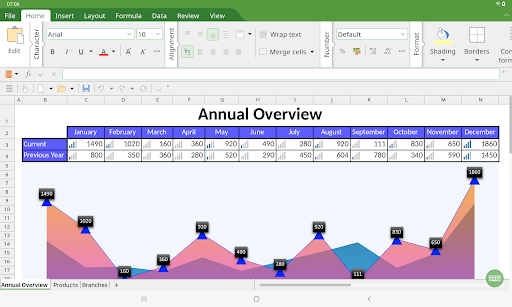
■ PlanMaker ► The only complete Office spreadsheet program for your Excel files ► Work on your Excel spreadsheets wherever and whenever you want. ► When working on the go, take advantage of a feature set that you would otherwise only know from your PC or Mac. ► Almost all features can be used permanently free of charge. The complete set of features that you know from Microsoft Excel or PlanMaker on your PC is now offered by PlanMaker on your smartphone and tablet. Compatibility without compromise: PlanMaker uses the Microsoft Office XLSX format as its native format. This guarantees seamless data exchange. You can open your spreadsheets directly in Microsoft Excel without having to convert them. Intuitive operation on smartphones and tablets: PlanMaker always provides an ideal user experience, regardless of whether you're using it on your smartphone or a tablet. On a phone, you can use the practical toolbars with just one finger. On your tablet, you work with ribbons similar to those on your PC. Save locally or in the cloud: PlanMaker not only enables you to open and save documents stored on your device, but it also allows you to access your files in Google Drive, Dropbox, Nextcloud and most other cloud services. The PlanMaker user interface is available in English, German, French, Spanish, Italian and more than 20 other languages. PlanMaker brings the features of a desktop spreadsheet program to your Android device. You shouldn't settle for less. ■ Working with files ► Worksheets can be losslessly exchanged with PlanMaker for Windows, Mac and Linux. ► Open and save XLSX and XLS files with full fidelity from Microsoft Excel 5.0 to 2021 and Excel 365, also with password protection ► Import and export assistant for text and CSV files ■ Extensive calculation capabilities ► 430 calculation functions, 1 million rows, 16384 columns ► Complex numbers and array functions ► AutoSum, AutoProduct, AutoFill, etc. ► External references ■ Editing and formatting ► Conditional formatting ► Format painter, borders, shading, fill patterns ► Cell styles ► Forms with input fields, dropdown lists, etc. ► Syntax highlighting ► Input validation (data validation) ► Password protection for sheets, workbooks and documents ■ Analyzing data ► AutoFilter ► Tables – specified areas of the worksheet that can be quickly formatted, modified and analyzed ► Pivot tables ► Scenarios ► Data grouping (outliner) ► Transpose ► Goal seeker ► Detective ("formula auditing") for troubleshooting ■ Comprehensive graphics functions ► Draw and design directly in the worksheet ► Excel-compatible AutoShapes ► Insert images ► Crop pictures, change brightness and contrast ► TextArt feature for font effects ■ Presenting and visualizing data ► More than 80 types of 2D and 3D charts ► Impressive effects: soft shadows, rounded edges, etc. ■ Other features Almost all features of PlanMaker for Android can be used free of charge. The following additional features are available to you via an inexpensive subscription: ► Printing ► Export to PDF and PDF/A ► Sharing documents directly from PlanMaker ► Free customer support A single subscription unlocks these features simultaneously in PlanMaker, TextMaker and Presentations for Android.

See this store page in another country

Prices, ranks and reviews are per country. Revenue above is already worldwide.

More from SoftMaker Software GmbH

Office NX: TextMaker
4.4 ★
Analyze →
Office NX: Presentations
4.4 ★
Analyze →