← Back to charts
Digital Watch face D33 icon
GOOGLE PLAY

Digital Watch face D33

VG Faces · Personalization · Brazil store
NOT IN TOP 100 HERE
View on Google Play ↗ Instagram card
Revenue a month, worldwide
Too small to estimate
Not enough chart or ratings data
New ratings
Tracking
Daily counts start building from today
Countries it ranks in
0
was 0 on Oct 16, 2026

Revenue

Estimated from the grossing charts of Oct 23, 2026 in the 53 countries we track.

EST. REVENUE / MONTH · WORLDWIDE
Unranked
Not in a grossing chart in any country we track, so there is no rank to estimate from. Most unranked apps earn far less than charted ones, often close to nothing.
LIFETIME INSTALLS (GOOGLE)
465
About 94 per month on average since launch
RATINGS
n/a
AVG RATING
n/a
PRICE
R$7.99
IN APP PURCHASES
No
CONTAINS ADS
No
LAST UPDATE
74d ago
RELEASED
May 26, 2026
CONTENT RATING
All ages

Last 30 days

From our daily snapshots of every grossing chart.

DAYS IN A GROSSING CHART
0 / 30
COUNTRIES NOW
0 (was 0)
EST. REVENUE FROM CHARTS, DAILY · GOOGLE PLAY ONLY EST
Show daily values
Sep 24, 2026not in a grossing chart
Sep 25, 2026not in a grossing chart
Sep 26, 2026not in a grossing chart
Sep 27, 2026not in a grossing chart
Sep 28, 2026not in a grossing chart
Sep 29, 2026not in a grossing chart
Sep 30, 2026not in a grossing chart
Oct 1, 2026not in a grossing chart
Oct 2, 2026not in a grossing chart
Oct 3, 2026not in a grossing chart
Oct 4, 2026not in a grossing chart
Oct 5, 2026not in a grossing chart
Oct 6, 2026not in a grossing chart
Oct 7, 2026not in a grossing chart
Oct 8, 2026not in a grossing chart
Oct 9, 2026not in a grossing chart
Oct 10, 2026not in a grossing chart
Oct 11, 2026not in a grossing chart
Oct 12, 2026not in a grossing chart
Oct 13, 2026not in a grossing chart
Oct 14, 2026not in a grossing chart
Oct 15, 2026not in a grossing chart
Oct 16, 2026not in a grossing chart
Oct 17, 2026not in a grossing chart
Oct 18, 2026not in a grossing chart
Oct 19, 2026not in a grossing chart
Oct 20, 2026not in a grossing chart
Oct 21, 2026not in a grossing chart
Oct 22, 2026not in a grossing chart
Oct 23, 2026not in a grossing chart
Best rank Sep 24, 2026: not ranked. Now: not ranked. Days at zero are days outside every grossing chart.

Money and momentum

Measured from the store, not estimated.

WHAT IT CHARGES
No in-app purchases
Earns from its upfront price, ads or payments outside the store.
REVIEW MOMENTUM
0.1 reviews / week
  • Recent reviews average4.7 stars
  • Recent 1 and 2 star share0%
From the latest 3 written reviews, covering 147 days.

What users say

Latest reviews, Brazil Google Play.

★★★★★Jun 17, 2026

good watch face, shows all relevant data in an elegant design. a couple things can be improved - the am/pm display and the seconds take up too much space. These can be a bit smaller and the complications above can get a bit more space.

★★★★★Jun 11, 2026

Love the watch face. Thank you for creating them.

★★★★★May 30, 2026

Great Face! Thanks!

Store screenshots

ScreenshotScreenshotScreenshotScreenshotScreenshotScreenshotScreenshotScreenshotScreenshotScreenshot

Growth research

Where this app is buying and earning its users. Each link opens pre filtered.

ASO keywords

Most repeated terms in the listing. Highlighted ones also appear in the title or short description.

watch7weather6tap6data5advanced weather5watch face5d334face4mode4battery4always display3tap zones3advanced3wear3display3maximum3smartwatch2designed2always2customizable2calendar2color2effortlessly2visibility2

What's new in VARY

app-release

Store description

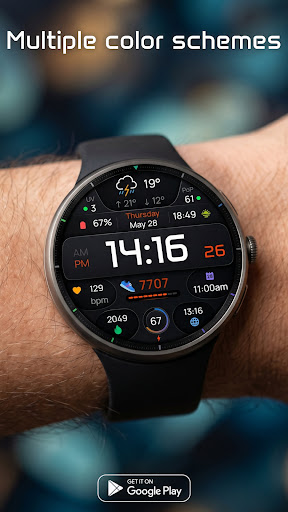
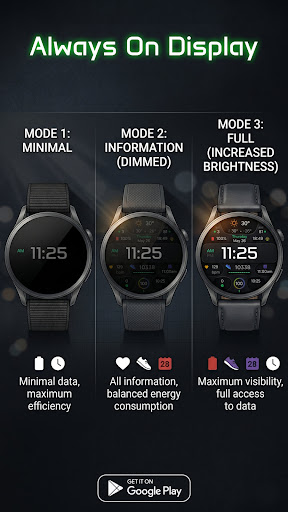
D33: Advanced Weather & Data Watch Face Maximize your smartwatch capabilities with the D33 Digital Watch Face for Wear OS. This highly informative face is designed for data lovers, offering advanced weather tracking, unmatched display customization, and a multi-tier Always-On Display. Key Features: • Advanced Weather Dashboard: Get all your forecast details at a glance. The dedicated weather section displays minimum & maximum temperatures, Day & Night icons, the Ultraviolet (UV) index, and your chance of precipitation. • 6 Customizable Complications: Tailor the layout to your exact needs. Fill the 6 available slots with your most critical daily data, such as step counts, heart rate, or calendar events. • Multiple Color Schemes: Match your watch face to your style effortlessly with a wide selection of vibrant color combinations. • Innovative 3-Mode AOD: Take total control over your battery life and visibility with three distinct Always-On Display modes: - Mode 1 (Minimal): Minimal data for maximum battery efficiency. - Mode 2 (Information - Dimmed): Shows all information with balanced energy consumption. - Mode 3 (Full - Increased Brightness): Maximum visibility giving you full access to data at all times. Smart Shortcut System (4 Tap Zones): Navigate your smartwatch effortlessly with intuitive tap zones: • Tap Time: Quick access to Alarm functions. • Tap Date: Opens your Calendar. • Tap Battery: Opens Battery status. • Tap Weather Icon: Customizable App Shortcut (Set it to open your favorite weather app or any other tool). Installation: 1. Ensure your watch is connected via Bluetooth. 2. Download D33 from the Google Play Store. 3. Long-press your watch screen, scroll to the end, and select "D33" to apply. Compatibility: Designed exclusively for Wear OS 5+ devices, including: • Samsung Galaxy Watch 8 & Ultra • Google Pixel Watch 4 • And other newer devices running Wear OS 5 or higher.

See this store page in another country

Prices, ranks and reviews are per country. Revenue above is already worldwide.

More from VG Faces

Digital Watch Face D36
Analyze →
Digital Watch Face D35
Analyze →
Digital watch face D34
Analyze →
Weather watchface 4
Analyze →
Analog watch face A9
Analyze →
Analog watch face A8
Analyze →
Hybrid watch face H3
Analyze →
Sky watch face
Analyze →
VG Faces: Wear OS Watch Faces
Analyze →