← Back to charts
PhotoSync NAS Add-On icon
GOOGLE PLAY

PhotoSync NAS Add-On

touchbyte · Photography · United States store
NOT IN TOP 100 HERE
View on Google Play ↗ Instagram card
Revenue a month, worldwide
Too small to estimate
Not enough chart or ratings data
New ratings
Tracking
Daily counts start building from today
Rating
4.7 of 5
459 ratings in this store
Countries it ranks in
0
was 0 on Oct 20, 2026

Revenue

Estimated from the grossing charts of Oct 26, 2026 in the 53 countries we track.

EST. REVENUE / MONTH · WORLDWIDE
Unranked
Not in a grossing chart in any country we track, so there is no rank to estimate from. Most unranked apps earn far less than charted ones, often close to nothing.
LIFETIME INSTALLS (GOOGLE)
16.4K
About 134 per month on average since launch
RATINGS
459
AVG RATING
4.67
PRICE
$2.49
IN APP PURCHASES
No
CONTAINS ADS
No
LAST UPDATE
432d ago
RELEASED
Aug 10, 2016
CONTENT RATING
Everyone

Last 30 days

From our daily snapshots of every grossing chart.

DAYS IN A GROSSING CHART
0 / 30
COUNTRIES NOW
0 (was 0)
EST. REVENUE FROM CHARTS, DAILY · GOOGLE PLAY ONLY EST
Show daily values
Sep 28, 2026not in a grossing chart
Sep 29, 2026not in a grossing chart
Sep 30, 2026not in a grossing chart
Oct 1, 2026not in a grossing chart
Oct 2, 2026not in a grossing chart
Oct 3, 2026not in a grossing chart
Oct 4, 2026not in a grossing chart
Oct 5, 2026not in a grossing chart
Oct 6, 2026not in a grossing chart
Oct 7, 2026not in a grossing chart
Oct 8, 2026not in a grossing chart
Oct 9, 2026not in a grossing chart
Oct 10, 2026not in a grossing chart
Oct 11, 2026not in a grossing chart
Oct 12, 2026not in a grossing chart
Oct 13, 2026not in a grossing chart
Oct 14, 2026not in a grossing chart
Oct 15, 2026not in a grossing chart
Oct 16, 2026not in a grossing chart
Oct 17, 2026not in a grossing chart
Oct 18, 2026not in a grossing chart
Oct 19, 2026not in a grossing chart
Oct 20, 2026not in a grossing chart
Oct 21, 2026not in a grossing chart
Oct 22, 2026not in a grossing chart
Oct 23, 2026not in a grossing chart
Oct 24, 2026not in a grossing chart
Oct 25, 2026not in a grossing chart
Oct 26, 2026not in a grossing chart
Oct 27, 2026not in a grossing chart
Best rank Sep 28, 2026: not ranked. Now: not ranked. Days at zero are days outside every grossing chart.

Money and momentum

Measured from the store, not estimated.

WHAT IT CHARGES
No in-app purchases
Earns from its upfront price, ads or payments outside the store.
REVIEW MOMENTUM
0.1 reviews / week
  • Trendsteady
  • Recent reviews average4.3 stars
  • Recent 1 and 2 star share15%
From the latest 62 written reviews, covering 3584 days.
RATING BREAKDOWN
451 ratings
5★91%
4★2%
3★0%
2★0%
1★8%

What users want

From the latest 62 reviews on the United States Google Play, Jan 3, 2017 to Sep 4, 2026: 15% are 1 or 2 stars. Open a theme to read what people wrote.

WHAT THEY COMPLAIN ABOUT · SHARE OF BAD REVIEWS
Bugs, things not working33%

3 of the 1 and 2 star reviews.

★★★★★ Accepted connection error.....
★★★★★ Fails to transfer over wireless unless your connection is perfect...So all the time.
★★★★★ It won't uninstall from my laptop, every attempt to uninstall has failed, key removal file removal Microsoft help to remove all failed.
Price and subscription22%

2 of the 1 and 2 star reviews.

★★★★★ Uninstalled, no refund option available.
WHAT THEY ASK FOR
  • Feature request: the ability to give a custom name to the folder on upload. 5★, Jun 21, 2022
  • It would be great to be able transfer other file types from Android to the computer too. 5★, May 17, 2021
  • it would be nice to have multiple contexts for autotransfer, ie.: trigger transfer when connected to wi-fi and phone charging. 4★, Apr 10, 2020
WORDS THAT KEEP COMING UP IN BAD REVIEWS

Nothing stands out.

WHAT THEY LOVE · SHARE OF GOOD REVIEWS
Easy to use15%

8 of the 4 and 5 star reviews.

★★★★★ Simple solution to get pictures from my phone to my NAS.
★★★★★ Easy to set up for backup, and leaves all those GB free on my mobile broadband for Xbox games - a happy bunny :)
★★★★★ Great app, easy to set up and use.
Accurate, great results15%

8 of the 4 and 5 star reviews.

★★★★★ Works great on both android and iOS
★★★★★ App works well and twice now support has answered questions promptly.
★★★★★ Takes a few minutes to get it set up but works great.

Found by matching words and phrases in the reviews, not read by a person. A review can count toward more than one theme.

What users say

Latest reviews, United States Google Play.

★★★★★Sep 4, 2026

wow! this app packs one heck of a punch! I use it constantly. it does backgrounds perfectly! images, videos from text are awesome. I bought the Pro version after how I saw it work. can't upload a sample but I love this little AI tool for my Android.

★★★★★Aug 24, 2026

no longer works

★★★★★Mar 2, 2025

1. I don't see a NAS button even though I purchased the app. 2. When you view lost view, it does not show location/path information. Also no refund option... 🥺

★★★★★Oct 15, 2024

Really good add on, worked very well with a raspberry pi SMB share

★★★★★Feb 11, 2024

Already purchased but it is still asking me to go to store!

★★★★★Apr 1, 2023

Transfers photos to my NAS while I'm sleeping. A bit complicated to set up, but works flawlessly when done.

Store screenshots

ScreenshotScreenshotScreenshotScreenshotScreenshotScreenshotScreenshotScreenshotScreenshotScreenshot

Growth research

Where this app is buying and earning its users. Each link opens pre filtered.

ASO keywords

Most repeated terms in the listing. Highlighted ones also appear in the title or short description.

photos videos21photosync17videos16nas14photos14transfer12photosync nas11smb ftp11ftp webdav11nas add10devices9personal cloud8add7smb7ftp7webdav7wifi7mobile5storage5device5personal5cloud5owncloud5usb5

What's new in 3.4.1

* Fixed status bar height calculation

Store description

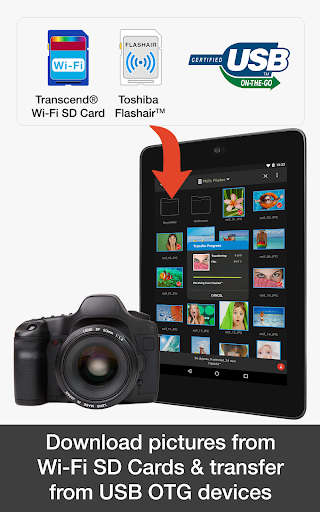
This product is the ‘PhotoSync NAS Add-On’ Activation License of PhotoSync. Once purchased, you can add PhotoSync NAS Add-On capabilities to the free PhotoSync version and remove ads. ★ Over 10,000 positive reviews, thousands of happy users and millions of photo transfers ★ Number one cross-platform solution with native apps for Android, iOS, Windows & Mac ★ Reliable and secure software – operating 10 years in the market and continuously updated ★ Total user control and fully customisable ABOUT PHOTOSYNC 'NAS' ADD-ON VERSION • Securely backup photos & videos to any NAS, mobile storage device or personal cloud over SMB, (S)FTP or WebDav • Download and view photos & videos on SMB, (S)FTP and WebDAV devices / servers • PhotoSync supports all storage devices with SMB, (S)FTP and WebDAV capabilities from Synology, QNAP & Buffalo NAS, ownCloud, Nextcloud, WD MyCloud, FreeNAS, Western Digital, Seagate, Toshiba, HyperDrive, SanDisk and many more… • Transfer photos & videos stored on USB or SD devices connected with a USB On-The-Go (OTG) adapter • No ads HOW IT WORKS 1. Download and Install PhotoSync at https://play.google.com/store/apps/details?id=com.touchbyte.photosync 2. Download and install PhotoSync NAS Add-On License 3. PhotoSync will automatically upgrade to PhotoSync NAS Add-On version upon the installation of PhotoSync NAS Add-On License PHOTOSYNC NAS HIGHLIGHTS Securely and safely transfer and backup your pictures and videos directly from your mobile device to any NAS, mobile storage device, remote server or personal cloud – no computer needed! Transfer to and from NAS devices • Backup photos & videos to your NAS, remote server or personal cloud over SMB, (S)FTP or WebDav • Download and view pictures & videos stored on SMB, (S)FTP and WebDAV servers • PhotoSync works flawlessly with NAS storage devices, servers and personal cloud services from: - Synology - QNAP & Buffalo NAS - ownCloud - Nextcloud - WD MyCloud - FreeNAS - OpenMediaVault - Seagate Personal Cloud - NETGEAR ReadyNAS - And many more… Transfer to and from wireless portable hard drives • Quickly and easily upload photos & videos whilst on-the-go to your wireless portable hard drive over SMB, (S)FTP and WebDav • Download, share and view photos & videos over SMB, (S)FTP and WebDAV servers • PhotoSync works seamlessly with all major mobile storage solutions (wireless USB sticks, portable hard drives, cable adapters) from: - Western Digital - Seagate - Toshiba (http://www.canvio.jp/apps/en/) - HyperDrive - SanDisk - And many more… Transfer to mobile devices from WiFi SD Cards • Take pictures, videos & RAWs on your camera equipped with a wireless SD card and download the full resolution files directly to your phone / tablet • Browse and view photos stored on your Wi-Fi SD Card • Toshiba FlashAir & Transcend Wi-Fi SD Cards are supported Full OwnCloud Support • PhotoSync works seamlessly with OwnCloud photos & videos • Use OwnCloud’s data protection to achieve maximum security and privacy Organize like a Pro • Organize photos & videos automatically by date (recording date & transfer date), media type, album/folder and device name • Set custom file names (recording date & transfer date) • Browse, select or create target folder before transfer • Delete or overwrite files after transfer to free space on device (optional) • Choose separate transfer quality options for WiFi & cellular connections ABOUT 'FREE' PHOTOSYNC VERSION • Backup photos & videos from Android devices to computer (PC & Mac) over WiFi • Send photos & videos from computer to Android phone / tablet over WiFi • Transfer photos & videos between Android phone and tablet over your local network (WiFi or Portable WiFi Hotspot) • Copy and move photos & videos between Android devices and iPhone / iPad over WiFi • Transfer photos & videos stored on USB or SD devices connected with a USB On-The-Go (OTG) adapter • Ad-supported

See this store page in another country

Prices, ranks and reviews are per country. Revenue above is already worldwide.

More from touchbyte

PhotoSync – Transfer Photos
4.3 ★
Analyze →
PhotoSync Bundle Add-On
4.6 ★
Analyze →
PhotoSync Cloud Add-On
4.3 ★
Analyze →
PhotoSync Autotransfer Add-On
4.5 ★
Analyze →