← Back to charts
Resize Image - Resize Photos icon
GOOGLE PLAY

Resize Image - Resize Photos

Neelam Govind Bhanushali · Tools · United States store
NOT IN TOP 100 HERE
View on Google Play ↗ Instagram card
Revenue a month, worldwide
Too small to estimate
Not enough chart or ratings data
New ratings
Tracking
Daily counts start building from today
Rating
3.5 of 5
120 ratings in this store
Countries it ranks in
0
was 0 on Oct 15, 2026

Revenue

Estimated from the grossing charts of Oct 21, 2026 in the 53 countries we track.

EST. REVENUE / MONTH · WORLDWIDE
Unranked
Not in a grossing chart in any country we track, so there is no rank to estimate from. Most unranked apps earn far less than charted ones, often close to nothing.
LIFETIME INSTALLS (GOOGLE)
15.3K
About 272 per month on average since launch
RATINGS
120
AVG RATING
3.50
PRICE
$0.99
IN APP PURCHASES
No
CONTAINS ADS
Yes
LAST UPDATE
25d ago
RELEASED
Feb 19, 2022
CONTENT RATING
Everyone

Last 29 days

From our daily snapshots of every grossing chart.

DAYS IN A GROSSING CHART
0 / 29
COUNTRIES NOW
0 (was 0)
EST. REVENUE FROM CHARTS, DAILY · GOOGLE PLAY ONLY EST
Show daily values
Sep 24, 2026not in a grossing chart
Sep 25, 2026not in a grossing chart
Sep 26, 2026not in a grossing chart
Sep 27, 2026not in a grossing chart
Sep 28, 2026not in a grossing chart
Sep 29, 2026not in a grossing chart
Sep 30, 2026not in a grossing chart
Oct 1, 2026not in a grossing chart
Oct 2, 2026not in a grossing chart
Oct 3, 2026not in a grossing chart
Oct 4, 2026not in a grossing chart
Oct 5, 2026not in a grossing chart
Oct 6, 2026not in a grossing chart
Oct 7, 2026not in a grossing chart
Oct 8, 2026not in a grossing chart
Oct 9, 2026not in a grossing chart
Oct 10, 2026not in a grossing chart
Oct 11, 2026not in a grossing chart
Oct 12, 2026not in a grossing chart
Oct 13, 2026not in a grossing chart
Oct 14, 2026not in a grossing chart
Oct 15, 2026not in a grossing chart
Oct 16, 2026not in a grossing chart
Oct 17, 2026not in a grossing chart
Oct 18, 2026not in a grossing chart
Oct 19, 2026not in a grossing chart
Oct 20, 2026not in a grossing chart
Oct 21, 2026not in a grossing chart
Oct 22, 2026not in a grossing chart
Best rank Sep 24, 2026: not ranked. Now: not ranked. Days at zero are days outside every grossing chart.

Money and momentum

Measured from the store, not estimated.

WHAT IT CHARGES
No in-app purchases
Earns from its upfront price, ads or payments outside the store.
REVIEW MOMENTUM
0.0 reviews / week
  • Recent reviews average3.1 stars
  • Recent 1 and 2 star share44%
From the latest 9 written reviews, covering 1705 days.
RATING BREAKDOWN
120 ratings
5★50%
4★17%
3★0%
2★0%
1★33%

What users say

Latest reviews, United States Google Play.

★★★★★Jan 21, 2026

folder selection crashes the app. I'm shocked it immediately had access to all my google photos. batch selection or folder not possible on android 16

★★★★★Mar 14, 2024

Still figuring out the app will post review later.

★★★★★Feb 11, 2024

Gooooooooooooood

★★★★★Sep 20, 2023

Garbage app doesn't open even i have given storage permission.

★★★★★Sep 20, 2023

Your all paid app need network access, network connection.... where it's no need. Remaining it's not working.

★★★★★Jul 24, 2022

Very nice

Store screenshots

ScreenshotScreenshotScreenshotScreenshotScreenshotScreenshotScreenshotScreenshotScreenshotScreenshot

Growth research

Where this app is buying and earning its users. Each link opens pre filtered.

ASO keywords

Most repeated terms in the listing. Highlighted ones also appear in the title or short description.

photos17resize11resize photos8choose7images4batch4folders4phone4tap4images resize3choose folder3folder images3choose multiple3multiple photos3batch resize3tap resize3tap choose3compress3folder3size3save3pictures2crop2once2

What's new in 1.8

No release notes.

Store description

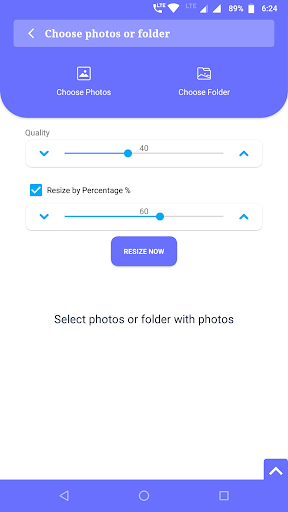
Resize photos and gallery pictures, its Photo Resizer app to resize photos, compress images and Crop images. Resize photos in batch, choose folder with images and resize whole folder images at once. Compress all photos in folders at once. You can choose multiple photos and can add folders to do batch resize or batch compress. We takes many photos with our phone cameras, these pictures needs a huge memory in our phone, we do want to keep all those photos with us but we never see them with there actual size and resolution. We mostly see those photos opening in our phone, hence we really do not need those high resolution photos. Using this app, you can resize all those photos by selecting image folders and save a lot more space on your phone. Features * Resize photos with custom size * Easy to use * Batch resize * Crop and resize * Save in JPEG or PNG format * Share or save the resized photos directly from app. How to use: 1. Open the app, and tap on resize. 2. Tap on Choose photos and choose multiple photos with long press. 3. Tap on Choose Folder and add any number of folders. 4. Choose the quality for the photos. (100% will keep current quality as it is.) 5. Set the size for all photos for resizing. 6. Choose whether you want to replace the original photos with the resized one or not. 7. Finally, Tap on "Resize Now" All options are self explanatory. Please try our app and let us know your feedback. Email us at yogi.306@gmail.com with your suggestions or any issue you find.

See this store page in another country

Prices, ranks and reviews are per country. Revenue above is already worldwide.

More from Neelam Govind Bhanushali

Shout Screen - Big Text Screen
4.4 ★
Analyze →
Video Cutter & Status Splitter
4.3 ★
Analyze →
Side Bar - Edge Screen
3.9 ★
Analyze →
Duplicate File Cleaner
Analyze →
Limit app usage - screen time
Analyze →
Quick Age Calculator
Analyze →
QuickPin - Fast Notes Reminder
Analyze →
Contact backup scheduler
Analyze →
Contact Organizer
Analyze →