← Back to charts
Planner Pro - Daily Calendar icon
GOOGLE PLAY

Planner Pro - Daily Calendar

TinyWork Apps · Productivity · United Kingdom store
NOT IN TOP 100 HERE
View on Google Play ↗ Instagram card
Revenue a month, worldwide
Too small to estimate
Not enough chart or ratings data
New ratings
Tracking
Daily counts start building from today
Rating
4.1 of 5
15K ratings in this store
Countries it ranks in
0
was 0 on Oct 15, 2026

Revenue

Estimated from the grossing charts of Oct 21, 2026 in the 53 countries we track.

EST. REVENUE / MONTH · WORLDWIDE
Unranked
Not in a grossing chart in any country we track, so there is no rank to estimate from. Most unranked apps earn far less than charted ones, often close to nothing.
LIFETIME INSTALLS (GOOGLE)
3.6M
About 24.5K per month on average since launch
RATINGS
15K
AVG RATING
4.11
PRICE
Free
IN APP PURCHASES
£2.89 - £87.99 if billed through Play
CONTAINS ADS
Yes
LAST UPDATE
84d ago
RELEASED
Jun 18, 2014
CONTENT RATING
PEGI 3

Last 29 days

From our daily snapshots of every grossing chart.

DAYS IN A GROSSING CHART
0 / 29
COUNTRIES NOW
0 (was 0)
EST. REVENUE FROM CHARTS, DAILY · GOOGLE PLAY ONLY EST
Show daily values
Sep 24, 2026not in a grossing chart
Sep 25, 2026not in a grossing chart
Sep 26, 2026not in a grossing chart
Sep 27, 2026not in a grossing chart
Sep 28, 2026not in a grossing chart
Sep 29, 2026not in a grossing chart
Sep 30, 2026not in a grossing chart
Oct 1, 2026not in a grossing chart
Oct 2, 2026not in a grossing chart
Oct 3, 2026not in a grossing chart
Oct 4, 2026not in a grossing chart
Oct 5, 2026not in a grossing chart
Oct 6, 2026not in a grossing chart
Oct 7, 2026not in a grossing chart
Oct 8, 2026not in a grossing chart
Oct 9, 2026not in a grossing chart
Oct 10, 2026not in a grossing chart
Oct 11, 2026not in a grossing chart
Oct 12, 2026not in a grossing chart
Oct 13, 2026not in a grossing chart
Oct 14, 2026not in a grossing chart
Oct 15, 2026not in a grossing chart
Oct 16, 2026not in a grossing chart
Oct 17, 2026not in a grossing chart
Oct 18, 2026not in a grossing chart
Oct 19, 2026not in a grossing chart
Oct 20, 2026not in a grossing chart
Oct 21, 2026not in a grossing chart
Oct 22, 2026not in a grossing chart
Best rank Sep 24, 2026: not ranked. Now: not ranked. Days at zero are days outside every grossing chart.

Money and momentum

Measured from the store, not estimated.

WHAT IT CHARGES
£2.89 - £87.99 if billed through Play
Google Play only shows the price range per item.
REVIEW MOMENTUM
2.4 reviews / week
  • Trendfalling
  • Recent reviews average4.0 stars
  • Recent 1 and 2 star share19%
From the latest 500 written reviews, covering 1437 days. The store only returns this many, so this is the most recent slice.
RATING BREAKDOWN
15K ratings
5★60%
4★20%
3★4%
2★3%
1★13%

What users want

From the latest 500 reviews on the United Kingdom Google Play, Nov 15, 2022 to Oct 17, 2026: 19% are 1 or 2 stars. Open a theme to read what people wrote.

WHAT THEY COMPLAIN ABOUT · SHARE OF BAD REVIEWS
Price and subscription20%

19 of the 1 and 2 star reviews.

★★★★★ I have unsubscribed to this and every year since I get a notification for a charge front his app.
★★★★★ I have canceled my subscription and have contacted the help department but I have continued to be charged.
★★★★★ I guess I'll be canceling my 3-day trial which is sad because I hoped it would be the solution to my planning problems.
Lost data, sync, backup15%

14 of the 1 and 2 star reviews.

★★★★★ Have not been able to link (sync) in an Outlook (Work) Calendar - although there are notes to do so, nothing has worked.
★★★★★ This app is not syncing properly on my tablet.
★★★★★ Has good features however events being the important is not syncing between devices.
Crashes and freezes11%

10 of the 1 and 2 star reviews.

★★★★★ I've downloaded it to my new Samsung & it does nothing but crash.
★★★★★ Crashing on my new zfold 5 please fix...its unuseable......'WAS' Great planner, would love a journalling option, not Just notes.
★★★★★ Keeps crashing when using notes.
Bugs, things not working9%

8 of the 1 and 2 star reviews.

★★★★★ I'm willing to try it again, if they get the bugs fixed.
★★★★★ Task syncing constantly fails across platforms.
★★★★★ Unfortunate bugs let this app down.
Login and account problems9%

8 of the 1 and 2 star reviews.

★★★★★ it's impossible to cancel I've signed into my apple account and unsubscribed to this app and I still get this issue.
★★★★★ Didn't help to restore paid account, so 4 months of service lost.
★★★★★ The app keeps demanding I create an account when I am happy to only have one device and use Google Calendar which this app claims to be able to read.
Worse after an update7%

7 of the 1 and 2 star reviews.

★★★★★ Issues with other calendars Sense the last ui update calendars are not syncing with out look and others.
★★★★★ - Update - I tried this app again - I really like the look of it.
★★★★★ Rubbish, changed phones, no longer recognises me, lost all my info Update, they do not care, cancelled sub, want a refund, LOST all my data
Limits, credits, locked features3%

3 of the 1 and 2 star reviews.

★★★★★ Best planner app I've found so far but I HATE that you have to pay yearly.
★★★★★ so it is rubbish to me..can't beat Google calendar or outlook..the calendars you get for free with your email, this one you need to pay to get no adds and still isn't that much better.
★★★★★ They won around $30 to purchase this but you have to give him your credit card for the free trial.
No customer support3%

3 of the 1 and 2 star reviews.

★★★★★ Reached out about double charges for each device and got no response.
★★★★★ Terrible customer service.
★★★★★ Customer service is incrediblt unhelpful and unresponsive.
WHAT THEY ASK FOR
  • I'm sticking to the planner; the others don't come close to delivering what I need a calendar to function. 5★, Jun 26, 2026
  • No way to add a background colour to the text. 3★, May 10, 2026
  • Who needs A1, A2, A3??? 3★, May 10, 2026
  • One thing I wish it did was duplicating events. 4★, May 2, 2026
  • for that reason im canceling, you don't need ,or should have anyone's info loke that. 3★, May 2, 2026
  • I have been a fan for years and it easily meets my need as I moved from a Franklin planner to Planner Pro. 5★, Apr 25, 2026
  • I love this app the simplicity and clear picture I get from this works so well but just switched from apple to android and I can't get it on my watch and it's such a huge part of my day would be nice to see my to do… 4★, Mar 30, 2026
  • Would love to see them add the ability to -Use app on (and sync with) desktop -Habit tracker (or tasks with multiple checkslots) -Collapse subtasks for a cleaner view -Create undated notes Best features: -Great UI… 4★, Feb 10, 2026
WORDS THAT KEEP COMING UP IN BAD REVIEWS
google calendar4
WHAT THEY LOVE · SHARE OF GOOD REVIEWS
Easy to use19%

72 of the 4 and 5 star reviews.

★★★★★ My use has expanded to include more that simple the calendar mgmnt tools.
★★★★★ Easy to use, help me organise my task easily
★★★★★ so easy nd so good..........
Useful, it helps11%

42 of the 4 and 5 star reviews.

★★★★★ Really helps stay on task.
★★★★★ It's very intuitive and easy to use, the layout feels like a paper journal and it really helps me keep track of everything I am doing!
★★★★★ As a small business owner, it helps me keep everything organized.
Looks great3%

10 of the 4 and 5 star reviews.

★★★★★ Would love to see them add the ability to -Use app on (and sync with) desktop -Habit tracker (or tasks with multiple checkslots) -Collapse subtasks for a cleaner view -Create undated notes Best features: -Great UI…
★★★★★ This app is the best ....waiting for an windows interface( reserved a star for that)!!!
★★★★★ Love the interface, great app!
Worth the money2%

9 of the 4 and 5 star reviews.

★★★★★ I have the premium account and it's worth it!
★★★★★ Easy to use and has a free option.
★★★★★ I'm using the free edition.
Great support2%

8 of the 4 and 5 star reviews.

★★★★★ Also great support when things weren't working on my devices.
★★★★★ please support galaxy watch.
★★★★★ I could love this app IF I could get some customer support.

Found by matching words and phrases in the reviews, not read by a person. A review can count toward more than one theme.

What users say

Latest reviews, United Kingdom Google Play.

★★★★★Oct 17, 2026

Great App. Out of all the Callendar apps I've tried this is the best.

★★★★★Oct 16, 2026

Greatly improved comment from me. MUCH better than when I started using 5+ yrs ago. My use has expanded to include more that simple the calendar mgmnt tools. I highly recommend this app. One of the few apps I've purchased that I still use.

★★★★★Oct 3, 2026

good

★★★★★Oct 1, 2026

After installing Planner Pro, the only thing that showed up was a blank screen 😞.

★★★★★Sep 25, 2026

hi can u please tell me how to adjusts tasks in day view to show latest tasks first?

★★★★★Sep 6, 2026

This is the most like the Franklin Covey time management planner that I have used for over 20 years. Easy to use! Sync's easily with all of my calendars.

Store screenshots

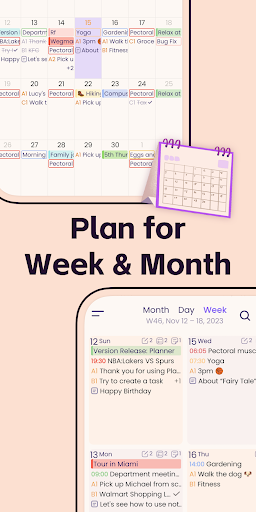
ScreenshotScreenshotScreenshotScreenshotScreenshotScreenshotScreenshotScreenshotScreenshotScreenshot

Growth research

Where this app is buying and earning its users. Each link opens pre filtered.

ASO keywords

Most repeated terms in the listing. Highlighted ones also appear in the title or short description.

planner12planner pro11tasks9pro7events7day7tasks projects6pro needs6needs permission6notes6supports6add5events tasks5day week5permission read5week4month4projects4choose4needs4permission4tasks notes3add edit3edit delete3

What's new in 8.1.9

Thanks for using Planner Pro! The new version improves the app stability and fixes some minor bugs to help us serve you better. We're glad to hear your feedback. If you have any questions or suggestions please feel free to contact us at planner.a@appxy.com .

Store description

Designed for those people who’re looking for a full-featured app to manage daily life better. Planner Pro, which costs years for designing and coding is now coming out for everybody especially those Franklin Covey Planner heavy users. We combine events, tasks and notes in one place so that you do not need to spend extra money for other apps, and it can be used as day planner, week planner and month planner. Planner Pro provides kinds of settings for different requirements from kinds of people. You’ll find the best way to meet your requirements in our app. Also, if you have any other great ideas or suggestions to make this app better please contact us with an email, which will be very appreciate. Events - Sync with Google calendar and events - Show or hide calendars as you want - Add, edit or delete events easily - Supports full recurring period - Manually time slot - Supports all-day & cross-day events Tasks - Supports tasks and projects with sub-tasks - Supports recurring tasks and projects - 5 different status for tasks and projects - 25 priorities for tasks and projects - System reminder for each task Notes - Unlimited number of notes for each day - Manage notes in day, week and month view - Easily to add, edit and delete notes Pomodoro - Add any activities you want to focus on - Study, work, fitness, entertainment and other categories for activities - Add reminders for each activity - Multiple white noise and alert tones to choose from - Supports quick focus - Supports continuous timing or manual timing Other Key Features - Day, Week, Month and Tasks modules for better management - Very well designed user interface - Full records searching including events, tasks and notes - Set the first day of week manually - Select the launch view as you want This version is an ad-supported version and has some function restrictions, we also offer an ad-free version which is available as subscription. Payment models for Premium Subscription: - $3.99/month - $19.99/year Please note the subscription is automatically renewed unless you choose to cancel the subscription at least 24 hours before the end of the current period in Subscriptions on Google Play. Permissions Used in Planner Pro: 1. Calendar: Planner Pro needs this permission to read events from local calendars. 2. Contacts: Planner Pro needs this permission to read contact from local device when you choose to invite an attendee from local contacts. 3. Files and media: Planner Pro needs this permission to read photos from Gallery when you choose to upload a photo. 4. Microphone: Planner Pro needs this permission to record audio and directly add audio files to the note. We're glad to hear your feedback. If you have any problems or suggestions please send a mail to planner.a@appxy.com, you’ll get a response in a short time.

See this store page in another country

Prices, ranks and reviews are per country. Revenue above is already worldwide.

More from TinyWork Apps

Family Shared Calendar: FamCal
4.9 ★
Analyze →
Tiny Scanner - PDF Scanner App
4.5 ★
Analyze →
Tiny Calendar: Planner & Tasks
4.3 ★
Analyze →
Account Tracker - bWallet
4.1 ★
Analyze →
Invoice Maker - Tiny Invoice
4.3 ★
Analyze →
Tiny Fax - Send Fax from Phone
4.2 ★
Analyze →
Checkbook - Account Tracker
3.8 ★
Analyze →
Interval Timer - HIIT Training
4.2 ★
Analyze →