← Back to charts
Business Calendar 2 Pro icon
GOOGLE PLAY

Business Calendar 2 Pro

Appgenix Software · Productivity · Japan store
NOT IN TOP 100 HERE
View on Google Play ↗ Instagram card
Revenue a month, worldwide
Too small to estimate
Not enough chart or ratings data
New ratings
Tracking
Daily counts start building from today
Countries it ranks in
0
was 0 on Oct 15, 2026

Revenue

Estimated from the grossing charts of Oct 21, 2026 in the 53 countries we track.

EST. REVENUE / MONTH · WORLDWIDE
Unranked
Not in a grossing chart in any country we track, so there is no rank to estimate from. Most unranked apps earn far less than charted ones, often close to nothing.
LIFETIME INSTALLS (GOOGLE)
35.7K
Worldwide, reported by Google
RATINGS
n/a
AVG RATING
n/a
PRICE
¥2,280
IN APP PURCHASES
No
CONTAINS ADS
No
LAST UPDATE
10d ago
RELEASED
n/a
CONTENT RATING
Rated for 3+

Last 29 days

From our daily snapshots of every grossing chart.

DAYS IN A GROSSING CHART
0 / 29
COUNTRIES NOW
0 (was 0)
EST. REVENUE FROM CHARTS, DAILY · GOOGLE PLAY ONLY EST
Show daily values
Sep 24, 2026not in a grossing chart
Sep 25, 2026not in a grossing chart
Sep 26, 2026not in a grossing chart
Sep 27, 2026not in a grossing chart
Sep 28, 2026not in a grossing chart
Sep 29, 2026not in a grossing chart
Sep 30, 2026not in a grossing chart
Oct 1, 2026not in a grossing chart
Oct 2, 2026not in a grossing chart
Oct 3, 2026not in a grossing chart
Oct 4, 2026not in a grossing chart
Oct 5, 2026not in a grossing chart
Oct 6, 2026not in a grossing chart
Oct 7, 2026not in a grossing chart
Oct 8, 2026not in a grossing chart
Oct 9, 2026not in a grossing chart
Oct 10, 2026not in a grossing chart
Oct 11, 2026not in a grossing chart
Oct 12, 2026not in a grossing chart
Oct 13, 2026not in a grossing chart
Oct 14, 2026not in a grossing chart
Oct 15, 2026not in a grossing chart
Oct 16, 2026not in a grossing chart
Oct 17, 2026not in a grossing chart
Oct 18, 2026not in a grossing chart
Oct 19, 2026not in a grossing chart
Oct 20, 2026not in a grossing chart
Oct 21, 2026not in a grossing chart
Oct 22, 2026not in a grossing chart
Best rank Sep 24, 2026: not ranked. Now: not ranked. Days at zero are days outside every grossing chart.

Money and momentum

Measured from the store, not estimated.

WHAT IT CHARGES
No in-app purchases
Earns from its upfront price, ads or payments outside the store.
REVIEW MOMENTUM
0.8 reviews / week
  • Trendsteady
  • Recent reviews average4.4 stars
  • Recent 1 and 2 star share11%
From the latest 303 written reviews, covering 2801 days.

What users want

From the latest 303 reviews on the Japan Google Play, Feb 20, 2019 to Sep 29, 2026: 11% are 1 or 2 stars. Open a theme to read what people wrote.

WHAT THEY COMPLAIN ABOUT · SHARE OF BAD REVIEWS
Lost data, sync, backup38%

12 of the 1 and 2 star reviews.

★★★★★ but doesn't sync with the google calendar app at all.
★★★★★ Anything added new doesn't show here despite Sync.
★★★★★ Looks pretty but Microsoft Outlook sync is NOT accurate or reliable.
Bugs, things not working22%

7 of the 1 and 2 star reviews.

★★★★★ Was thinking it's a best one but discovered now it failed to run the scheduler.
★★★★★ utterly broken, weather doesn't work and most importantly, setting events to repeat every month at a specific day like the 10th simply doesn't work, it repeats on a totally wrong day.
★★★★★ Microsoft calendar sync is buggy in this app, making it useless.
Wrong or poor results16%

5 of the 1 and 2 star reviews.

★★★★★ utterly broken, weather doesn't work and most importantly, setting events to repeat every month at a specific day like the 10th simply doesn't work, it repeats on a totally wrong day.
★★★★★ Microsoft calendar sync is buggy in this app, making it useless.
★★★★★ Looks pretty but Microsoft Outlook sync is NOT accurate or reliable.
Worse after an update13%

4 of the 1 and 2 star reviews.

★★★★★ after an update the problem was fixed.
★★★★★ Updated December 17, 2020.
★★★★★ Will update the review after the fix.
Login and account problems9%

3 of the 1 and 2 star reviews.

★★★★★ I've tried removing the account, clearing the app data and re-adding the account and re-syncing several times with similar results, not pulling all of the events, and it seems random.
★★★★★ When adding the google account, the login screen does not open.
★★★★★ Why task in free version apps linked with account is not appearing in paid version app
Crashes and freezes6%

2 of the 1 and 2 star reviews.

★★★★★ Last week the app suddenly crashed.
★★★★★ Doesn't sync with my watch, just gets stuck on loading events.
Price and subscription6%

2 of the 1 and 2 star reviews.

★★★★★ Otherwise, I'll need a refund.
★★★★★ I won't ask for a refund.
WHAT THEY ASK FOR
  • love this app would be great if you could add new useful feature 1. 3★, Jan 13, 2026
  • Please add a feature to be able to convert an event to a task and vice versa. 5★, Oct 14, 2025
  • I wish the app could adopt the colour scheme of calendar items preset in Outlook though. 5★, Jul 18, 2025
  • Failing that, I wish they had an option to manually choose the default colour of each calendar. 5★, Jul 18, 2025
  • In the "standards for new events/tasks", there's the option for "reminder time", would be nice to see multiple reminder times. 5★, Feb 15, 2025
  • Sadly I paid for this app already and won't be using it much until they add more features. 2★, Nov 26, 2024
  • would be great if full screen Notification is available 2. 5★, Aug 16, 2024
  • Add that function and I'll add the last star! 5★, Jul 28, 2023
WORDS THAT KEEP COMING UP IN BAD REVIEWS
pro version5free version3google calendar3
WHAT THEY LOVE · SHARE OF GOOD REVIEWS
Easy to use9%

23 of the 4 and 5 star reviews.

★★★★★ Full of features yet simple and straightforward.
★★★★★ good, comfortable, no hitches, user friendly.
★★★★★ The best and most logical and user-friendly calendar app.
Useful, it helps4%

11 of the 4 and 5 star reviews.

★★★★★ it has many useful features.
★★★★★ It's a useful and handy calendar tool for everyday needs.
★★★★★ Especially this will be useful while taking the PRINT IN PDF.
Looks great4%

11 of the 4 and 5 star reviews.

★★★★★ Everything works perfectly, its super polished, has a ton of features and customization and the most important part, the app is actively maintained (and I hope it keeps that way, Im so used to handle all my tasks and…
★★★★★ Better than Google or outlook calendar interface.
★★★★★ User interface and configuration options are exceptional.
Great support4%

11 of the 4 and 5 star reviews.

★★★★★ And the support is also excellent.
★★★★★ I was so happy when - after 10 years of users request - they announced caldav support including for tasks management.
★★★★★ Native sync support because having two calendar app is showing duplicate events 5.
Worth the money4%

9 of the 4 and 5 star reviews.

★★★★★ Best calendar app on the market, worth every penny!
★★★★★ I upgraded from the free version because I honestly owe this app my life.
★★★★★ I used the free one first and was already very happy and got the pro one just to avoid the ads

Found by matching words and phrases in the reviews, not read by a person. A review can count toward more than one theme.

What users say

Latest reviews, Japan Google Play.

★★★★★Sep 29, 2026

I use this calendar app for many years and I believe it is the best. The many options to turn calendars on and off, attach files to appointments, send invites, use colors etc etc.

★★★★★Sep 29, 2026

very satisfied.

★★★★★Aug 19, 2026

Was thinking it's a best one but discovered now it failed to run the scheduler.

★★★★★Aug 18, 2026

Excellent

★★★★★Jul 29, 2026

The only calendar I use for many years (have tried some others, but always return to Business Calendar)

★★★★★Jul 22, 2026

superb. but does not sync with other phone logged in the the same email

Store screenshots

ScreenshotScreenshotScreenshotScreenshotScreenshotScreenshotScreenshotScreenshotScreenshotScreenshot

Growth research

Where this app is buying and earning its users. Each link opens pre filtered.

ASO keywords

Most repeated terms in the listing. Highlighted ones also appear in the title or short description.

calendar18tasks11widget9events8business calendar8events tasks8month6view6business5event5day5week5month week5week day5schedule4agenda4quickly4move copy3weekly planner3day agenda3event details3calendar widget3calendar microsoft3add emoticons3

What's new in 2.55.7 Play Store Pro

- drag and drop tasks to reorder them, move them between lists and change parent/subtask relationships - use advanced grouping and sorting options - sync task positions with Google Tasks - some minor improvements - bug fixes

Store description

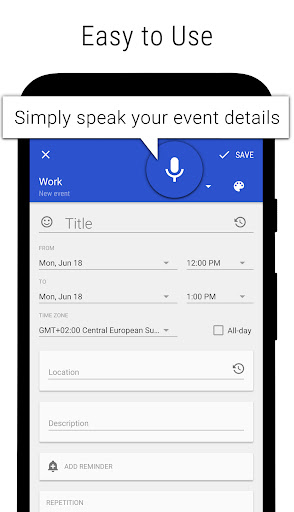
🏆 Included in "The Essential Android Apps for 2018" list of the Lifehacker weblog. Business Calendar 2 Pro is the premium version of our popular calendar app. It provides an excellent overview of your appointments, it’s easy to use and it gives you powerful tools for planning and scheduling your events and tasks. Premium features: 🏁 Speed Up Event Creation ▪ use templates for new events & tasks ▪ location auto-completion using suggestions from TomTom 🚀 Edit Your Schedule in No Time ▪ easily move and copy events using drag&drop in our weekly planner ▪ delete, move or copy multiple events at once using multi-selection ▪ copy the same event to multiple days at once e.g. to place your work shifts 🎨 Choose Your Design ▪ 22 beautiful themes for the app (e.g. dark theme) ▪ 14 unique widget themes for each widget ▪ individually configurable font sizes ⏰ Don’t Miss Anything ▪ repeating alarms ▪ individual ringtones for different calendars ⛅ How is the Weather? ▪ integrated weather report in month, day and agenda view 🔨 Enjoy Premium Tools ▪ attach files & photos ▪ privately link contacts ▪ repeated tasks, subtasks & priorities for tasks ▪ print your schedule to PDF ▪ import & export calendar data (.ics, .ical) 📱 Schedule on Your Home Screen ▪ premium "Day Pro" widget shows everything that matters in one view 👍 No Ads▪ completely free of ads A free version of Business Calendar 2 is also available. You may want to try the free version out before buying the premium app. Here are the features that are available in both versions of Business Calendar 2: 🎯 Your Personal Organizer ▪ calendar, schedule planner & task organizer in one app ▪ 6 clearly designed main views: month, week, day, agenda, year and tasks ▪ popup with event details directly in month view ▪ flexible daily and weekly planner, quickly adjustable to 1-14 days ▪ the calendar widget of your choice: agenda widget, month widget, week widget etc. ▪ sync with Google Calendar, Microsoft Outlook, Exchange etc. ▪ intuitive navigation with simple swipes between month, week and day ▪ quickly show and hide calendars with the favorite bar ▪ birthday calendar and public holidays calendar ⌚ Quick Appointment Scheduler ▪ convenient dialogs to enter event details hassle-free ▪ smart suggestions for title, location and attendees based on previous entries ▪ powerful voice input feature to quickly add events, tasks and birthdays ▪ flexible recurrences 🔔 Reminders ▪ status bar reminders or popup notifications ▪ snooze reminders, show map, write email to attendees or check tasks directly from notification 🌟 Unique Widgets ▪ 7 professional calendar widgets ▪ agenda, month, week, day, task & icon widget ▪ adapt each calendar widget to your personal needs 🌏 Synchronized or Local ▪ sync of events with Google Calendar, Microsoft Exchange, Outlook etc. by using the Android calendar synchronization ▪ sync of tasks with Google Tasks ▪ you can also use our calendar app as local organizer if you want 🔧 Always the Right Tools ▪ easily invite attendees to meetings ▪ view and answer meeting invitations in dedicated view ▪ heat map in year view to find free days quickly ▪ ongoing notification with event countdown ▪ live search in all views ▪ share your events and tasks easily 🎉 Add Emoticons ▪ add over 600 emoticons to your events and tasks (Emoji artwork provided free by EmojiOne: http://emojione.com) 💖 Developed with Energy and Passion Business Calendar is developed by a small, dedicated team in Berlin. We’re completely self-sustained and only funded by the revenue of our calendar apps. By upgrading Business Calendar you will not only get a lot of professional premium features but also greatly support the continuous development of the app. 😃 Follow us Read our tip of the week on Facebook: www.facebook.com/BusinessCalendar2 Twitter: twitter.com/BizCalPro

See this store page in another country

Prices, ranks and reviews are per country. Revenue above is already worldwide.

More from Appgenix Software

Business Calendar 2 Planner
4.4 ★
Analyze →
Simple Calendar - Plan Easily
3.7 ★
Analyze →
Business Tasks
2.3 ★
Analyze →
Business Calendar Pro
4.4 ★
Analyze →
Business Calendar
4.3 ★
Analyze →