← Back to charts
Keeble icon
APP STORE

Keeble

AssistiveWare · Education · United States store
NOT IN TOP 100 HERE
View on App Store ↗ Instagram card
Revenue a month, worldwide
Too small to estimate
Not enough chart or ratings data
New ratings
Tracking
Daily counts start building from today
Rating
3.4 of 5
13 ratings in this store
Countries it ranks in
0
was 0 on Oct 15, 2026

Revenue

Estimated from the grossing charts of Oct 21, 2026 in the 53 countries we track, and ratings growth on the App Store.

EST. REVENUE / MONTH · WORLDWIDE
Unranked
Not in any grossing chart, and too few ratings (14) to read its growth. Most apps at this stage earn little or nothing.
EST. LIFETIME DOWNLOADS
455 to 1.3K
Estimated from ratings count
RATINGS
13
AVG RATING
3.38
PRICE
$12.49
AGE
12.0y
LAST UPDATE
592d ago
VERSION
5.0.4
SIZE
200 MB
AGE RATING
4+

Last 29 days

From our daily snapshots of every grossing chart.

DAYS IN A GROSSING CHART
0 / 29
COUNTRIES NOW
0 (was 0)
EST. REVENUE FROM CHARTS, DAILY · APP STORE ONLY EST
Show daily values
Sep 24, 2026not in a grossing chart
Sep 25, 2026not in a grossing chart
Sep 26, 2026not in a grossing chart
Sep 27, 2026not in a grossing chart
Sep 28, 2026not in a grossing chart
Sep 29, 2026not in a grossing chart
Sep 30, 2026not in a grossing chart
Oct 1, 2026not in a grossing chart
Oct 2, 2026not in a grossing chart
Oct 3, 2026not in a grossing chart
Oct 4, 2026not in a grossing chart
Oct 5, 2026not in a grossing chart
Oct 6, 2026not in a grossing chart
Oct 7, 2026not in a grossing chart
Oct 8, 2026not in a grossing chart
Oct 9, 2026not in a grossing chart
Oct 10, 2026not in a grossing chart
Oct 11, 2026not in a grossing chart
Oct 12, 2026not in a grossing chart
Oct 13, 2026not in a grossing chart
Oct 14, 2026not in a grossing chart
Oct 15, 2026not in a grossing chart
Oct 16, 2026not in a grossing chart
Oct 17, 2026not in a grossing chart
Oct 18, 2026not in a grossing chart
Oct 19, 2026not in a grossing chart
Oct 20, 2026not in a grossing chart
Oct 21, 2026not in a grossing chart
Oct 22, 2026not in a grossing chart
Best rank Sep 24, 2026: not ranked. Now: not ranked. Days at zero are days outside every grossing chart.

Money and momentum

Measured from the store, not estimated.

WHAT IT CHARGES
No in-app purchases
Earns from its upfront price, ads or payments outside the store.
REVIEW MOMENTUM
0.0 reviews / week
  • Recent reviews average4.3 stars
  • Recent 1 and 2 star share0%
From the latest 12 written reviews, covering 4375 days.
RELEASE CADENCE
0 updates in 90 days
  • Typical gap between releases171 days
From the last 18 versions listed on the App Store.
RATING BREAKDOWN
13 ratings
5★38%
4★8%
3★31%
2★0%
1★23%

What users want

From the latest 12 reviews on the United States App Store, Oct 31, 2014 to May 18, 2023: 0% are 1 or 2 stars. Open a theme to read what people wrote.

WHAT THEY COMPLAIN ABOUT · SHARE OF BAD REVIEWS

Only 0 of the latest 12 reviews are 1 or 2 stars, too few to find patterns. Users are mostly happy.

WHAT THEY ASK FOR
  • It's annyoing because I have a high contrast keyboard I really need auto correct. 3★, Jan 20, 2023
  • Also wish you could pick custom colours. 3★, Jan 20, 2023
WORDS THAT KEEP COMING UP IN BAD REVIEWS

Nothing stands out.

WHAT THEY LOVE · SHARE OF GOOD REVIEWS
Useful, it helps38%

3 of the 4 and 5 star reviews.

★★★★★ The option for multiple-word prediction makes things so much faster, and the option to toggle learning on or off is particularly helpful.
★★★★★ Otherwise it is a lifesaver.
★★★★★ Assistiveware's support was very helpful with a suggestion on how to customize Keeble's features to work with my needs.
Accurate, great results25%

2 of the 4 and 5 star reviews.

★★★★★ I use this to type with my eyes and it works well, despite some bugs.
★★★★★ Impressed by the clarity of the voice of this Keeble keyboard! One important installation note necessary if the keyboard is to read out loud: "...you will need to tap its entry in the list of keyboards and toggle…
Great support25%

2 of the 4 and 5 star reviews.

★★★★★ One important installation note necessary if the keyboard is to read out loud: "...you will need to tap its entry in the list of keyboards and toggle Allow Full Access to ON/green." Thanks to this instruction in a…
★★★★★ Assistiveware's support was very helpful with a suggestion on how to customize Keeble's features to work with my needs.

Found by matching words and phrases in the reviews, not read by a person. A review can count toward more than one theme.

What users say

Latest reviews, United States App Store.

★★★★★May 18, 2023
Keeble keyboard

I have recently installed the Keeble keyboard on my iPad, nand found it to be a perfect fit for my accessibility problem (advanced ARMD). I am particularly impressed with the 'test' function of the App that allowed me to easily check out the various settings without committing to it. That allowed me to quickly decide what worked best for me (Purple Rain with simplified querty layout). Another great feature I like is the ability to use it in conjunction with Apples's Smart Typing feature. Having the ability to have a full-size keyboard with expanded text field is marvelous! The Phrase Bank originally displayed a 'hodge-podge of unrelated shortcuts, but after discovering that the order was determined by alphabetical order of the shortcut abbreviations I was able to re-order. Now on the first page of Phrase Bank I have my name, address, phone, Email address, etc. On the second, common phrases - and on the third, IP addresses. Dave Ow Lakeland, FL

★★★★★Jan 20, 2023
No autocorrect

Keeble is great except for the fact that there is absolutely co autocorrect and I can't change the colours of the symbols. It's annyoing because I have a high contrast keyboard I really need auto correct. Also wish you could pick custom colours.

★★★★★Mar 17, 2021
Customization is great but needs auto-correction option

Overall, I think this is a great app. The level of customization for how the keyboard looks is wonderfully helpful. However, the one major downside I have found is that there is no option for auto-correction. I wanted to use this app for accessibility because the customized keyboard is incredibly helpful but I can not use it because of the lack of auto-correction capabilities.

★★★★★Mar 12, 2021
A godsend

This is the best word prediction I have ever used. I have CP and type with a stylus or trackball and do a lot of writing for both work and general communication. The option for multiple-word prediction makes things so much faster, and the option to toggle learning on or off is particularly helpful. I prefer that my words don't move around a lot, so I'll turn on learning and enter phrases or word combinations I use most often, then turn off learning for a bit so that I know the most common choices will always come first. I also like the arrow keys and abbreviation expansion. However, it is impossible to knock the word "gonna" from the first row of choices after "I'm," which is slightly annoying. And I would like to see an option to reset the prediction data without having to reinstall the app. All in all, though, this keyboard seriously has me wishing I could do all my writing on the iPad, because it's light years above anything available on Windows. I hope it continues to thrive.

★★★★★Jan 17, 2021
Surprisingly good for Skyle eye gaze

I use this to type with my eyes and it works well, despite some bugs. Capitalization does not work automatically,, which is annoying, Otherwise it is a lifesaver.

★★★★★May 17, 2019
Laggy

This app is ok but lags a lot whe typing fast. Please update the app. $25 is a lot for an app that does not responds as it shoud. :thanks

Store screenshots

ScreenshotScreenshotScreenshotScreenshotScreenshotScreenshotScreenshotScreenshotScreenshotScreenshot

App Store ads

Apple Search Ads this app ran in the last 90 days, from Apple's public ad repository.

Apple's ad repository couldn't be reached right now. Try again later.

Growth research

Where this app is buying and earning its users. Each link opens pre filtered.

ASO keywords

Most repeated terms in the listing. Highlighted ones also appear in the title.

keyboard7word prediction6word6select6prediction5users4motor challenges3keyboard offers3timing options3select release3release select3select dwell3auditory feedback3switch control3keeble3switch3type3access3choose3motor2challenges2offers2timing2options2

What's new in 5.0.4

This version includes several bug fixes and performance improvements.

Released Oct 29, 2014. Current version shipped Mar 10, 2025.

Store description

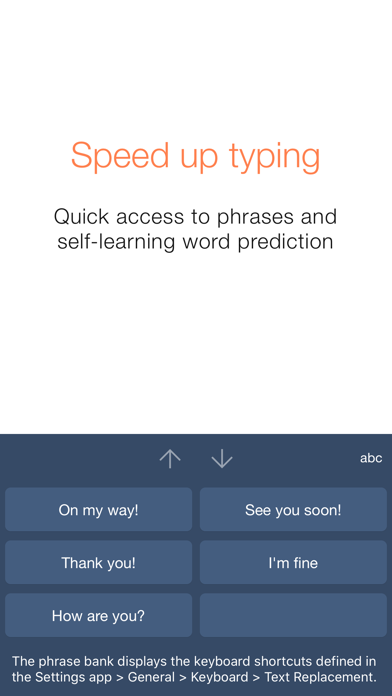
Keeble is an iOS keyboard that allows users with fine motor-challenges, switch users and users with vision impairments to type in almost any app. The keyboard offers word prediction, timing options, Select on Release, Select on Dwell, auditory feedback and other accessibility features. It also fully supports Switch Control and VoiceOver. Keeble is currently available in English, French, Spanish, Dutch, German, Italian, Swedish, Norwegian, Danish, Czech and Polish. The keyboard also offers optimized layouts for simplified, advanced and scanning keyboards. Alternative access - Prevent accidental selections with Timing options - Compensate for motor challenges with Select on Release or Select on Dwell - Use scanning-optimized keyboards with Switch Control: ABC and frequency of use Auditory feedback - Turn on keyboard clicks - Use spoken cues as you move your finger across the keyboard - Hear each key, word or sentence you type with Speak as you Type Self-learning word prediction - Choose between word completion, next-word prediction or multi-word prediction - Configure the number of suggestions and suggestion order - Adjust the size of the prediction bar to your needs Speed up typing - Benefit from the phrase bank providing quick access to your iOS keyboard shortcuts - Use the cursor keys to navigate through text quickly - Turn Auto-Capitalization and Auto-Spacing ON or OFF Optimize for different users - Use with beginning readers and select lowercase key labels, ABC layout and colored vowels - Customize for adults by allowing access to all characters and selecting QWERTY layout - Choose from 5 different themes or create a custom theme User comfort - Use Keeble on iPad, iPhone and iPod touch - Select one of the 11 available languages, including regional keyboard layouts - Choose your preferred font, including dyslexic and school-friendly fonts

See this store page in another country

Prices, ranks and reviews are per country. Revenue above is already worldwide.

More from AssistiveWare

Proloquo2Go AAC
Education
12.2K ratingsAnalyze →
Proloquo
Education
148 ratingsAnalyze →
Pictello Visual Stories
Education
33 ratingsAnalyze →
Proloquo Coach
Education
49 ratingsAnalyze →
Proloquo4Text AAC
Education
935 ratingsAnalyze →
simPODD
Education
23 ratingsAnalyze →
Keedogo Plus
Education
4 ratingsAnalyze →
Estello
Education
0 ratingsAnalyze →
Keedogo
Education
2 ratingsAnalyze →