← Back to charts
VideoPad Video Editor icon
APP STORE

VideoPad Video Editor

NCH Software · Photo & Video · United Kingdom store
NOT IN TOP 100 HERE
View on App Store ↗ Instagram card Google Play version →
Revenue a month, worldwide
Too small to estimate
Not enough chart or ratings data
New ratings
Tracking
Daily counts start building from today
Rating
0.0 of 5
0 ratings in this store
Countries it ranks in
0
was 0 on Oct 19, 2026

Revenue

Estimated from the grossing charts of Oct 25, 2026 in the 53 countries we track, and ratings growth on the App Store.

EST. REVENUE / MONTH · WORLDWIDE
Unranked
Not in any grossing chart, and too few ratings (0) to read its growth. Most apps at this stage earn little or nothing.
EST. LIFETIME DOWNLOADS
n/a
Estimated from ratings count
RATINGS
0
AVG RATING
n/a
PRICE
Free
AGE
12.3y
LAST UPDATE
12d ago
VERSION
18.55
SIZE
111 MB
AGE RATING
4+

Last 30 days

From our daily snapshots of every grossing chart.

DAYS IN A GROSSING CHART
0 / 30
COUNTRIES NOW
0 (was 0)
EST. REVENUE FROM CHARTS, DAILY · BOTH STORES ONLY EST
Show daily values
Sep 27, 2026not in a grossing chart
Sep 28, 2026not in a grossing chart
Sep 29, 2026not in a grossing chart
Sep 30, 2026not in a grossing chart
Oct 1, 2026not in a grossing chart
Oct 2, 2026not in a grossing chart
Oct 3, 2026not in a grossing chart
Oct 4, 2026not in a grossing chart
Oct 5, 2026not in a grossing chart
Oct 6, 2026not in a grossing chart
Oct 7, 2026not in a grossing chart
Oct 8, 2026not in a grossing chart
Oct 9, 2026not in a grossing chart
Oct 10, 2026not in a grossing chart
Oct 11, 2026not in a grossing chart
Oct 12, 2026not in a grossing chart
Oct 13, 2026not in a grossing chart
Oct 14, 2026not in a grossing chart
Oct 15, 2026not in a grossing chart
Oct 16, 2026not in a grossing chart
Oct 17, 2026not in a grossing chart
Oct 18, 2026not in a grossing chart
Oct 19, 2026not in a grossing chart
Oct 20, 2026not in a grossing chart
Oct 21, 2026not in a grossing chart
Oct 22, 2026not in a grossing chart
Oct 23, 2026not in a grossing chart
Oct 24, 2026not in a grossing chart
Oct 25, 2026not in a grossing chart
Oct 26, 2026not in a grossing chart
Best rank Sep 27, 2026: not ranked. Now: not ranked. Days at zero are days outside every grossing chart.

Money and momentum

Measured from the store, not estimated.

WHAT IT CHARGES
1 purchase listed
  • VideoPad Professional Upgrade£99.99
Top in-app purchases as listed on the App Store, in local prices.
REVIEW MOMENTUM
0.1 reviews / week
  • Trendfalling
  • Recent reviews average3.6 stars
  • Recent 1 and 2 star share31%
From the latest 71 written reviews, covering 4478 days.
RELEASE CADENCE
4 updates in 90 days
  • Typical gap between releases21 days
From the last 25 versions listed on the App Store.

What users want

From the latest 71 reviews on the United Kingdom App Store, Jul 23, 2014 to Feb 28, 2026: 31% are 1 or 2 stars. Open a theme to read what people wrote.

WHAT THEY COMPLAIN ABOUT · SHARE OF BAD REVIEWS
Crashes and freezes14%

3 of the 1 and 2 star reviews.

★★★★★ im half way through finishing a project and it crashes more and more the closer i get to finishing it.
★★★★★ Splitting of the video will replace the remaing sections with previous content Applying transitioins is a nightmare Importing files is a nightmare Play back options are very poor Content freezes all the time.
★★★★★ i downloaded this then opened it and i had to crash start my mac book twice to get rid of the damn thing… doesnt work or worse...
Price and subscription14%

3 of the 1 and 2 star reviews.

★★★★★ i completed my project then saved myfile to mp4 but when i come to play the video theres no transitions that i have added to the entire project tried everything and it just doesn't have the finshed video with…
★★★★★ I gave up after realising I wasn't able to edit my 2 clip viedo so I don't know how many other great features they removed for anyone who doesn't have the money to pay.
★★★★★ its a good editing app but it should have more options to do things like zoom and being able to access things without buying the PRO because people download the free app so they dont have to spend money
Slow, laggy, battery9%

2 of the 1 and 2 star reviews.

★★★★★ It lags all the time, even on the most powerful machines.
★★★★★ Rendering/exporting is unbearably slow.
WHAT THEY ASK FOR
  • I've only done basic editing but it does everything i need and exports quickly. 5★, Aug 14, 2019
  • Not allowing yo to add a track and then edit the video for the track without losing the audio and having to sped four hours trying to re-sync the video to the track. 1★, Nov 3, 2016
  • I wish I'd never updated, now I have nowhere to edit my videos which was very enjoyable for me and I would have reccomended this software to anyone! 1★, Aug 10, 2016
  • its a good editing app but it should have more options to do things like zoom and being able to access things without buying the PRO because people download the free app so they dont have to spend money 2★, Jul 30, 2016
  • Should allow save at least 1:00 video as sample / with marks.. 5★, Jul 23, 2014
WORDS THAT KEEP COMING UP IN BAD REVIEWS

Nothing stands out.

WHAT THEY LOVE · SHARE OF GOOD REVIEWS
Easy to use44%

19 of the 4 and 5 star reviews.

★★★★★ If you want a simple and efficient video editor in addition to zero cost, this is what you are looking for.
★★★★★ easy to use and just great
★★★★★ It's pretty easy to use and does the job.
Worth the money40%

17 of the 4 and 5 star reviews.

★★★★★ For basic editing for inserting videos into my PPT presentations - this is perfect. It's pretty easy to use and does the job. I've only done basic editing but it does everything i need and exports quickly. Brilliant!
★★★★★ I am very grateful that it is free, but if I start using some of the non-free features, I'll definitely pick this one because I know how to use it already and it's very practical.
★★★★★ This is way better than all the other editors and it is free and is very easy to use as long as you know the basic stuff i would definietly reccommend using this
Useful, it helps7%

3 of the 4 and 5 star reviews.

★★★★★ It's pretty intuitive and easy to use with plenty of useful features.
★★★★★ I was looking for a suitable free editor to replace the discontinued iMovie (lost when I upgraded to operating system last year). VideoPad pretty much does the job, it has the same range of transition effects and you…
Looks great7%

3 of the 4 and 5 star reviews.

★★★★★ O aplicativo, para uso pessoal, apresenta ótimos recurso com interface de fácil integração!
★★★★★ VideoPad pretty much does the job, it has the same range of transition effects and you can assemble both audio and visual clips in a similar interface to iMovie.
★★★★★ A interface parece confusa, mas em poucos minutos é possível se familiarizar com o app.
Accurate, great results5%

2 of the 4 and 5 star reviews.

★★★★★ It's amazing quality for something thats simply free.
★★★★★ It works well for me, but I can imagine that for more advanced editing this won't be quite so sufficient.

Found by matching words and phrases in the reviews, not read by a person. A review can count toward more than one theme.

What users say

Latest reviews, United Kingdom App Store.

★★★★★Feb 28, 2026
Good Editor

I have used this app for over 10 years and occasionally it develops various glitches usually associated with the latest ‘upgrade’ but lately it won’t play any audio from any video clips that I import into it plus it won’t expand the audio track - only the video track. This is making the program unusable for me at the moment and It would be good if you could address these issues. Yes I do have the paid version.

★★★★★May 24, 2024
Great Video Editor

Tried it and found it great. I would recommend it.

★★★★★Jan 7, 2023
crashes

keeps shutting down and restarting my mac, its very suspect, its an old mac but not as old as the software so it should work fine- but it does not. im half way through finishing a project and it crashes more and more the closer i get to finishing it. its reset about 10 times now and im starting to think its going to damage my mac.

★★★★★Jul 27, 2022
Transitions

i completed my project then saved myfile to mp4 but when i come to play the video theres no transitions that i have added to the entire project tried everything and it just doesn’t have the finshed video with transitions even though they are listed very strange another way of saying we want your money for you to get them whats the point ill go somwhere else

★★★★★Nov 7, 2020
The best

If you want a simple and efficient video editor in addition to zero cost, this is what you are looking for.

★★★★★Jun 26, 2020
HORIBBLE!

listen i might be using this editor wrong but when i was done the screen look so WEIRD its was like it bended the whole video to me its a waste of time and the instructions make no sence. worst editting app ive came across from my experience (MIGHT BE USING THE APP WRONG AND I MIGHT FIX THIS THE SECOND I SUMBIT BUT JUST KNOW TO NOT HAVE HIGH EXPECTATIONS)

Store screenshots

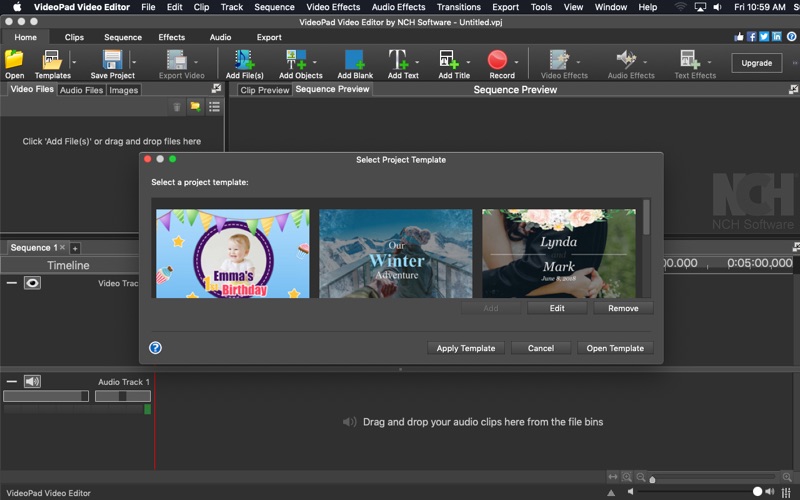
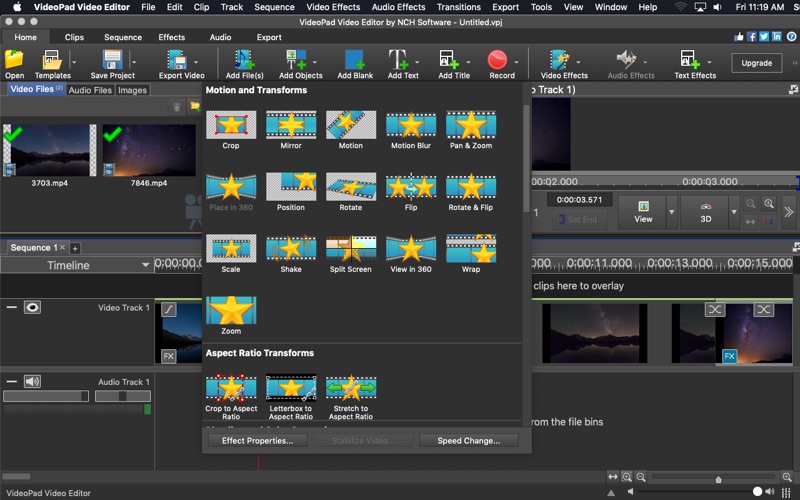
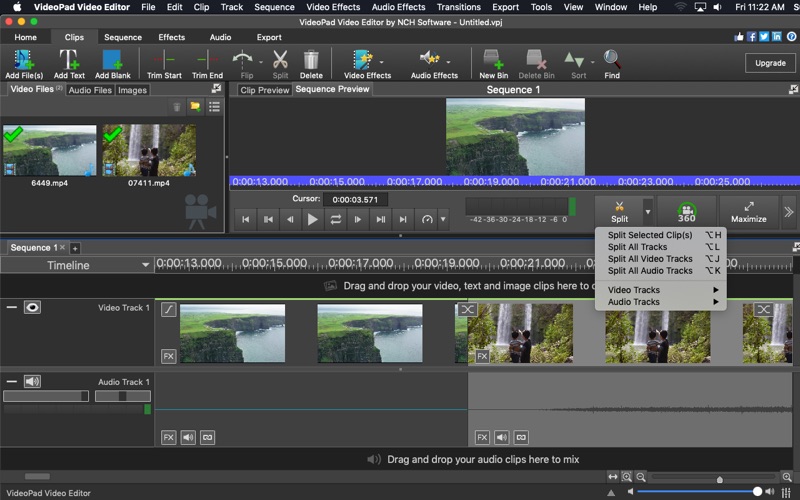
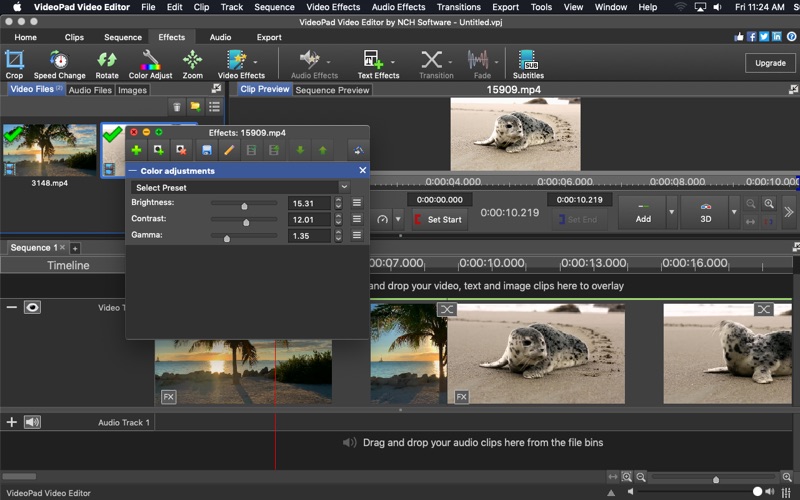
ScreenshotScreenshotScreenshotScreenshot

App Store ads

Apple Search Ads this app ran in the last 90 days, from Apple's public ad repository.

Apple's ad repository couldn't be reached right now. Try again later.

Growth research

Where this app is buying and earning its users. Each link opens pre filtered.

ASO keywords

Most repeated terms in the listing. Highlighted ones also appear in the title.

video7editing5features5audio5edit5drag drop5effects4directly4video editor3start editing3editing tools3color corrections3features drag3project3drag3drop3color3include3files3text3videopad2editor2movies2friends2

What's new in 18.55

Minor improvements, including bug fixes and support for existing paying users

Released Jul 13, 2014. Current version shipped Oct 14, 2026.

Store description

Offering professional quality, VideoPad Video Editor is the perfect video editor and recorder to make movies that will impress your family, friends, and colleagues. With its intuitive interface, you can quickly and easily start editing your project by using the drag and drop features to pull your audio and video clips in the timeline. Enjoy the ability to jump right in and start editing using the many editing tools available. Customize your project by applying stunning effects, transitions, color corrections, and filters. Once your project is created to perfection, share it with friends online or burn directly to DVD. Video Editing Features Include: Video Features + Drag and drop for speed and convenience. + Record video directly from VideoPad application or use pre-existing video files. + Select from over 30 transitions +Edit 360 videos + Apply artistic effects and filters, like: ripple, dots, dream, hue cycle, two-tone, or x-ray. + Take advantage of plugins to gain access to thousands more effects. +Add custom title cards or chose from animated title card templates + Make color corrections with color curves, exposure, transparency, and much more. + Edit in 3D and 2D to 3D stereoscopic conversion + Adjust clip speed and transition durations + Use the chroma key/green screen for image replacement + Add text and captions to create a storyline + Use batch edit to edit multiple files and clips at once Audio Features + Drag and drop in audio files or make a recording right in the app + Edit sound by using cut, copy, fade, split, and other editing tools + Convert text to audio by using the Text-To-Speech feature + Include stock sounds from the NCH Sound Library + Tell your movies story by creating narrations + Load music directly from a CD + Apply audio effects, like: amplify, compressor, flanger, or reverb Sharing Features + Share online directly to Facebook, YouTube, Flickr, Dropbox, or Google Drive + Burn to DVD to watch later + Export your movie onto portable devices, including your PSP, iPod, or iPhone + Choose from resolution sizes of full HD, 2K and 4K (720p, 1080p, 1440p, 2160p, and more) Supported file formats include: avi, mpeg, wmv, divX, Xvid, APGN, mp4, mov, vob, H.264, ogm, gif, jpg, png, bmp, tif, wav, mp3, m4a, mid, aiff, ogg, raw, dvf, and more.

See this store page in another country

Prices, ranks and reviews are per country. Revenue above is already worldwide.

More from NCH Software

WavePad Music and Audio Editor
Music
996 ratingsAnalyze →
VideoPad - Video Editor
Photo & Video
86 ratingsAnalyze →
WavePad Audio Editor
Music
0 ratingsAnalyze →
Express Dictate Dictation App
Business
95 ratingsAnalyze →
Prism Video File Converter
Photo & Video
0 ratingsAnalyze →
MixPad Music Mixer
Music
67 ratingsAnalyze →
Express Burn Disc Burner
Music
0 ratingsAnalyze →
Switch Audio File Converter
Music
0 ratingsAnalyze →
RecordPad Sound Recorder
Productivity
25 ratingsAnalyze →