← Back to charts
Screenshotter - Manage your screenshots icon
APP STORE

Screenshotter - Manage your screenshots

Cluster Labs, Inc. · Utilities · United States store
NOT IN TOP 100 HERE
View on App Store ↗ Instagram card
Revenue a month, worldwide
Too small to estimate
Not enough chart or ratings data
New ratings
Tracking
Daily counts start building from today
Rating
3.5 of 5
21 ratings in this store
Countries it ranks in
0
was 0 on Oct 16, 2026

Revenue

Estimated from the grossing charts of Oct 23, 2026 in the 53 countries we track, and ratings growth on the App Store.

EST. REVENUE / MONTH · WORLDWIDE
Unranked
Not in any grossing chart, and it sells nothing in the store (no in-app purchases, free download). Any revenue comes from ads or payments outside the store, which we can't see.
EST. LIFETIME DOWNLOADS
735 to 2.1K
Estimated from ratings count
RATINGS
21
AVG RATING
3.52
PRICE
Free
AGE
12.4y
LAST UPDATE
3559d ago
VERSION
2.6
SIZE
19 MB
AGE RATING
4+

Last 30 days

From our daily snapshots of every grossing chart.

DAYS IN A GROSSING CHART
0 / 30
COUNTRIES NOW
0 (was 0)
EST. REVENUE FROM CHARTS, DAILY · APP STORE ONLY EST
Show daily values
Sep 24, 2026not in a grossing chart
Sep 25, 2026not in a grossing chart
Sep 26, 2026not in a grossing chart
Sep 27, 2026not in a grossing chart
Sep 28, 2026not in a grossing chart
Sep 29, 2026not in a grossing chart
Sep 30, 2026not in a grossing chart
Oct 1, 2026not in a grossing chart
Oct 2, 2026not in a grossing chart
Oct 3, 2026not in a grossing chart
Oct 4, 2026not in a grossing chart
Oct 5, 2026not in a grossing chart
Oct 6, 2026not in a grossing chart
Oct 7, 2026not in a grossing chart
Oct 8, 2026not in a grossing chart
Oct 9, 2026not in a grossing chart
Oct 10, 2026not in a grossing chart
Oct 11, 2026not in a grossing chart
Oct 12, 2026not in a grossing chart
Oct 13, 2026not in a grossing chart
Oct 14, 2026not in a grossing chart
Oct 15, 2026not in a grossing chart
Oct 16, 2026not in a grossing chart
Oct 17, 2026not in a grossing chart
Oct 18, 2026not in a grossing chart
Oct 19, 2026not in a grossing chart
Oct 20, 2026not in a grossing chart
Oct 21, 2026not in a grossing chart
Oct 22, 2026not in a grossing chart
Oct 23, 2026not in a grossing chart
Best rank Sep 24, 2026: not ranked. Now: not ranked. Days at zero are days outside every grossing chart.

Money and momentum

Measured from the store, not estimated.

WHAT IT CHARGES
No in-app purchases
Earns from its upfront price, ads or payments outside the store.
REVIEW MOMENTUM
0.1 reviews / week
  • Trendfalling
  • Recent reviews average4.0 stars
  • Recent 1 and 2 star share13%
From the latest 38 written reviews, covering 4539 days.
RELEASE CADENCE
0 updates in 90 days
  • Typical gap between releases197 days
From the last 5 versions listed on the App Store.
RATING BREAKDOWN
21 ratings
5★43%
4★14%
3★19%
2★0%
1★24%

What users want

From the latest 38 reviews on the United States App Store, May 20, 2014 to Feb 6, 2024: 13% are 1 or 2 stars. Open a theme to read what people wrote.

WHAT THEY COMPLAIN ABOUT · SHARE OF BAD REVIEWS
Bugs, things not working80%

4 of the 1 and 2 star reviews.

★★★★★ Worked great until the last 6 months. Sometimes I don't see my folders at all. When they do appear and I get into them, I can only see a few of my screenshots. I'm so worried that I will lose hundreds of screenshots.…
★★★★★ The app does not seem to be working at all. I've organized over a hundred screenshots and now the folders are not visible anywhere to me. I can't find a settings button or an option to add new folders. And I'm unsure…
★★★★★ Please fix the bugs in this app.
Lost data, sync, backup40%

2 of the 1 and 2 star reviews.

★★★★★ I'm so worried that I will lose hundreds of screenshots.
★★★★★ And I'm unsure if I delete the app from my phone if my images will be lost.
WHAT THEY ASK FOR
  • Would love to see a dark mode, as well as the ability to select or deselect all, the ability to swipe to select, and change the aspect ratio, and the thumbnail size. 3★, Feb 6, 2024
  • Some automation options would be nice as well. 3★, Feb 6, 2024
  • If you need an effective way to clear out your screenshots (while organizing them, too) this is it! 5★, Sep 23, 2015
  • Would love to see it recognize apple watch screenshots as well. 4★, Jul 6, 2015
  • It would be awesome to be able to swipe left and right between screen shots in the designated folders. 5★, Aug 21, 2014
WORDS THAT KEEP COMING UP IN BAD REVIEWS

Nothing stands out.

WHAT THEY LOVE · SHARE OF GOOD REVIEWS
Easy to use18%

5 of the 4 and 5 star reviews.

★★★★★ Doesn't matter how many new screenshot apps come out: 1) most reliable 2) easiest to use 3) easy to find in the cloud 4) transfers from phone to phone
★★★★★ So nice. The iCloud integration is really great!
★★★★★ Extremely straightforward and beautifully designed.
Useful, it helps18%

5 of the 4 and 5 star reviews.

★★★★★ This is such a useful tool for design and UX research.
★★★★★ I have screen shots I don't want uploaded and this helps!
★★★★★ Since these are most often a form of note-taking, it's very useful to separate them out.
Looks great7%

2 of the 4 and 5 star reviews.

★★★★★ This is such a useful tool for design and UX research.
★★★★★ It's going to be a huge value add to my design process.

Found by matching words and phrases in the reviews, not read by a person. A review can count toward more than one theme.

What users say

Latest reviews, United States App Store.

★★★★★Feb 6, 2024
Used to be great

A very useful app when it works, but it hasn't been updated in 7 years, and has become unstable. It's a shame, really, because the developer appears to be updating other apps with regularity. Currently, it freezes or crashes frequently, especially if moving a large number of screenshots at a time. I limit a batch to 50, just to be safe, because a crash during this process may disappear the screenshots altogether. Would love to see a dark mode, as well as the ability to select or deselect all, the ability to swipe to select, and change the aspect ratio, and the thumbnail size. Some automation options would be nice as well.

★★★★★Mar 25, 2022
Not working at the moment

Worked great until the last 6 months. Sometimes I don’t see my folders at all. When they do appear and I get into them, I can only see a few of my screenshots. I’m so worried that I will lose hundreds of screenshots. Please help! 😬

★★★★★Aug 3, 2020
Still works, just be careful

Be careful when selecting a large number of items (hundreds+) The app may crash while it’s copying the screenshots and won’t see them in your camera roll anymore until you delete and reinstall the app. Move them in smaller batches, 100 at a time or so.

★★★★★Jul 14, 2020
No matter what....this will always be my favorite!

Doesn’t matter how many new screenshot apps come out: 1) most reliable 2) easiest to use 3) easy to find in the cloud 4) transfers from phone to phone 4s • 5s • 6s & 11 pro 5) With over 25k of screenshots to sort it thru ~ (yes I’ve been behind!) . . . I only will trust Screenshotter!!

★★★★★Feb 27, 2020
App not working at all

The app does not seem to be working at all. I’ve organized over a hundred screenshots and now the folders are not visible anywhere to me. I can’t find a settings button or an option to add new folders. And I’m unsure if I delete the app from my phone if my images will be lost. I can’t even access the help link from the app. I tried the contact form on the website which also did not work. For the star rating, I expected a better user experience.

★★★★★Jan 5, 2019
Amazing!

Just found and deleted 500 pictures from my camera roll that were random screenshots just taking up space! Took 10 minutes, that’s it!

Store screenshots

ScreenshotScreenshotScreenshotScreenshotScreenshotScreenshotScreenshotScreenshotScreenshot

App Store ads

Apple Search Ads this app ran in the last 90 days, from Apple's public ad repository.

Apple's ad repository couldn't be reached right now. Try again later.

Growth research

Where this app is buying and earning its users. Each link opens pre filtered.

ASO keywords

Most repeated terms in the listing. Highlighted ones also appear in the title.

screenshots6camera roll3tap3screenshotter2makes2organize2automatically2camera2roll2folder2

What's new in 2.6

* Yikes! Fixed a bug where you couldn't select multiple screenshots in iOS 10 * iOS 9 users and up will now be able to see cropped and modified screenshots

Released May 20, 2014. Current version shipped Jan 24, 2017.

Store description

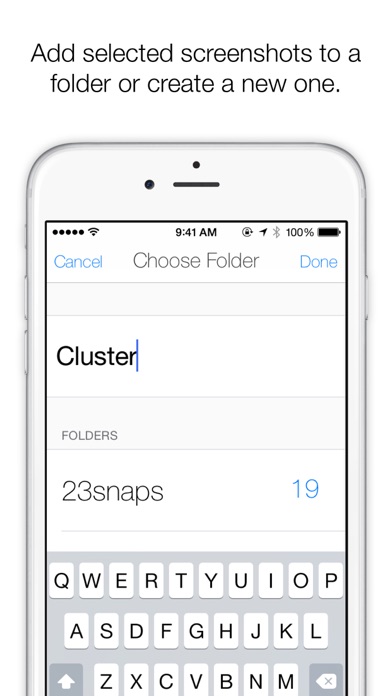
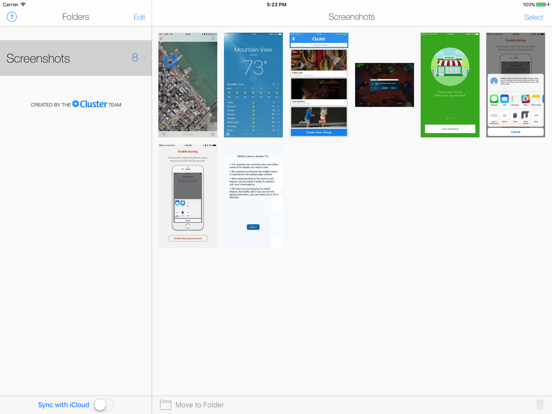
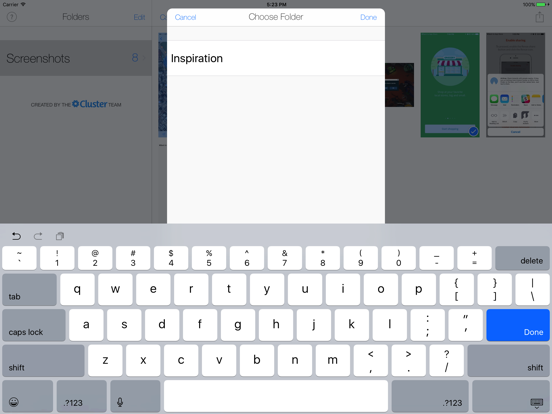
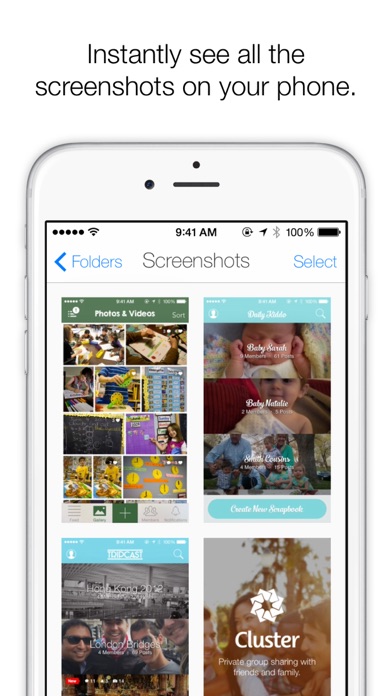
Screenshotter makes it incredibly simple to organize and manage the screenshots you take with your iPhone. It automatically identifies screenshots and makes it easy to organize them into folders. Here’s how it works: • Open the app and give it access to your camera roll. Screenshotter automatically displays your screenshots separate from your photos.  • Tap select and choose multiple screenshots.  • Tap “Move to Folder” and enter a name. The screenshots will be moved into a corresponding folder in iCloud Drive. It will now be magically available to all your devices and Mac computers. • For screenshots you don’t care about, tap the trash icon in the lower right. They will be removed from your Camera Roll. Created by the Cluster team

See this store page in another country

Prices, ranks and reviews are per country. Revenue above is already worldwide.

More from Cluster Labs, Inc.

Cluster
Social Networking
22.2K ratingsAnalyze →
Homeroom Private Photo Sharing
Education
16.5K ratingsAnalyze →
Tripcast
Travel
7.2K ratingsAnalyze →
Compose - Send email without distraction
Productivity
7 ratingsAnalyze →