← Back to charts
Splashtop Classroom icon
APP STORE

Splashtop Classroom

Splashtop Inc. · Education · Japan store
NOT IN TOP 100 HERE
View on App Store ↗ Instagram card Google Play version →
Revenue a month, worldwide
Too small to estimate
Not enough chart or ratings data
New ratings
Tracking
Daily counts start building from today
Rating
5.0 of 5
1 ratings in this store
Countries it ranks in
0
was 0 on Oct 16, 2026

Revenue

Estimated from the grossing charts of Oct 23, 2026 in the 53 countries we track, and ratings growth on the App Store.

EST. REVENUE / MONTH · WORLDWIDE
Unranked
Not in any grossing chart, and it sells nothing in the store (no in-app purchases, free download). Any revenue comes from ads or payments outside the store, which we can't see.
EST. LIFETIME DOWNLOADS
35 to 100
Estimated from ratings count
RATINGS
1
AVG RATING
5.00
PRICE
無料
AGE
12.7y
LAST UPDATE
1424d ago
VERSION
2.7.2.2
SIZE
39 MB
AGE RATING
4+

Last 30 days

From our daily snapshots of every grossing chart.

DAYS IN A GROSSING CHART
0 / 30
COUNTRIES NOW
0 (was 0)
EST. REVENUE FROM CHARTS, DAILY · BOTH STORES ONLY EST
Show daily values
Sep 24, 2026not in a grossing chart
Sep 25, 2026not in a grossing chart
Sep 26, 2026not in a grossing chart
Sep 27, 2026not in a grossing chart
Sep 28, 2026not in a grossing chart
Sep 29, 2026not in a grossing chart
Sep 30, 2026not in a grossing chart
Oct 1, 2026not in a grossing chart
Oct 2, 2026not in a grossing chart
Oct 3, 2026not in a grossing chart
Oct 4, 2026not in a grossing chart
Oct 5, 2026not in a grossing chart
Oct 6, 2026not in a grossing chart
Oct 7, 2026not in a grossing chart
Oct 8, 2026not in a grossing chart
Oct 9, 2026not in a grossing chart
Oct 10, 2026not in a grossing chart
Oct 11, 2026not in a grossing chart
Oct 12, 2026not in a grossing chart
Oct 13, 2026not in a grossing chart
Oct 14, 2026not in a grossing chart
Oct 15, 2026not in a grossing chart
Oct 16, 2026not in a grossing chart
Oct 17, 2026not in a grossing chart
Oct 18, 2026not in a grossing chart
Oct 19, 2026not in a grossing chart
Oct 20, 2026not in a grossing chart
Oct 21, 2026not in a grossing chart
Oct 22, 2026not in a grossing chart
Oct 23, 2026not in a grossing chart
Best rank Sep 24, 2026: not ranked. Now: not ranked. Days at zero are days outside every grossing chart.

Money and momentum

Measured from the store, not estimated.

WHAT IT CHARGES
No in-app purchases
Earns from its upfront price, ads or payments outside the store.
REVIEW MOMENTUM
0.0 reviews / week
  • Recent reviews average4.2 stars
  • Recent 1 and 2 star share22%
From the latest 9 written reviews, covering 4554 days.
RELEASE CADENCE
0 updates in 90 days
  • Typical gap between releases129 days
From the last 13 versions listed on the App Store.
RATING BREAKDOWN
1 ratings
5★100%
4★0%
3★0%
2★0%
1★0%

What users say

Latest reviews, Japan App Store.

★★★★★Jan 18, 2021
Exactly what I needed to work at home

So very pleased with this app. Has made working from home a breeze. Can log in super fast with no issues.

★★★★★Feb 6, 2018
Be wary of buying from SplashTop

I paid for SplashTop Presenter and used the app in my class training sessions for many years. With the new new iOS SplashTop Presenter is no longer compatible. SplashTop customer support chose to ignore my requests for help and I now have no app to use in my classes. Do not depend on SplashTop to support their product.

★★★★★Jul 12, 2017
Very Reliable Screen Collaboration Tool

Use in 1:1 IPad environment. Splash top gives me freedom to control everything on my teacher PC from and IPad, have students collaborate about their understanding. We can also let any IPad take control to type, photograph or mark up any products on teacher PC in real time. Thank you, Splashtop!!

★★★★★Apr 16, 2015
LOVE IT!!

I'm a math teacher for middle school and I absolutely love this app. I hate being stuck at the front of the room and with this app, I use my iPad and am able to teach from anywhere in the classroom. In conjunction with my smart board software I can also record my lessons with this app and post them online for my students to view. This especially helps when they are absent or can't remember the lesson. This app also allows my students to write on my iPad and have their work show up on the board...they love it! I've already got other teachers hooked on it!

★★★★★Feb 4, 2015
great for our 1:1 classroom initiative with chromebook

this works very well for our classroom where every student has a chromebook... and classroom support sharing across these chromebooks... very cool

★★★★★Jan 26, 2015
Simply Doesn't Work

You can't even log in. I was very disappointed. This app is not what you were most likely looking for.

Store screenshots

ScreenshotScreenshotScreenshotScreenshotScreenshotScreenshotScreenshotScreenshotScreenshotScreenshot

App Store ads

Apple Search Ads this app ran in the last 90 days, from Apple's public ad repository.

No App Store ads in the EU
None in the last 90 days.

Apple only publishes ads shown in the EU (EU Digital Services Act), with a 7 day delay. An app that advertises only outside the EU shows nothing here.

Growth research

Where this app is buying and earning its users. Each link opens pre filtered.

ASO keywords

Most repeated terms in the listing. Highlighted ones also appear in the title.

splashtop12splashtop classroom11classroom11students10control7class7student engagement6teachers6student6content6without6mac5engagement5rest class5annotate4share4ideas4instantly4experience splashtop3control annotate3chromebook mac3classroom allows3allows teachers3lesson content3

What's new in 2.7.2.2

- Security improvements. - Various bug fixes.

Released Jan 28, 2014. Current version shipped Nov 29, 2022.

Store description

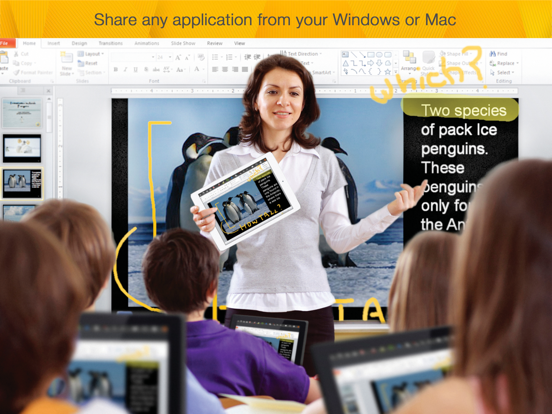
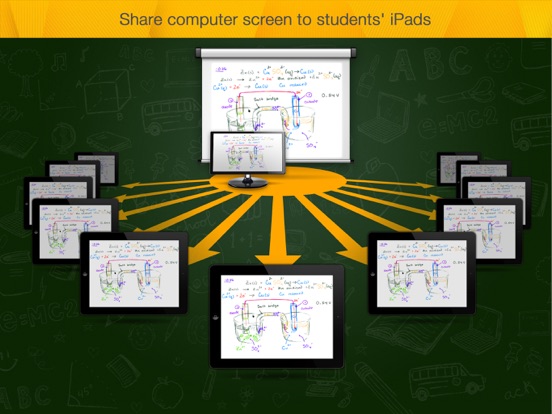
*** #1 Education App Developer for iPad – Over 1 million teachers are using Splashtop Remote Desktop, Whiteboard & Classroom products to improve the teaching and learning experience Splashtop Classroom: Control, Annotate, then Share a teacher’s PC/Mac with a students iPad or Chromebook, or PC/MAC running a Chrome browser. Splashtop Classroom allows teachers to stream their PC/Mac screen together with audio to every student’s iPad, Chromebook, PC or Mac, improving student engagement and interactivity. Students can then view, control and annotate over lesson content directly from their mobile device. Splashtop Classroom is perfect for teachers and instructors that want to engage and motivate their students. Pass control to a group of students and let them explore and communicate their ideas with the rest of the class without moving from their seats. Even the most demanding multi-media applications can be shared instantly and with a great user experience. Splashtop Classroom is perfect for 1:1 and BYOD initiatives! TEACHERS CAN: + Teach from anywhere inside the classroom. Have complete control over applications such as Keynote or PowerPoint or Flash-capable browser on the classroom PC as if you were sitting right there. No need to stay at the front of the class. Be free to roam around without losing control of the class! + Annotate over any content. Use gestures to draw, highlight, or write over any content. Take snapshots of the screen and save them to the gallery then print or email the snapshots to students, parents or colleagues. Use different colored and sized pens, stamps, highlighter, shapes, lines, and text tools over existing content or Flipchart backgrounds. Use the spotlight and screen shade tools to keep students focused. + Share anything from your computer instantly. Even the most demanding multi-media PC / MAC applications can be shared instantly from your iPad without any reformatting using unfamiliar authoring tools or uploading ahead of time! Have a website or YouTube FLASH video to share with the class? No problem – just start a Splashtop Classroom session and display the QR code for students to snap and instantly join! Visually or hearing impaired students can now see, hear – and interact with - the lesson content from anywhere in the class. + Capture student ideas easily. Pass control to a group of students and let them communicate their ideas with the rest of the class without moving from their seats. Annotate content or select an existing flipchart background and share it with the rest of the class. Take student engagement to the next level while improving classroom management! ***** Read how our education users love using Splashtop! ***** "The Splashtop Classroom software not only increases my instructional effectiveness, in that it allows me to roam the room as I teach, but it also increases student engagement, eases my workload, and makes my workday even more enjoyable. Effectiveness, Efficiency, Engagement, Ease, and Enjoyment- Splashtop is a 'multiple win situation.' It has become an indispensable and integral part of my everyday professional routine. I will never be tethered to a computer again!" Kevin Nerz, Ed.D. High School teacher "Splashtop Classroom allows our teachers to increase student engagement with or without a projector - also allowing students to take control and present their ideas from their own device. Splashtop also has the added benefit of allowing teachers and administrators to access their files and information from anywhere without having to return to the office and be chained to their desk." Darrin Tingey, Technology Director, Fremont Re-2 School District Please visit https://education.splashtop.com for more details.

See this store page in another country

Prices, ranks and reviews are per country. Revenue above is already worldwide.

More from Splashtop Inc.

Splashtop リモートデスクトップ
Business
2.9K ratingsAnalyze →
Splashtop Business
Business
1.9K ratingsAnalyze →
Splashtop - リモートデスクトップ
Business
3.6K ratingsAnalyze →
Splashtop Wired XDisplay – Extend & Mirror
Productivity
48 ratingsAnalyze →
Splashtop Wired XDisplay HD – Extend & Mirror
Productivity
124 ratingsAnalyze →
Splashtop Enterprise
Business
32 ratingsAnalyze →
Splashtop Business Lite
Business
48 ratingsAnalyze →
Splashtop for CACHATTO V3
Business
7 ratingsAnalyze →
Mirroring Assist
Education
8 ratingsAnalyze →