ASO keywords
Most repeated terms in the listing. Highlighted ones also appear in the title.
collage19video16video collage11photo9photos videos8photos6side6maker5editor5videos5grid5layouts5add5collage maker5add music5side side5clip4choose4music4clips4maker editor3videos collage3edit cell3cell add3
What's new in 4.5
- Performance improvements for faster, smoother editing.
- Fixed minor bugs and improved overall stability.
Released Oct 25, 2013. Current version shipped Oct 15, 2026.
Store description
Video Collage Maker & Editor lets you put photos and videos in one collage. Drop a video clip next to a still photo and both keep playing together in the same grid. Choose from 100 layouts, edit every cell, add music, and share your video collage in a few taps. Free to download.
WHAT IS VIDEO COLLAGE MAKER & EDITOR?
It is an iPhone and iPad collage maker and video editor for combining pictures and clips into a single frame. Use it as a photo grid maker, a pic stitch tool, a side by side video maker, a photo and video combiner, or a pic jointer and collage creator. There are no modes to choose: select your media and the layout tray previews every collage with your own photos and videos.
PHOTOS AND VIDEOS IN ONE COLLAGE
• Mix photos and videos in the same layout, in any order
• Merge clips and pictures into one video collage
• Side by side, split screen and stitch layouts for before-and-after, reactions and travel stories
• Pick several photos at once, or use limited photo access
100 COLLAGE LAYOUTS AND TEMPLATES
• Classic grids to stylish cut-out templates
• Drag any divider to resize cells
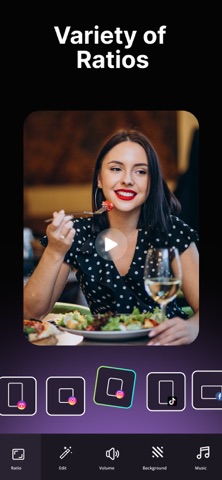
• Canvas ratios, including 9:16 for Reels and Stories
• Adjust the frame to create even more collage and grid options
EDIT EVERY CELL, NOT JUST THE WHOLE COLLAGE
• Trim and crop each video or photo on its own
• Change speed and volume per clip, or mute one clip and keep another
• Add music with a waveform range editor to pick the exact section
• Apply filters, effects and adjustments to a single cell
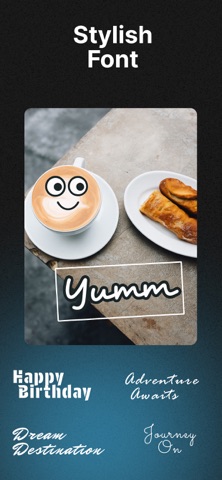
• Add text, 33 sticker packs and emoji
• Undo and redo while you work
A SIMPLE MONTAGE AND MUSIC VIDEO CREATOR
Build a video montage in minutes: choose a layout, add your clips, pick a song, then save. Great for Reels and Stories, travel diaries, birthday and family photo collages, before and after comparisons, and photo dumps.
PRIVATE BY DESIGN
Your library stays on your device. Photos and videos are not uploaded to build a collage, and rendering happens on your iPhone or iPad.
SAVE AND SHARE
• Save your collage to your camera roll
• Share online to social apps, messages and email
• Create video collages of up to 180 seconds
FREQUENTLY ASKED QUESTIONS
Can I put a video and a photo in the same collage? Yes. They play together in one frame.
How many layouts are there? 100 photo grid and video collage layouts.
Can I add my own music? Yes. Choose the section with the waveform editor and set per-clip volume.
Does it work as a foto collage and pic stitch app? Yes. It stitches, merges and combines pictures and clips side by side or in a grid.
Is my media uploaded? No.
Subscription Terms
- Subscribe to get unlimited access to all video collage app features.
- Upon confirmation of purchase, payment will be charged to your iTunes account.
- The subscription renews automatically unless auto-renew is turned off at least 24 hours before the end of the current period.
- You can turn off auto-renewal in your account settings after purchase.
- The renewal amount will be charged within 24 hours before the end of the current period.
- You can cancel anytime in your Apple ID account settings; access continues until the end of the current period. Refunds are handled by Apple.
Terms of use - https://www.outthinkingindia.com/terms-of-use/
Privacy policy - https://www.outthinkingindia.com/privacy-policy/
Download the video collage app now.
See this store page in another country
Prices, ranks and reviews are per country. Revenue above is already worldwide.