ASO keywords
Most repeated terms in the listing. Highlighted ones also appear in the title.
und21fotos19schen10videos9das8der7auf7nach7oder7das original6zum6ein6pro6foto5original5werden5zum schen5nach oben5aufr umen5ist4nicht4schneide4sie4deine4
What's new in 1.8.0
- Bessere Leistung und Stabilität – und nebenbei haben wir noch ein paar doppelte Videos aufgeräumt :)
Released Oct 5, 2026. Current version shipped Oct 25, 2026.
Store description
Der Speicher ist voll, aber du bringst es nicht übers Herz, Fotos zu löschen?
Mit Cleaner räumst du auf und bearbeitest gleichzeitig: Streiche weg, was du nicht brauchst, kürze zu lange Videos und schneide Fotos zu, statt sie zu löschen.
ZUM LÖSCHEN NACH OBEN STREICHEN
Geh deine Fotos eines nach dem anderen durch. Streiche nach oben, um ein Foto zum Löschen zu markieren. Überlegst du es dir anders, tippst du einfach auf „Widerrufen“.
Jedes Album merkt sich, wo du aufgehört hast, sodass du jederzeit weitermachen kannst.
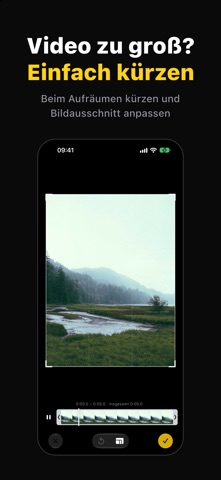
VIDEO ZU GROSS? KÜRZEN UND ZUSCHNEIDEN
Keine separate Bearbeitungs-App nötig. Beim Aufräumen ein langes Video gefunden? Zieh an der Zeitleiste, um unerwünschte Teile herauszuschneiden, oder schneide den Bildausschnitt zu.
Das bearbeitete Video wird als Kopie gesichert, das Original bleibt unverändert. Wenn du zufrieden bist, streichst du das Original einfach weg.
NICHT LÖSCHEN, EINFACH ZUSCHNEIDEN
Du willst nur einen Teil eines Fotos behalten? Schneide es direkt zu, mit Original, 1:1, 4:3, 16:9 oder frei.
Das zugeschnittene Foto wird als neues Foto gesichert und behält Datum, Ort, Favoritenstatus und Alben. Das Original bleibt unverändert.
SERIEN UND DUPLIKATE, AUTOMATISCH GRUPPIERT
Serienaufnahmen, doppelt gesicherte Bilder und leicht bearbeitete Kopien werden automatisch gruppiert. Das schärfste Foto wird zum Behalten vorgeschlagen, die übrigen kannst du auf einmal zum Löschen markieren.
AUCH ÄHNLICHE UND DOPPELTE VIDEOS
Mehrere Aufnahmen derselben Szene werden zu einer Gruppe zusammengefasst, und die beste wird zum Behalten vorgeschlagen. Kopien desselben Videos (doppelt gespeichert, komprimiert oder aus einer Messenger-App gesichert) werden ebenfalls gefunden.
FOTOS UND VIDEOS GETRENNT AUFRÄUMEN
Starte bei „Alle Objekte“, nur Fotos, nur Videos oder bei Systemalben wie Bildschirmfotos, Selfies und Live Photos.
Sortiere nach Aufnahmedatum, Hinzufügungsdatum oder Dateigröße und entferne die größten Dateien zuerst.
BEIM AUFRÄUMEN ORGANISIEREN
Doppeltippen, um als Favorit zu markieren, mit einem Tippen zum Album hinzufügen und Auflösung, Dateigröße und Kameradetails prüfen. So werden deine besten Fotos nebenbei sortiert.
VOR DEM LÖSCHEN PRÜFEN
Markierte Fotos landen zuerst in der Liste „Zu löschen“. So siehst du, wie viel Speicher du freigibst, bevor du bestätigst.
Gelöschte Fotos landen in der Fotos-App unter „Zuletzt gelöscht“, wo du sie 30 Tage lang wiederherstellen kannst.
DEINE FOTOS VERLASSEN NIE DEIN IPHONE
Analyse ähnlicher Fotos, Zuschneiden und Videobearbeitung laufen komplett auf deinem Gerät. Kein Account nötig – es werden niemals Fotos oder Videos hochgeladen.
KOSTENLOS UND PRO
Per Streichen löschen, nach Medienart durchsuchen sowie zu Favoriten und Alben hinzufügen ist kostenlos (die kostenlose Version zeigt Werbung).
Pro ist ein Einmalkauf – kein Abo, keine weiteren Kosten. Pro entfernt alle Werbung und schaltet „Ähnliche Fotos bereinigen“, „Fotos zuschneiden“ und „Videos bearbeiten“ frei.
Tippe in der App auf „Käufe wiederherstellen“, um Pro auf deinen anderen Geräten wiederherzustellen.
FAQ
F: Wie lösche ich schnell viele Fotos?
A: Öffne ein beliebiges Album, streiche bei unerwünschten Fotos nach oben und lösche sie dann alle auf einmal aus der Liste „Zu löschen“.
F: Videos belegen zu viel Speicher. Was kann ich tun?
A: Sortiere nach Dateigröße, um deine größten Videos zu finden, kürze nicht benötigte Teile oder schneide den Bildausschnitt zu, sichere eine Kopie und lösche dann das Original.
F: Braucht Pro ein Abo?
A: Nein. Pro ist ein Einmalkauf: einmal zahlen, für immer nutzen.
F: Was, wenn ich das falsche Foto lösche?
A: Gelöschte Fotos bleiben 30 Tage lang in der Fotos-App unter „Zuletzt gelöscht“, sodass du sie jederzeit wiederherstellen kannst.
See this store page in another country
Prices, ranks and reviews are per country. Revenue above is already worldwide.