ASO keywords
Most repeated terms in the listing. Highlighted ones also appear in the title.
step11mednais6runs6version5record5sop4watch4done4published4run4organisation4short line3published version3version performed3step took3works offline3per step3sop mednais3journal append3procedure3document3full3phone3performed3
What's new in 2.4.21
• Edit steps: open a draft in one tap, drag steps by a handle, move or swap them.
• Preview is a simple walkthrough and records nothing.
• Skip the wait asks for a reason; a hint says when Next opens.
• ⋯ on the run screen: report a problem with a step or stop the run.
• History shows a run's notes.
• Archive: restore an SOP or delete it permanently.
• Redesigned SOP page and Settings.
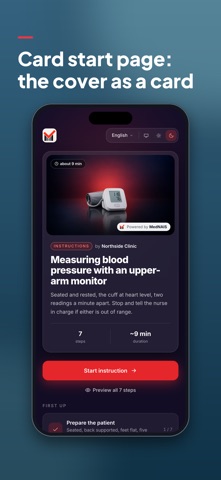
• Start page previews show your organisation's logo and name as publisher, in the design's accent colour.
• Timer steps: a skipped wait stays settled when you go back to it, also after reopening the app.
• Organisation profile: owners and admins edit the name, logo, description, website and contact email in the app. The Design tab has a Brand card with the logo, name and colours.
• The run screen is drawn in your SOP design's accent colour.
• A timer step is labelled Timer.
• Fixed a crash after skipping a timer wait with a reason.
• Fixes and improvements.
Released Sep 18, 2026. Current version shipped Oct 21, 2026.
Store description
MedNAIS™ teaches the SOP: a person learns the procedure by being taken through it step by step, rather than by reading the document first. It assists while the work is happening: the full step on a phone or tablet, the short line on a watch when a phone is out of your hands. And it accounts for what was done: which published version was performed, by whom and in what order, how long each step took — KPIs from your own runs, and a compliance record you can export.
NOT BUILT AROUND ONE INDUSTRY
MedNAIS is used for:
• healthcare and laboratories
• manufacturing and maintenance
• logistics and warehousing
• construction and workplace safety
LEARNING THE SOP BY DOING IT
A guided run takes somebody through the procedure in the order it sets out, one step at a time. A clean first pass — no mandatory step skipped, no going back — is marked as such on early runs.
GUIDANCE AT THE POINT OF WORK
• Confirmations, checklists, timed waits, yes-or-no answers and barcode steps.
• The scanner runs on the device and works offline; if a code will not read, it can be typed in. The record distinguishes a typed code from a scanned one, because the two are not the same evidence.
• Optional steps can be skipped, and the record says that they were.
• Works offline: procedures already fetched stay available, and what you record is sent when the network returns.
• Six languages: English, Russian, Spanish, German, Polish and French.
ON THE WRIST
The Apple Watch app shows one short line per step, for hands that are busy; the phone shows the full text. It is part of this app, not a separate purchase, and the demonstration runs on the watch as well — so the watch can be tried without an account. Signing in and running your organisation's own procedures are done on the iPhone in this version.
KPIS, AND WHAT YOU CAN SHOW AFTERWARDS
Analytics and supervision are in the web console at https://sop.mednais.com, not in this app. Your own completed runs are in this app, with the time each step took.
• Every run is pinned to the published version performed. That version cannot be deleted from under its history, its identity cannot be edited, and who published it and when is recorded.
• A superseded version stays published, so an old run stays readable. A draft cannot be performed at all — refused by the database, not by the screen.
• The step journal is append-only; no route exists by which a past event changes. Deleting a whole run is something the organisation's own administrator can do.
• A step can cite the document it came from; an uploaded document carries a checksum.
• Per-step timings from your organisation's own recent runs: your own practice described, not a target, never compared with an outside standard.
• A filterable history, weekly and monthly summaries, and CSV export.
SEE IT WITHOUT AN ACCOUNT
Open the demonstration from the sign-in screen, or visit https://sop.mednais.com/demo — no account, no sign-up. Nothing done there is recorded.
WHAT MEDNAIS IS NOT
It records what was done; it certifies nobody. No certification of any kind — ISO/IEC 27001, SOC 2, HIPAA, CE marking, FDA clearance — no electronic signature, no 21 CFR Part 11 validation, and no course, examination or certificate. The journal is append-only, not tamper-proof. Citing a standard is not certification against it, and a record is not proof of compliance by itself.
MedNAIS is not a medical device and must not be used as one: it does not diagnose, treat, monitor or make any decision about an individual patient.
A procedure drafted with the help of a language model is a draft. A person qualified in the relevant discipline must read it in full before anybody performs it or works to it.
An organisation account is needed for your own procedures. The demonstration needs nothing.
See this store page in another country
Prices, ranks and reviews are per country. Revenue above is already worldwide.