ASO keywords
Most repeated terms in the listing. Highlighted ones also appear in the title.
folio11siri5notebooks5notebook4read4templates4time4ready made3made templates3fields statuses3monthly yearly3voiceover3add3anything2need2medication2habits2ready2made2fields2statuses2reminders2screen2care2
What's new in 1.2.1
New:
• Sounds: choose a separate sound for each moment in Settings: item added, marked, deleted, undone and notebook completed. There are dozens of choices for the notification sound too. You can listen to every sound for free.
• Folio's own notification sound: reminders now play a sound made for Folio by default.
• Currency: choose your currency in Settings > General. By default it follows your device's region.
• Income and expenses: a new Income template. The History screen tells you this month's and last month's income, expenses and the difference in a single sentence.
• Totals per status: in notebooks with an amount field, the total for each status is read out too, for example "2 to pay: $212, 1 paid: $444".
• Numbers and addresses open with one tap: phone numbers, email addresses and web addresses written in an item get "Call", "Send email" and "Open link" actions.
• Link field type: type an address and open it in its default app.
• Long text fields are now multi-line.
Improvements:
• VoiceOver actions come in the same order in every notebook: statuses first, then date, time and reminder, then fields and note, and finally Edit, Move, Pin and Delete.
• The amount field opens with a single swipe, and you can type without deleting the zero first.
• Reminders play the sound you chose. Notifications are also shown and heard while the app is open.
• A reminder set on another device now reaches this device too.
• The purchase page clearly explains what the free version includes.
• Accessibility and sound settings are easier to find in Settings.
• Fixed the app freezing when choosing a currency.
Released Sep 11, 2026. Current version shipped Oct 22, 2026.
Store description
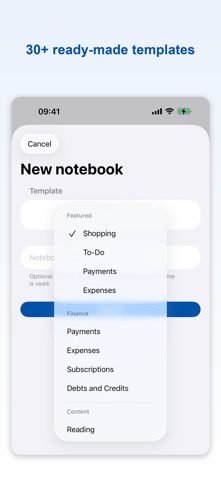
Folio turns anything you need to keep track of into a notebook you can actually use: groceries and errands, bills and subscriptions, medication and habits, books to read. Over 30 ready-made templates, each with its own fields, statuses and reminders — and every screen works perfectly with Siri and VoiceOver.
READY-MADE TEMPLATES
• Finance: Payments, Expenses, Subscriptions, Debt/Credit
• Content: To Read, To Watch, To Listen
• Special Days & Travel: Birthdays, Places to Go, Packing
• Routines: Habits, Chores, Maintenance, Plant Care, Pet Care, Exercise
• Processes: Applications, Project Tracking, Awaiting, Orders, Loans
• Personal Tracking: Inventory, Meal Plan, Courses, Goals, Attendance, Vaccinations
• Shopping, To-Do, and a completely blank notebook to start from scratch
HANDS-FREE WITH SIRI
• "Add to Folio": Siri asks which notebook and what to add, then keeps going with "Anything else?".
• "What's on tomorrow in Folio", "What's next in Folio", "What did I do yesterday in Folio".
• "When did I last do it in Folio" — perfect for medication, watering plants or feeding pets.
• "Read what's left in Folio": long lists are read five at a time.
• Every command is listed in Settings > Siri & Shortcuts > All Siri commands.
DESIGN IT YOUR WAY
• Customize each notebook's fields, statuses, and order with the Field Designer.
• Build your own templates, then use or remove them from the template picker.
• Organize notebooks into folders, pin the ones that matter most.
DATES, REMINDERS & RECURRENCE
• Add a date, time, and reminder to any item.
• Set daily, weekly, monthly, yearly, or completion-based recurrence rules.
• Overdue items automatically surface to the top.
FULL VOICEOVER SUPPORT
• Folio was designed from day one for VoiceOver users — every screen and action is announced clearly.
• Status changes, delete/undo, and list updates are announced instantly.
• Haptic and sound feedback are fully customizable in Settings.
HISTORY & ARCHIVE
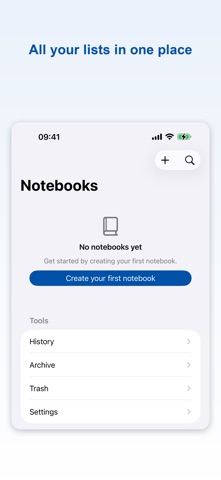
• Save a snapshot of completed lists to history and review them anytime.
• Deleted notebooks and items wait in Trash for a while before you decide.
ICLOUD SYNC, NO ACCOUNT NEEDED
• Folio doesn't ask you to create an account — it just uses the iCloud account already on your device.
• Your notebooks sync automatically across your devices; nothing is stored on Folio's own servers.
Your first 2 notebooks are free forever, fully editable — no payment info, no time limit. Need more? Unlock unlimited notebooks, custom templates, folders, and full JSON backup with monthly, yearly, or one-time Lifetime Folio Pro; plain text and CSV export are always free.
Terms of Use (EULA): https://www.apple.com/legal/internet-services/itunes/dev/stdeula/
See this store page in another country
Prices, ranks and reviews are per country. Revenue above is already worldwide.