ASO keywords
Most repeated terms in the listing. Highlighted ones also appear in the title.
drone9dji9fly8flight8real time8mavic7series dji6time6pro6remote5live5real5mini5drone remote5dji mobile5mobile sdk5mini mini5sdk4camera4wind4series4fly drone3remote control3low latency3
What's new in 0.0.1
No release notes.
Released Sep 10, 2026. Current version shipped Sep 10, 2026.
Store description
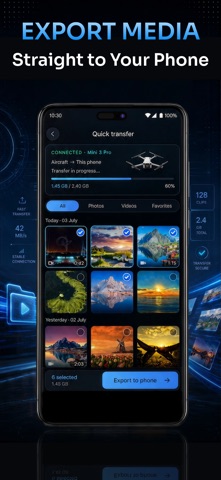
Welcome to Go Fly 4: Drone Remote Control — the complete flight management and piloting app designed for drone pilots, filmmakers, and UAV professionals on iOS. Powered by the DJI Mobile SDK V4 framework, Go Fly 4 equips your iPhone and iPad with precision remote controls, low-latency HD camera live streaming, autonomous 3D waypoint missions, airspace safety maps, and real-time drone weather forecasts.
Whether capturing cinematic flycam landscapes or planning custom aerial routes, Go Fly 4 provides the reliability and precision your UAV needs.
KEY FEATURES & CAPABILITIES
1. Precision Flight Controller & HD Live View
- Intuitive iOS Remote: Fly smoothly with responsive on-screen virtual joysticks or tethered hardware controllers.
- Ultra-Clear Live FPV Stream: View real-time HD video feeds directly from your drone camera with low latency.
- Real-Time Telemetry: Monitor altitude, flight speed, distance, battery status, GPS satellite signal, and orientation live.
- Pro Camera & Gimbal Controls: Adjust shutter speed, ISO, exposure compensation, grid lines, and gimbal tilt in flight.
2. Autonomous Waypoint & Flight Route Planner
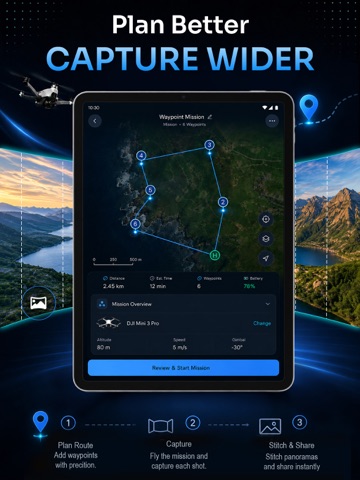
- 3D Waypoint Missions: Create automated multi-point flight paths on interactive maps with customizable speed, altitude, and heading.
- Point of Interest (POI) & Orbit: Circle landmarks smoothly with locked camera focus.
- Smart Fail-Safe RTH: Automated Return-to-Home ensures your drone returns safely upon low battery or signal loss.
3. Airspace Safety & No-Fly Zone Maps
- Airspace Intelligence: View real-time no-fly zones (NFZ), restricted airspaces, and airport boundaries before takeoff.
- Boundary & Height Warnings: Receive instant alerts when your drone approaches restricted flight zones or altitude ceilings.
- Satellite Map Layers: Toggle between standard, hybrid, and high-resolution satellite imagery for situational awareness.
4. Drone Weather & Wind Forecast
- Aviation Wind Forecast: Check wind speeds, gust levels, and wind directions at ground and cruise altitudes before flying.
- Geomagnetic KP-Index Monitor: Prevent compass errors and GPS drift with live geomagnetic activity tracking.
- Flight Safety Indicator: Real-time analysis of visibility, rain probability, cloud ceiling, and temperature.
COMPATIBILITY & SUPPORTED HARDWARE
- Go Fly 4 is built on the DJI Mobile SDK V4 architecture, fully optimized for the following drones and UAV systems:
- Mavic Series: DJI Mavic 2 Pro / Zoom / Enterprise, Mavic Air 2, DJI Air 2S, Mavic Air, Mavic Pro, Mavic Mini, Mini SE, Mini 2.
- Phantom & Spark Series: DJI Phantom 4 / Pro / Advanced / RTK, Phantom 3 Series, DJI Spark.
- Inspire & Matrice Series: DJI Inspire 1 / 2, Matrice 200 / 210 / 600 Pro.
(Note: Newer MSDK V5 models such as Mini 3, Mini 4 Pro, Mavic 3 Enterprise, and Matrice 350 RTK require SDK V5 architecture and are not supported in this version).
QUICK SETUP GUIDE FOR iOS
- Power on your drone and remote controller.
- Connect your iPhone or iPad to the controller using an official Lightning or USB-C cable.
DISCLAIMER & TRADEMARK NOTICE
- Go Fly 4: Drone Remote Control is an independent 3rd-party application developed using the official DJI Mobile SDK V4.
- This application is not an official product and is not affiliated with, endorsed by, certified by, or sponsored by Da-Jiang Innovations (DJI).
SUBSCRIPTION & PURCHASE INFORMATION
- Unlock premium features with subscription: weekly, monthly and yearly.
- Payment will be charged to your iTunes Account at confirmation of purchase.
- Subscription automatically renews unless auto-renew is turned off at least 24 hours before the end of the current period.
- Account will be charged for renewal within 24 hours prior to the end of the current period.
- You can manage or turn off auto-renew in your Apple ID Account Settings any time after purchase.
Privacy Policy: https://xappify.co/privacy-policy
Terms of Service: https://xappify.co/terms-of-service
See this store page in another country
Prices, ranks and reviews are per country. Revenue above is already worldwide.