← Back to charts
eTrackPad: Wireless Trackpad icon
APP STORE

eTrackPad: Wireless Trackpad

Batuhan Tufekci · Utilities · Brazil store
NOT IN TOP 100 HERE
View on App Store ↗ Instagram card
Revenue a month, worldwide
Too small to estimate
Not enough chart or ratings data
New ratings
Tracking
Daily counts start building from today
Rating
0.0 of 5
0 ratings in this store
Countries it ranks in
0
was 0 on Oct 15, 2026

Revenue

Estimated from the grossing charts of Oct 21, 2026 in the 53 countries we track, and ratings growth on the App Store.

EST. REVENUE / MONTH · WORLDWIDE
Unranked
Not in any grossing chart, and it sells nothing in the store (no in-app purchases, free download). Any revenue comes from ads or payments outside the store, which we can't see.
EST. LIFETIME DOWNLOADS
n/a
Estimated from ratings count
RATINGS
0
AVG RATING
n/a
PRICE
Grátis
AGE
89d
LAST UPDATE
89d ago
VERSION
1.0
SIZE
9 MB
AGE RATING
+4

Last 29 days

From our daily snapshots of every grossing chart.

DAYS IN A GROSSING CHART
0 / 29
COUNTRIES NOW
0 (was 0)
EST. REVENUE FROM CHARTS, DAILY · APP STORE ONLY EST
Show daily values
Sep 24, 2026not in a grossing chart
Sep 25, 2026not in a grossing chart
Sep 26, 2026not in a grossing chart
Sep 27, 2026not in a grossing chart
Sep 28, 2026not in a grossing chart
Sep 29, 2026not in a grossing chart
Sep 30, 2026not in a grossing chart
Oct 1, 2026not in a grossing chart
Oct 2, 2026not in a grossing chart
Oct 3, 2026not in a grossing chart
Oct 4, 2026not in a grossing chart
Oct 5, 2026not in a grossing chart
Oct 6, 2026not in a grossing chart
Oct 7, 2026not in a grossing chart
Oct 8, 2026not in a grossing chart
Oct 9, 2026not in a grossing chart
Oct 10, 2026not in a grossing chart
Oct 11, 2026not in a grossing chart
Oct 12, 2026not in a grossing chart
Oct 13, 2026not in a grossing chart
Oct 14, 2026not in a grossing chart
Oct 15, 2026not in a grossing chart
Oct 16, 2026not in a grossing chart
Oct 17, 2026not in a grossing chart
Oct 18, 2026not in a grossing chart
Oct 19, 2026not in a grossing chart
Oct 20, 2026not in a grossing chart
Oct 21, 2026not in a grossing chart
Oct 22, 2026not in a grossing chart
Best rank Sep 24, 2026: not ranked. Now: not ranked. Days at zero are days outside every grossing chart.

Money and momentum

Measured from the store, not estimated.

WHAT IT CHARGES
No in-app purchases
Earns from its upfront price, ads or payments outside the store.
REVIEW MOMENTUM
Too few reviews
Fewer than 3 recent written reviews in this country.

Store screenshots

ScreenshotScreenshotScreenshotScreenshotScreenshotScreenshotScreenshotScreenshotScreenshotScreenshot

App Store ads

Apple Search Ads this app ran in the last 90 days, from Apple's public ad repository.

Apple's ad repository couldn't be reached right now. Try again later.

Growth research

Where this app is buying and earning its users. Each link opens pre filtered.

ASO keywords

Most repeated terms in the listing. Highlighted ones also appear in the title.

mac5etrackpad5remote5remote keyboard5finger4click4numeric keypad3jog wheel3presentation remote3drag fingers3right click3full3trackpad3keyboard3cursor3fingers3scrolling3right3connection3apprip3gesture2screen2numeric2keypad2

What's new in 1.0

No release notes.

Released Jul 25, 2026. Current version shipped Jul 25, 2026.

Store description

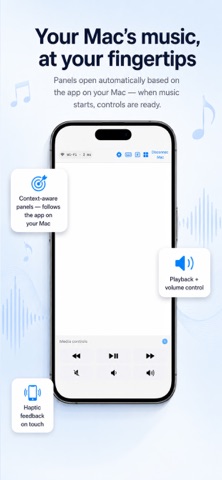
Turn your iPad or iPhone into a full-featured wireless trackpad for your Mac. eTrackPad brings every gesture you know from the Magic Trackpad to your touch screen with 1-2 ms latency — plus a remote keyboard, numeric keypad, jog wheel and presentation remote. THE REAL macOS GESTURE SET • 1 finger: cursor, tap to click, tap-press-drag • 2 fingers: scrolling, right click, pinch to zoom • 3 fingers: switch between desktops, Mission Control, App Exposé, optional three-finger drag • 4 fingers: Launchpad, show desktop MORE THAN A TRACKPAD • Remote keyboard: type on your Mac from your iPad • Numeric keypad: full-size numpad with ÷ × − + operator column • Media controls: playback and volume keys at your fingertips • Jog wheel: step frame by frame in Final Cut and Premiere, with Blade (⌘B) and Marker (M) shortcuts • Presentation remote: full-screen mode with timer for Keynote and PowerPoint • Context-aware panels: the right panel opens automatically based on the frontmost Mac app FAST AND SECURE CONNECTION • Wi-Fi, USB cable or Bluetooth — your choice • Automatic discovery, one-time PIN pairing • All traffic is end-to-end encrypted; your data flows only between your devices and never touches the internet • No ads, no analytics, no account FINE-TUNING • Palm rejection, haptic feedback, natural scrolling • Adjustable cursor and scroll speed, left-handed mode, light/dark theme SETUP Download the free eTrackPad helper app on your Mac (apprip.com), open eTrackPad on your iPad and pair with a PIN — that's it. FREE AND PRO Cursor, left click, two-finger scrolling and Wi-Fi connection are completely free. A one-time eTrackPad Pro purchase (not a subscription) unlocks: • Right click and all gestures • Pinch and smart zoom • 3-4 finger gestures • Remote keyboard • USB and Bluetooth connection • Pairing with multiple Macs REQUIREMENTS • iOS/iPadOS 16 or later • macOS 13 Ventura or later + the free eTrackPad Mac helper app (apprip.com) Questions or feedback: support@apprip.com

See this store page in another country

Prices, ranks and reviews are per country. Revenue above is already worldwide.

More from Batuhan Tufekci

Timelapse Planner
Photo & Video
0 ratingsAnalyze →
Ahenk
Music
0 ratingsAnalyze →
byTahwin
Sports
0 ratingsAnalyze →
iTahmin.com
Sports
0 ratingsAnalyze →
ViviWallix
Graphics & Design
0 ratingsAnalyze →